


A television can display HDR only when the screen, video source, and connection support the relevant format. What is HDR TV technology describes a way to deliver a broader range of brightness and color than standard dynamic range, though the visible difference depends on the content and display. HDR can make bright highlights more pronounced while retaining detail in darker areas, but the label alone does not promise a specific picture quality. A TV’s panel, backlight, picture settings, and supported HDR formats all influence the result.
The practical question is whether HDR material will look meaningfully different in your room and with your devices. The supplied product information shows examples of TVs listing Dolby Vision, HDR10+, HDR10, or HLG support, while other listings mention Dolby Vision without naming every format. That distinction matters because a streaming service, disc, game, or connected player also needs to provide compatible HDR content. For the related basics, see this guide to 4K UHD resolution; resolution and HDR describe different aspects of the picture.

Pros
- Official HDMI 2.1 certification provides dependable 48Gbps bandwidth for 4K 120Hz gaming and high-bitrate streaming.
- High-grade braided construction resists tangling and everyday wear behind TV stands.
- Reliable eARC support enables high-definition Dolby Atmos audio pass-through to compatible soundbars.
- Built-in shielding helps prevent signal dropouts, black screens, and audio stuttering.
Cons
- The 6.6-foot length may be too short for in-wall cable runs or extra-wide entertainment centers.
- Durable braided nylon jacket makes tight 90-degree bends behind ultra-flush wall mounts slightly stiff.
The Silkland Certified HDMI 2.1 Cable is an Ultra High Speed audio and video cord designed to unlock the full potential of contemporary 4K and 8K home entertainment displays. Modern televisions, including premium OLED, QLED, and Mini-LED sets, require substantial bandwidth to deliver features like high refresh rates and expanded color palettes. This cable bridges the gap between your display and high-performance source devices, ensuring that signals travel without bottlenecking or digital noise.
This accessory is well-suited for console gamers, home theater enthusiasts, sports fans, cord-cutters, and apartment dwellers who want dependable audiovisual performance. Whether you are running a PlayStation 5, an Xbox Series X, a dedicated gaming PC, or an Apple TV 4K, having a certified 48Gbps pipeline allows you to take advantage of advanced display capabilities. Movie lovers will appreciate how reliably it carries Dynamic HDR, Dolby Vision, and uncompressed Dolby Atmos audio via eARC to an external soundbar or multi-channel surround sound system.
Real-world entertainment demands consistent signal transmission, and user feedback highlights how essential a certified cable is for stopping intermittent black screens. Gamers playing fast-paced shooters or racing titles can access fluid 4K gaming at 120Hz or 144Hz without stutter, alongside support for Variable Refresh Rate (VRR) and Auto Low Latency Mode (ALLM). During high-stakes sports watch parties or family movie nights, the cable maintains pristine color accuracy, sharp contrast, and deep black levels without introducing signal compression or visual artifacts.
In terms of physical build quality, the cable features a double-layer braided nylon exterior paired with copper cores and ferrite shielding to resist electromagnetic interference. The connectors seat securely into TV ports and media consoles, reducing the likelihood of accidental disconnections when adjusting wall mounts or swiveling tabletop TV stands. At 6.6 feet, it fits comfortably behind standard living room credenzas, dorm desks, and bedroom dressers without creating excess slack or cable clutter.
A practical consideration is the overall reach and flexibility of the cord. While 6.6 feet is ideal for nearby equipment racks and clean console tables, homeowners attempting longer in-wall routes or complex multi-room setups will need a longer variant. The heavy-duty braided shielding is built to last, though it requires a slightly wider turning radius directly behind ultra-thin, flush-mounted televisions. Despite this minor stiffness, it remains a dependable, high-value connection upgrade for anyone setting up a modern 4K gaming display or home theater system.
Modern gaming displays demand serious transmission speed, and this cable provides the full 48Gbps pipeline required for next-generation consoles and gaming rigs. Players using a PlayStation 5 or Xbox Series X can tap into silky-smooth 4K gameplay at 120Hz, while PC players can push compatible monitors up to 144Hz with low input lag.
The cable natively supports essential gaming enhancements, including Variable Refresh Rate (VRR) and Auto Low Latency Mode (ALLM). These protocols help eradicate screen tearing and judder during fast motion, ensuring responsive controls during competitive multiplayer tournaments or extended weekend gaming marathons.
Integrating this cable into your home theater setup allows your television to deliver uncompromised picture and sound. By supporting Dynamic HDR, HDR10+, and Dolby Vision metadata, it lets your display showcase peak brightness, deep contrast ratios, and rich color volume exactly as content creators intended.
On the audio side, integrated eARC functionality provides the bandwidth necessary to pass high-bitrate audio formats like Dolby Atmos and DTS:X directly to your soundbar or AV receiver. This makes dialogue crisp and clear while delivering room-filling cinematic bass for your favorite action films and streaming shows.
Pros
- Smooth 120Hz panel with HDMI 2.1 features tailored specifically for modern console gaming
- Accurate, natural colors out of the box thanks to Sony XR Triluminos Pro processing
- Intuitive Google TV interface enhanced by helpful Gemini voice assistance for easy navigation
- Includes Sony Pictures Core movie credits with high-bitrate Pure Stream and IMAX Enhanced titles
Cons
- Standard LED backlight does not achieve the inky black levels of premium OLED or Mini-LED panels
- Built-in X-Balanced speakers lack deep sub-bass and perform best when paired with an external soundbar
- Off-angle color saturation can shift slightly when viewing from wide seating positions
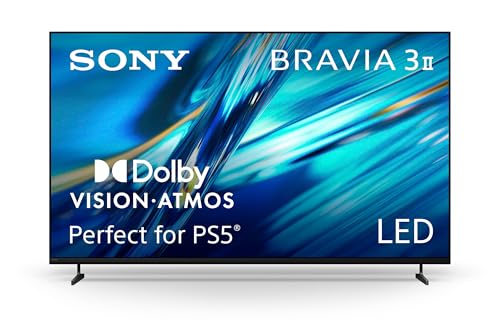
The Sony 55-Inch BRAVIA 3 II LED 4K HDR Smart Google TV (model K-55XR30M2) represents a balanced home entertainment display engineered for mainstream media fans. Designed to anchor modern living rooms, apartments, and dedicated media dens, this display targets movie lovers, sports enthusiasts, and console gamers who want reputable processing without jumping into ultra-expensive flagship tiers. Its 55-inch profile fits comfortably into mid-sized spaces, whether resting on a media console or mounted cleanly against a focal wall.
Picture quality is driven by the Sony XR Processor, which uses AI scene recognition to analyze incoming signals and enhance clarity, contrast, and texture. Viewers watching standard HD broadcasts, live cable sports, or compressed streaming video will benefit from XR Clear Image upscaling, which helps clean up digital artifacts and restore lost detail. Supported by XR Triluminos Pro, the panel reproduces over a billion shades with realistic nuance rather than oversaturated tones. For cinematic content, native compatibility with Dolby Vision brings out noticeable dynamic range in highlights and shadows during evening movie marathons.
Gamers will find strong synergy with modern hardware, especially PlayStation 5 owners. With dedicated HDMI 2.1 capabilities, the screen handles 4K gaming at up to 120Hz, complemented by Variable Refresh Rate (VRR) to prevent screen tearing and Auto Low Latency Mode (ALLM) to keep control inputs crisp. Sony includes proprietary features such as Auto HDR Tone Mapping and Auto Genre Picture Mode, which automatically configure optimal HDR levels and latency settings when powering up a PS5 console. The integrated Game Menu also allows quick adjustments to motion blur reduction, black equalizer settings, and crosshair overlays on the fly.
Smart functionality centers around Google TV, now integrated with Gemini conversational assistance. Users can search across major streaming catalogs like Netflix, Prime Video, and Disney+ using natural voice prompts, control compatible smart home gear, or ask detailed questions without leaving the screen. In addition, the TV includes access to Sony Pictures Core, providing complimentary movie credits and access to hundreds of streaming titles in high-bitrate Pure Stream and IMAX Enhanced formats. On the audio front, built-in X-Balanced speakers offer clear dialogue and lower distortion than typical entry-level sets, backed by Dolby Atmos and DTS:X audio decoding.
While the BRAVIA 3 II delivers well-rounded performance, viewers looking for perfect pitch-black contrast in dark rooms should remember this is a standard LED display rather than a full-array local dimming, Mini-LED, or OLED model. Extreme wide-angle viewing may also show mild contrast fading. However, for everyday daytime viewing, Sunday football watch parties, and smooth high-frame-rate gaming, the Sony BRAVIA 3 II stands out as a dependable, highly versatile 55-inch 4K centerpiece.
Console gamers will appreciate the responsive gaming architecture built into the Sony BRAVIA 3 II. Equipped with HDMI 2.1 ports, the display supports fluid 4K gaming at 120 frames per second, making it well-suited for fast-paced multiplayer shooters, racing titles, and action games. Variable Refresh Rate (VRR) keeps screen transitions smooth across fluctuating frame rates, while Auto Low Latency Mode (ALLM) instantly switches the display into its lowest lag state whenever a console is detected.
PlayStation 5 integration is especially seamless. Exclusive Auto HDR Tone Mapping optimizes HDR parameters during initial setup so players can pick out subtle details in deep shadows and bright skies. The built-in Game Menu allows quick access to essential gaming toggles, including screen sizing, black equalization, and motion blur reduction, keeping you locked into the match without navigating cumbersome main settings menus.
Google TV serves as the entertainment hub on the BRAVIA 3 II, organizing more than 700,000 movies and television episodes from across popular streaming apps into one customized home screen. Profile support allows individual household members to maintain separate watchlists and personalized recommendations based on viewing habits.
With Gemini conversational assistance onboard, navigating the interface feels intuitive. Users can speak naturally into the remote to locate niche film genres, check weather forecasts, or control smart lighting and thermostats. In addition, the included Sony Pictures Core service delivers high-bitrate streaming that rivals physical media fidelity, offering selected IMAX Enhanced titles and complimentary movie redemption credits straight out of the box.

Pros
- Exceptional peak brightness that easily cuts through ambient glare in sunlit living rooms
- Industry-leading image processing and upscaling for crisp sports, cable, and legacy content
- Exclusive PS5 optimization features alongside 4K 120Hz, VRR, and ALLM support
- Intuitive Google TV interface with snappy navigation and responsive Google Assistant voice controls
Cons
- Substantial weight of over 111 pounds requires a heavy-duty wall mount or wide TV console
- Off-angle color and contrast saturation can dip slightly compared to OLED panels at wide viewing angles
- Premium investment level tailored primarily for serious home theater setups
The Sony 85-Inch BRAVIA 7 (K-85XR70) is a flagship-grade 4K Mini LED television engineered for viewers who want cinema-scale presentation without having to darken the room completely. Operating on a dense matrix of Mini LEDs guided by Sony XR Backlight Master Drive, this display bridges the gap between deep, inky black levels and punchy, room-filling peak brightness. Homeowners, movie buffs, sports fans, and video game enthusiasts looking for an expansive centerpiece for large living rooms or dedicated basement entertainment centers will appreciate its sheer scale and balanced visual tuning.
Visual processing is anchored by the XR Processor, which analyzes scenes in real time to optimize color fidelity, contrast gradations, and edge clarity. Paired with QLED technology and XR Triluminos Pro, color reproduction remains authentic and saturated across both subtle dramatic scenes and bright animated films. For weekend football games, basketball tournaments, and classic cinema, XR Clear Image provides high-level upscaling and motion smoothing that minimizes blur and judder without introducing the unnatural soap opera effect.
Console gamers, particularly PlayStation 5 owners, will find targeted advantages right out of the box. The TV automatically recognizes the console to configure Auto HDR Tone Mapping and Auto Genre Picture Mode, ensuring detailed shadow visibility in dark environments and vibrant highlight pop. With support for 4K playback at 120Hz, Variable Refresh Rate (VRR), and Auto Low Latency Mode (ALLM), gameplay feels responsive and fluid during fast-paced online shooters and racing titles. A dedicated Game Menu also allows quick adjustments to screen sizing and black equalizers on the fly.
On the smart interface front, Google TV provides a tidy, responsive home screen that organizes personal subscriptions such as Netflix, Prime Video, Disney+, and YouTube into curated recommendations. Hands-free navigation is effortless using the built-in Google Assistant, while AirPlay 2 and Chromecast allow guests to mirror vacation photos or mobile videos directly to the 85-inch panel. Sound reproduction features Dolby Atmos and DTS:X processing for clean dialogue and decent onboard dynamic range, though pairing the unit with an eARC soundbar or surround sound system is recommended to match the TV visual grandeur.
Given its 111.7-pound heft and wide footprint, setup requires at least two people and a reinforced wall mount or sturdy, deep credenza. While the panel handles direct reflections well, viewing angles may show minor color washing at extreme side seating positions, which is typical for VA-style Mini LED panels. For viewers seeking an expansive, reliable 4K display packed with intelligent image processing and rich streaming options, the BRAVIA 7 represents an outstanding long-term home entertainment centerpiece.
At the heart of the BRAVIA 7 is Sony XR Backlight Master Drive, an advanced local dimming algorithm that controls thousands of miniature LEDs with surgical precision. This technology actively curbs the halo effect or blooming around bright white subtitles on pure black backgrounds, delivering deep contrast that rivals OLED while outputting substantially higher sustained brightness.
The XR Processor applies cognitive understanding to recognize human focal points, enhancing detail where your eyes naturally look first. Studio Calibrated picture modes specifically tuned for Netflix, Prime Video, and Sony Pictures Core ensure you watch films with director-approved color temperature, dynamic range, and frame timing straight out of the box.
Designed to be the ultimate companion for modern gaming setups, the BRAVIA 7 features HDMI 2.1 bandwidth supporting up to 4K resolution at 120 frames per second. Input lag remains low, giving players a competitive edge in rapid-response titles where every millisecond counts.
Exclusive PS5 integration removes the guesswork from display calibration by matching the console HDR output directly to the panel capabilities. The on-screen Game Menu lets you toggle VRR status, apply a custom crosshair overlay, or tweak motion blur reduction without ever leaving your gaming session.
Google TV brings order to fragmented streaming libraries by aggregating movies and TV shows across multiple accounts into a unified watch list. You can quickly search for actors, genres, or live sports scores using the voice-enabled remote or hands-free Google Assistant commands.
Acoustic multi-audio tuning ensures voices sound like they originate directly from the characters on screen rather than beneath the bezel. With built-in decoding for Dolby Atmos and DTS:X, connecting your audio gear via the high-speed HDMI eARC port provides lossless cinema sound for blockbuster movie nights.

Pros
- Absolute black levels and zero backlight blooming for top-tier dark room viewing
- Industry-leading image processing and upscaling for lower-resolution cable and streaming video
- Exclusive visual features and rapid menu adjustments tailored for PlayStation 5 gaming
- Wide viewing angles ensure consistent colors and contrast from any seat in the room
- Comprehensive HDR and audio format coverage including Dolby Vision, IMAX Enhanced, and DTS:X
Cons
- Overall peak brightness is better suited for controlled lighting than rooms with direct, bright sunlight
- Substantial 74.9-pound weight requires two people for safe unboxing and wall mounting
- Premium investment compared to entry-level LED and standard 4K televisions
The Sony 77-inch BRAVIA 8 OLED (K-77XR80) is an expansive flagship-tier 4K smart television engineered for viewers who demand true-to-life picture quality and deep cinematic immersion. It is particularly well suited for dedicated home theater enthusiasts, movie collectors, and console gamers looking to anchor a large living room or media space with reference-grade visuals. With its generous 77-inch screen size, this display bridges the gap between everyday living room streaming and a dedicated cinema installation.
At the core of the display is an OLED panel driven by Sony's XR Processor and XR Contrast Booster 15. Because each of the 8 million OLED pixels emits its own light independently, the TV achieves absolute black levels and zero blooming around bright text or highlights. Whether you are watching dark, atmospheric science fiction films or streaming colorful nature documentaries, the contrast provides realistic visual depth. The XR Triluminos Pro engine accurately reproduces nuanced color shades, while XR Clear Image cleans up and upscales lower-resolution cable broadcasts or standard HD streaming content without adding artificial noise.
Sports fans and action movie lovers will appreciate the motion handling on display. Powered by XR OLED Motion, the panel keeps fast-moving sports like football or hockey fluid without introducing aggressive soap-opera judder. Thanks to native OLED viewing angles, colors and contrast remain consistent even if family members or party guests sit off to the sides during a weekend watch party. HDR support is comprehensive, featuring Dolby Vision, IMAX Enhanced, and studio-calibrated picture presets that automatically match filmmaker targets for services like Netflix and Prime Video.
Console gamers, especially PlayStation 5 owners, will find seamless hardware synergy here. The BRAVIA 8 automatically optimizes HDR tone mapping upon initial PS5 connection and shifts into low-latency gaming picture modes automatically. The on-screen Game Menu lets players toggle visual assist features, adjust black equalizer levels, and check refresh settings quickly without leaving the gameplay screen. Responsive controls and fluid motion help make both competitive multiplayer matches and expansive story campaigns feel sharp and immediate.
For daily navigation, the built-in Google TV platform brings virtually every major streaming service together into a unified, recommendation-driven home screen. Voice commands through Google Assistant allow for hands-free searching, and integration with Apple AirPlay 2 and Chromecast makes sharing phone photos or video clips effortless. On the audio side, onboard support for Dolby Atmos and DTS:X provides clear dialogue and solid spatial cues, though pairing this massive screen with a dedicated soundbar or multi-channel surround sound system completes the authentic theater experience.
As with most OLED televisions, extreme direct sunlight in rooms with uncovered windows can challenge overall panel brightness compared to high-output Mini-LED alternatives. Additionally, the broad dimensions and 74.9-pound weight require careful planning when mounting to standard VESA brackets or selecting a wide media console. For homeowners and entertainment enthusiasts building a premier movie and gaming setup, the Sony BRAVIA 8 offers an exceptional balance of picture accuracy, intelligent processing, and long-term entertainment value.
Picture quality on the BRAVIA 8 is defined by the precise control of its self-lit OLED pixels. Because each individual pixel can shut off entirely, dark scenes achieve true pitch-black levels, giving night sequences and space scenes incredible realism without backlight bleed. The XR Contrast Booster 15 pushes highlights in specular details, like sunlight glinting off water or neon signs against dark streets, creating a punchy dynamic range.
Sony's XR Processor handles picture processing with an emphasis on cognitive enhancement. Rather than sharpening everything uniformly, the processor prioritizes key focal points in each frame, keeping skin tones natural while refining background textures. Color reproduction via XR Triluminos Pro covers a wide color gamut, ensuring subtle gradients in skies and landscapes appear smooth and natural without banding or oversaturation.
Designed with modern console gaming in mind, the BRAVIA 8 incorporates exclusive optimizations when paired with a PlayStation 5. Auto HDR Tone Mapping instantly adjusts the console's HDR settings during initial setup, ensuring bright highlights and dark shadows reveal critical details. Auto Genre Picture Mode switches the display to low-lag Game Mode for gaming sessions and back to Standard Mode when watching movies or streaming apps.
The dedicated Game Menu centralizes essential gaming controls in one accessible overlay. Players can easily adjust VRR status, customize black equalizer settings to spot hidden opponents in dark corners, and resize the display area for competitive titles. Combined with native 120Hz refresh rates and low input latency, this screen delivers a fast and fluid gaming experience across action, racing, and shooting titles.

Pros
- Native 120Hz refresh rate delivers fluid motion for sports broadcasts and high-framerate video games.
- Quantum Dot color reproduction provides rich, lifelike hues across HDR movie and streaming content.
- Fire TV platform offers quick app switching, customized recommendations, and seamless Alexa smart home integration.
- Four HDMI inputs provide plenty of hookups for multiple gaming consoles, streaming boxes, and audio receivers.
Cons
- Standard LED backlighting without full-array local dimming means blacks may appear slightly elevated in very dark rooms.
- Off-angle viewing can show slight color desaturation, making center seating ideal.
- Compact built-in speakers deliver clear dialogue but benefit greatly from an external soundbar for deep low-end impact.
The TCL 50-Inch F8D Series is a versatile 4K QLED smart television designed to deliver premium display capabilities in a practical screen size. Sized appropriately for medium-sized living rooms, studio apartments, master bedrooms, and dedicated gaming dens, this display bridges the gap between everyday streaming convenience and performance-minded entertainment. It serves sports fans, avid console gamers, and cord-cutters who want high-framerate playback and vivid color without requiring an oversized screen.
Picture quality stands out thanks to the Quantum Dot color layer, which broadens color coverage across movies and nature documentaries. Support for both Dolby Vision and HDR10+ ensures you get proper scene-by-scene tone mapping regardless of whether you stream from Prime Video, Disney+, or Netflix. The high-brightness LED backlight helps combat daytime reflections in sunlit rooms, while an ambient light sensor automatically tweaks panel intensity based on your room lighting conditions.
For gamers and fast-action sports enthusiasts, the native 120Hz refresh rate provides noticeable fluidity compared to entry-level 60Hz panels. Features like Variable Refresh Rate (VRR) and Auto Low Latency Mode (ALLM) work to eliminate screen tearing and minimize input lag when paired with current-generation gaming consoles or gaming PCs. TCL also includes Game Accelerator 288 processing, keeping fast camera pans and chaotic multiplayer moments clear and responsive.
Daily operation centers around Amazon Fire TV, offering straightforward navigation across streaming platforms, live television broadcasts, and digital rentals. With the Alexa Voice Remote and Alexa+ capabilities, viewers can speak naturally to locate titles, check the evening weather, or manage compatible smart lighting. The software even supports multi-camera picture-in-picture views, letting you monitor a front-door video doorbell or backyard camera without pausing your favorite movie.
Physical connectivity is unusually generous for a 50-inch display, offering four HDMI ports, including an eARC connection designed for seamless soundbar or AV receiver hookup. While the onboard audio system features Dolby Atmos and DTS Virtual:X processing for enhanced vocal clarity and spatial spread, pairing this television with an external soundbar will provide the deeper bass needed for full cinematic impact. As with many LED-backlit displays in this tier, viewing from wide angles can result in minor color fading, making straight-on viewing preferable.
Overall, the TCL 50F8D represents a balanced and feature-rich option for shoppers seeking high refresh rates and vibrant color reproduction. Its combination of gaming responsiveness, HDR format support, and effortless smart home control makes it an easy recommendation for everyday family viewing, bedroom entertainment setups, and casual home theater spaces.
Console and PC gamers will appreciate the responsive hardware packed into this 50-inch panel. The native 120Hz refresh rate keeps rapid camera movement sharp during competitive shooters, racing titles, and fast-paced action adventures.
Auto Low Latency Mode detects when a gaming console powers on, switching the TV directly into optimized low-lag settings without manual menu adjustments. Variable Refresh Rate (VRR) synchronizes panel timing with console output, eliminating frustrating screen tearing and jitter during intense graphic sequences.
With Game Accelerator 288 processing, motion clarity remains sharp even in high-action sports titles and flight simulators. Combined with multiple HDMI inputs to keep both a PlayStation and Xbox plugged in simultaneously, this model provides a dedicated, low-friction battle station display.
The integrated Fire TV operating system brings thousands of channels, streaming applications, and live broadcast integrations into one unified home screen. You can curate personalized watchlists and jump back into unfinished series quickly across different services.
Built-in Alexa+ functions transform the television into a central smart home dashboard. Viewers can check live feeds from compatible home security cameras, dim living room lights for movie night, or ask general questions through the voice remote.
Hardware connections include four HDMI inputs with eARC support for uncompressed audio passthrough. Dual-band Wi-Fi and Bluetooth 5.4 support wireless headphone listening, while Apple AirPlay 2 and Apple HomeKit integration make wireless media casting effortless for iOS users.

Pros
- Colossal 100-inch screen delivers an authentic commercial theater feel in spacious living rooms or basements
- Smooth 120Hz panel with HDMI 2.1, VRR, and dedicated PS5 optimizations makes it stellar for console gaming
- XR Triluminos Pro and XR Processor generate accurate, vibrant colors and sharp 4K upscaling
- Convenient Google TV interface with Gemini AI helps pinpoint movies, live sports, and streaming apps quickly
- Built-in support for both Dolby Vision and DTS:X provides flexible high-end audio and video compatibility
Cons
- Massive footprint and 117-pound weight demand dedicated room space and heavy-duty professional wall mounting
- Standard LED panel design may show some blooming or elevated black levels in pitch-black rooms compared to OLED screens
- Built-in X-Balanced speakers do well for dialogue, but an external soundbar or multi-speaker surround setup is recommended for full home theater impact
The Sony 100-Inch BRAVIA 3 II (K100XR30M2) is an ultra-large 4K HDR LED television built specifically for homeowners and entertainment enthusiasts looking to establish a commercial-grade cinema experience right in their living room or finished basement. Measuring an incredible 100 inches diagonally, this massive display is geared toward sports fans hosting game day watch parties, families settling in for movie night, and console gamers seeking total visual immersion. While apartment renters with tight quarters might find the proportions overwhelming, those with spacious media rooms or dedicated home theater spaces will find the scale second to none.
Visual performance is anchored by the proprietary Sony XR Processor, which utilizes AI-assisted scene recognition to fine-tune color, clarity, and contrast frame by frame. Supporting high dynamic range via Dolby Vision and HDR10, the screen produces punchy highlights while XR Triluminos Pro delivers over a billion shades of lifelike color. The XR Clear Image processing works reliably to upscale standard definition and 1080p cable feeds, reducing visual noise and artifacts so sports broadcasts and older sitcoms look crisp. Because this uses an LED backlight panel, black levels are respectable, though viewers seeking ink-black performance in pitch-black environments might notice some contrast limits compared to premium OLED alternatives.
For fast-paced entertainment like hockey, football, or blockbuster action sequences, the native 120Hz refresh rate combined with Motionflow XR provides superb motion handling. Fast panning shots maintain stability without distracting judder or blurring, making Sunday football streams and high-speed car chases feel remarkably natural. Wide viewing angles accommodate spread-out sectional seating, ensuring guests on the edge of the couch still enjoy vibrant picture quality during Super Bowl gatherings.
Gamers will appreciate the specialized features tailored for modern consoles, particularly the PlayStation 5. With full HDMI 2.1 support across designated inputs, the display provides 4K gaming at up to 120 frames per second, Variable Refresh Rate (VRR) to banish screen tearing, and Auto Low Latency Mode (ALLM) for swift controller response. Sony includes exclusive PS5 integrations like Auto HDR Tone Mapping and Auto Genre Picture Mode, alongside an on-screen Game Menu that lets players tweak crosshairs, motion blur, and black equalizer settings without pausing the action.
Daily navigation is driven by Google TV, which now integrates Google Gemini to deliver intuitive, conversational voice search and smart home control. Finding titles across Netflix, Prime Video, Disney+, and YouTube is prompt and fluid. In addition, the TV includes Sony Pictures Core with high-bitrate Pure Stream capabilities and IMAX Enhanced movie access. On the audio side, the built-in X-Balanced speakers deliver clean dialogue with Dolby Atmos and DTS:X support, though a screen of this scale truly deserves a dedicated multi-channel soundbar or AV receiver setup to match the monumental visual presentation.
Considering the sheer scale, the television weighs approximately 117 pounds and spans over seven feet wide, meaning professional delivery and sturdy VESA wall-mounting into wall studs are essential. For buyers seeking a gargantuan statement piece that merges trusted Sony video processing, refined 120Hz gaming support, and a smooth smart streaming ecosystem, the BRAVIA 3 II stands as a compelling centerpiece for high-end home entertainment.
Built with dedicated console enthusiasts in mind, this 100-inch display brings modern gaming to an epic scale. The integration of HDMI 2.1 features enables native 4K gameplay at 120Hz, providing ultra-smooth graphics that keep fast-paced first-person shooters and racing simulators remarkably responsive. Variable Refresh Rate (VRR) automatically syncs frame rates between console and screen to eliminate stuttering and screen tearing.
PlayStation 5 players gain exclusive perks through Auto HDR Tone Mapping, which calibrates HDR settings instantly during initial setup to reveal fine highlight and shadow details. The quick-access Game Menu lets players toggle visual assist features, adjust screen sizing, and reduce motion blur without ever leaving the match.
Setting up a 100-inch television requires thoughtful planning. With a width exceeding 87 inches and a weight of roughly 117 pounds, proper installation necessitates a sturdy media console or a heavy-duty, stud-anchored VESA wall mount. Ensuring an optimal viewing distance of roughly ten to twelve feet will maximize the cinematic field of view without causing eye fatigue.
Complementing the visual display with robust audio is equally beneficial. While the internal X-Balanced speakers support Dolby Atmos and DTS:X, connecting a dedicated surround sound system or Dolby Atmos soundbar through the eARC HDMI port turns large basements or media rooms into a bona fide personal movie theater. Sony Pictures Core further enhances the setup by offering pristine IMAX Enhanced streaming with high bitrates that rival physical 4K discs.
How HDR TV technology affects the picture
HDR, or high dynamic range, gives compatible video a broader range of light and color information than standard dynamic range. On a capable TV playing matching content, that extra information can produce brighter highlights, more visible gradations in shadow, and richer color in appropriate scenes. HDR is a signal and content format as well as a display capability, so no single setting or logo creates the effect on its own. The actual result varies by television, source, format, room lighting, and picture configuration.
- Check which HDR formats the TV lists, rather than relying on the word HDR alone.
- Confirm that the streaming app, disc player, console, or other source offers HDR content.
- Use a compatible input and cable when connecting an external source to the TV.
- Check picture settings if HDR content looks unusually dim, oversaturated, or washed out.
- Consider room light, since reflections and daylight can affect perceived contrast.
HDR expands brightness information, not just screen brightness
Standard dynamic range content is mastered for a narrower brightness range. HDR content can encode a wider span between dark and bright parts of a scene, giving compatible equipment more information to reproduce. Think of a sunlit window in a dim room: HDR may preserve a bright view outside while showing more detail indoors, if the source and screen can render those tones. It does not mean that every pixel is brighter all the time.
A TV’s ability to show that range depends on its display hardware and processing. A specification that says HDR compatible establishes that the set accepts or supports a format, but does not by itself describe peak brightness, black level, local dimming, or how well small highlights stand out. Those traits vary across models, and the product information supplied here does not provide measured luminance results for every set. Treat format support and picture performance as related but separate questions.
HDR formats determine which signals a TV can decode
HDR is an umbrella term, not one universal file format. Common names include HDR10, HDR10+, Dolby Vision, and HLG. The video source and display need compatible support for a format to be presented as intended; streaming services and devices can differ in what they provide. If a title is available in more than one version, playback may use a format supported by both the service or player and the TV.
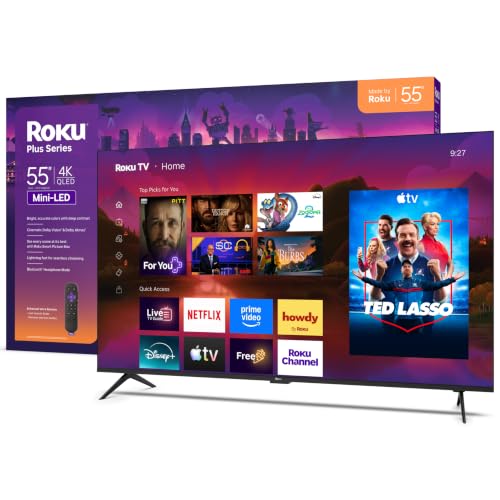
HDR10 is widely used as a baseline format, while HDR10+ and Dolby Vision can carry scene-by-scene or frame-by-frame instructions that guide display rendering. HLG is another HDR format associated with broadcast workflows. These distinctions explain why two TVs carrying an HDR label may list different format support. A Sony listing in the supplied data names Dolby Vision, and the TCL listing names Dolby Vision, HDR10+, HDR10, and HLG; those descriptions should not be generalized to every model.
Format support is worth checking against the services and devices you actually use. A console, streaming stick, receiver, or disc player can sit in the signal path, and any component that does not support a particular format may affect what reaches the screen. Verify the specifications for each device rather than assuming that an HDR television automatically makes every connected source HDR-capable. Also check whether a particular app or title streams in HDR on your chosen device and subscription.
Panel and backlight design shape visible HDR contrast
HDR can reveal more tonal detail, but the display needs to reproduce the scene’s bright and dark regions in a way that suits the room. OLED pixels emit their own light, while LED LCD designs use a backlight behind the panel. Mini-LED is a type of LED backlighting that uses smaller light sources, and some models combine LED or Mini-LED backlighting with QLED color technology. These design labels describe different parts of a TV, not interchangeable HDR formats.
Backlight control can affect how bright objects appear against dark surroundings. On an LCD television, local dimming may adjust zones of the backlight, but visible results depend on the implementation and content. Bright subtitles or stars against a dark scene can expose limits in how a display controls light around small objects, sometimes producing a halo or raised blacks. The supplied specifications do not state dimming-zone counts or comparable measurements for all listed models, so those details should be verified rather than inferred from a technology name.
OLED’s self-lit pixels can switch off individually, which supports very dark areas beside bright ones. That design differs from an LCD backlight, but it does not establish that every OLED or LCD model renders HDR equally well in every setting. Processing, brightness capability, screen reflections, and the scene itself all matter. For a fair comparison, look for model-specific specifications and consider how the TV will be used, rather than treating panel type as a complete performance score.
Room lighting and HDR picture settings change perception
A bright room can make dark scenes look less contrasty, especially when windows or lamps reflect off the screen. HDR highlights may remain visible, but glare can obscure shadow detail and reduce the impression of depth. In a light-controlled room, dark scenes are easier to assess, while a sunny living room calls for attention to reflections and the TV’s brightness characteristics. Marketing language about a bright picture is not a substitute for a specified measurement taken under known conditions.
Picture modes may change how a television handles HDR signals. A TV can switch to an HDR-specific mode when compatible content starts, and settings such as brightness, contrast, tone mapping, and energy saving may affect the result. Menu names differ by manufacturer, so consult the model’s manual before changing advanced controls. If highlights appear clipped or dark areas lose detail, compare the available HDR picture modes and restore default settings if adjustments make the image less natural.
Confirm the complete signal path before troubleshooting
If HDR content appears in standard range, start by checking the source title and playback device. Confirm that the specific program or game is HDR-enabled, that the player is configured to output HDR, and that the selected TV input supports the connection mode required by that device. A soundbar or receiver between the source and TV can also affect signal compatibility, so check the manuals for each component. Avoid assuming that a cable’s label alone confirms the full system supports every advertised feature.
For an external device, the TV may provide input settings that enable enhanced signal formats or higher bandwidth. The exact names and locations vary by brand and model, so use the manufacturer’s instructions rather than guessing. A direct connection to the TV can help isolate whether an intermediate device is involved, provided the setup is safe and the equipment guidance allows it. Keep the original connections in mind so you can restore them after checking.
HDR playback may also depend on app support, software settings, and network delivery. A title’s availability can vary by service, device, region, and subscription, and an unstable connection may reduce streaming quality or interrupt playback. If a show looks different from another HDR title, that does not automatically indicate a TV fault: mastering choices and scene brightness can vary. Compare a known compatible source and verify the format indicator or playback information where the device provides one.
Use these checks when evaluating HDR compatibility
These checks help distinguish a format mismatch from a difference in the display or content:
- Read the exact TV model specifications for HDR10, HDR10+, Dolby Vision, or HLG support.
- Check the title’s playback details to confirm that an HDR version is available.
- Verify that the connected player or console supports the format used by that content.
- Review the TV input guidance for enhanced format or high-bandwidth connection settings.
- Check receiver and soundbar pass-through support if they sit between the player and screen.
- Compare another known HDR title before concluding that the TV or source is malfunctioning.
HDR is separate from resolution, refresh rate, and cable claims
Resolution describes the number of picture pixels, while HDR concerns brightness and color information. A 4K signal can be standard dynamic range, and an HDR signal can be delivered at a resolution other than 4K. Refresh rate describes how often the display updates its image, which is relevant to motion and gaming but is not the same feature as HDR. These labels often appear together in product listings, so keeping their meanings separate makes specifications easier to assess.
An HDMI cable carries the signal; it does not create HDR detail that the content, source, or TV lacks. The required connection capability depends on the chosen resolution, refresh rate, HDR format, and other features in the setup. A product listing for the Silkland cable describes HDR and high-bandwidth support, but that claim alone does not establish compatibility for every device combination. Check the specifications of the connected equipment and follow its stated connection requirements.
For gaming, confirm the console or computer output settings as well as the TV’s supported input features. HDR, variable refresh rate, and high refresh rate can be separate capabilities, and not every input or connected device necessarily supports the same combination. A TV listing may advertise features such as VRR or ALLM alongside HDR, but those features should be assessed individually. This avoids mistaking a smooth-motion feature for proof of HDR image quality.
Set realistic expectations for HDR labels and content
An HDR logo is a useful starting point, not a guarantee that every scene will look brighter or more colorful. Some scenes are intentionally dark, and creative mastering choices can make one title appear more restrained than another. A TV may also map the incoming signal to its own display capabilities, which can change the appearance of highlights and shadows. Differences between models are most meaningful when their format support, display design, and stated performance information are considered together.
Manufacturers sometimes list picture processing or scene recognition alongside HDR support. Those features describe processing claims and should not be confused with measured brightness or independent picture-quality results. For example, product details for the Sony BRAVIA 7 list Mini-LED and QLED technologies and Dolby Vision support, while the BRAVIA 8 listing describes OLED and Dolby Vision. The supplied information does not establish equivalent HDR performance between them, so compare the individual model specifications and intended room conditions.
Buyers who watch mostly standard-range broadcasts may see less benefit than viewers with access to HDR movies, shows, and games. Streaming catalogs change, and HDR availability can depend on the title and playback device. If the TV will serve a bright family room, consider reflections and everyday viewing comfort alongside format support. If it will serve a dark theater, pay particular attention to dark-scene handling and the display’s stated panel design.
Protect the screen and keep connections within manufacturer guidance
HDR does not require unusual physical care, but modern TV panels can be sensitive to pressure and unsuitable cleaners. Follow the television manufacturer’s screen-cleaning instructions and avoid pressing on the panel. Keep ventilation openings unobstructed and use the recommended power and mounting arrangements. For wall installation, follow the TV and bracket guidance, confirm that the wall and mounting hardware are rated for the set, and get appropriate help handling a large display.
Do not route a standard power cord through a wall or alter electrical connections based on advice meant for a different installation. In-wall power work and mounting can create serious hazards if done improperly. Follow applicable manufacturer guidance and local requirements, and use a qualified installer when the work is beyond your capabilities. These precautions support safe installation; they do not change which HDR formats a TV can display.
For a related connection question, the guide to Full HD and 4K playback clarifies how source resolution and screen capability interact. Apply the same principle to HDR: check each device and signal format in the chain, rather than relying on one feature label. A clear match among content, player, connection, and television is the practical basis for HDR playback. If a format remains unavailable, consult the device manuals or manufacturer support for model-specific settings.
In short, HDR is a broader brightness-and-color signal that becomes visible only when compatible content, source equipment, connection, and television work together. Before buying or troubleshooting, verify the exact HDR formats and consider the display design and room lighting that shape the result.




Write Your Review
No reviews yet. Be the first to share your experience!