


A living room can make a 50-inch screen feel either comfortably sized or a little undersized, depending mainly on how far you sit and how much of your viewing happens together. A larger screen can make films, sports, and subtitles easier to see from across a room, but it also takes more wall or console space. The useful question is not just whether a 50-inch TV will fit, but whether it will feel engaging from your usual seat.
If you are asking is 50 inch tv big enough for living room, start with your seating distance, room layout, and viewing habits rather than a blanket size rule. The products listed below include two 50-inch TVs as well as stands and mounting options, so they can help with different parts of a living room setup. For context on resolution and screen detail, see this practical 4K UHD television guide; if gaming is part of your plan, our budget gaming TV guide covers a related set of display considerations.
Top Products
Pros
- Simple, intuitive Roku interface is perfect for all ages and tech comfort levels
- Sharp 4K HDR picture quality for the price, with good color and detail
- Enhanced voice remote with lost remote finder and personal app shortcuts
- Solid smart TV platform with automatic updates and wide app support
Cons
- Built-in speakers may lack deep bass compared to a dedicated soundbar
- Modest peak brightness may not be ideal for very bright rooms with direct sunlight
- Limited to 60Hz refresh rate, which is fine for typical streaming but not for high-end gaming
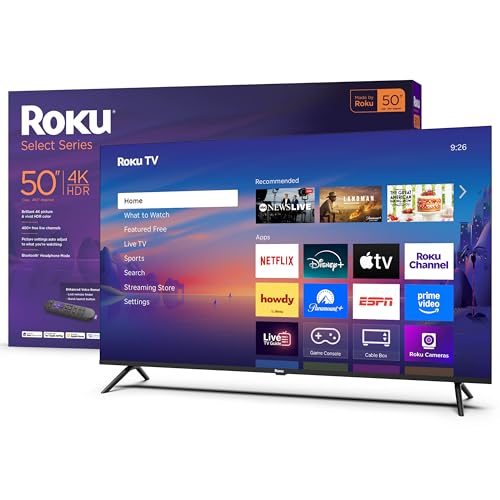
The Roku Select Series 50-inch 4K HDR TV is a straightforward, user-friendly television that prioritizes easy access to streaming content. It's designed for the modern viewer who wants a reliable smart TV without the complexity. This model features a 4K resolution panel with HDR10 support, aiming to deliver a sharp and colorful picture for a wide range of content, from live sports to the latest Netflix originals.
This TV is ideally suited for cord-cutters, families, apartment renters, bedroom TV buyers, and budget-conscious shoppers. The Roku operating system is renowned for its simplicity and vast selection of apps, making it a top choice for households where multiple people need to find their favorite shows quickly. It works well in a family living room for movie nights, in a kid's room for cartoons, or as a secondary TV in a bedroom or guest room. The inclusion of 500+ free channels and live local news makes it particularly attractive for those looking to reduce their cable bill.
In terms of performance, the 4K HDR10 panel provides a noticeable improvement over standard 1080p TVs. Colors appear more vibrant, and details are sharper, especially with native 4K content from services like Netflix, Prime Video, or Disney+. The Roku Smart Picture feature automatically optimizes the picture mode based on the incoming signal, which helps ensure a good-looking image without manual tweaking. However, like most TVs in this price range, the peak brightness is moderate, so it may not excel in bright, sunlit rooms. The 60Hz refresh rate is adequate for movies, TV shows, and casual gaming, but serious gamers might want a higher refresh rate for competitive play.
The smart platform is the highlight of this TV. The enhanced voice remote allows you to search for content across apps using your voice, which is fast and convenient. The lost remote finder is a lifesaver when the remote inevitably slips between couch cushions. The home screen is customizable, letting you rearrange apps to your liking. The TV also supports Apple AirPlay, so you can easily share content from your iPhone or iPad, and it works with voice assistants like Siri, Alexa, and Google Assistant, making it a flexible addition to a smart home setup.
Build quality is typical for an entry-level 4K TV. The frameless design gives it a clean, modern look that minimizes distractions and lets the screen stand out. The stand is sturdy enough for most entertainment centers, and the TV supports VESA wall mounting for a floating look. Sound quality from the built-in speakers is decent for casual viewing, with Roku emphasizing clear speech. However, for a more immersive experience, especially with movies or music, a soundbar would be a worthwhile upgrade. The Bluetooth headphone mode is a thoughtful feature for late-night viewing without disturbing others.
Overall, the Roku Select Series 50-inch 4K HDR TV is a fantastic value proposition for streamers and families who prioritize a simple, effective smart TV experience. It's a practical choice for everyday use, from binge-watching shows to catching the big game. If you're looking for a reliable TV that gets out of your way and lets you watch what you want, this model is an excellent option. For those wanting higher peak brightness for bright rooms or advanced gaming features, a higher-tier model might be better, but for most viewers, this Roku TV hits a sweet spot of performance and price.
Pros
- Ambilight technology expands perceived screen size and reduces eye strain during dark-room viewing.
- Quantum Dot color panel provides rich, saturated colors that elevate 4K streaming shows and family movies.
- Intuitive Roku OS interface makes finding content simple for kids, parents, and cord-cutters alike.
- Multi-format HDR compatibility ensures optimal tone mapping with premium Dolby Vision titles.
Cons
- Native 60Hz panel does not support high-frame-rate 120Hz output for competitive next-gen console gaming.
- Ambilight visual impact is less noticeable in rooms with very bright ambient daylight or non-reflective dark wall surfaces.
- Slim built-in speakers benefit significantly from a dedicated external soundbar for rich movie bass.
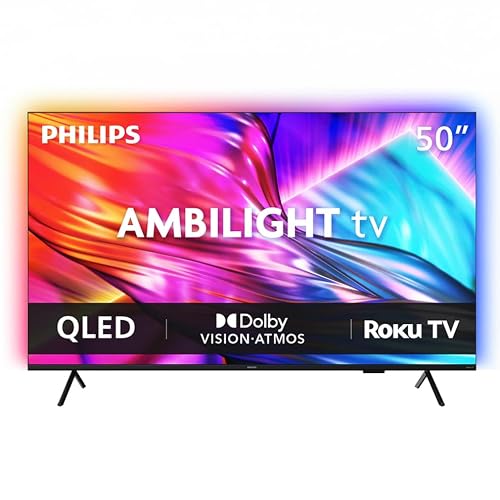
The Philips 50-Inch 7985 Series is a 4K UHD smart display that combines Quantum Dot color technology with Philips' signature Ambilight rear illumination. Designed with apartment renters, secondary living spaces, and bedroom entertainment setups in mind, this television provides an immersive viewing experience without dominating the entire room. It serves as an appealing choice for movie fans, cord-cutters, family streaming sessions, and casual gamers who want unique visual styling alongside dependable 4K picture quality.
Under the hood, the Quantum Dot QLED panel brings significant vibrancy and color saturation to everyday viewing. By expanding color volume, the display renders nature documentaries, animated family movies, and live sports broadcasts with lifelike punch. The inclusion of Dolby Vision, HDR10, and HLG HDR formats ensures that high dynamic range content from services like Netflix, Disney+, and Prime Video features well-defined highlight detail. Because the ambient Ambilight cast acts as natural bias lighting, perceived black levels and contrast appear stronger during dark-room movie viewing.
The defining highlight of the 7985 Series is its integrated Ambilight system. Real-time intelligent LEDs mounted along the rear chassis analyze on-screen picture cues and project matching color washes directly onto your wall. Viewers can select from four video modes tailored to sports broadcasts, movies, or gaming, along with a Follow Audio mode that pulses dynamically to music during weekend gatherings. When the display is turned off, the Lounge Light feature allows the unit to cast a calm ambient glow, functioning as subtle decorative lighting in your living space.
For video gaming and multimedia playback, the dedicated Ambilight gaming mode tracks fast-paced on-screen action to expand peripheral visual feedback during racing simulators, open-world adventures, and sports titles. While competitive esports enthusiasts will note that the panel operates at a standard 60Hz refresh rate rather than 120Hz, casual console players will find the input latency and crisp 4K presentation well suited for everyday play. Built-in Dolby Atmos decoding enhances vocal clarity and spatial separation, though connecting a dedicated soundbar via HDMI eARC is recommended for home theater buffs who desire deep, room-shaking low-end bass.
Operating on the Roku TV smart platform, the daily user experience remains responsive, uncluttered, and easy to navigate for all household members. Streamers gain access to thousands of channels, hundreds of free live TV networks, and easy screen casting through Apple AirPlay. Setup is quick and simple, whether resting the lightweight display on a standard media stand or mounting it flush against a neutral wall using a standard VESA bracket. The Philips 50-Inch 7985 Series stands out as a versatile, feature-packed option that brings distinctive theater ambiance to any modern living space.
Quantum Dot technology allows the Philips 7985 Series to produce wide color gamuts with impressive purity, resulting in realistic skin tones and vivid scenery across both HD upscaled feeds and native 4K streams. Whether watching weekend football games or high-budget science fiction films, the panel maintains balanced clarity across diverse lighting conditions.
Support for Dolby Vision, HDR10, and HLG optimizes color tone mapping on a frame-by-frame basis when paired with compatible 4K HDR streams. The integrated Ambilight backlighting acts as an effective optical bias light, softening harsh contrast transitions in pitch-black rooms and giving perceived contrast a noticeable boost for late-night viewing.
Running on the Roku TV operating system, this television provides a clean, user-friendly home screen that puts favorite streaming services, cable inputs, and gaming consoles on a single unified menu. Cord-cutters can browse over 500 free live channels directly through the built-in guide without needing extra tuner boxes or subscriptions.
Smart home integration is broad and flexible, supporting Apple AirPlay, Apple HomeKit, Amazon Alexa, and Google Assistant. Users can easily mirror mobile photos, stream personal videos from an iPhone, or use hands-free voice devices around the home to control power, volume, and input selections.

Pros
- Open mesh shelving promotes maximum airflow for high-performance gaming consoles and streaming devices.
- Compact footprint fits easily into smaller living rooms, bedrooms, or studio apartments.
- Convenient soundbar storage shelf allows unobstructed audio projection.
- Simple assembly with labeled parts and clear instructions.
Cons
- Slim 11.8-inch depth may not accommodate extra-deep home theater AV receivers.
- Top shelf is limited to televisions up to 55 inches, making it unsuitable for 65-inch or larger displays.
- Open shelving design leaves wires visible unless managed with zip ties or cable sleeves.
The Furologee 47-Inch TV Stand is an open-frame media console engineered to hold flat-panel televisions measuring up to 55 inches. Designed with a rustic brown wood-grain surface and a durable steel frame, this media table bridges the gap between functional living room furniture and dedicated home entertainment hubs. Whether pairing it with a vibrant 4K QLED panel, an OLED gaming display, or a standard streaming bedroom LED TV, it serves as a stable base that keeps your essential electronics well organized.
This entertainment center is well suited for apartment renters, college students, budget-conscious homeowners, and streamers looking to optimize modest living spaces. Gamers will appreciate the specialized tier spacing that allows consoles like the PlayStation 5, Xbox Series X, or Nintendo Switch to remain front and center. It also makes an exceptional choice for secondary TV setups, such as master bedrooms, home offices, or cozy den areas where massive entertainment credenzas would overwhelm the room.
A standout advantage for home theater enthusiasts is the open-air construction. Modern 4K streaming sticks, AV accessories, and gaming rigs generate substantial heat during extended movie marathons or competitive multiplayer sessions. The dual-tier metal mesh shelves ensure continuous airflow, preventing high-demand hardware from thermal throttling in enclosed cabinets. Additionally, the upper shelf accommodates compact soundbars, ensuring dialogue clarity and Dolby audio tracks fire directly toward your listening position without blocking the lower bezel of your TV screen.
Built from engineered particleboard and rigid square metal tubing, the console delivers solid tabletop support for flat-screen legs or pedestal bases. Open-back access means connecting high-speed HDMI cables, eARC audio lines, and surge protectors requires zero blind groping through tiny cable grommets. Four bonus side hooks provide handy storage for gaming headsets, extra controllers, or coiled cables, helping preserve a tidy look across your gaming setup or family movie viewing area.
Potential buyers should note that the 11.8-inch shelf depth is tailored for slim components, so oversized multi-channel AV receivers might hang over the edges. Furthermore, displays exceeding 55 inches will extend beyond the frame and are better paired with wider consoles. For viewers who own 43-inch, 50-inch, or 55-inch smart TVs and want an affordable, ventilated media center that handles soundbars and gaming gear with ease, this Furologee console represents an efficient, practical addition to any living space.
Supporting flat-panel displays up to 55 inches, this console allows standard 4K and 1080p televisions to rest at an ergonomic viewing height for couches, recliners, or beds. The dedicated sub-top shelf is sized appropriately for compact soundbars, keeping front-firing speaker drivers aligned with ear level to maximize vocal intelligibility.
Media streamers and gaming fans can place consoles, set-top boxes, and Blu-ray players across the bottom wire mesh shelves. Because there are no glass doors or solid backing panels, infrared remote signals pass through without obstruction, and heat dissipates quickly during high-frame-rate gaming or 4K HDR streaming.


Pros
- Smooth 60-degree swivel provides flexible viewing angles across wide living rooms and open floor plans
- Nine height adjustments create ideal clearance for soundbars, cable boxes, and gaming consoles beneath the screen
- Heavy-duty tempered glass base and steel column safely support up to 88 pounds without drilling wall studs
- Fits narrow media furniture far better than wide, factory-supplied TV feet
Cons
- Mounting large 65-inch or 70-inch displays onto the bracket requires two people for safe lifting
- Does not accommodate ultra-large displays exceeding 70 inches or 88 pounds
- Requires manual adjustment for swivel and tilt rather than motorized positioning
The Perlegear Universal Swivel TV Stand is an aftermarket tabletop replacement base engineered for flat-panel televisions ranging from 32 to 70 inches. Unlike basic feet included with modern displays, this heavy-duty stand attaches directly to standard rear VESA patterns while resting on a sleek tempered glass foundation. It serves as an accessible mounting upgrade for apartment renters who cannot drill into walls, as well as homeowners wanting more flexibility from their living room or bedroom entertainment centers.
A major highlight of this base is its 60-degree swivel arc, which allows the display to rotate 30 degrees to the left or right. For open-concept living rooms, kitchen-adjacent dining spaces, or corner furniture placements, this movement helps maintain direct on-axis picture quality. Viewing angles on many LED and QLED panels degrade when seen from off-center, leading to washed-out contrast and muted colors. By swiveling the screen toward your seating position, you can preserve peak brightness, rich black levels, and vibrant HDR highlights during movie night or high-stakes sports broadcasts.
Practicality also shines through its nine height configuration choices. Modern televisions often feature wide, low-profile stock feet that leave zero room for external audio gear. The Perlegear stand raises the screen center up to 24 inches, providing sufficient vertical clearance to slide a soundbar, Apple TV, or gaming console directly underneath without blocking infrared remote sensors or lower screen bezels. Additionally, an integrated 8-degree upward tilt helps offset the forward lean that sometimes affects heavier 65-inch and 70-inch screens.
Build quality is reinforced by a solid steel support pillar and a 15.75-inch by 10.24-inch tempered glass base rated to hold up to 88 pounds. Non-slip rubber pads keep the assembly firmly planted on wood or laminate consoles while preventing cosmetic scuffs. Rear safety locks and dual bracket hooks ensure the television remains anchored to the mounting plate during repositioning. Assembly is straightforward, typically taking 10 to 15 minutes with the included hardware assortment covering common M4, M6, and M8 screw sizes.
While this mount handles most mainstream 4K displays up to 70 inches, there are realistic boundaries to keep in mind. Extra-large 75-inch and 85-inch screens exceed the recommended footprint, and sets heavier than 88 pounds require larger commercial mounts. You will also want a second person nearby to help lift and hook larger 55-inch or 65-inch screens onto the frame safely.
For renters, students, and home theater fans wanting to upgrade their living space without putting holes in drywall, this Perlegear tabletop base offers exceptional utility. It frees up console surface area, optimizes picture clarity from multiple seating spots, and makes room for quality soundbars, making it an easy recommendation for everyday living room and bedroom media setups.
Setting up the Perlegear Universal Swivel TV Stand is designed to be completed in roughly 10 to 15 minutes without specialized tools. The package includes an organized assortment of mounting bolts, spacers, and washers that fit most standard television brands, including Samsung, LG, Sony, TCL, and Hisense. The steel column bolts securely into the tempered glass base, providing a firm foundation before the mounting plate is attached.
Once the rear brackets are fixed to the VESA holes on your display, you can select from three column heights and three bracket hook positions to achieve your preferred screen height. After hanging the TV onto the horizontal crossbar, built-in safety locking screws fasten beneath the rails to prevent accidental lifting. For larger screens, having a friend assist with lifting ensures an effortless and damage-free installation.
Integrating this swivel base into a dedicated home theater or living room setup solves several common audio and video placement dilemmas. Many modern 4K TVs ship with wide stance legs positioned at the extreme outer edges of the cabinet, requiring oversized media furniture. This central base condenses the footprint, allowing a 65-inch display to rest comfortably on narrower consoles.
The elevated height range is especially advantageous for home audio enthusiasts. Placing a compact or full-size soundbar right below the screen helps anchor dialogue directly to the action, enhancing speech clarity for action movies and broadcast sports. Paired with smooth 30-degree lateral swivel adjustments, this setup ensures everyone in the room enjoys an immersive audiovisual experience.
Pros
- Affordable and space-saving solution for rooms without a dedicated TV stand or wall mount.
- Tilt function helps combat glare and improve viewing comfort from different seating positions.
- Sturdy build with locking wheels ensures the TV stays secure during use and when moved.
Cons
- Maximum weight capacity of 88 lbs may limit use with heavier larger TVs or certain OLED models.
- Some users may prefer a fixed mount for a more permanent and flush installation.
- Assembly required; tools and instructions are included but can be time-consuming for some.
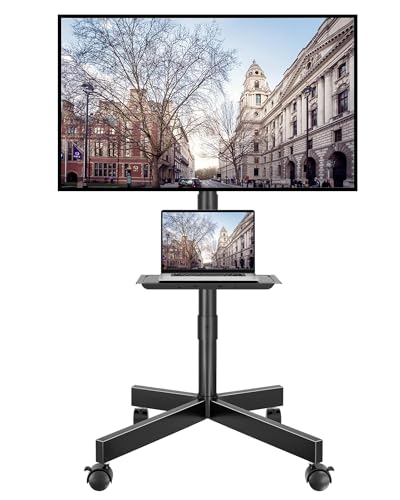
The BONTEC Mobile TV Stand is a practical, space-saving solution for anyone who needs a flexible TV setup. Designed to fit most 23-60 inch LED, LCD, and OLED TVs, it supports VESA patterns up to 400x400mm and a maximum weight of 88 lbs, making it compatible with a wide range of popular brands like Samsung, LG, and Sony.
This rolling TV stand is best suited for apartment renters, homeowners with limited floor space, and those who want the freedom to move their TV between rooms. It also works well for cord-cutters, streamers, and families who need a versatile setup for movie nights, sports viewing, or gaming marathons. The tilt function lets you adjust the screen up to 10 degrees, which can help reduce glare from windows or overhead lights, improving your overall viewing experience.
In terms of build quality, the stand features a sturdy frame with four durable 360-degree locking wheels. Once parked, the locks keep the TV securely in place, giving you peace of mind in busy households or office environments. The low-profile rear feet design helps maximize floor space, while the adjustable media shelf provides extra room for a laptop, gaming console, or streaming device. The integrated cable management system keeps wires tidy and hidden, contributing to a clean look.
Setup is straightforward with the included hardware and instructions, though some assembly is required. Many users find the process manageable within 30 minutes. Once assembled, the stand feels solid and stable, even with a 55-inch TV mounted. The wheels roll smoothly on hardwood floors, tile, and low-pile carpet, though on thick carpet they may catch slightly.
Overall, the BONTEC Mobile TV Stand offers great value for budget-conscious shoppers and gift buyers looking for a practical home entertainment accessory. It's not a replacement for a permanent wall mount or a high-end TV stand, but for its price, it delivers reliable mobility, decent adjustability, and a clean appearance. If you need a flexible TV cart for an apartment living room, bedroom, or office, this is a solid choice.
The BONTEC Mobile TV Stand makes moving your TV easy. Four locking wheels let you roll the setup from the living room to the bedroom or office without hassle. The locking mechanism ensures it stays put once in position. The included cable management system helps keep HDMI, power, and other wires organized, reducing clutter and tripping hazards. This makes the stand especially useful for cord-cutters who have multiple streaming devices or for gamers who need to connect a console.
This rolling TV stand features a black frame with a low-profile design that minimizes its footprint. The rear feet sit close to the wall, maximizing floor space in smaller rooms. The adjustable media shelf can be positioned at different heights to accommodate various devices. The stand supports VESA patterns up to 400x400mm, covering most TVs in the 23-60 inch range. With a weight capacity of 88 lbs, it can handle most flat or curved LED and LCD TVs. However, some heavier OLED models may exceed this limit, so check your TV's weight before purchasing.

How to Judge a 50-Inch Screen in a Living Room
A 50-inch TV can be big enough for a living room when the primary seat is at a moderate distance and the screen is positioned where viewers can see it without craning their necks. It may feel small if the main sofa is far away, if several people watch from a broad seating area, or if you want a more cinema-like image. A room’s square footage alone cannot answer the question because furniture placement and viewing distance shape the experience.
Measure from the spot where your eyes are while seated to the planned screen position, not from the back wall to the TV. Include the distance from the wall to the front of the sofa if the sofa sits well forward, and consider the seat you actually use most. In an open-plan room, the main viewing position may be considerably farther away than the nearest chair, so decide which seat matters most before settling on a size.
Screen size is measured diagonally, not by the width of the set. A 50-inch screen has a narrower viewing area than a larger television, but the exact outer dimensions vary by model and bezel. Check the manufacturer’s listed dimensions before buying a stand or planning a wall position, and leave room for any feet, cables, and connected equipment.
Viewing distance changes perceived screen size
The farther away you sit, the smaller the image appears within your field of view. That is why a 50-inch set can feel immersive in a compact living room yet modest in a deep room with a sofa well back from the screen. People also differ in how close they prefer to sit, so treat general viewing-distance recommendations as starting points rather than hard limits.
For a practical comparison, measure the distance and then sit in the intended spot while looking at a 50-inch screen if you can do so safely in a store or by using a screen-size mock-up at home. A rectangle marked on a wall with removable tape can help you judge the physical footprint, though it cannot fully reproduce the brightness, image detail, or sense of immersion of an operating TV. Compare that outline with a larger diagonal to understand whether the smaller option leaves too much empty space in your view.
Resolution affects how close you can sit before individual pixels or image structure become noticeable, but it does not make every screen size equally immersive from every distance. A 4K image contains more detail than a lower-resolution image, yet whether that extra detail is obvious depends on screen size, seating distance, content quality, and eyesight. Avoid assuming that the words “4K” alone mean a 50-inch screen will look large from the back of a spacious room.
Room layout can make a smaller screen more practical
A 50-inch set may be a sensible choice when the room is shared with other activities or has limited wall space. It can leave more room for artwork, shelving, windows, and furniture, and a compact screen may be easier to position without dominating the room. These advantages matter if the TV is used casually rather than as the main focus for movie nights.
A larger screen may be more satisfying for regular film viewing, sports, or group watching, especially when people sit at different distances. But the biggest available screen is not automatically the best choice if it blocks a doorway, sits too high, or overwhelms the wall. Check the full screen and stand dimensions alongside the room plan rather than deciding from the diagonal number alone.
Also consider whether viewers sit directly in front of the television or spread across a sectional. The supplied product information does not identify the panel structure or viewing-angle performance of the two televisions, so it would be unwise to promise consistent color and contrast from every seat. If wide seating is common, look for independent model-specific information about viewing angles and, where possible, view the image from seats near the sides.
What the Listed 50-Inch TVs Offer
Roku Select Series: 4K HDR and Roku TV features
The Roku Smart TV – 50-Inch Select Series, 4K HDR TV is listed with a 50-inch 4K screen, HDR10, and Roku TV. Its supplied feature description also highlights Roku’s home screen, streaming channels, voice search through the enhanced remote, and compatibility with several voice assistants. These details make the platform and screen size relevant to a living room where viewers want streaming apps without adding a separate player.
The supplied information does not state a native refresh rate, measured brightness, reflection handling, or gaming latency. Do not assume those details from the 4K or HDR labels, particularly if fast sports motion, direct sunlight, or console gaming is a major priority. Check the full model specifications and the inputs you need before purchase, because those are the details that determine whether a particular TV suits a more demanding setup.
Philips QLED Roku TV: color technology and Ambilight
QLED refers to quantum-dot color technology, but the label alone does not establish peak brightness, contrast, viewing angles, or how well the screen handles reflections. Ambilight adds lighting behind the television that responds to content, which may appeal to buyers who like a room glow around the screen. Treat the listed features as a starting point, then confirm the specifications and connections that matter for your sources and room.
Both sets are 50 inches, so neither solves a distance mismatch simply by offering a different diagonal. Their listed platforms and picture formats differ, but a preference for Roku TV, HDR formats, or Ambilight should be weighed separately from whether the screen is large enough. Product descriptions do not replace checking the exact model’s installation dimensions, warranty terms, or current support information.
Picture Conditions Matter Alongside Screen Size
Room light changes how comfortable a screen is to watch, though it does not change the physical diagonal. A bright window opposite the TV can create visible reflections, and a darker image can be harder to make out when daylight washes across the room. The supplied specifications do not provide measured brightness or anti-reflection performance for these models, so a buyer with strong daytime glare should seek model-specific information rather than infer performance from HDR branding.
Try to avoid placing the TV directly opposite a strong light source if the room layout allows it. Curtains or blinds can help manage daylight, while a modest change in screen position may reduce reflections. Keep the television’s ventilation openings unobstructed and follow the manufacturer’s placement guidance; do not attempt to solve glare by putting an indoor television in an environment it is not designed to handle.
Screen technology also shapes the picture, but the descriptions here are not detailed enough to make a complete panel comparison. The Roku set is described as LED with HDR10, while the Philips set is identified as QLED and lists multiple HDR formats. Neither supplied description provides local-dimming zone counts, panel type, brightness measurements, or a full backlight design, so claims about black levels, blooming, or sustained HDR impact would be speculation.
For sports, screen size can help make players and on-screen information easier to follow from a distance, but it does not guarantee clear motion. Native refresh rate, motion processing, broadcast quality, and the source all influence how fast action appears. Since those details are not established in the supplied descriptions, check the exact specifications and credible model-specific evaluations if smooth sports playback is central to the decision.
Choose the Right Support for the Screen
A correctly sized television still needs a stable, compatible support. The product list includes stands rather than only televisions, and the stated compatibility limits differ. Match the TV’s actual weight, mounting pattern where applicable, and physical dimensions to the support’s manufacturer specifications before buying; a screen-size range by itself is not enough to confirm compatibility.
Console stands and swivel bases
The Furologee stand is described as a 55-inch-wide console for TVs up to 55 inches, with open shelves and storage hooks. The Luplom stand is described as measuring 45 inches wide and intended for televisions under 50 inches, so check the TV’s feet placement and overall base width carefully. A 50-inch diagonal does not tell you whether the set’s feet will sit safely on a narrower console.
The GAZHOME console is listed for TVs up to 55 inches and has open storage shelving. The Perlegear tabletop swivel base is listed for a range that includes 50-inch televisions, but the listing also calls for checking the TV’s VESA pattern and weight. These are distinct checks: screen-size compatibility does not automatically confirm the mounting pattern, load limit, or stability for a specific model.
A swivel base can help direct a screen toward different seats, while a fixed console may suit a room where the TV is watched from one main position. The BONTEC rolling stand is described for televisions from 23 to 60 inches and includes locking wheels and a tilt function. Mobility can be useful in a multipurpose room, but place and secure the stand in line with its instructions and avoid moving it over obstacles that could destabilize the display.
For wall mounting, follow the television and mount manufacturers’ installation guidance, confirm that the wall structure and hardware are suitable for the combined load, and use appropriate help when handling a heavy screen. Do not route a standard power cord through a wall or improvise a mounting arrangement. If you are unsure about wall structure or electrical work, use a qualified installer.
Make the Final Size Decision at Your Main Seat
Use your actual seating distance as the deciding reference. A 50-inch screen is a reasonable candidate if its image appears comfortably large from your usual seat and the room benefits from a restrained footprint. If the screen looks small from the sofa, compare a larger size before choosing, while checking that the larger set can be positioned safely and fits the furniture or wall.
Think about what you watch most and how often other people join you. Casual streaming in a compact room puts different demands on screen size than family sports viewing across a deep living room. Also consider subtitles, menus, and smaller on-screen details, which can be easier to read when the display occupies more of your view.
Do not let an advertised feature settle a room-size question on its own. 4K resolution, HDR formats, a smart platform, and QLED color technology describe parts of the experience, but none tells you how large the image will feel from your seat. The TV’s actual viewing position and your preference for immersion remain central, while brightness and reflection handling require separate model-specific evidence.
Check connectivity too if a console, sound system, or streaming device will be part of the setup. The supplied descriptions do not list a complete port inventory, HDMI bandwidth, eARC support, or gaming features, so verify those points in the manufacturer’s documentation. A television that fits the room physically may still lack a connection you need, and product titles alone are not enough to establish port capability.
A short in-store viewing can help, but remember that display settings and lighting may differ from your home. If you cannot view the exact model, use dimensions to judge fit and rely on complete specifications for features that matter. Confirm the return policy and warranty terms before purchase, especially if screen size or glare performance remains uncertain.
For a typical living room, 50 inches is not inherently too small or too large; it is suitable when the seating distance and room arrangement make the image comfortable. Measure from your main seat, compare the screen’s footprint with the wall or console, and verify the features and support separately. If the picture seems too modest from that position, a larger screen is likely the more useful comparison than choosing between two TVs with the same diagonal.





Write Your Review
No reviews yet. Be the first to share your experience!