


A remote that won’t control the TV can turn a simple evening into a hunt for the right buttons and settings. If you’re dealing with Xfinity Remote Not Pairing With Hisense Tv, first separate the Xfinity equipment remote from a remote intended to control the Hisense TV itself. The products here aren’t interchangeable by default: the Xfinity XR15 listing identifies support for Xfinity X1, Xi6, Xi5 and XG2 equipment, while the other choices describe Hisense TV compatibility. That distinction matters before you spend money. Check the TV’s exact model number and operating system, then compare those details with each listing rather than relying on a broad “Hisense” label.
The Hisense options vary in ways that affect everyday use. Some listings identify Google TV or Android TV model ranges, while another is specifically for Roku TV and notes that some buttons may not work. Several claim no programming is needed, but that doesn’t establish support for every Hisense model or for an Xfinity box. The XR15 listing, by contrast, describes voice control and automatic pairing for named Xfinity equipment, not Hisense TV compatibility. The roundup below helps you weigh model coverage, connection details, shortcuts, voice features and battery information. Treat manufacturer descriptions as claims to verify against your setup, especially if you need both TV and cable controls from one remote.

Pros
- Requires zero setup or programming codes to function with supported Hisense models
- Convenient one-touch hotkeys for top streaming platforms like Netflix and Disney+
- Stable self-standing base design keeps it upright and easy to spot on tables
- Long infrared range extends beyond 35 feet for large living room setups
Cons
- Relies strictly on infrared line-of-sight and does not feature voice control or Bluetooth
- Requires two AAA batteries that are not included in the package
- Not compatible with standalone Google Chromecast streaming dongles or other TV brands
The LOUTOC Replacement Remote Control is an essential home entertainment accessory designed specifically for Hisense 4K UHD and ULED Smart Google TVs. Whether you are dealing with a misplaced remote after a busy weekend or a factory controller that suffered an accidental drop, this unit provides an immediate, low-stress replacement. It is especially suited for busy households, apartment renters, cord-cutters, and movie lovers who want straightforward control over their main living room or bedroom television without spending extra time on complicated pairing steps.
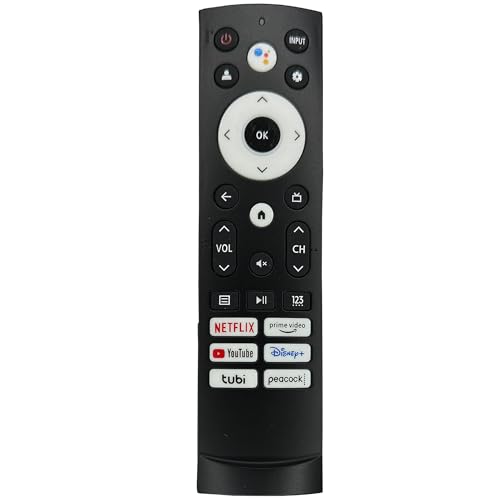
Daily navigation through the Google TV interface feels brisk and dependable thanks to an upgraded infrared transmitter that functions across distances up to 35 feet. Users can smoothly browse 4K streaming libraries, adjust volume levels on their soundbars through standard TV audio controls, and change picture modes between cinema and sports without delay. The inclusion of six dedicated shortcut keys for Netflix, Prime Video, YouTube, Disney+, Tubi, and Peacock lets family members launch their favorite shows with a single button press, bypassing several menus on movie nights.
Constructed from lightweight yet resilient ABS plastic, the remote is built to survive typical household mishaps such as sofa tumbles or accidental knocks off a bedside table. A distinct physical attribute is its tapered profile, featuring a narrow top and wider base that allows it to stand vertically on flat surfaces. This upright orientation makes it visibly prominent on a cluttered coffee table, helping streamers and sports fans locate the clicker instantly during high-stakes games or commercial breaks.
Setting up the remote requires virtually no technical effort. Unlike Bluetooth accessories that demand scrolling through settings menus with a phone app, this infrared model works the moment you slide in two fresh AAA batteries. It directly supports popular Hisense series such as the A6, A65H, A6H, U6, U6H, U7, U7H, U8, U8H, and U6K displays. While it bypasses technical setup headaches entirely, users should keep in mind that line-of-sight to the TV sensor is necessary for consistent command transmission.
Based on product specifications and user feedback, this clicker trades voice search microphone capabilities for pure convenience, rugged simplicity, and budget appeal. Viewers who frequently rely on Google Assistant voice queries may miss the built-in mic found on original Bluetooth remotes. However, for everyday streaming, quick volume adjustments, input switching for game consoles, and late-night TV viewing, this replacement offers outstanding reliability and practical value for any Hisense smart TV owner.
Compatibility is a standout benefit of this replacement controller, as it is pre-configured to communicate directly with a vast range of Hisense Smart Google TV models. Supported lineups include the budget-friendly A6, A6H, and A65H series, as well as high-performance Mini-LED and ULED models like the U6H, U6K, U7H, U7K, U8H, U8K, and UX series. It functions as an exact functional match for traditional infrared control across these televisions.
Getting started takes only seconds because no code entry or Wi-Fi sync is necessary. Simply slide off the rear battery door, insert two standard AAA batteries with correct polarity, and point the emitter at the lower bezel of your Hisense display. Keep in mind that this remote does not pair with external Google Chromecast HDMI streaming sticks, Apple TV units, or non-Hisense smart displays.

Pros
- Integrated voice search works seamlessly with Hisense Google TV models
- Broad compatibility covering popular U6K, U7K, U8K, A6H, and UX Mini-LED series
- Six dedicated shortcut buttons make jumping directly to streaming apps effortless
- Lightweight, durable ABS construction fits comfortably in hand
- Strong 50-foot operational range suitable for large living rooms and basements
Cons
- Requires two standard batteries that are not included in the package
- Bluetooth pairing is required to activate the voice microphone features
- Designed specifically for Hisense Google TV models and will not operate Hisense Roku or Fire TV units
Losing or breaking a television remote can instantly disrupt family movie nights, weekend sports streaming, and console gaming marathons. The EWO'S ERF3M90H Voice Remote Replacement is engineered specifically to resolve this headache for owners of Hisense Google Smart TVs. Compatible with an extensive lineup including the popular U6, U7, U8, UX, and A-series Mini-LED, QLED, and ULED sets, this replacement accessory brings back full operational control without the steep price tag of an original manufacturer unit. It serves apartment renters, busy families with kids, cord-cutters, and home theater enthusiasts who need immediate access to their display's smart features.
Navigating modern 4K smart TVs requires quick responsiveness, especially when fine-tuning picture modes for Dolby Vision content or switching over to low-latency Game Mode on a 120Hz or 144Hz panel. According to product specifications, this remote boasts an ultra-fast 0.2-second command activation time alongside an operational range of up to 50 feet. That wide coverage ensures reliable communication across open-concept living rooms, spacious basements, or bedroom entertainment nooks. The central voice microphone button pairs with your Hisense Google TV's built-in assistant, enabling spoken search queries, input toggling, and volume adjustments without typing out titles letter by letter on an awkward virtual keyboard.
Daily usability is anchored by six prominent streaming shortcut keys placed along the lower half of the remote. These one-touch buttons let viewers bypass home screen menus to jump directly into favorite entertainment services, saving valuable time when kicking off a binge-watching session or settling in for live sports. The chassis is molded from eco-friendly ABS plastic, giving it a sturdy, lightweight profile that feels balanced in hand and easily survives regular drops off couch cushions. Button feedback is distinct and tactile, minimizing missed inputs when adjusting volume, tweaking audio output settings, or cycling through HDMI inputs.
Getting the remote up and running is straightforward, though basic infrared commands work immediately while the integrated voice control functionality requires pairing via your TV's Bluetooth settings menu. It is worth noting that the remote does not ship with batteries, so you will need a fresh pair on hand before setting it up. Additionally, because Hisense manufactures displays on multiple operating systems, this unit is strictly intended for Google TV platforms rather than Roku or Fire TV variants. Buyers should double-check their TV model number prior to ordering to ensure flawless operation.
For homeowners, streamers, and budget-conscious TV shoppers seeking to restore effortless navigation to their Hisense 4K QLED or Mini-LED television, this replacement remote represents a practical, high-value solution. It restores essential voice capabilities, app shortcuts, and menu controls necessary to enjoy modern streaming and HDR movie viewing to the fullest.
This remote replacement puts total command of the Hisense Google TV ecosystem right at your fingertips. The dedicated Google Assistant voice button streamlines searching for 4K movies, checking game scores, or launching favorite apps across large content libraries. Voice search eliminates the hassle of on-screen typing, making content discovery effortless for both kids and adults.
Six direct-access hotkeys provide one-touch launching for leading streaming services, allowing cord-cutters to jump into shows without navigating multiple sub-menus. The unit also preserves access to essential display adjustments, enabling quick toggles for picture modes like Filmmaker Mode, IMAX Enhanced, and custom HDR presets so your movies and live sports always look their best.
Compatibility spans a broad range of Hisense Google Smart TVs, including the U6H, U7H, U8H, A6H, U6K, U7K, U8K, U75K, UX, and Laser TV series. Standard infrared functions like power, volume, channel changing, and direct input switching work out of the box once fresh batteries are inserted.
To activate hands-free voice commands, the remote must be paired to your television through the Bluetooth accessories menu on the Google TV home screen. Once connected, the remote maintains a dependable 50-foot operating radius, making it an ideal match for large living rooms, master bedrooms, and home theater setups alike.

Pros
- Simple plug-and-play infrared operation without tedious network pairing
- Direct factory compatibility with popular Hisense Roku TV series like H4030F1 and R6ER8F
- Lightweight and compact ergonomic design that feels familiar to use
- Affordable replacement solution for worn-out or lost television controllers
Cons
- Lacks voice control and microphone capabilities for spoken search commands
- Requires clear line-of-sight infrared aim toward the TV receiver
- Certain app shortcut buttons might vary depending on specific Hisense TV models
The Hisense Roku TV IR Remote is a dedicated infrared replacement controller engineered for viewers who rely on Hisense Roku smart televisions for their everyday entertainment. Designed primarily for owners of popular models like the H4030F1 and R6ER8F series, this clicker offers a budget-friendly way to restore full command over your screen. Whether you are an apartment renter tired of juggling a smartphone remote app, a family with kids who misplaced the original clicker, or a cord-cutter setting up a secondary bedroom TV, having a dependable physical remote remains an essential part of the home theater experience.
Daily interaction with modern smart platforms requires fast, responsive navigation, and this remote delivers direct access to the intuitive Roku interface. Switching between 4K HDR movie streaming, live sports broadcasts, and gaming inputs becomes effortless through its familiar directional pad and dedicated menu buttons. For movie lovers tweaking picture modes like contrast, brightness, or color temperature during late-night viewing, the remote allows quick access to on-screen settings without interrupting your streaming session on Netflix, Prime Video, or YouTube.
In terms of build quality and ergonomics, the controller features a lightweight, classic black chassis that fits naturally in the hand. Because it operates over standard infrared (IR) light, it bypasses the need for complicated Wi-Fi synchronization or Bluetooth pairing menus. Simply insert standard batteries, aim the sensor directly at your television, and begin browsing immediately. This hassle-free design makes it an ideal pick for guest rooms, dorm rooms, or living rooms where quick usability is prized above all else.
Potential buyers should consider a few practical operational trade-offs before purchasing. Unlike higher-end remotes that feature built-in microphones for voice search, this model relies strictly on physical button inputs, meaning spoken title queries are not supported. Additionally, because it uses standard infrared transmission, it requires an unobstructed line of sight to the TV panel receiver. Some users may also find that specific pre-programmed streaming app shortcut buttons can vary slightly depending on the exact Hisense production year or regional firmware.
Overall, this replacement remote delivers exceptional practicality and straightforward utility for any household running a compatible Hisense Roku display. It eliminates the frustration of unresponsive screens and brings reliable everyday control back to your family movie nights, weekend gaming sessions, and binge-watching marathons. For budget-conscious homeowners and streamers looking for an easy, no-fuss replacement, this accessory offers dependable performance at an accessible value.
Getting started with this Hisense Roku TV replacement remote requires virtually no technical effort. Because the device utilizes standard infrared signaling rather than radio frequency or Wi-Fi, there is no pairing code or wireless sync button required. Simply slide open the battery compartment, install the necessary batteries, and point the sensor directly at the lower bezel of your television.
The unit is tailored for seamless operation with popular Hisense series such as the H4030F1 and R6ER8F, while offering broad compatibility with numerous other Hisense Roku TV displays. Viewers should ensure that the path between the remote and the television sensor remains clear of soundbars or decorative items to maintain optimal responsiveness across the living room or bedroom.

Pros
- Instant functionality upon inserting batteries without confusing programming steps
- Convenient quick-launch shortcut buttons for rapid streaming navigation
- Generous 35-foot operating range suitable for spacious living rooms and home theaters
- Durable ABS material withstands everyday family living room use
Cons
- Not compatible with Hisense Roku TV or Hisense Fire TV models
- Uses infrared technology that requires an unobstructed line of sight to the TV sensor
- Batteries are not included in the package and must be purchased separately
A missing or broken remote can instantly bring family movie nights or weekend sports viewing to a frustrating halt. This universal replacement remote from Smartby is designed specifically to restore full control to owners of Hisense 4K ULED, LED, UHD, and Android smart TVs. It serves as an accessible replacement for apartment renters, busy households with kids, cord-cutters, and home entertainment enthusiasts who need an uncomplicated way to get back to streaming their favorite shows and managing TV inputs.
In daily home theater use, the remote offers responsive navigation through smart TV menus and streaming dashboards. Viewers can easily adjust picture settings, switch between HDR and sports viewing modes, dial in dialogue volume, and toggle HDMI sources for gaming consoles or soundbars. The inclusion of four dedicated quick-launch buttons makes jumping directly into major entertainment apps quick and effortless, cutting down on menu searching during late-night binge watching.
The build quality centers around a rigid ABS plastic shell crafted to survive typical living room hazards, such as accidental falls from couches or coffee tables. Measuring roughly 7.9 inches in length and weighing under a quarter of a pound, it provides a balanced, natural grip for hands of all sizes. The rubberized buttons offer clear tactile feedback, ensuring that volume adjustments and channel selections register smoothly from across the room.
Setup is genuinely effortless because the unit requires no manual code entry, Wi-Fi pairing, or Bluetooth syncing. As soon as two standard batteries are inserted, the remote communicates directly with compatible Hisense televisions right away. It covers a vast lineup of original Hisense remotes, including common variants like the EN2A27, EN2BN27H, and ERF2A60, making it an ideal drop-in replacement when the original controller gets lost or damaged.
There are a few practical limitations to keep in mind before buying. Because this controller relies strictly on standard infrared (IR) signals rather than RF or Bluetooth, it must be pointed directly toward the television sensor without obstructions in the way. Additionally, it lacks integrated voice search microphones, so viewers who frequently use voice commands will need to rely on the physical directional buttons. It is also strictly incompatible with Hisense models running Roku OS or Fire TV platforms.
For homeowners and budget-conscious streamers looking for an affordable, reliable way to navigate Hisense Android and UHD displays, this replacement delivers excellent utility. It restores easy access to your 4K display, HDMI inputs, and streaming channels without unnecessary setup steps or premium replacement costs.
Compatibility is straightforward for owners of Hisense televisions running native smart interfaces or Android TV. The unit is pre-programmed to replace a broad array of original factory remote models, such as the EN2A27, EN2A127H, EN2B27, EN2G27, and ERF2A60, ensuring reliable control across standard 4K LED and ULED screens.
Setting up the remote requires zero technical knowledge. There are no pairing buttons to hold down and no multi-digit code lists to enter. Simply install fresh batteries, point the remote at the infrared receiver on your Hisense display, and start navigating immediately.
Buyers should take note of platform restrictions. This remote will not work with Hisense Roku TVs or Hisense Fire TV editions, as those operating systems require different command protocols. Confirming your TV platform before purchasing ensures a seamless, out-of-the-box experience.
Navigating modern streaming platforms requires a remote that responds swiftly, and this model delivers dependable command execution via its infrared transmitter. With an operating reach extending beyond 35 feet, it easily covers large living areas, open-concept apartments, and basement home theaters.
The remote layout features dedicated quick-launch buttons that take you directly into major streaming applications with a single click. This convenience eliminates tedious cursor navigation, making it simple for kids and guests to jump into entertainment without hassle.
Beyond streaming shortcuts, the remote gives you full authority over essential television settings. Switching picture profiles for HDR movie viewing, adjusting audio modes for better dialogue clarity, and cycling through HDMI ports for gaming setups are all easily accessible via dedicated controls.

Pros
- Zero setup required, working immediately once two AAA batteries are inserted.
- Direct shortcut hotkeys for major streaming platforms like Netflix and Disney+.
- Ergonomic, lightweight build with long-lasting button durability.
- Affordable fix for lost or broken Hisense Android TV remotes.
Cons
- Does not feature built-in voice search or microphone capabilities.
- Incompatible with Hisense Roku TV, Fire TV, and Google TV streaming models.
- Requires direct infrared line of sight to the television receiver.
For anyone whose original remote control ended up lost between couch cushions or ruined by pets, the Tsinghcw replacement remote serves as a practical lifeline for Hisense Android TV owners. Operating as an infrared replacement for 4K LED and ULED displays, this handy accessory restores everyday functionality to living room setups and bedroom TVs without paying the steep cost of an original manufacturer replacement.
Based on product specifications, this clicker is best suited for budget-conscious homeowners, apartment renters, cord-cutters, and families with kids who rely on daily streaming. Whether you are hosting friends for game day or running through an evening movie marathon, losing access to input switches and streaming hubs can derail your entertainment. This remote gets family viewing back on track with minimal fuss.
While the remote itself does not alter your display panel, it puts complete authority over your TV settings back in your hands. Users can swiftly pull up menus to adjust picture settings like contrast, backlight levels, and Dolby Vision modes, or switch audio outputs to an external soundbar via eARC. The inclusion of six direct app buttons for services like Netflix, Prime Video, Disney+, and YouTube ensures that finding current shows or kids' programming remains quick and smooth.
Crafted from lightweight yet sturdy ABS plastic, the remote is engineered to survive accidental drops from coffee tables and daily living room handling. The button layout closely mimics traditional TV remotes, offering tactile feedback designed to withstand extended use. Its compact profile fits naturally into hands of all sizes, making channel surfing, volume adjustments, and menu navigation comfortable during late-night binge watching.
Setup could not be simpler since the unit operates via standard infrared signals. There is no Bluetooth syncing, Wi-Fi configuration, or manual code entry required; you simply drop in two fresh AAA batteries and point it at the screen. However, shoppers should keep a few realistic limitations in mind. The unit lacks a built-in microphone, meaning voice control through Google Assistant is unavailable. Furthermore, it does not work on Hisense sets powered by Roku or Fire OS, nor does it control separate streaming sticks.
If you own an A6G, U6G, or similar Hisense Android smart television and need a straightforward replacement clicker, this remote provides dependable value. It delivers essential navigation, easy volume adjustments, and quick streaming access that keep family movie nights, video game sessions, and everyday television viewing running smoothly.
Getting started requires virtually zero technical know-how. Unlike Bluetooth accessories that mandate navigating complex pairing menus on your TV, this remote relies on pre-programmed infrared frequencies tailored specifically to Hisense Android TV models.
Simply slide off the rear battery cover, insert two standard AAA alkaline batteries observing the correct polarity, and slide the cover back on. Once powered, point the remote directly toward your Hisense TV IR sensor to begin adjusting picture modes, managing inputs, and opening streaming apps right away.
Ensuring proper compatibility is essential before picking up this replacement remote. It is engineered specifically for Hisense smart televisions running the Android TV platform, covering popular screen sizes from 43 inches up to 75 inches across the A6G, U6G, and U68G model lines.
Home entertainment owners should note that this unit will not function with Hisense Roku TVs, Hisense Fire TVs, or external Google TV streaming devices. Checking your TV model number on the rear sticker or within the system menu ensures a hassle-free match for your living room setup.
Pros
- Responsive voice search speeds up navigation across live TV channels and streaming apps
- Backlit buttons make nighttime TV viewing and home theater use significantly easier
- Quick automated pairing process with compatible Xfinity X1 boxes and common TV brands
- Direct accessibility controls for closed captioning and audio descriptions
Cons
- Designed specifically for Xfinity X1 ecosystem hardware and will not function as a universal smart TV remote alone
- Button layout differs from older XR11 remotes, which may require a brief adjustment period for some users
- Requires compatible X1 or Flex streaming hardware to utilize full voice command functionality
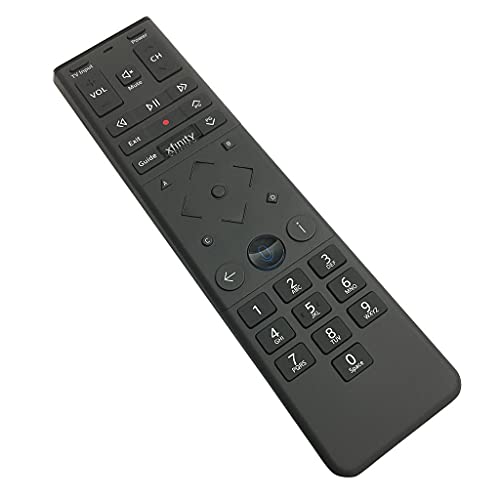
The Xfinity XR15 Voice Remote is an essential entertainment accessory designed to control Comcast X1 cable boxes, including modern Xi6 and Xi5 4K streaming hardware, as well as connected living room televisions. For households that rely on cable for live sports, news broadcasts, and integrated streaming platforms, a reliable remote is the foundation of daily viewing. This replacement model features an updated ergonomic profile, illuminated keys, and integrated microphone hardware engineered to bring convenient speech control directly to your television screen.
This remote is best suited for homeowners, apartment renters, busy families, and sports enthusiasts who want rapid access to high-definition entertainment without navigating complicated menus. Whether you are switching between college football games on a Saturday afternoon, searching for children's cartoons, or pulling up a movie on 4K streaming apps, the voice interface removes the friction of pecking letters on an on-screen keyboard. It also serves as an indispensable upgrade for bedroom TVs and basement home theaters where finding the right button in low-light environments is a common challenge.
In everyday living room entertainment use, voice recognition proves remarkably responsive for finding titles, pulling up sports scores, switching inputs, and launching integrated streaming apps like Netflix, Prime Video, or YouTube. The microphone picks up commands cleanly, allowing viewers to search by actor, title, or sports team with dependable accuracy. While it relies on the processing speed of the connected X1 or Xi6 set-top box to execute commands, user feedback highlights smooth navigation through 4K on-demand libraries and live guides. Furthermore, the remote handles primary TV power and volume functions, simplifying control over compatible television displays and audio equipment.
Build quality is centered on clean ergonomics and intuitive accessibility. Measuring just seven inches in length and weighing under a third of a pound, the lightweight handheld unit feels balanced during extended TV sessions. The soft-touch backlit buttons light up to assist viewing in dark home theater rooms, addressing one of the biggest complaints with budget remotes. Dedicated buttons for Closed Captioning, voice guidance, and descriptive audio make accessibility features instantly reachable, benefiting viewers with hearing or visual impairments. The package even includes starter batteries, allowing immediate setup without an extra trip to the store.
Setup is designed to be straightforward thanks to automatic pairing protocols that quickly link the remote to compatible Xfinity set-top equipment. In most setups, programming the remote to adjust volume and power on major smart TV brands like Samsung, LG, Sony, TCL, or Hisense takes only a couple of on-screen steps. Realistic limitations do exist, however. This accessory is firmly tied to the Xfinity ecosystem, meaning it cannot operate as a standalone universal remote for independent smart TV operating systems without an active Xfinity box. Additionally, long-time users transitioning from older XR11 remotes may need a few days to adjust to the flatter button profile.
For anyone replacing a broken or lost remote, or upgrading a secondary bedroom TV connected to an X1 box, the Xfinity XR15 offers dependable value. Its blend of reliable voice search, nighttime backlighting, and quick access to live sports and streaming content makes it a practical addition to any family home entertainment center.
Getting the Xfinity XR15 remote configured for your entertainment center is designed to be an automated process. When paired with compatible X1 hardware, such as the Xi6, Xi5, or XG2 boxes, the remote utilizes an automated pairing sequence that guides you through sync steps directly on your television display. This eliminates the need for manually entering lengthy device code lists during initial connection.
Beyond controlling the cable box itself, the remote can be programmed to manage power and audio levels on major television displays from brands such as Samsung, LG, Sony, Vizio, TCL, and Hisense, as well as connected soundbars. This integration minimizes coffee table clutter, allowing you to manage everyday viewing, audio adjustments, and channel browsing from a single handheld controller.
Voice navigation on the XR15 simplifies how users browse extensive cable and streaming libraries. By holding down the dedicated microphone button, viewers can issue conversational commands such as naming a favorite sports team, requesting a specific movie genre, or asking for the channel guide. The system searches across live cable channels, on-demand catalogs, and integrated streaming platforms simultaneously, saving valuable time during family movie nights or fast-paced game days.
Accessibility is another prominent focus of the XR15 layout. The remote features quick-access keys for Closed Captioning, audio description tracks, and voice guidance menus. These physical shortcuts ensure that viewers who depend on audio-visual accommodations can activate essential features immediately without digging through multi-layered system settings.
If this topic is part of a bigger decision, hisense tv not responding to remote is a useful related read.
Questions to Check Before You Buy
Will an Xfinity XR15 remote control my Hisense TV?
Compatibility with Hisense TVs is not specified for the Xfinity XR15 in the supplied information. Its listing names X1, Xi6, Xi5 and XG2 equipment, so check your TV model number and Xfinity setup before expecting one remote to control both.
Which Hisense replacement works with a Roku TV?
The Hisense Roku TV IR Remote is identified for Hisense Roku TVs, including H4030F1 and R6ER8F series. Its listing notes that a few buttons may not work, so confirm brand compatibility and needed functions before buying.
A closely related question is covered in hisense fire tv remote not working, which may help alongside this section.
Do any listed Hisense remotes require programming or pairing?
Several listings say no programming or pairing is needed, including the Smartby and Tsinghcw options. That claim applies only to stated compatible TVs; verify the TV model number, operating system and setup instructions rather than assuming every Hisense set is supported.
For more on a connected point, our page on hisense vidaa tv remote not working goes into it separately.
Are batteries included with these replacement remotes?
The Hisense options that specify batteries say they are not included and identify two AAA batteries. The XR15 listing says batteries are included, but does not state their type; check the battery compartment details and listing before ordering.
Can one remote control both a Hisense TV and an Xfinity box?
The supplied details do not establish that any listed remote controls both a Hisense TV and an Xfinity box. The Hisense remotes describe TV compatibility, while the XR15 names Xfinity equipment; confirm device compatibility and required buttons before choosing.
For more on a connected point, our page on hisense google tv remote not working goes into it separately.


Write Your Review
No reviews yet. Be the first to share your experience!