

A lost or unresponsive remote can make a Hisense Fire TV frustrating to navigate, but not every Hisense replacement remote supports Fire TV models. This roundup focuses on the compatibility details supplied for each option, so you can distinguish Fire TV support from remotes intended for Google TV or other Hisense sets. The Replacement Remote for Fire Smart TV explicitly lists Hisense Fire smart TVs among its compatible devices, while several other listings warn that they do not work with Hisense Fire TV. That distinction matters more than a broad Hisense label. Before ordering, check your TV’s exact model number against the product listing and consider which controls you need most.
The five options vary in connection and convenience details, including voice control, shortcut keys, and whether setup or programming is described as necessary. The LOUTOC remote is listed for specific Hisense Google TV series, not Fire TV; the Tsinghcw and Smartby listings explicitly exclude Fire TV. The B BraiNice listing names Hisense Fire models in its compatibility information, though it also describes a pairing step for older Insignia TVs, so read its instructions for your setup. For a Fire TV replacement, prioritize explicit brand compatibility and listed model support over price or a familiar-looking button layout. The comparisons below can help narrow the choices without assuming every remote supports every TV function.

Pros
- Requires zero setup or programming codes to function with supported Hisense models
- Convenient one-touch hotkeys for top streaming platforms like Netflix and Disney+
- Stable self-standing base design keeps it upright and easy to spot on tables
- Long infrared range extends beyond 35 feet for large living room setups
Cons
- Relies strictly on infrared line-of-sight and does not feature voice control or Bluetooth
- Requires two AAA batteries that are not included in the package
- Not compatible with standalone Google Chromecast streaming dongles or other TV brands
The LOUTOC Replacement Remote Control is an essential home entertainment accessory designed specifically for Hisense 4K UHD and ULED Smart Google TVs. Whether you are dealing with a misplaced remote after a busy weekend or a factory controller that suffered an accidental drop, this unit provides an immediate, low-stress replacement. It is especially suited for busy households, apartment renters, cord-cutters, and movie lovers who want straightforward control over their main living room or bedroom television without spending extra time on complicated pairing steps.
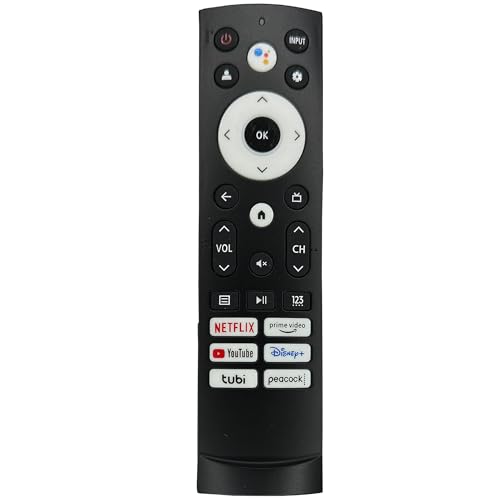
Daily navigation through the Google TV interface feels brisk and dependable thanks to an upgraded infrared transmitter that functions across distances up to 35 feet. Users can smoothly browse 4K streaming libraries, adjust volume levels on their soundbars through standard TV audio controls, and change picture modes between cinema and sports without delay. The inclusion of six dedicated shortcut keys for Netflix, Prime Video, YouTube, Disney+, Tubi, and Peacock lets family members launch their favorite shows with a single button press, bypassing several menus on movie nights.
Constructed from lightweight yet resilient ABS plastic, the remote is built to survive typical household mishaps such as sofa tumbles or accidental knocks off a bedside table. A distinct physical attribute is its tapered profile, featuring a narrow top and wider base that allows it to stand vertically on flat surfaces. This upright orientation makes it visibly prominent on a cluttered coffee table, helping streamers and sports fans locate the clicker instantly during high-stakes games or commercial breaks.
Setting up the remote requires virtually no technical effort. Unlike Bluetooth accessories that demand scrolling through settings menus with a phone app, this infrared model works the moment you slide in two fresh AAA batteries. It directly supports popular Hisense series such as the A6, A65H, A6H, U6, U6H, U7, U7H, U8, U8H, and U6K displays. While it bypasses technical setup headaches entirely, users should keep in mind that line-of-sight to the TV sensor is necessary for consistent command transmission.
Based on product specifications and user feedback, this clicker trades voice search microphone capabilities for pure convenience, rugged simplicity, and budget appeal. Viewers who frequently rely on Google Assistant voice queries may miss the built-in mic found on original Bluetooth remotes. However, for everyday streaming, quick volume adjustments, input switching for game consoles, and late-night TV viewing, this replacement offers outstanding reliability and practical value for any Hisense smart TV owner.
Compatibility is a standout benefit of this replacement controller, as it is pre-configured to communicate directly with a vast range of Hisense Smart Google TV models. Supported lineups include the budget-friendly A6, A6H, and A65H series, as well as high-performance Mini-LED and ULED models like the U6H, U6K, U7H, U7K, U8H, U8K, and UX series. It functions as an exact functional match for traditional infrared control across these televisions.
Getting started takes only seconds because no code entry or Wi-Fi sync is necessary. Simply slide off the rear battery door, insert two standard AAA batteries with correct polarity, and point the emitter at the lower bezel of your Hisense display. Keep in mind that this remote does not pair with external Google Chromecast HDMI streaming sticks, Apple TV units, or non-Hisense smart displays.

Pros
- Includes voice search support for compatible Google TV, Android TV, and Fire TV platforms
- Helpful remote finder beep feature saves time searching under couch cushions
- Broad compatibility covering multiple generations of Insignia, Toshiba, TCL, and Hisense displays
- Fast 0.2-second latency provides instant feedback when browsing TV menus and streaming apps
- Effortless one-step pairing avoids tedious code searches on older smart sets
Cons
- Voice search functionality does not work on Samsung, LG, or Vizio TVs
- App shortcut button selection is fixed and cannot be remapped to other services
- Requires two AAA batteries that are not included in the package
The B BraiNice Replacement Smart TV Remote serves as an all-in-one controller designed to restore effortless control over dozens of modern televisions, including models from Insignia, Toshiba, Hisense, TCL, and Pioneer. For busy families, apartment renters, and cord-cutters who rely on their displays daily for streaming and casual viewing, dealing with a lost or unresponsive clicker can bring movie night to a sudden halt. This replacement unit offers an accessible, functional alternative to expensive original manufacturer controllers, ensuring that living room setups, basement rec rooms, and bedroom displays stay completely operational.
In everyday use, responsive control makes a noticeable difference when browsing massive streaming libraries or jumping between live sports feeds. Based on product specifications, this controller operates with an ultra-low latency of roughly 0.2 seconds and provides an extended wireless reach of up to 40 feet. Because viewers do not need to aim the wand directly at the television sensor, navigating through fast-paced Fire TV or Google TV interfaces remains fluid and hassle-free, whether kicking back on the couch or checking scores from the kitchen counter.
Smart entertainment setups benefit significantly from integrated modern features like voice search and dedicated streaming shortcuts. Compatible Google TV, Android TV, and Fire TV models allow viewers to search for specific actors, change inputs, or check weather updates with a simple spoken prompt. The remote also incorporates four dedicated preset buttons for instant access to Netflix, Prime Video, Peacock, and DirecTV or Disney, minimizing menu clutter when starting a favorite binge-watch series. Furthermore, the inclusion of an audible remote finder beep locator for supported Insignia smart TVs eliminates the frustration of digging under couch cushions during family movie gatherings.
Durability and power efficiency are well addressed in the physical build. The silicone buttons are rated for over 150,000 clicks, offering reassuring tactile feedback that withstands heavy daily use by kids and gaming marathons alike. An automatic sleep state activates during idle periods to stretch battery life beyond 12 months under standard conditions. Setting up legacy sets is straightforward, requiring users to hold down the volume up and rewind keys for five seconds rather than entering complex manual programming codes.
While compatibility is broad across numerous Fire TV and Google TV platforms, some practical limitations exist. Voice search functionality is restricted to compatible smart platforms and will not function when operating basic infrared protocols on Samsung, LG, or Vizio sets. Additionally, the dedicated streaming shortcut buttons are permanently assigned and cannot be custom remapped to alternative apps like YouTube or Hulu. Users will also need to supply a pair of standard AAA batteries since they are not included in the package.
For home entertainment enthusiasts, families, and budget-conscious streamers seeking an affordable, feature-packed backup or replacement controller, this unit offers dependable value. Its blend of voice navigation, extended wireless range, and the time-saving remote locator makes it a sensible addition to any modern living room or bedroom television setup.
Integrated voice search functionality brings conversational convenience to compatible Google TV, Android TV, and Fire TV platforms. By pressing the microphone key, viewers can launch shows, switch inputs, or search for titles across multiple streaming services without typing letter by letter on an onscreen keyboard.
Dedicated quick-launch buttons provide direct shortcuts to major entertainment hubs including Netflix, Prime Video, Peacock, and DirecTV or Disney. These one-touch keys streamline daily entertainment, making it simple for kids and adults to start their favorite programming instantly.
The integrated remote finder function offers added peace of mind for living rooms prone to misplaced accessories. When activated on compatible smart TVs, the remote emits an audible beep locator that makes tracking it down fast and simple.
Pairing the controller with older Insignia LED and LCD models requires no complex manufacturer code entry. Viewers simply press and hold the volume up and rewind buttons simultaneously for five seconds to establish a direct connection.
The remote supports extensive hardware compatibility spanning Insignia F-series and DF-series, Toshiba C-series and LF-series, Hisense U6 and QD models, as well as select TCL and Pioneer smart displays. It also handles core control functions for Samsung, LG, and Vizio displays through standard infrared commands.

Pros
- Restores full voice search functionality on compatible Insignia, Toshiba, TCL, and Hisense Fire smart TVs
- Includes handy pre-programmed shortcut buttons for quick streaming app access
- Quick and straightforward pairing sequence requires no complex programming codes
- Comfortable, compact form factor that feels natural in hand during long viewing sessions
Cons
- Requires two AAA batteries that are not included in the packaging
- Designed exclusively for Fire OS smart TVs and will not work with standalone Fire TV streaming sticks or non-Fire smart TVs
- Does not feature backlit buttons for easy navigation in completely dark home theater rooms
A lost or malfunctioning clicker can bring movie night or game-day sports streaming to a complete halt. The IDGPUW Replacement Remote for Fire Smart TV is built as a direct alternative for viewers running television sets powered by Amazon Fire TV OS. Designed specifically for smart TV sets from Insignia, Toshiba, TCL, and Hisense, this handheld controller restores the essential navigational and interactive capabilities that make smart platforms easy to operate. For cord-cutters, busy households with kids, or apartment dwellers tired of juggling temperamental smartphone remote apps, this accessory brings tactile comfort back to the coffee table.
Smart navigation on a modern 4K TV relies heavily on quick voice commands, and this replacement remote maintains that convenience. With integrated voice search capability, users can press the microphone button to search for 4K movies, launch streaming services, check local sports scores, or jump straight into their favorite live TV channels. The responsive voice pickup assists viewers in bypassing cumbersome on-screen keyboard typing, which helps maintain a smooth user experience across extensive Fire TV libraries. Additionally, four dedicated channel shortcut buttons allow family members to instantly open key streaming apps without wading through home screen menus.
Beyond smart voice navigation, the controller handles everyday television operations with familiar button placement. Whether adjusting soundbar output volume, switching HDMI inputs for a gaming console, or pausing a late-night streaming show in the bedroom, the remote delivers tactile feedback and straightforward layout design. Measuring just over six inches in length, it offers an ergonomic grip that feels secure for users of all ages. The clean black finish blends naturally into any living room, den, or home theater arrangement alongside sound systems and media players.
Setup is designed to be quick and hassle-free, requiring a simple pairing sequence that links the remote to your Fire smart TV in just a few steps. The controller requires two standard AAA batteries to operate, which can be quickly installed in the rear compartment. While it works reliably with Fire OS integrated televisions from Toshiba, Insignia, Hisense, and TCL, users should note that it is not intended for standalone Fire TV streaming sticks or displays running Roku, Google TV, or proprietary brand interfaces. The absence of backlit keys also means navigating during pitch-dark movie marathons may take a little muscle memory.
For anyone seeking an affordable and dependable replacement for a damaged or misplaced clicker, this voice remote offers tremendous practical value. It successfully restores smooth menu navigation, crisp voice input, and essential television controls without the premium expense of first-party manufacturer parts. Whether you need a fresh remote for the living room family hub or a secondary controller for a bedroom setup, this accessory ensures you can get right back to enjoying your favorite sports, films, and gaming sessions uninterrupted.
This remote gives you back full control over the rich Amazon Fire TV OS environment built into your television. The built-in voice control button lets you speak naturally to launch streaming applications, search for actors and movie titles, check weather forecasts, and control volume without manual typing. The responsive microphone processes commands quickly to make navigating expansive streaming libraries effortless.
In addition to voice navigation, the face of the remote includes four dedicated preset buttons for instant app launching. These one-touch shortcuts bypass the home screen, taking you straight to top entertainment services in seconds. Standard direction pads, playback controls, and quick-access guide buttons ensure you can manage live TV feeds, streaming queues, and input selections with minimal effort.
Pairing this replacement remote with your television is straightforward and takes only a few minutes. Following the included three-step setup instructions, users can hold the home button to establish connection with their television set. Because it is programmed specifically for Fire smart TVs, there is no need to enter lengthy code sequences or hunt through complicated programming guides.
Compatibility is tailored strictly for Fire TV edition televisions manufactured by Insignia, Toshiba, TCL, and Hisense. It is engineered to replace original equipment clickers for these smart displays. Prospective buyers should verify that their TV runs the native Fire TV operating system prior to purchase, as this unit does not operate standalone streaming sticks, streaming boxes, or TVs operating on alternative smart platforms.

Pros
- Instant functionality upon inserting batteries without confusing programming steps
- Convenient quick-launch shortcut buttons for rapid streaming navigation
- Generous 35-foot operating range suitable for spacious living rooms and home theaters
- Durable ABS material withstands everyday family living room use
Cons
- Not compatible with Hisense Roku TV or Hisense Fire TV models
- Uses infrared technology that requires an unobstructed line of sight to the TV sensor
- Batteries are not included in the package and must be purchased separately
A missing or broken remote can instantly bring family movie nights or weekend sports viewing to a frustrating halt. This universal replacement remote from Smartby is designed specifically to restore full control to owners of Hisense 4K ULED, LED, UHD, and Android smart TVs. It serves as an accessible replacement for apartment renters, busy households with kids, cord-cutters, and home entertainment enthusiasts who need an uncomplicated way to get back to streaming their favorite shows and managing TV inputs.
In daily home theater use, the remote offers responsive navigation through smart TV menus and streaming dashboards. Viewers can easily adjust picture settings, switch between HDR and sports viewing modes, dial in dialogue volume, and toggle HDMI sources for gaming consoles or soundbars. The inclusion of four dedicated quick-launch buttons makes jumping directly into major entertainment apps quick and effortless, cutting down on menu searching during late-night binge watching.
The build quality centers around a rigid ABS plastic shell crafted to survive typical living room hazards, such as accidental falls from couches or coffee tables. Measuring roughly 7.9 inches in length and weighing under a quarter of a pound, it provides a balanced, natural grip for hands of all sizes. The rubberized buttons offer clear tactile feedback, ensuring that volume adjustments and channel selections register smoothly from across the room.
Setup is genuinely effortless because the unit requires no manual code entry, Wi-Fi pairing, or Bluetooth syncing. As soon as two standard batteries are inserted, the remote communicates directly with compatible Hisense televisions right away. It covers a vast lineup of original Hisense remotes, including common variants like the EN2A27, EN2BN27H, and ERF2A60, making it an ideal drop-in replacement when the original controller gets lost or damaged.
There are a few practical limitations to keep in mind before buying. Because this controller relies strictly on standard infrared (IR) signals rather than RF or Bluetooth, it must be pointed directly toward the television sensor without obstructions in the way. Additionally, it lacks integrated voice search microphones, so viewers who frequently use voice commands will need to rely on the physical directional buttons. It is also strictly incompatible with Hisense models running Roku OS or Fire TV platforms.
For homeowners and budget-conscious streamers looking for an affordable, reliable way to navigate Hisense Android and UHD displays, this replacement delivers excellent utility. It restores easy access to your 4K display, HDMI inputs, and streaming channels without unnecessary setup steps or premium replacement costs.
Compatibility is straightforward for owners of Hisense televisions running native smart interfaces or Android TV. The unit is pre-programmed to replace a broad array of original factory remote models, such as the EN2A27, EN2A127H, EN2B27, EN2G27, and ERF2A60, ensuring reliable control across standard 4K LED and ULED screens.
Setting up the remote requires zero technical knowledge. There are no pairing buttons to hold down and no multi-digit code lists to enter. Simply install fresh batteries, point the remote at the infrared receiver on your Hisense display, and start navigating immediately.
Buyers should take note of platform restrictions. This remote will not work with Hisense Roku TVs or Hisense Fire TV editions, as those operating systems require different command protocols. Confirming your TV platform before purchasing ensures a seamless, out-of-the-box experience.
Navigating modern streaming platforms requires a remote that responds swiftly, and this model delivers dependable command execution via its infrared transmitter. With an operating reach extending beyond 35 feet, it easily covers large living areas, open-concept apartments, and basement home theaters.
The remote layout features dedicated quick-launch buttons that take you directly into major streaming applications with a single click. This convenience eliminates tedious cursor navigation, making it simple for kids and guests to jump into entertainment without hassle.
Beyond streaming shortcuts, the remote gives you full authority over essential television settings. Switching picture profiles for HDR movie viewing, adjusting audio modes for better dialogue clarity, and cycling through HDMI ports for gaming setups are all easily accessible via dedicated controls.

Pros
- Zero setup required, working immediately once two AAA batteries are inserted.
- Direct shortcut hotkeys for major streaming platforms like Netflix and Disney+.
- Ergonomic, lightweight build with long-lasting button durability.
- Affordable fix for lost or broken Hisense Android TV remotes.
Cons
- Does not feature built-in voice search or microphone capabilities.
- Incompatible with Hisense Roku TV, Fire TV, and Google TV streaming models.
- Requires direct infrared line of sight to the television receiver.
For anyone whose original remote control ended up lost between couch cushions or ruined by pets, the Tsinghcw replacement remote serves as a practical lifeline for Hisense Android TV owners. Operating as an infrared replacement for 4K LED and ULED displays, this handy accessory restores everyday functionality to living room setups and bedroom TVs without paying the steep cost of an original manufacturer replacement.
Based on product specifications, this clicker is best suited for budget-conscious homeowners, apartment renters, cord-cutters, and families with kids who rely on daily streaming. Whether you are hosting friends for game day or running through an evening movie marathon, losing access to input switches and streaming hubs can derail your entertainment. This remote gets family viewing back on track with minimal fuss.
While the remote itself does not alter your display panel, it puts complete authority over your TV settings back in your hands. Users can swiftly pull up menus to adjust picture settings like contrast, backlight levels, and Dolby Vision modes, or switch audio outputs to an external soundbar via eARC. The inclusion of six direct app buttons for services like Netflix, Prime Video, Disney+, and YouTube ensures that finding current shows or kids' programming remains quick and smooth.
Crafted from lightweight yet sturdy ABS plastic, the remote is engineered to survive accidental drops from coffee tables and daily living room handling. The button layout closely mimics traditional TV remotes, offering tactile feedback designed to withstand extended use. Its compact profile fits naturally into hands of all sizes, making channel surfing, volume adjustments, and menu navigation comfortable during late-night binge watching.
Setup could not be simpler since the unit operates via standard infrared signals. There is no Bluetooth syncing, Wi-Fi configuration, or manual code entry required; you simply drop in two fresh AAA batteries and point it at the screen. However, shoppers should keep a few realistic limitations in mind. The unit lacks a built-in microphone, meaning voice control through Google Assistant is unavailable. Furthermore, it does not work on Hisense sets powered by Roku or Fire OS, nor does it control separate streaming sticks.
If you own an A6G, U6G, or similar Hisense Android smart television and need a straightforward replacement clicker, this remote provides dependable value. It delivers essential navigation, easy volume adjustments, and quick streaming access that keep family movie nights, video game sessions, and everyday television viewing running smoothly.
Getting started requires virtually zero technical know-how. Unlike Bluetooth accessories that mandate navigating complex pairing menus on your TV, this remote relies on pre-programmed infrared frequencies tailored specifically to Hisense Android TV models.
Simply slide off the rear battery cover, insert two standard AAA alkaline batteries observing the correct polarity, and slide the cover back on. Once powered, point the remote directly toward your Hisense TV IR sensor to begin adjusting picture modes, managing inputs, and opening streaming apps right away.
Ensuring proper compatibility is essential before picking up this replacement remote. It is engineered specifically for Hisense smart televisions running the Android TV platform, covering popular screen sizes from 43 inches up to 75 inches across the A6G, U6G, and U68G model lines.
Home entertainment owners should note that this unit will not function with Hisense Roku TVs, Hisense Fire TVs, or external Google TV streaming devices. Checking your TV model number on the rear sticker or within the system menu ensures a hassle-free match for your living room setup.
Hisense Fire TV Remote Buying Questions
Which listed remote explicitly supports a Hisense Fire TV?
The Replacement Remote for Fire Smart TV explicitly lists Hisense Fire smart TVs as compatible. Its supplied details also name Insignia, Toshiba, and TCL Fire smart TVs, plus voice control and four channel shortcuts. Check your TV model number before ordering.
Are the Hisense Google TV remotes suitable for Fire TV?
No, the LOUTOC listing is for specified Hisense Google TV series, while the Tsinghcw listing explicitly excludes Hisense Fire TV. Their shortcut keys and setup claims don’t establish Fire TV compatibility, so confirm your model and TV operating system first.
Does the Smartby remote work with Hisense Fire TV?
No, Smartby’s listing says it does not work with Hisense Fire or Roku TV. It identifies infrared operation and Hisense TV model references, but those details don’t override the Fire TV exclusion. Consider it only if your set matches its supported type.
Do these replacement remotes require programming or pairing?
Setup differs by listing: the Fire Smart TV replacement describes a three-step setup, while LOUTOC says no programming is required. B BraiNice gives a pairing instruction for older Insignia TVs; don’t assume that procedure applies to your Hisense model.
Are batteries included with the compatible Fire TV options?
No, the supplied details say the Fire Smart TV replacement requires two AAA batteries, not included. The B BraiNice listing also specifies batteries are not included, but its information doesn’t establish a battery type here, so check the listing.




Write Your Review
No reviews yet. Be the first to share your experience!