


A lost or broken remote can make even basic TV controls a hassle, and a voice button alone doesn’t guarantee a replacement will fit your setup. This roundup of Best Voice Control Tv Remote options includes brand-specific and streaming-focused choices, so the first step is matching the listing to your exact TV or device. The supplied details distinguish options such as the VIZIO Voice Remote – XRT260, Roku remotes, and Fire TV remotes, but compatibility varies by model and generation. If you’re considering a VIZIO replacement, check your TV’s model details alongside this VIZIO smart TV guide. That small check can help avoid buying a remote that offers voice features your TV can’t use.
Button layout and setup details matter, too. The listings describe features ranging from voice search and shortcut keys to backlit buttons, remote finding, and TV power or volume controls, but those features aren’t shared by every option. Some replacements require pairing, while others state that no programming is needed; battery requirements also differ or aren’t provided. The Amazon Fire TV Alexa Voice Remote Pro highlights backlighting and customizable buttons, while the Roku Voice Remote Pro (2nd Ed.) lists backlit controls and rechargeable power. Treat manufacturer compatibility claims as a starting point, not a substitute for checking your model number and any stated exclusions. The picks below are most useful when you compare the specific functions you need against your existing TV or streaming setup.

Pros
- Instant push-to-talk voice search saves time finding shows and switching TV inputs
- Bluetooth connection means you do not have to point directly at the TV sensor
- Straightforward setup works smoothly with supported VIZIO smart TVs without complex programming
- Dedicated app shortcut buttons speed up streaming on family movie nights
Cons
- Engineered specifically for modern VIZIO TVs and does not support third-party television brands
- Lacks backlit keys for easy button visibility in pitch-black home theater rooms
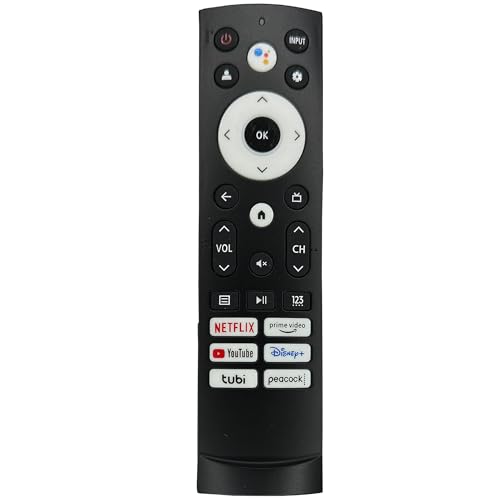
The VIZIO XRT260 Voice Remote is an essential accessory engineered for modern VIZIO smart TV owners, specifically those with V-Series, M-Series, and P-Series 4K HDR displays. Whether managing a busy living room entertainment setup, an apartment home theater, or a bedroom TV, this remote streamlines navigation across menus, streaming platforms, and broadcast inputs. For cord-cutters and everyday streamers, having a fast remote that eliminates slow on-screen typing makes daily viewing far more enjoyable.
Families with kids, sports fans tracking multiple games, and movie lovers hosting weekend watch parties will appreciate the push-to-talk voice functionality. Instead of slowly hunting through letters on an on-screen keyboard, viewers can simply press the dedicated voice button to search for titles, open streaming platforms, or adjust TV settings. Apartment renters and bedroom viewers also benefit from the clean, simplified layout that prioritizes high-frequency controls over unnecessary buttons.
Built with Bluetooth wireless technology, this remote frees viewers from the strict line-of-sight limitations of standard infrared clickers. You can adjust volume, swap HDMI inputs for gaming consoles, or pause a show from under a blanket or across a large living room. App loading and menu responsiveness remain snappy, allowing rapid access to free streaming channels via the WatchFree button and quick jumps between favorite platforms during game days or holiday movie marathons.
Measuring roughly seven inches long and weighing just a fraction of a pound, the remote features a sleek matte black profile that sits comfortably in hand. The button travel provides tactile feedback so users can reliably navigate directional rings and volume rockers without looking down. While it lacks backlit buttons for pitch-black cinema rooms, the smart layout groups key commands logically, keeping volume, mute, power, and app shortcuts within thumb reach.
Setup is straightforward, designed to work smoothly with compatible VIZIO smart TVs right out of the box without tedious code entry or pairing hassles. Supported by the broader SmartCast and VIZIO companion app ecosystem, it also offers peace of mind if a backup mobile remote is ever needed. For any homeowner, gamer, or binge-watcher needing to replace a lost remote or upgrade to hands-free voice discovery, this unit offers dependable convenience and strong everyday value.
The XRT260 remote is tailored to unlock the full potential of the VIZIO SmartCast operating system. The integrated push-to-talk voice search communicates directly with your television software, allowing you to search for actors, genres, or titles across multiple installed apps simultaneously.
In addition to voice discovery, the remote includes dedicated quick-launch buttons for popular streaming services. The dedicated WatchFree button offers instant one-touch entry into hundreds of ad-supported live television channels, sports feeds, and news streams, making it a standout tool for cord-cutters looking to ditch traditional cable boxes.
Designed for immediate operation, this remote provides plug-and-play simplicity for supported VIZIO V-Series, M-Series, and P-Series 4K HDR smart TVs. In most setups, the remote pairs automatically once batteries are inserted, bypassing the tedious manual programming codes required by generic universal remotes.
The built-in Bluetooth connectivity maintains a strong wireless link through light obstacles, which is ideal if your television is mounted high on a living room wall or if your media console sits at an off-angle from your primary viewing couch.

Pros
- Built-in voice button provides swift search across Fire TV streaming apps
- Simple pairing process gets living room and bedroom TVs back up and running fast
- Durable ABS build holds up well against daily drops and active family use
- Affordable replacement option compared to buying original manufacturer units
Cons
- Requires two AAA batteries that are not included in the packaging
- Limited to smart TVs that natively support Fire TV voice control pairing
Managing your home entertainment setup becomes frustrating when a remote gets misplaced, worn out, or damaged by pets. The IDGPUW Replacement Voice Remote is designed specifically for owners of Insignia, Toshiba, TCL, Hisense, and Amazon Fire TV Series displays who need a straightforward replacement. Whether you are outfitting a family living room, an apartment media corner, or a secondary bedroom TV, this accessory restores full access to streaming platforms and core television functions without unnecessary complications.
Navigating modern smart TV platforms relies heavily on responsive controls, especially on displays packed with 4K HDR movies, sports channels, and streaming apps. Based on product specifications, this remote integrates convenient voice control functionality directly into the interface. Users can search for titles across Prime Video, Disney Plus, and Netflix, adjust volume, or switch inputs simply by holding down the voice command button. This quick access saves time during weekend family movie nights or while tracking live sports broadcasts across various apps.
In terms of physical build, the controller measures roughly 6.2 inches in length with a slim, ergonomic footprint that sits comfortably in your hand. Built from fresh ABS plastic, the casing is designed to be pet-friendly and durable enough to withstand everyday drops onto hard living room floors. The manufacturer notes a tested button lifespan of over 100,000 clicks, which provides reliable tactile feedback whether you are adjusting dialogue levels on a connected soundbar or browsing streaming catalogs during late-night viewing sessions.
Setting up the device avoids the headaches typical of traditional multi-device universal remotes. Instead of manually entering lengthy programming codes or scrolling through manufacturer lists, pairing is intended to be fast and intuitive right out of the box once you install two standard AAA batteries. This streamlined connection process makes it especially attractive for budget-conscious shoppers and busy households that want their main entertainment hub running again in minutes.
There are a few realistic considerations to keep in mind prior to purchasing. The remote does require two AAA batteries, which are not included in the package, so having a spare pair handy is recommended. Additionally, while it supports an extensive lineup including Omni, 2-Series, and 4-Series televisions, compatibility centers specifically on smart TVs configured with Fire TV software and voice support. For cord-cutters, college dorms, and family households seeking an economical and functional replacement, this remote offers a dependable way to keep entertainment within easy reach.
Compatibility centers on smart television sets powered by the Fire TV operating system. Supported brands and models include Insignia, Toshiba, TCL, Hisense, and Omni Series screens featuring native voice navigation capabilities. Pairing the remote generally involves inserting two fresh AAA batteries, holding down the designated pairing button near the television, and following the on-screen prompt to establish a wireless link.
Because the unit uses direct wireless pairing rather than obsolete programming tables, you will not have to hunt down brand-specific digit codes. This makes replacing a lost controller straightforward for living rooms, guest bedrooms, and home theater setups alike.
Modern streaming demands quick navigation, and the integrated microphone button allows viewers to bypass tedious on-screen keyboard typing. By pressing the voice control button, you can search for actors, launch streaming applications, switch HDMI inputs for gaming consoles, or pause playback during Super Bowl watch parties and movie marathons.
The layout preserves the streamlined button layout familiar to Fire TV users, giving quick access to navigation rings, back keys, playback controls, and volume adjustments so family members of any tech skill level can operate the screen with confidence.

Pros
- Includes voice search support for compatible Google TV, Android TV, and Fire TV platforms
- Helpful remote finder beep feature saves time searching under couch cushions
- Broad compatibility covering multiple generations of Insignia, Toshiba, TCL, and Hisense displays
- Fast 0.2-second latency provides instant feedback when browsing TV menus and streaming apps
- Effortless one-step pairing avoids tedious code searches on older smart sets
Cons
- Voice search functionality does not work on Samsung, LG, or Vizio TVs
- App shortcut button selection is fixed and cannot be remapped to other services
- Requires two AAA batteries that are not included in the package
The B BraiNice Replacement Smart TV Remote serves as an all-in-one controller designed to restore effortless control over dozens of modern televisions, including models from Insignia, Toshiba, Hisense, TCL, and Pioneer. For busy families, apartment renters, and cord-cutters who rely on their displays daily for streaming and casual viewing, dealing with a lost or unresponsive clicker can bring movie night to a sudden halt. This replacement unit offers an accessible, functional alternative to expensive original manufacturer controllers, ensuring that living room setups, basement rec rooms, and bedroom displays stay completely operational.
In everyday use, responsive control makes a noticeable difference when browsing massive streaming libraries or jumping between live sports feeds. Based on product specifications, this controller operates with an ultra-low latency of roughly 0.2 seconds and provides an extended wireless reach of up to 40 feet. Because viewers do not need to aim the wand directly at the television sensor, navigating through fast-paced Fire TV or Google TV interfaces remains fluid and hassle-free, whether kicking back on the couch or checking scores from the kitchen counter.
Smart entertainment setups benefit significantly from integrated modern features like voice search and dedicated streaming shortcuts. Compatible Google TV, Android TV, and Fire TV models allow viewers to search for specific actors, change inputs, or check weather updates with a simple spoken prompt. The remote also incorporates four dedicated preset buttons for instant access to Netflix, Prime Video, Peacock, and DirecTV or Disney, minimizing menu clutter when starting a favorite binge-watch series. Furthermore, the inclusion of an audible remote finder beep locator for supported Insignia smart TVs eliminates the frustration of digging under couch cushions during family movie gatherings.
Durability and power efficiency are well addressed in the physical build. The silicone buttons are rated for over 150,000 clicks, offering reassuring tactile feedback that withstands heavy daily use by kids and gaming marathons alike. An automatic sleep state activates during idle periods to stretch battery life beyond 12 months under standard conditions. Setting up legacy sets is straightforward, requiring users to hold down the volume up and rewind keys for five seconds rather than entering complex manual programming codes.
While compatibility is broad across numerous Fire TV and Google TV platforms, some practical limitations exist. Voice search functionality is restricted to compatible smart platforms and will not function when operating basic infrared protocols on Samsung, LG, or Vizio sets. Additionally, the dedicated streaming shortcut buttons are permanently assigned and cannot be custom remapped to alternative apps like YouTube or Hulu. Users will also need to supply a pair of standard AAA batteries since they are not included in the package.
For home entertainment enthusiasts, families, and budget-conscious streamers seeking an affordable, feature-packed backup or replacement controller, this unit offers dependable value. Its blend of voice navigation, extended wireless range, and the time-saving remote locator makes it a sensible addition to any modern living room or bedroom television setup.
Integrated voice search functionality brings conversational convenience to compatible Google TV, Android TV, and Fire TV platforms. By pressing the microphone key, viewers can launch shows, switch inputs, or search for titles across multiple streaming services without typing letter by letter on an onscreen keyboard.
Dedicated quick-launch buttons provide direct shortcuts to major entertainment hubs including Netflix, Prime Video, Peacock, and DirecTV or Disney. These one-touch keys streamline daily entertainment, making it simple for kids and adults to start their favorite programming instantly.
The integrated remote finder function offers added peace of mind for living rooms prone to misplaced accessories. When activated on compatible smart TVs, the remote emits an audible beep locator that makes tracking it down fast and simple.
Pairing the controller with older Insignia LED and LCD models requires no complex manufacturer code entry. Viewers simply press and hold the volume up and rewind buttons simultaneously for five seconds to establish a direct connection.
The remote supports extensive hardware compatibility spanning Insignia F-series and DF-series, Toshiba C-series and LF-series, Hisense U6 and QD models, as well as select TCL and Pioneer smart displays. It also handles core control functions for Samsung, LG, and Vizio displays through standard infrared commands.

Pros
- Fast voice control significantly speeds up app browsing and content discovery
- Integrated TV power and volume buttons remove the need for a secondary television remote
- Seamless automatic pairing across Roku TVs and standalone streaming devices
- Compact, lightweight form factor with an intuitive button layout for family use
Cons
- Pre-set streaming channel shortcut buttons are fixed and cannot be reprogrammed
- Lacks a headphone jack for private listening unlike higher-end voice remote models
- Operates on standard disposable batteries rather than a built-in rechargeable battery
The Roku Voice Remote serves as an official replacement and functional upgrade for anyone navigating the Roku smart TV ecosystem. Whether you are dealing with a misplaced remote in a busy family living room, setting up a guest bedroom television, or upgrading an older infrared clicker, this compact accessory is built to streamline your daily viewing. It works across all Roku TV models from brands like TCL, Hisense, and Sharp, as well as the majority of standalone Roku streaming players and audio products.
For cord-cutters, sports fans, and movie lovers, the standout utility here is the integrated push-to-talk voice search. Instead of painstakingly tapping out titles on a virtual keyboard with arrow keys, holding down the microphone button allows you to launch channels, search for specific actors, switch inputs, or find where a game is streaming in seconds. Based on product specifications, the remote handles wide-ranging search queries across thousands of entertainment apps, making family movie night significantly smoother.
Living room practicality is enhanced through integrated television controls. Many budget smart TV remotes require you to keep a secondary remote nearby just to adjust volume or turn the set on and off. This model features dedicated TV power and volume rocker buttons on the side, along with mute control. When paired with a Roku TV, it can even switch display inputs directly, consolidating your coffee table controllers into one sleek wand.
In terms of build quality and ergonomics, the remote weighs just 0.1 pounds and features smooth, curved edges that sit comfortably in hand. The button layout remains clean and uncluttered, keeping essential playback controls, a directional pad, and four pre-set streaming shortcut buttons within natural thumb reach. Because it communicates wirelessly with compatible Roku hardware, you do not have to point it directly at the television screen, which is especially convenient for mounted bedroom displays or hidden streaming sticks.
Setup is virtually instant for most home setups. In most cases, pulling the battery protective tab on the back causes the remote to pair automatically with your active Roku device. However, buyers should be aware of a few minor trade-offs. The pre-set app buttons are fixed to specific popular platforms and cannot be remapped to your personal favorites, and this standard version does not include a headphone jack for private listening or a rechargeable battery pack.
Overall, this replacement voice remote offers outstanding convenience and everyday value for apartment renters, busy families with kids, and streaming enthusiasts. If you need a reliable replacement clicker or want to upgrade an older standard remote to gain TV power, volume, and voice navigation, this unit is a practical and dependable choice for any Roku-powered home theater.
Voice navigation transforms the daily smart TV browsing experience. Holding the voice button allows you to speak natural commands such as launching your favorite sports streaming app, searching for popular comedies, or pausing playback when stepping away from the couch. The voice recognition quickly scans across available platforms on your Roku device to show which service offers the title for free or with an active subscription.
The remote also integrates essential display controls directly into your streaming routine. You can turn your television on and off, adjust audio levels on the fly, or mute commercials without hunting down the original TV factory remote. For Roku TV owners, the ability to jump between HDMI inputs right from the controller keeps gaming consoles, soundbars, and cable boxes easily accessible within the unified Roku interface.
Getting the Roku Voice Remote up and running is designed to be completely hassle-free. Most users can simply turn on their television and Roku player, pull the battery tab on the back of the remote, and wait for the screen to display a pairing confirmation message. The wireless link establishes quickly without entering tedious device codes.
If the remote does not pair immediately, pressing and holding the internal pairing button beneath the battery cover initiates a fresh search. Once connected, your Roku system guides you through a brief on-screen audio test to configure the power and volume keys to match your specific TV brand, ensuring smooth operation right out of the box.

Pros
- Restores voice control search functionality on compatible streaming sticks and smart TVs
- Works across multiple hardware generations, including 4K Max and Fire TV Cube
- Simple pairing procedure gets your home entertainment setup back up and running quickly
- Familiar button layout makes everyday navigation intuitive for kids and adults alike
Cons
- Requires two AAA batteries that are not included in the packaging
- Does not support older legacy 1st or 2nd generation Fire TV sticks or 1st generation TV Cubes
- Pairing instructions differ between standalone streaming sticks and built-in smart TVs
Finding a reliable replacement controller is essential when your original TV clicker goes missing or stops responding during family movie night. This replacement voice remote from ORQRQO is designed specifically for compatible Fire TV streaming sticks, TV Cubes, and integrated smart TVs such as Amazon Omni, Insignia, and Toshiba models. It suits budget-conscious streamers, busy households with kids, apartment dwellers, and cord-cutters who rely on quick daily access to streaming platforms like Netflix, Prime Video, and YouTube without spending money on an expensive OEM unit.
Daily streaming depends heavily on smooth navigation, especially when browsing 4K HDR movies, toggling soundbar volume through HDMI eARC controls, or searching for live sports watch parties. The built-in microphone allows viewers to issue Alexa voice commands, making it significantly faster to launch apps or adjust playback than typing with an on-screen keyboard. For movie lovers and sports fans who want snappy responsiveness while catching up on highlights or holiday films, this remote preserves the core hands-free searching convenience that modern smart TV platforms offer.
The physical design features a lightweight black shell with standard directional buttons, dedicated volume controls, and playback keys that mirror original equipment configurations. Compatibility spans popular hardware including Fire TV Stick 3rd Gen, 4K, 4K Max, and 2nd or 3rd Gen TV Cubes, alongside smart televisions from Pioneer, Ember, and Insignia. However, buyers should check their hardware version beforehand, as legacy 1st and 2nd generation standard TV Sticks and 1st generation TV Cubes are not supported.
Pairing is straightforward, though steps vary slightly depending on whether you are syncing with a standalone HDMI streaming stick or a built-in smart television platform. Two AAA batteries are required to get started, which must be supplied separately. Once synchronized, the buttons provide tactile feedback suitable for late-night bedroom viewing or quick channel changes across live broadcast guides, giving users dependable control over their primary living room display.
For homeowners and apartment renters facing a broken or lost remote, this budget-friendly replacement delivers the essential voice search and platform control needed to keep home entertainment running smoothly. It offers a practical fix for family rooms, dorm spaces, and secondary bedroom TVs, ensuring quick access to streaming content without complicated universal programming codes.
Setting up this replacement remote involves a quick pairing procedure that matches your specific entertainment device. For Fire TV streaming sticks and TV Cubes, pressing and holding the home button typically initiates the wireless pairing connection. For smart TVs with built-in Fire OS, following the on-screen accessory settings menu helps establish a secure wireless connection.
Before purchasing, confirm that your hardware is compatible. While it supports recent 4K and 4K Max streaming devices as well as modern smart TVs from Toshiba, Insignia, and Pioneer, it does not function with older first-generation media boxes or earlier standard sticks.

Pros
- Motion-sensing backlit keys make dark room navigation effortless
- Audible remote finder saves time searching couch cushions and living room clutter
- Quick-access headphone button simplifies late-night TV audio pairing
- Programmable shortcut buttons provide instant access to favorite channels or apps
- Consolidates TV power, volume, and live channel navigation into one handheld unit
Cons
- Incompatible with older first- and second-generation Fire TV devices and select budget Fire TV Edition models
- Requires two AAA batteries rather than featuring a built-in rechargeable battery pack
- Sold separately as an upgrade accessory rather than bundled standard with entry-level streaming sticks
The Amazon Fire TV Alexa Voice Remote Pro is an advanced replacement and upgrade remote designed for smart TV viewers, apartment dwellers, and home theater owners using the Fire TV platform. Whether managing a bustling family living room setup or a quiet bedroom television, keeping track of small remotes and navigating buttons in the dark can be frustrating. This accessory aims to streamline entertainment control for cord-cutters, sports fans, and movie lovers who spend significant time streaming content across apps like Netflix, Prime Video, and Disney+.
A primary highlight for evening entertainment is the motion-activated backlighting. In a dedicated dark home theater or during late-night movie viewing, finding the correct playback or volume keys often requires turning on a lamp or squinting at reflective plastic. The motion sensors detect movement when the remote is picked up, softly illuminating the keypad so viewers can pause, rewind, or adjust sound without disturbing the immersive lighting of their 4K HDR display. Additionally, a dedicated headphone shortcut button pulls up the on-screen Bluetooth pairing menu immediately, allowing late-night viewers and apartment renters to connect wireless headphones for private listening without waking sleeping household members.
The integration of an audible remote finder addresses one of the most common living room complaints. By speaking to an Echo smart speaker or utilizing the Alexa or Fire TV app, users can prompt the remote to emit a ringing chime from deep within couch cushions or under blankets. Alongside the acoustic finder, the remote adds two customizable preset buttons. Viewers can program these shortcut keys to launch favorite live TV channels, open specific streaming applications, or execute Alexa smart home routines such as dimming living room lights before a movie marathon.
In terms of daily build quality and usability, the remote feels sturdy in hand while offering comprehensive control over TV hardware. Beyond basic streaming navigation, it features dedicated infrared and Bluetooth controls for TV power, volume adjustment, and live channel surfing. This setup allows many viewers to tuck away their original television remote and rely on a single handheld device for both streaming navigation and primary TV settings. The tactile click of the buttons provides reliable feedback, reducing accidental presses during fast-paced sports watching or channel switching.
Setup is straightforward, linking wirelessly to compatible Fire TV streaming sticks, Fire TV Cube units, and smart TVs with Fire TV built-in. Buyers should check hardware compatibility before ordering, as it does not work with first- or second-generation Fire TV hardware, older Fire TV Stick models, or select older Insignia and Element Fire TV Edition screens. For households invested in the Amazon streaming ecosystem looking for backlit buttons, simple headphone pairing, and an end to lost remotes, this accessory provides practical value and daily convenience.
Integrating the Alexa Voice Remote Pro into a modern living room or home theater display helps eliminate clutter by unifying audio and video commands. Its direct television power and volume control support most major TV brands, including Samsung, LG, Sony, TCL, and Hisense, allowing you to control both your display and Fire TV interface through one device.
For late-night entertainment in shared spaces or apartments, the one-touch Bluetooth audio shortcut is especially beneficial. It pairs smoothly with wireless soundbars, Bluetooth headphones, or earbuds, routing rich audio dialogue directly to your ears while maintaining full volume control from the remote keypad.

Pros
- Bright backlit buttons make low-light navigation and movie nights effortless
- Convenient USB-C rechargeable battery eliminates the recurring cost of disposable batteries
- Hands-free voice recognition and lost remote finder save time in busy households
- Comfortable ergonomic grip consolidates TV power, volume, and streaming into one wand
Cons
- USB-C charging cable and power adapter are not always bundled in the package
- Leaving hands-free voice detection active around the clock will drain the battery faster
- Designed exclusively for Roku OS devices and does not operate other smart TV platforms
The Roku Voice Remote Pro (2nd Edition) is a dedicated wireless TV remote upgrade engineered for Roku streaming players, soundbars, and Roku smart TVs. Designed specifically for movie lovers, apartment renters, cord-cutters, and busy families, this accessory solves the common annoyances of standard plastic remotes. Whether you are running a 4K home theater setup or a modest bedroom television, it provides a unified way to navigate content without juggling extra clickers.
During nighttime viewing or family movie sessions, the backlit keys light up automatically so you can pause, rewind, or adjust volume without turning on a lamp. The hands-free microphone system lets viewers speak naturally from across the room using voice prompts like 'Hey Roku' to track down movies, pull up live sports, or pause playback when your hands are busy. If the remote slips between couch cushions, a quick voice command or a tap inside the Roku mobile app triggers an audible chime to locate it instantly.
The physical design features a smooth matte black finish with responsive rubberized buttons and a balanced, lightweight feel. Instead of swapping out pairs of disposable AA or AAA batteries, this second-generation remote relies on an internal lithium-ion pack rechargeable via USB-C. Based on product specifications and typical home entertainment use, a single charge can keep the controller powered for up to three months, reducing household battery waste.
Setup is quick and user-friendly through the existing Roku OS settings menu. Because it connects via wireless RF rather than strict infrared line-of-sight, you do not need to point the remote directly at the television or media console to navigate apps. The remote also pairs with standard television display controls, providing integrated TV power and volume adjustment over HDMI-CEC or infrared.
One realistic limitation to consider is that keeping hands-free voice listening perpetually active will reduce battery life more quickly, though a physical slide switch is included to turn off the microphone whenever privacy or power conservation is preferred. Additionally, this accessory is built strictly for the Roku ecosystem and will not navigate competing platforms such as Fire TV or Apple TV. For any household looking to upgrade an existing Roku TV or replace a lost remote with a rechargeable, backlit controller, this unit offers exceptional convenience and everyday value.
Hands-free voice control lets you search for actors, launch streaming channels, and manage media playback without holding down a button. The built-in far-field microphone listens for commands across standard living room distances, making channel navigation seamless.
The lost remote finder can be activated with a spoken command or triggered remotely using the free Roku mobile app on your smartphone, producing a clear audio alert to help you retrieve the controller from under furniture.
Pairing is handled wirelessly through the Roku system settings screen, connecting directly to Roku Express, Streaming Stick, Ultra, Streambar, and Roku TV models from manufacturers such as TCL, Hisense, and Sharp.
Television power and volume pairing uses standard HDMI-CEC and infrared protocols, allowing the remote to control primary display functions alongside streaming navigation.

Pros
- Affordable replacement for lost or broken original Samsung remotes
- Voice control works well for basic commands and searches, adding convenience
- Compatible with a wide range of Samsung TV models from 2019-2026
- Durable build quality with high button press longevity
- Shortcut keys streamline access to streaming apps
Cons
- Voice and shortcut functions require original TV hardware support; may not work on all models
- No backlit buttons, which can be inconvenient for use in dark rooms
- Some users may find the build less premium than the original Samsung remote
If you have a Samsung smart TV from 2019-2026 and your original remote has gone missing or stopped working, the Acoyer replacement remote is a solid and budget-friendly solution. This remote is designed to work with a huge range of Samsung models, including QLED, LED, Frame, and Crystal series, making it a versatile pick for many households. It's especially good for streamers, cord-cutters, and families who want a simple way to control their TV without spending a lot.
One of the standout features here is the voice control capability. You can press the voice button and speak commands like 'Open Netflix' or 'Volume up,' which works well for hands-free navigation. However, it's important to note that this function relies on your TV's original hardware support. If your original remote didn't have voice control, this remote won't add it. The same goes for the four shortcut keys, which let you jump straight to popular streaming services. For most compatible models, these shortcuts are a real time-saver during movie nights or binge-watching sessions.
Build quality is decent for the price. The remote uses a durable ABS plastic shell that feels sturdy enough for everyday use. The buttons are well-spaced and have a satisfying click, and they're rated to withstand over 150,000 presses, which should last for years. The ergonomic shape fits comfortably in your hand, and the layout is intuitive, so even kids or older family members can pick it up and use it right away.
Setup is straightforward. Just insert the included batteries (usually AAA, but check the package), and the remote should pair automatically with your Samsung TV. If it doesn't, there's a simple pairing process in the manual. The remote works via infrared and Bluetooth on compatible models, offering reliable control from up to 40 feet away. It's a hassle-free replacement that gets you back to watching your favorite shows quickly.
There are a couple of limitations to keep in mind. The remote doesn't have backlit buttons, which can be annoying if you often watch TV in a dark room. Also, while the voice control works for basic commands, it's not as responsive as a dedicated smart speaker like an Amazon Echo or Google Nest. For most users, though, these are minor trade-offs given the low price.
Overall, the Acoyer replacement remote is a practical choice for Samsung TV owners who need a reliable backup or replacement. It's ideal for streamers, families, and anyone who wants voice control without paying for an expensive original remote. If you're a home theater enthusiast who needs advanced features like backlighting or a premium feel, you might prefer a first-party remote. But for everyday use, this remote gets the job done without breaking the bank.

Pros
- Seamless Bluetooth pairing with fast and accurate voice search on supported Samsung displays
- Extensive compatibility across multiple generations of Samsung Smart TVs
- Sturdy ABS shell engineered to handle drops and daily household wear
- Includes a reassuring two-year warranty for extended reliability
Cons
- Requires two AAA batteries that are not included in the packaging
- Voice recognition features only work on Samsung TVs that natively support Bluetooth voice remotes
- Does not feature solar cell charging like select high-end factory remotes
The Nettech Replacement Voice Remote is an aftermarket controller engineered specifically for Samsung Smart TVs released between 2019 and 2026. Whether a pet chewed up your original wand or the buttons have worn out from years of daily entertainment, this accessory provides an accessible lifeline for homeowners, apartment dwellers, and families. It brings back voice-enabled navigation to your living room or home theater display without requiring an expensive official replacement from the manufacturer.
In terms of day-to-day smart TV performance, this remote helps maintain the swift navigation that modern Samsung Tizen OS platforms are known for. Once paired via Bluetooth, users can launch popular streaming services like Netflix, Prime Video, Disney+, and YouTube with minimal friction. The integrated microphone supports voice recognition from up to 40 feet away, making it easy to search for movie titles, adjust audio levels during sports watch parties, or switch inputs during weekend gaming sessions without repeatedly tapping directional arrows.
From a hardware perspective, the unit is constructed from lightweight yet resilient ABS plastic designed to survive accidental coffee table drops and energetic kids. The internal switches are rated for over 100,000 presses, equating to years of reliable channel surfing and streaming menu browsing. It serves as a direct stand-in for a broad catalog of Samsung remotes, including common BN59 series part numbers and standard One Remote models, preserving the clean, button-conscious layout familiar to Samsung owners.
Setting up the remote is remarkably straightforward. Users simply slide open the battery hatch, insert two standard AAA batteries, and point the remote toward their active display. Holding down the Back/Exit and Play/Pause buttons simultaneously for five to seven seconds triggers the on-screen pairing notification. Unlike basic infrared clickers that require direct line-of-sight to the TV sensor, the Bluetooth connection allows you to control your display freely from across the room, even under a cozy living room blanket.
While this remote covers the primary needs of most Samsung owners, there are a few practical trade-offs to keep in mind. The voice control feature depends entirely on whether your specific TV model natively supported Bluetooth voice functions from the factory; if your screen was originally paired with a basic infrared remote, voice commands will not function. Additionally, unlike newer premium OEM remotes with built-in solar panels or USB-C charging ports, this model relies on standard replaceable AAA batteries that must be purchased separately.
For cord-cutters, movie buffs, and busy households looking to restore full voice functionality to a Samsung 4K, QLED, or Crystal UHD display on a budget, this replacement delivers dependable convenience. With its simple pairing process and two-year warranty coverage, it stands out as a practical, wallet-friendly upgrade for keeping your home entertainment running smoothly.
Getting this replacement remote synced to your Samsung television takes just a minute. Start by sliding open the back panel and inserting two fresh AAA alkaline batteries. Power on your television manually or with your existing hardware before beginning the synchronization sequence.
To establish the Bluetooth connection, sit within standard viewing distance of your screen, then press and hold both the Back/Exit and Play/Pause buttons together for roughly five to seven seconds. A prompt will appear on your Samsung TV screen confirming that pairing is complete, after which your voice search and smart navigation are immediately ready for use.
Designed to work seamlessly with Samsung Tizen smart platforms, this controller preserves the voice-first experience that makes modern streaming effortless. Users can activate the microphone to search across multiple streaming hubs, pull up live broadcast channels, or switch HDMI inputs for console gaming marathons.
The extended 40-foot Bluetooth wireless range eliminates the frustration of having to point the remote directly at the lower bezel of your TV, giving you smooth command over media playback from anywhere in the living room or bedroom.

Pros
- Restores smooth pointer cursor navigation and voice search features on compatible LG TVs.
- Covers multiple generations of LG 4K and OLED models from 2019 through 2025.
- Instant shortcut buttons for popular platforms like Netflix and Disney+ speed up viewing.
- Solid ABS build quality holds up well against drops, active kids, and everyday family handling.
- Much more budget-friendly than buying an expensive original manufacturer replacement.
Cons
- Voice control and pointer functions do not work on pre-2018 LG TVs or budget models lacking native voice hardware.
- Designed strictly for LG smart TVs and cannot operate standalone audio soundbars or third-party streaming boxes.
- Requires initial manual pairing with the TV rather than working immediately out of the box.
The Nettech Replacement Magic Remote is an aftermarket controller designed specifically for owners of modern LG smart televisions, including OLED, QNED, NanoCell, and standard 4K UHD displays. It is an ideal pick for apartment renters, busy households with kids, movie buffs, sports fans, and cord-cutters who need to replace a lost, chewed, or damaged factory remote. Whether you are hosting Super Bowl watch parties in the living room, cueing up family cartoons on a Saturday morning, or binge-watching your favorite drama late at night, having a responsive controller makes everyday viewing effortless.
Based on product specifications and user feedback, this controller effectively duplicates the signature pointer cursor and scroll-wheel capabilities of the original LG Magic Remote. Instead of tediously tapping directional arrows across on-screen keyboards, viewers can smoothly point, click, and scroll directly through webOS menus, web browsers, and streaming menus. The built-in microphone allows for quick voice searches, making it easy to find titles across Netflix, Disney+, or YouTube, or adjust TV settings without navigating multiple sub-menus.
Crafted from durable ABS plastic, this remote is built to handle everyday living room drops, couch cushions, and high-frequency button pressing. The buttons offer crisp tactile feedback and are rated for extended operational life. The layout closely mimics official LG remote ergonomics, complete with dedicated hotkeys for major streaming platforms, an ergonomic thumb rest, and an energy-saving internal design that helps preserve AA battery power during marathon streaming sessions.
Setup is straightforward for most users. After installing two AA batteries and turning on your display, holding the Home and Back buttons simultaneously triggers pairing mode, which you finalize by pressing the center scroll wheel. Prospective buyers should keep in mind that the advanced pointer and voice search capabilities require an LG TV that originally supported those features out of the box. Additionally, this unit is engineered solely for LG televisions and will not control auxiliary soundbars, AV receivers, or external streaming sticks.
For anyone seeking to restore fluid webOS navigation, quick voice control, and effortless streaming without paying a steep price for an original manufacturer remote, this replacement controller delivers excellent practical value. Backed by a 1-year warranty, it offers a dependable, budget-conscious upgrade that keeps movie nights and everyday streaming running smoothly.
Setting up this replacement remote requires just a few moments before you can access all pointer and voice features. Start by inserting two fresh AA alkaline batteries into the rear compartment, then power on your LG television manually or with the power button.
To pair the remote, aim it toward the screen and press and hold the Home and Back buttons at the same time for 5 to 7 seconds until the indicator light flashes. Once the screen acknowledges the pairing signal, press the center Wheel (OK) button to lock in the connection. If the pointer cursor does not immediately appear, simply repeat the two-button sequence to reset the Bluetooth handshake.
This remote preserves the core smart features that make the LG webOS platform popular among streamers and home theater enthusiasts. The air-mouse cursor functionality tracks natural hand motion, letting you glide across on-screen keyboards and click web links as easily as using a computer mouse.
Six dedicated hotkeys provide immediate one-click access to essential services like Netflix, Disney+, and LG Channels, eliminating extra clicks through home dashboards. When paired with compatible 2019 to 2025 LG models, the built-in microphone processes voice queries quickly, letting you switch inputs, check the weather, or jump directly to your favorite movies with simple voice commands.
Questions to Check Before Buying
How can I check whether a voice remote works with my TV?
Check the exact TV model number against the product listing. Compatibility claims can cover specific model ranges, and voice features may require TV support, so verify the brand compatibility and listed exclusions before ordering a replacement TV remote.
Are these original manufacturer remotes or replacements?
Most listings identify themselves as replacements, while Roku’s products are named Roku Voice Remotes. The supplied details don’t establish OEM status for every option, so compare the remote model number, device compatibility, and product description rather than assuming equivalence.
Do voice remotes need pairing or programming?
It depends on the model. The VIZIO XRT260 listing says no programming or pairing is needed, while other products describe pairing steps; check the supplied setup instructions and any programming code requirements before purchase.
Are batteries included with the replacement remotes?
Not always. The ORQRQO Fire TV replacement specifies two AAA batteries that aren’t included, and other listings may not state battery details; check the battery compartment information and stated AAA batteries requirement for your chosen remote.
Can one remote control both a TV and a Roku device?
The Roku Voice Remote listing says it can control a Roku device and, for supported setups, TV power, volume, and input. Check your device model and the Roku TV settings guide for related setup context; support isn’t universal across remotes.




Write Your Review
No reviews yet. Be the first to share your experience!