

Unresponsive television buttons can interrupt a show, but replacing the wrong component may not solve the problem. If the issue is a failed or missing remote, this roundup of options for sony tv buttons not working can help you compare compatibility before buying. The listed products are replacement remotes, not outdoor televisions, so check your Sony model and the remote model number rather than relying on a broad compatibility phrase. The Smartby RMT-TX100U is described as requiring no programming, while several other options use voice functions that require pairing. For a separate look at purpose-built screens, see this outdoor smart TV guide.
Choose based on the controls you actually need: basic power and navigation, streaming shortcuts, voice search, or a number pad. The UNOCAR remote lists backlighting and six app shortcuts, while the Nettech option lists a number pad and four hotkeys but no backlight. The Gvirtue model is identified as an RMF-TX310U replacement, and its listing calls for pairing before use. These are manufacturer-supplied details, not proof that every feature works with every Sony set. Check the compatibility list, battery requirements, voice support and pairing steps for your exact television. That small check can prevent a replacement remote from creating another compatibility headache.

Pros
- Bright integrated backlight activates for clear visibility during dark room viewing
- Full Google Assistant voice control support matches original Sony functionality
- Dedicated shortcut keys provide rapid launch for top streaming platforms
- Direct replacement for numerous high-end Sony OLED and Mini-LED Bravia models
Cons
- Requires two AAA batteries that are not included in the package
- Bluetooth voice pairing process must be performed manually before voice commands activate
- Third-party plastic casing may feel slightly lighter than original premium Sony remotes
The UNOCAR replacement remote for Sony Bravia Google Smart TVs is designed as a direct substitute and functional upgrade for modern 4K LED, Mini-LED, and QD-OLED home entertainment displays. Geared toward home theater enthusiasts, busy families, apartment dwellers, and cord-cutters, this accessory restores full control over compatible Sony displays without the premium price tag of an official factory unit. Whether your original remote was misplaced, chewed by pets, or simply worn out from intense sports seasons and movie marathons, this unit provides the essential inputs needed for smooth daily operation.
A primary highlight for evening movie watchers and basement theater setups is the integrated button backlight. Unlike standard entry-level replacement remotes that leave users guessing in pitch-black viewing conditions, this remote illuminates the keypad so you can easily adjust audio volume, tweak picture presets, or swap inputs while watching high dynamic range films in Dolby Vision. The addition of six dedicated quick-access buttons for Netflix, Prime Video, Disney+, YouTube, Bravia Core, and Crunchyroll streamlines streaming navigation, allowing family members of all ages to jump straight into their favorite shows.
Smart functionality is anchored by built-in voice command support via Google Assistant, matching the convenience found on original Sony remotes. Based on product specifications, activating the microphone lets viewers search for 4K titles, launch applications, ask questions, or manage compatible smart home gear hands-free. With an advertised operating range of up to 32 feet and low-latency wireless transmission, navigation through Google TV menus and app rows feels snappy and dependable during fast-paced binge sessions or Super Bowl gatherings.
Regarding compatibility and hardware build, this handheld controller supports an extensive selection of modern Sony television lines, including the Bravia 3, Bravia 7, Bravia 8, Bravia 9, X90L, X93L, A80L, and flagship A95L series. It serves as a drop-in replacement for factory model codes like the RMF-TX810U, RMF-TX820U, RMF-TX910U, and RMF-TX920U. While the plastic chassis feels slightly lighter in the hand than high-end metallic OEM remotes, the ergonomic profile and tactile buttons deliver comfortable grip during long gaming tournaments or weekend streaming sessions.
Setup remains straightforward, though users should keep in mind that the two AAA batteries required for operation are not supplied in the box. To unlock Google voice functionality, a quick Bluetooth pairing procedure is necessary by holding down the volume-down and microphone buttons for five seconds until the LED indicator confirms connection. For standard infrared functions such as power, volume, and input switching, the remote works out of the box with zero programming required.
For budget-conscious homeowners and movie lovers seeking to restore full control over their premium Sony 4K television, this replacement remote delivers exceptional practical value. The combination of illuminated buttons, voice command support, and broad Bravia series compatibility makes it a dependable everyday companion for living rooms, master bedrooms, and home cinema spaces.
Setting up standard infrared controls requires nothing more than inserting two fresh AAA batteries into the rear compartment. Basic commands such as power toggling, volume adjustment, directional navigation, and input switching operate immediately without programming.
To enable the voice search features, you must pair the remote to your Sony Bravia TV via Bluetooth. Simply hold the Volume Down and Mic buttons simultaneously for approximately five seconds until the indicator light blinks, confirming that pairing is complete.
Designed specifically to complement the Google TV interface found on modern Sony Bravia displays, this remote includes six pre-programmed app shortcut buttons. Viewers can launch Netflix, Prime Video, Disney+, YouTube, Bravia Core, and Crunchyroll with a single press, skipping menu navigation entirely.
Google Assistant integration allows you to locate movies by genre, check sports scores, or launch gaming modes using natural speech, maintaining the interactive smart experience expected from modern 4K home entertainment systems.

Pros
- Restores full voice search functionality across compatible Sony Bravia Google TVs
- Features six convenient dedicated app shortcut buttons for faster streaming access
- Easy two-button pairing process connects via Bluetooth in seconds
- Cost-effective replacement compared to purchasing an original factory remote
- Lightweight and comfortable design fits naturally in the hand for daily TV use
Cons
- Requires two AAA batteries that are not included in the package
- Voice commands require manual Bluetooth pairing and do not work over basic infrared alone
- Keys lack backlighting for pitch-dark home theater environments
For owners of Sony Bravia smart televisions, a misplaced or broken remote control can disrupt daily entertainment. The LOUTOC replacement voice remote control is engineered to restore seamless navigation across modern Sony 4K LED, Mini-LED, and QD-OLED displays. Whether you are a streamer binge-watching your favorite drama series, a sports fan switching between games on Sunday afternoon, or a family sharing the living room TV with kids, having full command of the Google TV interface is essential. This accessory serves apartment renters, homeowners, and home theater enthusiasts looking for an accessible drop-in replacement that mimics the functionality of original remotes.
Modern Sony displays such as the X90L, A80L, and new Bravia 7 or 9 series rely heavily on fast navigation to get the most out of Dolby Vision HDR content, Bravia Core high-bitrate streaming, and calibrated sound modes. This remote features six dedicated hotkeys for popular platforms like Netflix, Prime Video, Disney+, YouTube, Bravia Core, and Crunchyroll, giving viewers one-touch access to top 4K HDR catalogs. The built-in microphone connects with Google Assistant, allowing users to search for actors, launch specific apps, adjust display settings, or tweak dialogue clarity without laboriously typing on an on-screen keyboard.
Constructed from lightweight ABS plastic, the remote provides a practical grip and familiar button layout that matches standard living room expectations. Weighing around 2.4 ounces without batteries, it feels manageable in hand during long video game tournaments or late-night movie marathons in the bedroom. The responsive silicone buttons offer clear tactile feedback, reducing accidental presses when browsing menus. While it does not include backlit keys for pitch-black cinema rooms, the intuitive spacing allows most viewers to locate volume, input, and directional keys by touch after minimal use.
Getting the remote operational requires inserting two AAA batteries and following a straightforward pairing step. By holding down the volume down and voice buttons together for three seconds, the remote pairs via Bluetooth to enable voice recognition on supported Google TV models. In addition to current Bravia lineup releases, it replaces factory remote model numbers including RMF-TX810U, RMF-TX820U, RMF-TX910U, and RMF-TX920U. Basic infrared functions work right away for power and volume, ensuring quick recovery if an original remote is damaged or chewed by household pets.
A few considerations should be noted before purchasing. Because voice search relies entirely on Bluetooth connectivity, skipping the pairing step will limit the device to standard infrared operation. Furthermore, household buyers must provide their own AAA batteries since none come in the package. For cord-cutters, movie lovers, and busy households seeking an economical way to regain voice search and dedicated streaming shortcuts on their Sony Bravia TV, this replacement unit offers dependable daily operation backed by a one-year warranty.
Initial setup is designed to be quick and user-friendly. Basic commands such as power, volume, and input switching operate via infrared immediately after inserting two AAA batteries. To activate voice commands and smart navigation, users must pair the unit with their Sony TV via Bluetooth by holding the Volume Down and Voice buttons simultaneously for three seconds near the TV sensor.
Compatibility spans a broad selection of Sony Google TVs, including recent BRAVIA 3, BRAVIA 7, BRAVIA 8, and BRAVIA 9 models, as well as earlier popular series like the X90L, X93L, X95L, A75L, A80L, and A95L. It functions as an effective direct replacement for original Sony remote models RMF-TX810U, RMF-TX820U, RMF-TX910U, and RMF-TX920U, ensuring smooth integration into existing home entertainment centers.
The dedicated Google Assistant voice button streamlines searching across thousands of streaming titles on Google TV. Instead of slowly typing movie names using directional arrows, viewers can speak naturally to find 4K titles, check live sports scores, or switch picture presets directly from the couch.
Direct streaming shortcuts add substantial convenience for binge-watchers and families. One-touch buttons for Netflix, Prime Video, Disney+, YouTube, Bravia Core, and Crunchyroll allow instant app launching without navigating intermediate home screen menus, making daily streaming faster and simpler for all household members.
Pros
- Genuinely plug-and-play: no syncing or complicated setup required.
- Works with many Sony TV models, including older and newer Smart Bravia sets.
- Compact and lightweight, easy to store or use as a backup remote.
- Low price point offers great value for a basic replacement remote.
- Dedicated Netflix button is convenient for streamers and cord-cutters.
Cons
- May not support all advanced smart TV functions or voice control features found on original remotes.
- Build quality feels somewhat light and basic, which might not withstand heavy daily use.
- Limited to Sony TVs only; does not work with other brands or universal functions.
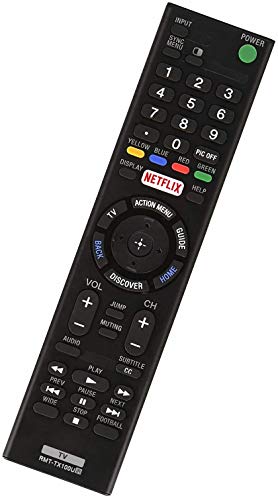
Looking for a quick, no-fuss remote replacement for your Sony TV? The Smartby RMT-TX100U universal remote might be just what you need. This is a basic IR remote designed to work with a broad range of Sony LCD, LED, HDTV, and Smart Bravia televisions. The biggest selling point here is simplicity: you just pop in two AAA batteries (not included), and it's ready to go. No pairing, no code entry, no app downloads. For homeowners or apartment renters who just lost their original remote or need a spare for the bedroom, that's a huge time saver.
For streamers and cord-cutters, the dedicated Netflix button is a nice touch. It sits right on the remote, giving you one-click access to the streaming platform. Many families with kids appreciate having a backup remote that doesn't require a tech degree to set up, especially when the original remote gets lost in the couch cushions. However, it's important to keep expectations realistic: this is a budget-friendly replacement remote, not a feature-packed universal controller. It lacks voice control, backlighting, and advanced smart TV functions like quick settings or app-specific hotkeys.
Build quality is what you'd expect at this price point. The plastic casing feels light and a bit thin, but it's functional. The button layout is straightforward, with clearly labeled power, volume, channel, and directional controls. The remote runs on two AAA batteries, which are easy to replace. For a bedroom TV, a secondary family room set, or a dorm room setup, this remote gets the job done without breaking the bank. Many users in reviews mention that it works well as a simple replacement for basic TV functions like power, volume, and input switching.
One realistic limitation is that this remote is designed specifically for Sony TVs and may not support every unique feature of your particular model, such as certain smart home integrations or advanced picture settings. If you rely heavily on voice commands through Google Assistant or Alexa, or need a remote that can control other devices like a soundbar, you'll need to look elsewhere. But for a straightforward, no-nonsense TV clicker for watching Netflix, checking the news, or flipping through cable channels, it does the trick.
Setup is incredibly simple, as mentioned. Users just need to ensure they have fresh batteries and point the remote at the TV. No manual is required for basic operation, though the included instructions cover button functions and compatibility. For gift buyers shopping for a senior relative or someone who gets frustrated with complex remotes, this could be a thoughtful and easy-to-use option.
Overall, the Smartby RMT-TX100U is a practical, low-cost solution for anyone who needs a basic Sony TV remote without the hassle of programming. It's perfect for cord-cutters, families, and budget-conscious shoppers who want a functional spare or replacement for their Sony display. Just don't expect premium features or broad universal compatibility. As an affordable backup or primary remote for everyday television watching, it delivers solid value.

Pros
- Full voice command support preserves Google Assistant functionality on Sony smart platforms
- Instant access buttons for Netflix and Google Play streamline evening streaming sessions
- Simple pairing process requires only holding the Volume Down and Microphone buttons
- Substantial wireless range works smoothly across expansive home theaters and open living spaces
Cons
- Requires Bluetooth pairing with the TV before voice search features will function properly
- Only features two dedicated streaming hotkeys rather than modern four-button quick-launch pads
- Batteries are not included in the packaging, requiring separate AAA cells
The Gvirtue RMF-TX310U replacement remote control is designed specifically for owners of Sony Bravia 4K smart TVs who need an exact substitute for a lost, worn-out, or pet-damaged original clicker. Tailored to work with a broad spectrum of Sony XBR, KD, and XR series LED and OLED displays running Android TV or Google TV, this accessory preserves the modern navigation experience that premium Sony screens demand. It serves as an accessible replacement for busy households, cord-cutters, movie buffs, and apartment dwellers who rely on seamless voice commands and instant app launching for their daily entertainment.
A key highlight of this replacement unit is its built-in microphone, which fully supports Sony smart TV voice search. By simply pressing the dedicated mic button, viewers can prompt Google Assistant to search for 4K movies, launch streaming services like Disney+ or Prime Video, check the weather, or adjust volume levels without tedious on-screen typing. The remote also features two physical shortcut keys for Netflix and Google Play, giving family members instant, one-touch entry into their primary entertainment hubs during busy evenings or weekend watch parties.
In terms of build quality and tactile feedback, the remote mirrors the layout and dimensions of the factory-original Sony clicker, measuring just under eight inches in length and weighing a lightweight 0.26 pounds. The button arrangement offers reassuring tactile clicks, while the internal transmitter boasts a brisk 0.2-second response time. With an operational range reaching beyond 33 feet, it easily maintains an unbroken connection across expansive living rooms, finished basements, and open-concept home theater spaces.
Setting up the remote is remarkably quick and does not involve searching for complicated universal programming codes. Users only need to power on the TV manually, point the remote, and hold down the Volume Down and Microphone buttons simultaneously for two seconds. The television handles the Bluetooth pairing sequence automatically in the background, promptly linking the voice recognition module so you can get right back to watching live sports or streaming your favorite shows.
There are a few practical factors to keep in mind prior to purchase. Unlike some newer factory remotes that offer four or more direct streaming hotkeys, this model sticks to the classic dual-button configuration for Netflix and Google Play. It also lacks backlighting, which may make finding specific volume or input keys slightly tricky during pitch-black home theater viewing, and standard AAA batteries must be provided separately.
For Sony TV owners looking to restore factory-level voice functionality without the steep markup of an original manufacturer replacement, this Gvirtue remote stands out as a dependable and sensible choice. It blends reliable operational range, swift pairing, and responsive smart navigation, making it a well-rounded investment for anyone seeking hassle-free control over their home entertainment setup.
Pairing the Gvirtue RMF-TX310U remote with your Sony Bravia television requires only a few basic steps. First, ensure two fresh AAA batteries are properly seated in the rear compartment, then turn on your Sony TV using the manual power button on the television panel.
Next, aim the remote toward your television screen and press and hold both the Volume Down (VOL-) button and the Microphone button together for approximately two seconds. This action activates the pairing mode, allowing the TV to automatically detect and register the Bluetooth voice module without manual code entry.
Once the pairing cycle completes behind the scenes, test the microphone by pressing the voice button and speaking a command to verify full functionality. If the TV does not register the voice prompt immediately, restarting the TV from the settings menu and re-attempting the two-button sequence will usually establish the connection smoothly.
Navigating modern smart TV platforms like Google TV and Android TV on Sony Bravia displays depends heavily on responsive voice recognition. This replacement clicker retains full microphone integration, letting users bypass tedious on-screen keyboard searches when hunting for 4K HDR movies, YouTube videos, or live sports broadcasts.
The inclusion of direct streaming shortcut keys for Netflix and Google Play ensures fast switching between broadcast television and streaming catalogs. Whether you are managing smart home accessories through Google Assistant or queuing up cartoons for family movie night, the remote maintains the fluid interactivity Sony television owners expect.

Pros
- Restores Bluetooth voice control for compatible Sony Bravia XR and Google TV models
- Includes dedicated shortcut buttons for Netflix, YouTube, Disney+, and Prime Video
- Retains the full numeric keypad for easy broadcast TV channel selection
- Broad compatibility across multiple Sony remote model numbers from 2019 through 2026
- Lightweight design with a standard layout that feels familiar to household members
Cons
- Buttons are not backlit, which can make navigating in dark home theater rooms tricky
- Requires two AAA batteries that are not included in the packaging
- Voice search functionality requires manual Bluetooth pairing and does not work on pre-2018 Sony TVs
The Nettech Voice Replacement Remote is designed as a direct substitute for lost, unresponsive, or worn-out factory remotes across Sony Bravia smart televisions. Built for homeowners, apartment renters, and busy families who rely on their living room entertainment hub, this accessory bridges the gap between traditional broadcast TV control and modern streaming platforms. Whether you are running a high-end Sony Bravia XR OLED display in a basement home theater or an LED panel in the master bedroom, keeping responsive control over your display is essential for movie nights and daily streaming.
Navigating a Sony Google TV or Android TV interface requires quick menu response, and this unit integrates smoothly with modern smart TV features. With built-in Bluetooth voice functionality, viewers can utilize Google Assistant to search for titles, switch inputs, pause playback, or pull up YouTube clips without typing on an on-screen keyboard. Four dedicated shortcut keys provide instant access to Netflix, Prime Video, Disney+, and YouTube, making it convenient for kids cartoon sessions or spontaneous binge-watching marathons.
In terms of layout and everyday ergonomics, the remote maintains a practical form factor that balances modern app shortcuts with a traditional numeric keypad. Many recent factory remotes omit number keys entirely, which can frustrate sports fans and cord-cutters who regularly tune into over-the-air antenna channels or live cable broadcasts. The grey housing fits comfortably in hand, offering tactile silicone buttons that give solid feedback during late-night channel surfing or input toggling.
Getting the remote up and running is straightforward, though voice capabilities require an initial Bluetooth sync rather than simple infrared line-of-sight operation. Users pair the remote by opening the TV settings menu, navigating to Remotes and Accessories, and holding the Volume Down and Microphone buttons simultaneously for three to five seconds. Once paired, the Bluetooth connection delivers reliable responsiveness without needing direct line-of-sight to the TV sensor, which is particularly helpful if your TV is wall-mounted or sits behind a soundbar.
There are a few practical considerations to keep in mind before ordering. The keys are not backlit, meaning navigating in completely dark home theater environments requires muscle memory, and you will need to supply two standard AAA batteries. Additionally, while basic infrared controls work out of the box on most Bravia sets, the voice feature relies on Google TV architecture and will not operate on pre-2018 Sony models. For anyone needing an affordable, fully featured replacement that restores voice control and direct streaming shortcuts to their Sony TV, this unit serves as a dependable everyday solution.
Setting up basic infrared functions on this replacement remote requires no programming, allowing you to power on your Sony TV, adjust volume, and navigate menus immediately after inserting two AAA batteries. However, unlocking full voice control functionality requires syncing the remote to your Sony Bravia Google TV or Android TV via Bluetooth.
To complete the Bluetooth pairing process, access your TV settings and navigate to Remotes and Accessories, then select Remote Control and Connect a New Remote. Hold down the Volume Down button and the Mic button simultaneously for three to five seconds until the TV screen confirms the connection. If the sync does not initiate, verifying that your Sony TV is signed in to an active Google account and that fresh batteries are installed will typically resolve the issue.
This replacement controller covers a broad spectrum of Sony televisions manufactured between 2019 and 2026, including Bravia XR, XBR, KD, and K series displays. It is engineered to replace popular OEM models such as RMF-TX520U, RMF-TX500U, RMF-TX800U, RMF-TX900U, and RMF-TX600U series remotes.
While infrared commands like channel switching, input selection, and volume control work across almost all Sony sets, the integrated microphone and voice command features are specifically tailored for Sony models running Android TV or Google TV software. Television models released prior to 2018 or displays that lack native Bluetooth voice support will not support the voice search features.
For more on a connected point, our page on best indoor tv for outdoor use goes into it separately.
Questions to Check Before Choosing a Sony Remote
How do I choose a replacement if my Sony TV buttons are not working?
Start by matching your TV model to the remote’s compatibility list. Check whether you need voice search, streaming shortcuts or a basic remote, then confirm battery and pairing requirements before ordering.
Does the Smartby RMT-TX100U need pairing?
No, its listing says no programming or setup is needed. It requires two AAA alkaline batteries, which aren’t included, and includes a Netflix shortcut; confirm your Sony set fits its stated LCD, LED and smart TV compatibility.
Will every voice remote work with my Sony TV?
No, compatibility depends on the television and remote model. The Nettech listing warns voice search may not work on unsupported sets or models released before 2018, so check the manufacturer’s compatibility details and pairing guidance.
What should I check if voice pairing fails?
Check the remote’s instructions, battery installation and TV compatibility first. Nettech lists a Google TV account sign-in as a troubleshooting step, while UNOCAR and Gvirtue specify holding volume-down and microphone buttons to initiate pairing.
Are shortcut buttons and backlighting standard on these replacements?
No, features differ by model. UNOCAR lists backlighting and six shortcuts, while Nettech specifies four hotkeys and no backlight; compare the desired controls with your Sony TV’s supported functions before choosing.
A closely related question is covered in sony tv not updating apps, which may help alongside this section.


Write Your Review
No reviews yet. Be the first to share your experience!