

Connect karaoke vocals without losing your TV audio
A bright, sharp picture is only part of a satisfying home entertainment setup. If TV dialogue sounds thin or you want to sing along with music from a streaming app, a mixer that routes TV audio and microphone vocals to the same sound system can help. This guide to a karaoke microphone for tv focuses on the connections and controls that matter, rather than TV picture specifications the product listing does not provide.
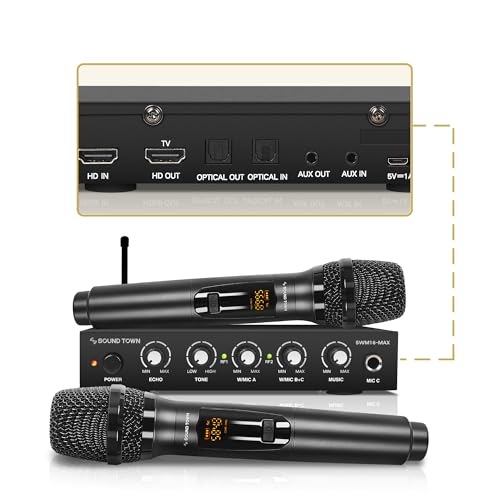
The Sound Town Wireless Microphone Karaoke Mixer has HDMI ARC, optical, and 3.5 mm AUX connections, plus two wireless handheld microphones. Its product details say the mixer can take audio from a compatible TV, blend it with microphone input, and send the combined signal to a soundbar or amplifier. Check your TV’s available ports and settings before buying; HDMI ARC needs to be enabled, and the manufacturer’s setup instructions call for PCM audio and external speakers. An HDMI cable is not included.
TV setup still involves practical trade-offs: OLED, Mini-LED, and QLED differ in contrast and bright-room performance, while native 60Hz and 120Hz panels suit different sports and gaming needs. Those are display choices, not features specified for this microphone mixer. If you are also comparing screens, our 4K UHD TV guide explains resolution basics, and this overview of budget gaming TVs covers another part of a home entertainment setup. Check the actual TV’s HDR formats, refresh rate, and HDMI eARC support rather than assuming this accessory changes them.
The listed UHF system operates across 550–590 MHz and offers 16 selectable frequencies, with separate microphone volume controls and shared echo and tone adjustments. The receiver can support up to two additional compatible microphones, sold separately. One practical caveat: microphone level may need adjustment at the TV, soundbar, and receiver. The included connection guidance suggests starting the mixer’s microphone control low to mid, then raising it gradually. That makes this option worth considering if your goal is a flexible TV karaoke connection, not a display upgrade.
Pros
- Direct HDMI ARC and Optical connectivity simplifies integration with modern 4K smart TVs and soundbars.
- Durable all-metal handheld microphones provide a solid feel and clear vocal transmission.
- UHF frequency band with selectable channels minimizes interference from Wi-Fi routers and household electronics.
- Independent volume dials for each microphone allow personalized vocal balance during duets.
Cons
- Requires setting the TV digital audio output format to PCM mode because it does not decode multi-channel Dolby Digital signals.
- An HDMI cable is not included in the box, requiring users to supply their own spare cable for TV ARC setup.
- May require fine-tuning volume levels across the TV, soundbar, and mixer to prevent background hiss or low vocal gain.
The Sound Town SWM16-MAX is an innovative wireless microphone and audio mixer system engineered to integrate directly into modern smart TV living room setups. While conventional karaoke machines rely on self-contained, low-quality speakers or cumbersome PA equipment, this compact unit uses HDMI ARC, Optical, and 3.5mm AUX connections to merge live vocal audio with streaming music from your television. It routes the blended sound directly to your existing soundbar or home theater receiver, preserving the full acoustic presence of your primary entertainment system.
This mixer is an ideal match for homeowners, apartment renters, families with kids, and social streamers looking to host lively singing sessions without cluttering their floor space. It also appeals to movie lovers and sports fans hosting game-day gatherings or holiday celebrations where quick voice amplification, announcements, or sing-alongs enhance the party atmosphere. Because it leverages your existing 4K TV screen for lyrics and song queues, anyone comfortable navigating YouTube, Apple Music, or Spotify can start singing immediately.
Audio performance is anchored by a reliable Ultra-High Frequency (UHF) wireless transmission system covering 550 to 590 MHz. Operating on UHF allows the microphones to deliver clean vocal clarity while steering clear of standard 2.4 GHz Wi-Fi interference from nearby routers, streaming sticks, and gaming consoles. Front-mounted rotary dials provide independent volume control for both included microphones, while dedicated echo and tone controls allow quick equalization so voices sound smooth and balanced over background music tracks.
Build quality and physical practicality are strong points for the SWM16-MAX. The two included microphones feature weighted metal housings that withstand accidental drops better than entry-level plastic mics. The mixer itself sports a low-profile black chassis designed to sit neatly beneath a wall-mounted TV or inside an open entertainment console shelf. With support for up to 16 switchable frequencies, users can change channels on the fly if local interference occurs.
There are a few setup requirements to keep in mind for proper operation. Smart TVs must have their digital audio output set to PCM stereo, as the mixer cannot process multi-channel Dolby Digital or DTS bitstream formats. Users must also provide their own HDMI cable for ARC connectivity and take a moment to balance the volume levels across the TV, soundbar, and mixer knobs to achieve clean vocal projection without introducing unwanted background hiss.
The Sound Town SWM16-MAX represents a practical and enjoyable upgrade for any living room or home theater. By pairing clean UHF wireless microphones with versatile HDMI ARC and Optical connectivity, it allows home entertainment enthusiasts to transform their smart TV and soundbar setup into an engaging entertainment stage for family gatherings and weekend parties.
Integrating the Sound Town SWM16-MAX into a modern smart TV setup is straightforward when using HDMI ARC or Optical audio connections. To configure the system using HDMI ARC, connect an HDMI cable from your smart TV ARC or eARC port into the HDMI OUT (TV ARC) jack on the mixer, then run an audio connection from the mixer output to your soundbar or home theater receiver.
Within your television sound settings, enable HDMI CEC and ARC audio output, then manually change the digital audio output format from Auto or Dolby Digital to PCM stereo. This step ensures that audio from streaming apps like YouTube or Spotify passes cleanly to the mixer without digital format incompatibility.
For optimal sound balance, start with the TV and soundbar set to a moderate volume level, then raise the microphone knobs on the mixer to approximately 20 to 30 percent. This gain-staging technique provides ample headroom for vocal dynamics while minimizing unwanted feedback or background amplifier hum.
The SWM16-MAX offers a flexible array of inputs and outputs designed to accommodate both modern digital home theaters and legacy analog equipment. It includes an HDMI IN port for media players or streaming boxes, an HDMI OUT port supporting TV Audio Return Channel (ARC), Optical Toslink input and output jacks, and 3.5mm AUX stereo connections.
In addition to physical connections, the system supports Bluetooth streaming, allowing party guests to play music tracks directly from a smartphone or tablet when the main TV is occupied with sports or gaming. This multi-input flexibility ensures compatibility with virtually any soundbar, AV receiver, desktop PC, or portable speaker system.
FAQs
Can this karaoke mixer take audio from a smart TV?
Yes, the Sound Town mixer supports TV audio through HDMI ARC or optical input. Enable ARC on the TV, select PCM audio, and choose external speakers in its audio settings as directed by the product instructions. Confirm that your TV has a compatible output before purchase.
Will it work with a soundbar?
Yes, the product supports sending mixed TV and microphone audio to a soundbar or amplifier. Its connection options include HDMI ARC, optical, and AUX, but compatibility depends on the ports available on your equipment. The HDMI cable is not included.
Does the mixer include two microphones?
Yes, the listing specifies two metal handheld wireless microphones. Separate receiver knobs adjust Mic A and Mic B independently, while echo and tone controls apply to both. Up to two additional compatible microphones may be added, but they are not included.
What should I do if microphone volume is low?
Raise the volume on the TV, soundbar, and receiver first, then adjust the mixer’s microphone level gradually. The product instructions suggest starting at a low-to-mid setting before increasing it to the desired level. This helps avoid jumping straight to an unnecessarily high mixer setting.
Does the product support 4K 120Hz gaming or improve TV picture quality?
No such display or gaming feature is specified for this karaoke mixer. It handles audio connections and microphone mixing, not OLED or Mini-LED picture performance, HDR decoding, refresh rates, or gaming latency. For a TV purchase, compare those specifications on the television itself; our 4K TV buying overview can help explain resolution considerations.
Does it connect to a TV using Bluetooth?
The product details list Bluetooth among supported device types, but describe TV audio connections through HDMI ARC, optical, or AUX. They do not specify Bluetooth microphone-to-TV pairing or audio delay performance. Check the connection requirements for your exact TV and sound system before relying on Bluetooth.




Write Your Review
No reviews yet. Be the first to share your experience!