

Introduction
A 65-inch television can feel immersive in a living room or oversized in a bedroom, and the difference usually comes down to seating distance, room layout, and personal preference. If you’re asking is 65 inch tv too big, start by checking how far you sit from the screen and whether the display will dominate the space. Screen size alone doesn’t determine comfort. Resolution, content quality, viewing habits, and the position of windows and seats all affect how a large screen feels.
The options below include a 65-inch OLED and LED television, plus stands, mounts, and an outdoor cover that may help with different installation needs. The listed Sony televisions have distinct features: one lists OLED pixels, Google TV, Dolby Vision, and HDMI 2.1 gaming features, while the other is a 4K LED model with Google TV and PlayStation 5 features. For background on screen resolution, see our guide to understanding 4K UHD displays. Compare the specifications with your room and intended use, and follow the manufacturer’s safety guidance for placement or mounting.
Product Shortcode

Pros
- Wide compatibility with VESA patterns 100x100 to 400x400mm, fitting most 26-65 inch TVs.
- Tool-free tilt and smooth swivel make on-the-fly adjustments easy for different viewing positions.
- Sturdy steel build that can handle up to 82 lbs, giving peace of mind for larger TVs.
- Space-saving design that extends and retracts, ideal for corners or tight setups.
Cons
- Single stud design may not be suitable for all wall types; ensure your wall stud is properly located.
- Cable management could be more integrated; cables may hang loose if not routed carefully.
- Some users might find the mounting bracket's plastic parts less durable over time.
The Perlegear PGMF3 Full Motion TV Mount is designed to accommodate most 26 to 65 inch flat or curved televisions with VESA patterns up to 400x400mm, supporting a maximum weight of 82 lbs. This wall mount is engineered to deliver flexibility and convenience, making it a smart choice for a variety of U.S. households, including homeowners, apartment renters, home theater enthusiasts, gamers, sports fans, families, and budget-conscious shoppers.
One of the standout features of this mount is its ability to minimize glare through its +5/-15 degree tool-free tilt and +/-90 degree swivel. This allows you to quickly adjust the screen for a clear view whether you are watching a movie in a brightly lit living room or playing games from an angled seating position. The articulating arms extend up to 17.3 inches from the wall, bringing the TV closer to you, and then retract back to just 3 inches for a low-profile appearance that saves space. This makes it particularly useful for corner installations or above media consoles, helping to keep the room organized and open.
Build quality appears robust, with the mount constructed from heavy-duty steel and featuring thicker articulating arms than many comparable mounts. The larger TV plate and solid wall plate are designed to provide extra stability, and the mount has passed a 4x load test to support up to 82 lbs with confidence. The single stud design fits standard wood studs, concrete, or brick walls, though users should confirm their wall type and stud location before installation.
Setup is straightforward with the included detailed instructions and all necessary hardware. The three-step process involves attaching the TV brackets, mounting the wall plate, and hanging the TV. While cable management is not fully integrated, you can use basic cable ties to keep wires tidy. The mount also offers +/-3 degrees of post-installation leveling, which helps fine-tune the screen alignment without having to remove the TV.
In terms of real-world use, this mount is well-suited for comfortable TV watching in most room settings. The full motion capability helps reduce eye strain and enhances the overall viewing experience for families or roommates sharing a space. However, it may not be ideal for very heavy or oversized TVs beyond the 65-inch/82 lb limit, and the single stud design may require careful wall selection. Priced competitively, the Perlegear PGMF3 delivers solid performance and ease of use, making it a practical recommendation for anyone looking to improve their TV setup without breaking the bank.


Pros
- Sturdy tempered glass base with a small footprint fits well on most entertainment centers or desks.
- Height and swivel adjustments offer excellent flexibility for different viewing preferences.
- Cable management helps maintain a tidy appearance.
Cons
- Some users may find the swivel tension a bit stiff initially, though it loosens over time.
- The stand may not be suitable for TVs at the larger end of the 65-inch range if the TV is very heavy, as weight distribution can vary.
- Limited to tabletop use, so it won't work for wall-mounting scenarios.
The PERLESMITH Universal Swivel TV Stand (PSTVS17) is a practical and affordable solution for anyone looking to place a TV on a table or desk without the hassle of wall mounting. Designed to fit most 32- to 65-inch flat-screen TVs from brands like Sony, Samsung, LG, TCL, and Vizio, this stand supports up to 88 lbs and accommodates VESA patterns from 100x100mm to 400x400mm. It's a great option for apartment renters, homeowners, or anyone setting up a TV in a bedroom, game room, home office, or dorm.
One of the standout features is its 70-degree swivel range, allowing you to tilt the TV 35 degrees left or right. This is particularly useful in rooms with multiple seating areas, such as a living room where you might want to watch from the sofa or the dining table. The stand also offers three height adjustment positions between 12.05 and 15.98 inches, so you can set the TV at a comfortable eye level to reduce neck strain during long movie nights or gaming sessions.
Build quality is solid, with a heavy-duty tempered glass base that provides a stable foundation. The base is compact enough to fit on most entertainment centers or desks without taking up too much space. The steel TV brackets feel durable, and the included cable management clips help keep wires neat and out of sight. Assembly is straightforward, with clear instructions and all necessary hardware included, so you can have it set up in under 30 minutes without any special tools.
In terms of real-world use, this stand works well for a variety of scenarios. For families, it's a safe way to keep a TV secure without drilling into walls. For gamers, the swivel feature makes it easy to angle the screen toward a gaming chair or bed. For cord-cutters using streaming devices, the cable management helps keep the setup tidy. However, it's worth noting that the stand is designed for tabletop use only, so it won't work if you prefer a wall-mounted look.
Some users have mentioned that the swivel tension can be a bit stiff at first, but it typically loosens up with use. Also, while the stand is rated for TVs up to 88 lbs, heavier TVs at the larger end of the 65-inch range may feel less stable if the TV's weight is unevenly distributed. Overall, the PERLESMITH PSTVS17 is a reliable, versatile, and cost-effective TV stand that suits a wide range of users, from budget-conscious shoppers to those seeking a flexible viewing solution without permanent installation.
Pros
- Durable waterproof interior PVC coating effectively blocks moisture and rainwater
- Accommodates most major wall mounts, ceiling brackets, and freestanding table setups
- Protects expensive 4K panels from abrasive dust, tree sap, and damaging UV light
- Fast and intuitive hook-and-loop fastening system makes removal quick before game time
Cons
- Must be completely unfastened and removed each time you want to watch television
- Does not provide active heating or cooling for displays placed in extreme unshaded climates
- Accurate TV bezel and depth measurements are required to ensure a snug fit
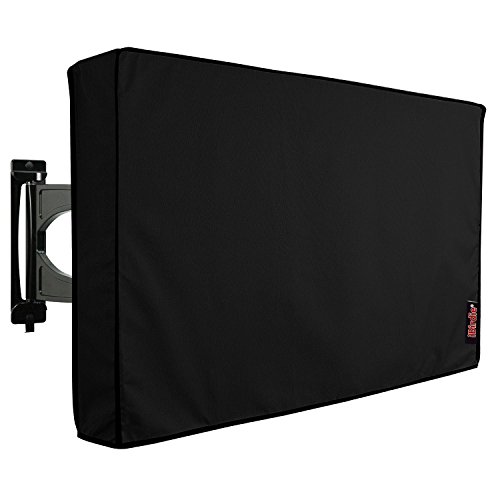
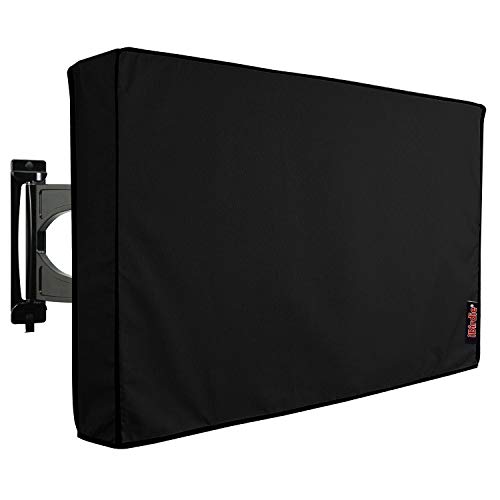
The iBirdie Outdoor TV Cover is a heavy-duty protective enclosure engineered to protect 60-inch to 65-inch flat screen displays from outdoor hazards. Installing an indoor 4K LED, QLED, or OLED television on a covered patio, gazebo, or backyard deck creates an incredible viewing hub, but unprotected electronics quickly suffer from humidity, blowing dust, and moisture intrusion. This durable cover serves as a reliable first line of defense, letting you bring the living room home theater experience out into the open air without spending exorbitant sums on specialized all-weather commercial monitors.
This protective accessory is best suited for homeowners, sports fans hosting backyard Super Bowl parties, and families who enjoy warm-weather outdoor movie nights by the pool. Having a large 65-inch screen mounted outdoors lets you stream live sports, binge watch evening shows, or entertain guests during barbecue cookouts. According to product specifications, this cover fits displays measuring up to 58 inches wide, 37 inches high, and 5.5 inches deep, making it compatible with popular television models across major brands.
Preserving optimal picture quality begins with protecting the panel surface and internal components. The exterior heavy-duty fabric repels ambient grime, while the interior waterproof PVC coating prevents rain runoff and heavy morning dew from reaching sensitive internal circuit boards, power supplies, and HDMI 2.1 inputs. Keeping corrosive moisture, tree sap, and pollen away from the display ensures that vibrant HDR colors, deep contrast ratios, and sharp 4K details remain clear every time you unveil the screen for family entertainment.
Build quality and practicality remain top priorities for outdoor living spaces. The cover features a clever split back-flap system that accommodates various mounting solutions, including articulating full-motion arms, low-profile tilting wall brackets, and traditional desktop stands. Durable hook-and-loop closures run along the edges and bottom perimeter, locking the cover tightly in place so sudden gusts of wind will not dislodge it. When it is time for kickoff or family movie streaming, peeling back the fasteners takes only moments.
While this heavy-duty enclosure provides thorough defense against rain, dirt, and ambient moisture, it does not regulate ambient temperature. Standard consumer televisions installed outdoors in regions with extreme summer heat or sub-zero winters should still be placed under a covered roof or sheltered patio area to maximize overall longevity. For any homeowner seeking an affordable, dependable way to shield their outdoor 60 to 65-inch smart TV between watch parties, the iBirdie cover represents a sensible, high-value investment.
Setting up the iBirdie Outdoor TV Cover requires minimal effort and can be completed in just a few minutes. Before purchasing, verify your television dimensions, including the frame width, height, and depth, especially if you have an older display with wider bezels or a soundbar attached to the base. The cover easily slips over the top of the display and slides downward smoothly over both front and rear corners.
The multi-panel rear flap design allows cable management routes and wall-mount brackets to pass through without compromising weather defense. Simply wrap the individual flaps around your single-arm or dual-arm mount structure and seal the hook-and-loop seams firmly. Sealing the bottom enclosure seals out crawling insects, ground moisture, and windborne dust, ensuring your outdoor entertainment setup stays clean and ready for your next viewing session.

Pros
- Smooth multi-room mobility allows flexible display positioning for workouts, gaming marathons, and family viewing
- Vertical tilt mechanism helps preserve picture contrast and color fidelity by reducing window and overhead light reflections
- Solid steel framework provides dependable stability for flat screens up to 88 pounds
- Tool-included assembly avoids wall damage, making it ideal for apartments, dorms, and rental homes
Cons
- Initial assembly requires patience and careful alignment of mounting brackets
- The lower AV shelf has modest surface area and is not suited for bulky audio receivers
- Cables require external ties or management sleeves to maintain a clutter-free look
The PERLESMITH PSTVMC06 mobile rolling TV cart is a versatile mounting solution designed to hold flat-panel displays from 23 to 60 inches. Unlike static wall brackets or bulky entertainment centers, this rolling trolley gives viewers the freedom to reposition their screen on demand. It is especially well-suited for apartment renters who cannot drill into walls, homeowners who want a movable screen for patio gatherings, bedroom viewers seeking an elevated display, and gamers who switch between desktop and couch play.
Optimizing picture quality often comes down to viewing angle and lighting control. Ambient sunlight from nearby windows or harsh overhead fixtures can wash out vibrant colors and degrade the deep black levels of your LED, QLED, or OLED TV. This stand addresses that challenge with a vertical tilt range of 5 degrees upward and 10 degrees downward. Adjusting the tilt angle helps maintain optimal contrast and color saturation whether you are lounging low on the sofa, stretching out during a morning workout stream, or watching late-night movies in bed.
Structural integrity is paramount when trusting a mobile stand with an expensive 4K television. Engineered with heavy-duty cold-rolled steel tubes, the frame accommodates television sets weighing up to 88 pounds. It supports universal VESA hole patterns ranging from 100x100mm up to 400x400mm, ensuring compatibility across leading brands such as Samsung, LG, Sony, TCL, and Hisense. Built-in safety screws lock the TV brackets firmly to the horizontal mounting bar, preventing accidental dislodging when the cart is in motion.
Mobility is handled by four polyurethane caster wheels that roll quietly across hardwood, tile, and low-pile carpet without leaving scuffs. Once the cart reaches the preferred viewing spot for a Super Bowl watch party or gaming session, the two front wheel locks can be engaged to keep the entire setup firmly planted. Below the screen mount sits an integrated media shelf, providing convenient placement for a streaming player, gaming console, laptop, or compact soundbar.
Setting up the stand is straightforward and avoids the dust, noise, and structural commitments of traditional wall mounting. All necessary hardware and assembly tools are included in the package. Potential buyers should keep in mind that while the AV shelf handles standard streaming devices and game systems, it cannot support massive multi-channel home theater amplifiers. Exterior cable ties are also recommended to keep HDMI and power cables bundled neatly against the upright steel tubing.
For cord-cutters, college students, renters, and busy families looking to maximize a single TV across multiple spaces, the PERLESMITH mobile stand delivers exceptional utility. It transforms any standard 23 to 60-inch screen into a portable entertainment hub that adapts easily to everyday living, casual gaming tournaments, and backyard movie nights.
Mounting your television to this rolling cart is simple thanks to the broad range of supported VESA mounting patterns. It accommodates bolt configurations of 100x100mm, 200x200mm, 300x300mm, 400x200mm, and up to 400x400mm. Before purchasing, verify your display's rear mounting hole dimensions and confirm the weight stays below the 88-pound threshold.
The package contains labeled hardware packs with various bolt sizes and spacers to match flat or curved TV panels. Assembly can typically be finished in under an hour using the included tools, making it an accessible project for beginners who want to avoid hiring an installer or dealing with drywall anchors.
A space-conscious footprint allows this mobile cart to slide neatly into bedroom corners, beside office desks, or along living room walls. The streamlined dual-pole design keeps the center of gravity balanced, even when supporting mid-sized 55-inch and 60-inch smart TVs.
The quiet PU-coated wheels roll smoothly across room thresholds without jarring sensitive electronics. Engaging the step-lock wheel brakes prevents unexpected shifting when kids or pets are around, ensuring a secure, wobble-free foundation for movie nights and daily streaming.
Pros
- Sturdy build with heavy-duty steel and thick arms prevents sagging or slipping
- Extensive range of motion (tilt, swivel, extend, level) for versatile viewing angles
- Fits a wide range of TV sizes and VESA patterns, including most 40-55 inch models
- Affordable price point offers great value compared to similar full-motion mounts
Cons
- No included paper template for marking drill holes, which may complicate installation for some users
- Maximum weight capacity of 110 lbs may not support very large or heavy TVs above 70 inches
- Only designed for wood studs, concrete, or brick; drywall-only installation not recommended
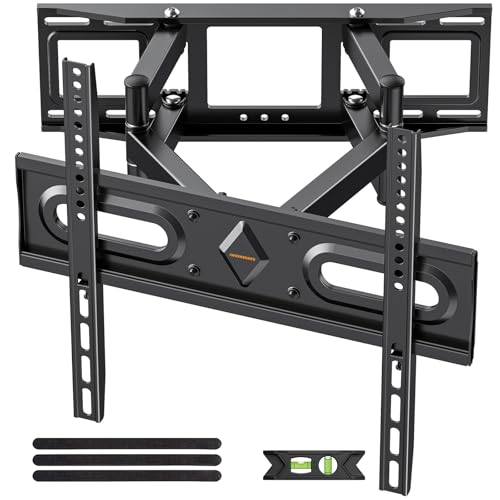
The IWORKBOARD full motion TV wall mount is a versatile and affordable solution for homeowners and renters looking to mount their 32 to 70 inch television securely to the wall. This mount is particularly well-suited for home theater enthusiasts, families, and gamers who want the flexibility to adjust their TV's position for different viewing scenarios, such as movie nights, sports gatherings, or gaming marathons.
Built from heavy-duty steel with dual articulating arms that are 30% thicker than some competing models, this mount provides a solid and wobble-free support system for TVs up to 110 lbs. The full motion capabilities include a tilt range of +5 to -15 degrees to reduce glare from windows or lights, a swivel of +/-45 degrees to direct the screen toward different seating areas, and an extension of up to 15.07 inches from the wall, making it easy to access cables or adjust the viewing angle. When retracted, the TV sits just 3.43 inches from the wall, giving a sleek, modern look that saves space in small apartments or living rooms.
Installation is straightforward with the included hardware and instructions, though some users may miss a paper template for drilling holes. The mount is designed for wood studs spaced at 8, 12, or 16 inches, as well as concrete and brick walls. It is important to note that drywall alone will not support the weight, so proper stud mounting is essential. A built-in level adjustment of +/-4 degrees allows for fine-tuning after the TV is mounted, which is a nice touch for achieving a perfectly horizontal screen.
This mount is compatible with most flat and curved TVs with VESA patterns ranging from 75x75mm to 400x400mm, covering a vast majority of 32 to 70 inch models from brands like Samsung, LG, Sony, TCL, Hisense, and Vizio. The dual articulating arms are strong and smooth, and they lock into place to hold the TV at the desired angle without drifting. The overall build quality feels reassuringly robust for its price point.
On the downside, the lack of a paper template may make the initial drilling step a bit more challenging for DIY beginners, and the 110 lbs weight capacity, while adequate for most TVs, might not handle larger or heavier models. Additionally, if your wall studs are not standard 16-inch spacing, you may need to use concrete anchors or consult the manufacturer for guidance. However, for the vast majority of living rooms, bedrooms, or home theater setups, this mount offers excellent value and performance.
Overall, the IWORKBOARD full motion TV wall mount is a reliable and flexible choice for anyone wanting to enhance their viewing experience by mounting their TV on the wall. It is especially recommended for budget-conscious shoppers, apartment renters who want to save floor space, and home theater enthusiasts who need adjustable positioning for different types of content. With a 10-year support promise from the manufacturer, it is a purchase you can feel confident about.
Pros
- Powerful 4K Processor X1 for accurate colors and contrast
- Exclusive PS5 integration for optimized gaming performance
- Motionflow XR delivers smooth motion for sports and action
- Google TV platform with wide app support and voice control
- Good value for a 65-inch 4K LED TV with smart features
Cons
- LED panel may not achieve the deep blacks of OLED TVs
- Built-in sound quality may lack bass and need a soundbar for immersive audio
- No Dolby Vision or HDR10+ support mentioned, limiting HDR performance
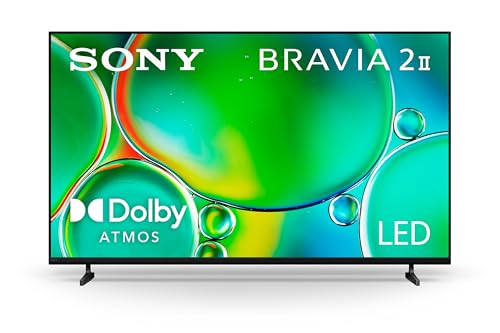
The Sony BRAVIA 2 II 65-inch 4K LED Smart TV (2025 model) is a solid choice for homeowners, apartment renters, and families looking for a reliable everyday television. It combines Sony's 4K Processor X1 with a standard LED panel to deliver vibrant colors and decent contrast, though it doesn't match the black levels of OLED or the brightness of high-end QLED models. This TV is best suited for general TV watching, streaming, and casual gaming, especially if you own a PlayStation 5.
Picture quality is the highlight here. The 4K Processor X1 does a great job upscaling HD content to near-4K, so your old movies and TV shows look sharper. Color accuracy is solid out of the box, and Motionflow XR helps keep fast-moving sports and action movies clear without too much blur. However, the LED backlight means you won't get perfect blacks in dark scenes, and there's no local dimming to boost contrast. Brightness is adequate for most living rooms, but if you have a very bright room, you might notice some glare.
For gamers, this TV offers exclusive PlayStation 5 features like Auto HDR Tone Mapping and Auto Genre Picture Mode, which automatically adjust settings for the best gaming experience. The Game Menu puts all gaming picture settings in one place, making it easy to tweak. While the TV likely supports 60Hz refresh rate (not 120Hz), it still handles console gaming well with low input lag. If you're a competitive gamer needing high refresh rates, you may want to look elsewhere.
The Google TV smart platform is smooth and responsive, giving you access to Netflix, Disney+, Prime Video, Hulu, and more. Voice control via Google Assistant works well, and you can also use Apple AirPlay 2 or Google Cast to stream from your phone. The included remote is simple and functional, though it lacks a dedicated number pad. Setup is straightforward, and the TV's slim bezels give it a modern look that fits nicely on a stand or wall mount (VESA compatible).
Sound quality from the built-in speakers is average. Dialogue is clear for news and talk shows, but bass is weak for action movies and music. Many users may want to add a soundbar or home theater system for a more immersive experience. Connectivity includes multiple HDMI ports (likely HDMI 2.0), USB, and Wi-Fi, but note that eARC support is not confirmed.
Overall, the Sony BRAVIA 2 II 65-inch is a practical choice for families, streamers, and PS5 owners who want a dependable 4K TV without breaking the bank. It's not the best for bright rooms or home theater purists, but for everyday use in a living room or bedroom, it delivers solid performance and excellent upscaling at a reasonable price.
Is a 65-Inch TV Too Big for Your Room?
A 65-inch television is not automatically too large; it is a reasonable size when your seating position, room arrangement, and viewing preference suit a broad screen. The clearest first check is to measure the distance from the place you watch to the screen location, then consider how much of your field of view you want the image to occupy. Some viewers enjoy a cinematic, enveloping picture, while others prefer to take in the entire screen without moving their eyes much. A tape measure and a temporary screen outline can help turn an uncertain purchase into a more concrete room decision.
The diagonal measurement describes the screen, not its total width or the space needed for the stand, cables, or nearby furniture. A television’s exact exterior dimensions vary by model, so check the manufacturer’s dimensions before deciding whether it fits a cabinet or wall area. Allow room for the model’s feet or stand, and verify that the furniture can support the television as specified. If you’re wall mounting, confirm the mount’s compatibility with the TV’s weight and VESA pattern, and have suitable assistance handling a large display.
Seating distance matters more than the room label
A small room can sometimes accommodate a 65-inch screen if seating is far enough back and the layout leaves clear sightlines. Conversely, a large room may make the same television seem modest when seats are placed well away from it. There is no single distance that feels right for every viewer because people differ in preferred immersion, visual comfort, and tolerance for seeing image imperfections. Treat distance formulas found online as starting points, not rules that override your own preference.
Think about the content you watch, too. A detailed 4K movie may look comfortable at a closer distance than lower-resolution or heavily compressed video, where picture flaws can become easier to notice as the screen fills more of your view. Sports broadcasts, streaming shows, games, and older television content can each look different at the same size and distance. If possible, sit at your usual spot and view a similarly sized display before buying, or mark out the screen area with removable tape to judge its visual scale.
Screen Size, Resolution, and Viewing Comfort
Screen size and resolution work together, but neither guarantees that a particular setup will feel comfortable. A 65-inch 4K set can show detailed high-resolution content, while lower-resolution sources depend more on the television’s processing and the quality of the original video. Upscaling can make lower-resolution material fit a 4K panel, but it cannot restore detail that was never present in the source. This is one reason a large screen can make weak broadcasts or low-bitrate streams more apparent.
Consider your everyday viewing, rather than judging size only from a short demo clip. A family that watches mixed-quality broadcast television may have different preferences from someone who mostly streams high-resolution films. Subtitles, on-screen text, and game interfaces can also affect perceived comfort when viewed up close. A 65-inch television is more likely to feel oversized if it forces you to turn your head repeatedly, strains your eyes, or overwhelms the room’s usual viewing position.
Room layout can make a large screen feel larger
Furniture placement, walking paths, and the location of doors and windows matter as much as the wall’s available width. A TV mounted too high can make a large screen uncomfortable to watch, while a screen positioned directly opposite bright windows may be distracting because of reflections. Check the sightline from every regular seat, not just the center of the sofa. If multiple people watch from off-center positions, a model’s viewing-angle performance becomes relevant, but the supplied specifications do not establish how either listed Sony television performs from every angle.
Lighting affects the viewing experience, but a larger screen does not solve glare. Daylight reflected across the panel can obscure dark scenes, and bright room lighting may change how vivid the picture appears. The Sony OLED listing specifies self-lit pixels and a wide viewing angle, but the supplied details do not state a measured brightness level or anti-reflective treatment. The Sony LED listing highlights color processing and motion features, but it does not provide measured brightness or reflection data either. For either model, check the complete manufacturer specification and plan the screen position around windows and lamps.
What the Listed 65-Inch TVs Offer
The product listings include two distinct 65-inch televisions rather than a set of interchangeable screens. The Sony BRAVIA 6 is listed as an OLED 4K HDR Google TV with Dolby Vision and Dolby Atmos support. Its description says that more than eight million self-lit pixels are precisely controlled and lists a wide viewing angle. These are manufacturer-listed features, not a guarantee that the screen will suit every room, content source, or seating arrangement.
The Sony BRAVIA 2 II is listed as a 65-inch 4K Ultra HD LED smart TV with Google TV. Its supplied features include a 4K Processor X1, Motionflow XR, upscaling, and exclusive features for PlayStation 5, including Auto HDR Tone Mapping and Auto Genre Picture Mode. The listing does not state a native refresh rate, brightness measurement, viewing-angle measurement, or HDMI bandwidth, so those details should be checked with the manufacturer if they are important to your decision. A shared 65-inch diagonal does not mean these two models have identical picture characteristics.
The OLED listing explicitly identifies HDMI 2.1 features including 4K at 120Hz, VRR, and ALLM. Those features may matter to console and PC players who want the listed high-refresh gaming options, but verify the source device, selected port, and supported settings before purchase. The BRAVIA 2 II listing describes PlayStation 5 features without providing the same detailed port specification in the supplied information. Buyers should avoid assuming that every 65-inch television offers the same gaming connections simply because it has a 4K screen.
For readers whose planned use includes gaming, our gaming TV guide discusses a related display use case. A large screen can make games feel more involving, but physical size does not establish input lag, refresh rate, or variable-refresh support. Verify those specifications for the exact model and intended console. Also consider where the controller will be used and whether a close seat makes the screen feel excessively dominant during long sessions.
Mounting or Supporting a 65-Inch Television
A screen that fits visually can still be awkward if its support takes up too much space or cannot be positioned for comfortable viewing. The supplied PERLESMITH tabletop stand is listed for televisions from 32 to 65 inches, with compatibility based on VESA patterns from 100 by 100 mm to 400 by 400 mm and a stated maximum weight of 88 pounds. It has three height positions and can swivel up to 35 degrees in either direction. Check the TV’s actual VESA pattern, weight, and stand arrangement against the stand specifications before ordering.
The listed PERLESMITH rolling stand supports TVs from 23 to 60 inches, so its stated size range does not include a 65-inch screen. That distinction is useful: a product appearing in a page about 65-inch TVs is not necessarily suitable for every 65-inch model. The two wall mounts in the product list have different stated limits. The Perlegear mount is listed for most 26-to-65-inch TVs weighing up to 82 pounds, while the IWORKBOARD mount is listed for 32-to-70-inch televisions with a maximum weight of 110 pounds.
For any mount, compare the display’s weight and VESA pattern with the exact mount requirements rather than relying on screen diagonal alone. Installation needs to follow the mount and television manufacturers’ instructions. Verify wall construction and the mount’s specified attachment requirements, and do not attach a mount to drywall alone when the product instructions require a suitable structural support. Get appropriate assistance when handling a large television, and avoid placing it where it could be knocked over or block normal movement through the room.
A tabletop setup can be a practical alternative when wall installation is unsuitable, but measure the furniture’s top and confirm that the base will sit securely. The PERLESMITH stand’s height adjustment may help accommodate a different screen position or a soundbar, though the supplied details do not establish fit for every soundbar or cabinet. Keep cables arranged so they do not pull on the TV or interfere with movement. Follow the equipment instructions for ventilation and power connections.
When a 65-Inch TV May Be Too Big
A 65-inch TV may be too big if your regular seat is very close, the screen blocks a walkway, or the panel leaves no comfortable place for speakers and other equipment. It may also be a poor match if you prefer a subtle screen presence or mostly watch lower-quality sources from nearby. These are practical fit issues, not evidence that a particular screen size is universally unsuitable. A smaller television can be the better choice when it preserves comfortable sightlines and leaves the room easier to use.
Bedrooms often call for a different balance than shared living rooms. A screen at the foot of a bed may be viewed from farther away than one on a desk, while a wall-mounted set can feel close if the bed sits near the wall. Measure from the viewer’s head position, not the edge of the bed or the far wall. Also consider whether the television will be watched while reclining, because angle and mounting height can affect comfort independently of diagonal size.
Secondary uses can change the calculation again. A television used occasionally in a spare room may not need to dominate the space, while a main living-room display may benefit from a larger image if seating is spread out. The supplied iBirdie cover is listed for outdoor TVs measuring 60 to 65 inches, but it is a cover, not a weatherproof television. If you are planning an outdoor viewing area, our outdoor TV options guide offers related context. Use a television specifically suited to its location and follow its manufacturer’s placement and weather guidance.
A Practical Room-Fit Decision
Before buying, identify the normal seating position, measure the viewing distance, and check the actual exterior dimensions of the model. Then consider resolution and the typical quality of your sources, since a close seat can reveal more flaws in low-quality video. Assess window reflections, viewing angles, and whether the screen will fit the room without disrupting furniture or walkways. If uncertainty remains, compare a smaller screen and a 65-inch screen from your usual seat rather than relying on diagonal measurements alone.
The installation choice is part of the size decision. Confirm that a cabinet can support the television and accommodate its feet, or verify the display and mount specifications before planning a wall installation. Treat listed size ranges as compatibility limits, not as a substitute for checking weight and VESA measurements. Follow product instructions and arrange appropriate help for lifting and positioning the display.
So, is a 65-inch TV too big? It is too big when your preferred seat is too close for comfortable viewing, the screen overwhelms the room, or the actual setup cannot be installed safely and securely. If distance, dimensions, picture needs, and support all check out, 65 inches can be a sensible choice. Let the room and your viewing habits decide, then verify the exact model’s specifications before you commit.




Write Your Review
No reviews yet. Be the first to share your experience!