

Mounting a compact television in a bedroom, kitchen, or home office often brings up immediate questions about electric bills and panel efficiency. Understanding how much energy an LED TV uses helps you balance vivid picture quality with everyday household operating costs. Many shoppers specifically ask, How Many Watts Does the LG 32-Inch LED TV Use in 2026? to see if compact screens provide genuine utility savings. Standard 32-inch LED displays from LG typically draw between 25 and 60 watts during active operation, depending heavily on backlight levels and content brightness. That minimal power draw keeps entertainment affordable while still powering intelligent video processing and vibrant high-definition visuals.
Modern compact screens like the LG 32LQ630BPUA or the LG LM570B pair energy-conscious Direct LED backlights with advanced processing like the α5 AI Processor and quad-core chips. Efficient LED backlighting ensures that features like Active HDR, scene-by-scene adjustments, and the responsive webOS smart platform run seamlessly without pulling heavy wattage from your wall outlet. Standby power remains impressively low at under 0.5 watts, preventing phantom power drain when the TV sits idle. Adjusting picture modes and enabling ambient energy-saving modes can drop electricity consumption even further, delivering sharp bedroom viewing without inflating monthly expenses.

Pros
- Affordable price for a name-brand smart TV
- webOS interface is user-friendly and responsive
- Good size for small spaces like bedrooms and dorms
- Direct LED lighting provides even brightness
Cons
- Only 720p resolution, not full HD or 4K
- Built-in speakers lack bass and volume for larger rooms
- Limited to 60Hz refresh rate, not ideal for fast-paced gaming
The LG 32LQ630BPUA is a 32-inch LED HDTV that brings smart functionality to a compact, budget-friendly package. Designed for smaller spaces like bedrooms, dorm rooms, kitchens, or as a secondary TV in a home office, this set offers a 720p resolution and a 60Hz refresh rate. It's a practical choice for viewers who prioritize streaming convenience and everyday TV watching over cutting-edge picture quality.
Picture quality is decent for this class. The 720p panel is perfectly fine for typical viewing distances in a bedroom or small room, and the Direct LED backlighting helps maintain consistent brightness across the screen. Colors are natural, though not as vibrant or accurate as higher-end models. Contrast and black levels are adequate for casual viewing, but don't expect deep blacks or high dynamic range performance. The 60Hz refresh rate is sufficient for most TV shows, news, and slower sports, but fast-moving action may show some motion blur.
Smart features are a strong point. The built-in webOS platform is snappy and easy to navigate, with access to popular streaming apps like Netflix, Hulu, Prime Video, YouTube, and more. Wi-Fi connectivity is built-in, so you don't need an extra streaming stick. Voice control is not included, but the remote is simple and functional. For cord-cutters and streamers, this TV makes it easy to watch your favorite shows without extra hardware.
In terms of connectivity, you get a couple of HDMI ports, a USB port, and composite inputs, which is fine for a basic setup. You can hook up a game console like a Nintendo Switch or a streaming device, though gamers should note the 60Hz limit and lack of advanced gaming features like VRR or low input lag modes. The TV supports PC streaming, so you can connect a laptop for a bigger screen experience.
Build quality is typical for a budget TV: a plastic body with slim bezels that look modern. The stand is stable, and the TV is VESA mount compatible for wall mounting. Sound from the built-in speakers is acceptable for a small room but lacks bass and can sound tinny at higher volumes. A soundbar would be a good upgrade for better dialogue clarity and fuller sound.
Overall, the LG 32LQ630BPUA is a solid choice for anyone needing a compact, smart TV for a secondary room or a first TV for a kid's room. It's not meant for home theater enthusiasts or serious gamers, but for casual TV watching, streaming, and as a space-saving solution, it delivers good value at a low price.

Pros
- Excellent value for a small smart TV with voice control built in
- Quad-core processor helps improve image quality and motion handling
- Compact size and lightweight design are great for wall mounting or tight spaces
Cons
- HD resolution, not 4K, which limits detail on larger screens or close viewing
- Limited smart TV features compared to higher-end LG models with webOS
- Built-in speakers may lack bass and clarity for immersive audio
The LG LM570B is a 32-inch HDR HD Smart LED TV designed for those who need a reliable, compact television for secondary viewing spaces. This model is best suited for apartment renters, budget-conscious shoppers, bedroom TV buyers, or anyone looking for an affordable smart TV for a guest room, dorm, or kitchen. With a quad-core processor and built-in voice control through Alexa and Google Assistant, it offers a convenient and user-friendly experience without breaking the bank.
When it comes to picture quality, the LM570B delivers solid HD performance with Active HDR that adjusts brightness and contrast scene by scene. While it doesn't offer the deep blacks of an OLED or the vibrant colors of a QLED, the quad-core processor helps improve clarity and color accuracy for everyday viewing. Motion handling is acceptable for most content, though fast-action sports or gaming may show some blur due to the 60Hz panel. Viewing angles are typical for an LED TV, so it's best to sit directly in front for the best picture.
The smart TV platform is straightforward and responsive, with access to popular streaming apps like Netflix, Hulu, and Amazon Prime Video. The built-in voice control is a standout feature at this price point, allowing you to change channels, adjust volume, or search for content hands-free. However, the app selection is more limited than on higher-end smart TVs, and the interface can feel a bit basic compared to Roku or Fire TV.
Build quality is decent for a budget TV, with a slim bezel that gives it a modern look. The stand is stable, and the TV is VESA-compatible for easy wall mounting. Setup is quick and simple, and the lightweight design makes it easy to move around. Connectivity includes two HDMI ports, one USB port, and built-in Wi-Fi, which is sufficient for most users but may be limiting if you have multiple devices.
Sound quality is adequate for casual viewing, but dialogue clarity and bass response are limited. For a better audio experience, consider adding a soundbar or external speaker. The remote control is basic but functional, and the TV supports both infrared and voice commands.
Overall, the LG LM570B is a practical choice for anyone needing a small, affordable smart TV with voice control. It's perfect for a bedroom, dorm, or as a secondary TV in a kitchen or office. While it won't satisfy home theater enthusiasts or serious gamers, it offers excellent value for everyday streaming and casual viewing.

Pros
- Space-saving 27-inch form factor suits small living quarters and multipurpose rooms
- IPS panel offers consistent colors and contrast from wider angles compared to standard VA TVs
- webOS is user-friendly and includes popular streaming services out of the box
- Wall-mountable design with VESA compatibility adds setup flexibility
- Affordable price point for a smart TV with monitor functionality
Cons
- Only Full HD resolution (1080p) – not ideal for 4K content or large screen enthusiasts
- Speakers are limited to 5W each, lacking bass and immersive sound for movies or gaming
- Lacks advanced gaming features like HDMI 2.1, VRR, or high refresh rates
The LG 27-inch LED Full HD Smart TV Monitor (model B0BFZLSZ5J) is a hybrid device that blends a computer monitor with a smart television. Its 27-inch 1080p IPS display and integrated webOS platform target users who need a compact, all-in-one screen for casual TV watching, streaming, or as a secondary display. This product is best suited for apartment renters, bedroom TV buyers, students in dorms, and cord-cutters looking for a simple, space-efficient setup without sacrificing smart functionality.
In terms of picture quality, the Full HD IPS panel provides clear details and maintains color accuracy even when viewed from off-angles, making it a solid choice for small gatherings or desk viewing. However, the 1080p resolution means it cannot deliver the sharpness or HDR impact of a 4K TV, and there is no local dimming or high brightness for HDR content. The IPS technology helps avoid the color shift typical of VA panels, but contrast ratios are lower, so blacks appear more gray in darker rooms. For everyday shows, news, and streaming, the display performs adequately, especially in well-lit spaces where its moderate brightness works fine.
The built-in webOS smart TV platform is responsive and offers a clean interface. Users can access Netflix, YouTube, Prime Video, Hulu, and other popular apps without needing a separate streaming stick. The remote control includes voice control via Google Assistant or Alexa, making navigation convenient. App loading is reasonably fast, though occasional menu lag may occur compared to higher-end LG models. Wireless connectivity supports Wi-Fi for streaming and Bluetooth for pairing wireless headphones or speakers.
Sound quality from the two 5W stereo speakers is acceptable for casual viewing, but dialogue clarity and bass are limited. For better audio, consider adding a soundbar or external speakers via the audio output options. The build quality is typical for LG monitors: a slim bezel, sturdy stand, and lightweight construction (7.8 lbs). VESA mount compatibility (likely 75x75 or 100x100 pattern) allows wall mounting, and the small footprint makes it easy to place on a desk, shelf, or counter.
Setting up the LG 27-inch Smart TV Monitor is straightforward: unbox, attach the stand, plug in, and follow the on-screen webOS setup. The included remote works out of the box. Connection ports probably include HDMI, USB, and possibly a headphone jack, though the exact port selection should be verified. Cable management is simple given the compact size. The main limitations are the 1080p resolution, lack of high-refresh-rate gaming features, and small speaker output – this is not a TV for serious movie nights or competitive gaming. But for its intended use as a bedroom, kitchen, or desk companion, it offers solid value at its price point.
Overall, the LG 27-inch LED Full HD Smart TV Monitor is a practical recommendation for budget-conscious shoppers, gift buyers, or anyone needing a small smart TV for casual streaming, news, or as a secondary display. It excels in space-saving and ease of use, but falls short for home theater enthusiasts or gamers seeking 4K HDR or high-performance features. For a simple, reliable addition to a small room, it is a worthy choice.
Pros
- Affordable way to fix backlight issues on many popular LG 32-inch models
- Original-grade build quality may help maintain picture uniformity
- 3-strip pack includes the exact A/B configuration needed for many LG sets
Cons
- Only compatible with specific LG models using Innotek DRT 3.0 or WOOREE A/B – double-check your TV's backlight connector before purchase
- Installation requires disassembling the TV, which can be tricky and carries risk of damage if not done properly
- Limited to 32-inch TVs with edge-lit LED backlight – not suitable for other sizes or backlight types
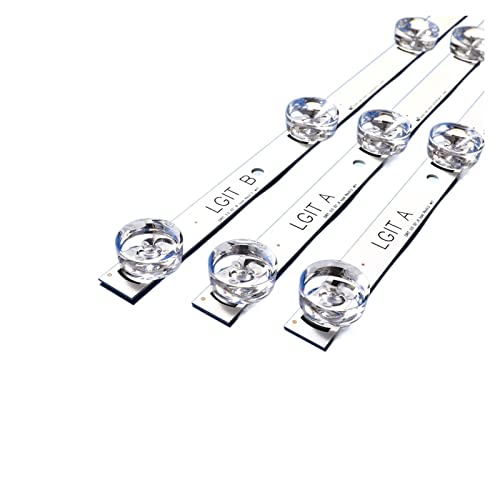
If you own an LG 32-inch TV that's starting to show dim or uneven backlighting, the AZJSCNBE 3 X LED Backlight Strip kit might be just what you need. This replacement pack is designed specifically for LG models that use Innotek DRT 3.0, LGIT Drt3.0, or WOOREE A/B backlight technology – common in many 32LB, 32LF, and UOT series sets. Instead of throwing out a perfectly good TV, you can swap the failing strips yourself and bring the picture back to life.
This kit contains three strips: two A-type and one B-type, matching the original configuration found in many LG 32-inch edge-lit TVs. Each strip measures 590mm by 15mm and runs at 6V per lamp. The total voltage range is 0-94V, which aligns with typical LG backlight driver boards. According to product specs, these are 100% new original-grade strips, so you're not getting used or refurbished parts.
Before ordering, you should absolutely verify that your TV model is listed – the seller mentions compatibility with LG 32MB27VQ, 32LB5610, 32LB552B, 32LF5610, and 32lf560, among others. If your set uses a different backlight connector or driver IC, these may not fit or may cause incorrect voltage. Homeowners or apartment renters with older LG 32-inch TVs will find this kit a cost-effective fix compared to buying a new TV.
Installation requires some patience and a steady hand. You'll need to open the TV bezel, remove the diffuser sheets, and carefully detach the old strips before connecting the new ones. Many online guides walk through the process for common LG models. Tech enthusiasts and DIYers comfortable with small electronics can likely handle it in an hour or two. For less experienced users, it might be wise to watch a tutorial or ask a friend with repair skills to assist.
Picture quality after a successful replacement should return to normal brightness and uniformity – no more dark patches or flickering. Since this is a direct replacement, you won't gain any new features like higher contrast or HDR; the goal is to restore the TV to its original state. For families using an LG 32-inch in a bedroom, kitchen, or kids' playroom, this kit can extend the TV's life by months or years.
One realistic limitation is that not every LG 32-inch model uses this exact backlight layout. If your TV is not on the compatibility list, there's a risk of mismatch. Also, working inside a TV involves handling thin strips and delicate connectors – static discharge or bending could damage the new parts. For the price (around $26.60 at the time of this writing), this kit offers a solid value for anyone comfortable performing minor TV repairs. It's a practical option for homeowners, cord-cutters, or budget-conscious shoppers who want to keep their LG 32-inch TV running without replacing the whole set.

Pros
- Affordable price point for a name-brand smart TV with protection plan
- webOS interface is user-friendly and responsive for app navigation
- Small footprint and lightweight design make it easy to move or mount
- Good option for secondary rooms where 4K is not necessary
Cons
- Only HD (720p) resolution, not suitable for 4K content or large viewing distances
- Built-in speakers may lack bass and volume for immersive audio
- Limited smart TV app selection compared to higher-end models
The LG 32LM577BPUA is a 32-inch LED HD smart TV that brings the convenience of webOS to a compact, budget-friendly package. Designed for casual viewing, this TV is best suited for bedrooms, dorm rooms, kitchens, or as a secondary screen in a home office. It's an excellent choice for apartment renters, families looking for a kids' room TV, or cord-cutters who want a simple streaming setup without breaking the bank.
Picture quality is typical for an HD (720p) LED panel. Colors appear natural and skin tones look realistic for everyday content like news, talk shows, and streaming movies. The contrast ratio is decent for an entry-level model, though black levels are not as deep as higher-end TVs. Brightness is adequate for a dimly lit room, but direct sunlight may cause glare. Motion handling is basic, but fine for standard 60Hz content. Upscaling of lower-resolution sources like YouTube videos is acceptable, though not as sharp as 4K models.
The webOS smart platform is one of the highlights here. It's responsive and easy to navigate, with a launcher bar at the bottom for quick access to popular apps like Netflix, Hulu, Amazon Prime Video, and YouTube. Voice control is not built-in, but you can use the included remote to browse. App loading speeds are reasonable for a budget TV. The TV also includes a few HDMI and USB ports, allowing you to connect a streaming stick, game console, or external hard drive.
Build quality is solid for the price. The bezels are relatively thin, giving a modern look. The stand is stable and easy to assemble. VESA mount compatibility makes wall mounting straightforward. The bundle includes a 2-year CPS Enhanced Protection Pack, which adds extended warranty coverage - a nice perk for peace of mind. Setup is quick: just attach the stand or mount, plug in, and follow on-screen instructions.
One realistic limitation is the audio. The built-in speakers are adequate for dialogue clarity at moderate volumes, but they lack bass and can sound tinny during action scenes. For better sound, consider adding a soundbar. Also, the HD resolution means you won't get the sharpness of 4K, so it's not ideal for large living rooms or critical movie watching. However, for its intended use - a secondary TV in a bedroom or kitchen - it performs well.
Overall, the LG 32LM577BPUA is a practical choice for budget-conscious shoppers, families, or anyone needing a compact smart TV for casual streaming and everyday viewing. The included protection plan adds value. If you prioritize 4K or high-end gaming, look elsewhere, but for a reliable, easy-to-use small TV, this is a solid option.

Pros
- Affordable price point for a 2025-model smart TV with AI processing.
- Good picture quality for HD content with HDR10 support.
- webOS 23 is smooth and easy to navigate.
- Bluetooth 5.0 allows wireless speaker connection for better sound.
- Renewed model offers cost savings with reliability.
Cons
- Only 720p HD resolution, not full 1080p or 4K.
- No Dolby Vision or HDR10+ support.
- Limited to 2 HDMI ports, may require a switch for multiple devices.
- Built-in speakers are adequate but lack bass and room-filling volume.
The LG 32-inch LR600 series (2025 model) is a renewed HD smart TV designed for viewers who want a straightforward, affordable television for everyday use. It packs LG's latest α5 Gen6 AI processor, which works to optimize picture quality in real time, and runs on the user-friendly webOS 23 platform. While it's not a 4K set, it's a solid choice for smaller spaces like a bedroom, apartment, dorm room, or even a kitchen counter where you just want to catch the news, stream shows, or watch a movie before bed.
Picture quality is decent for an HD set. The Active HDR10 and HLG support help bring out some extra detail in bright and shadowy scenes, though the 720p native resolution means you won't get the sharpness of a 1080p or 4K screen. Colors are fairly accurate after a quick calibration, and the α5 processor does a nice job reducing noise and enhancing contrast. For a secondary TV, the picture is more than acceptable for most streaming content, sports, and daytime viewing. However, in a bright room, reflections can be noticeable, and peak brightness is modest. The viewing angles are typical for an LED panel, so sitting directly in front is best for optimal color and contrast.
Smart TV performance is where this LG shines. webOS 23 is snappy, with a clean interface that puts your favorite streaming apps front and center. Netflix, Hulu, Disney+, Prime Video, and YouTube all load quickly, and the built-in voice assistants (LG ThinQ, Google Assistant, and Amazon Alexa) let you search for content or control smart home devices hands-free. The Bluetooth 5.0 support is a nice bonus: you can wirelessly pair two Bluetooth speakers to create a simple surround-sound setup without running cables. Just keep in mind that the TV's built-in speakers are adequate for dialogue and casual listening, but they lack bass and volume for a larger room.
Connectivity includes two HDMI ports (one with eARC for a soundbar) and a USB port. That's enough for a streaming stick, a game console, and a soundbar, but you might need a switch if you have more devices. The TV also supports Wi-Fi 5 and Bluetooth 5.0, so wireless streaming is reliable. Setting up the TV is straightforward: the included stand is easy to attach, and the VESA mount pattern (100x100mm) makes wall mounting simple. The slim bezel design gives it a modern look that won't distract from the picture.
One realistic limitation is the resolution. If you're used to 4K or even 1080p, the 720p panel will be noticeably softer, especially with text or fine details. Also, the lack of Dolby Vision or HDR10+ means HDR performance is limited to what the TV's own processing can do. For a bedroom or secondary TV, these trade-offs are acceptable given the price. But for a main living room where you watch a lot of 4K content, you'd want to step up to a 1080p or 4K model.
Overall, this LG LR600 is a practical, budget-friendly option for anyone who needs a reliable HD smart TV for a smaller space. It's especially good for cord-cutters, families looking for a kids' room TV, apartment renters, or as a gift for a college student. The renewed condition means you get a like-new product at a discount, but you should still check the warranty and return policy. If you're okay with HD resolution and want a TV that's easy to use and has a modern smart platform, the LG 32-inch LR600 is a solid choice.

Pros
- Large 32-inch curved screen enhances immersion for gaming and movies.
- Smooth 100Hz refresh rate with AMD FreeSync for fluid gameplay.
- Eye-care features reduce strain for all-day use.
- OnScreen Control software boosts productivity with easy screen splitting.
Cons
- Only Full HD resolution, not 4K, which may be a limitation for some users.
- Limited connectivity options with only HDMI and PC ports.
- Built-in speakers may lack the depth for immersive audio experiences.
If you are looking for a monitor that pulls double duty for both work and play, the LG 32-inch Curved FHD Monitor (model B0G1LZ2WT1) is a compelling option. This is a 32-inch Full HD display with a 1800R curvature, a VA panel, and a 3000:1 contrast ratio. It is best suited for home office users, budget-conscious gamers, and anyone who wants a large, immersive screen for everyday computing, streaming, and casual gaming.
When it comes to picture quality, the VA panel delivers deep blacks and good contrast, making movies and games look more vibrant. The 1800R curve wraps the screen around your field of view, which can help reduce eye strain during long sessions and make you feel more engaged in your content. The 100Hz refresh rate and AMD FreeSync support are the standout features for gaming. They work together to minimize screen tearing and stuttering, providing a noticeably smoother experience in fast-paced titles like first-person shooters or racing games. Dynamic Action Sync further reduces input lag, keeping your actions responsive.
For productivity, the LG OnScreen Control software is a practical tool. It allows you to easily split the screen into multiple windows, adjust settings, and manage your workspace efficiently. This is a real advantage for multitaskers who need to have several documents or applications open at once. The monitor also includes eye-care features like Flicker Safe and Reader Mode, which reduce blue light and flicker to help prevent eye fatigue over long workdays.
Build quality is solid with a sleek, borderless design that looks modern on any desk. The stand is tilt-adjustable, so you can find a comfortable viewing angle, and the overall footprint is manageable. Connectivity is straightforward with one HDMI and one PC port, which is enough for a laptop and a gaming console, but power users may want more options. The monitor is VESA mount compatible, giving you the flexibility to attach it to an arm or wall mount for a cleaner setup.
One realistic limitation is the Full HD resolution. At 32 inches, some users may notice the lower pixel density compared to a 4K monitor, especially for detailed work like photo editing or reading small text. Also, the built-in speakers are basic, so you will likely want to use external speakers or a headset for a better audio experience. The lack of USB-C or additional video inputs may also be a consideration for users with multiple devices.
Overall, this LG monitor offers strong value for its price. It is an excellent choice for a home office or a bedroom gaming setup where you want a large, curved screen without breaking the bank. It may not satisfy those needing 4K resolution or premium gaming features like 144Hz, but for its intended audience, it delivers a satisfying and immersive experience.
Lowering Electric Bills: How Many Watts Is Lg 32 Inch Led Tv FAQs
What is the average wattage of an LG 32-inch LED TV during normal viewing?
An LG 32-inch LED TV typically consumes between 30 and 45 watts under standard picture settings. Models like the LG 32LQ630BPUA utilize energy-efficient Direct LED lighting that limits overall energy draw while maintaining clear high-definition resolutions. When placed in standby mode, power usage drops below 0.5 watts, ensuring virtually no wasted electricity when turned off.
Does streaming through the built-in webOS platform consume more electricity?
Yes, running native streaming apps uses roughly 3 to 7 watts more than viewing offline inputs through HDMI. The onboard processor and Wi-Fi hardware actively decode video streams and balance audio profiles in real time. Even with this slight bump, total power draw rarely exceeds 40 to 50 watts during high-definition streaming on popular platforms.
How much does picture brightness and Active HDR affect overall power consumption?
Raising backlight intensity to maximum levels can increase power consumption by up to 30 percent. Engaging features like Active HDR triggers dynamic tone mapping, prompting the LED panel to push peak luminance in bright movie scenes. Selecting the TV’s built-in Eco picture mode keeps backlight output balanced, preserving contrast while trimming unnecessary wattage.
What is the estimated yearly electricity cost for operating an LG 32-inch LED TV?
Running this television for four to five hours daily typically costs between $6 and $12 per year, depending on local kilowatt-hour utility rates. Because the power demand hovers around 35 watts, daily consumption totals roughly 0.15 to 0.20 kWh. This modest footprint makes small LED displays exceptionally cost-effective compared to older or larger screens.
Can aging LED backlight strips cause screen failure or erratic power behavior?
Yes, deteriorating backlight strips can draw irregular voltage or trigger automatic shutdown safeguards inside the power board. If individual diodes burn out, you may need to troubleshoot an LG LED TV black screen to confirm whether the panel or internal power supply requires replacement. Using compatible replacement LED strips restores screen brightness without causing power surges.
Does wall mounting an LG 32-inch LED TV impact its thermal management and efficiency?
No, wall mounting does not negatively impact power efficiency as long as rear ventilation slots have adequate clearance. Installing the TV using a secure single stud TV wall mount keeps airflow open behind the chassis while organizing power cords cleanly. Proper heat dissipation prevents internal processors from throttling and protects long-term circuit reliability.






Write Your Review
No reviews yet. Be the first to share your experience!