


A safe outdoor antenna installation means choosing a suitable location, following the antenna instructions, and checking reception before treating the job as finished. How to install an outdoor TV antenna depends on the antenna design, the building, the available mounting points, and local signal conditions. Reception can vary with your address, terrain, nearby buildings and trees, antenna direction, cable routing, and broadcast conditions, so installation alone cannot promise particular channels. A location-specific broadcast lookup can help you identify signals to investigate before choosing a mounting position.
Plan the cable route and the television connection before mounting anything outdoors. Check whether an attic, eave, or other permitted location could work, and weigh its access and obstruction limits against the exposure and safety demands of a roof or mast installation. Follow the supplied instructions and applicable local requirements, especially for mounting, grounding, and electrical protection. For an overview of related display terms, see our 4K UHD television guide; screen resolution does not determine which broadcast signals an antenna can receive.

Pros
- Pulls in free uncompressed over-the-air digital signals with no monthly subscriptions
- Generous 16-foot shielded coaxial cable provides plenty of reach to find the best window placement
- Upgraded internal Smart IC chip helps maintain signal stability during bad weather
- Quick and painless setup that connects straight into standard ANT/IN ports on modern digital TVs
Cons
- Channel availability and signal strength vary based on terrain and distance from broadcast towers
- May require testing multiple room locations and rescanning to achieve the highest channel count
- Older analog televisions require a separate digital converter box
The DAANT Indoor Long Range TV Antenna is a compact reception accessory built to help home entertainment enthusiasts capture free over-the-air television. Designed for cord-cutters, apartment renters, suburban homeowners, and budget-conscious families, this unit pulls down network programming without adding to monthly entertainment expenses. Whether you want to follow local NFL games on CBS and FOX, track emergency weather bulletins, or watch morning programming on NBC and ABC, this digital antenna complements any living room or bedroom television display.
When plugged into a modern 4K LED, QLED, or OLED television, an over-the-air antenna often delivers picture quality that exceeds standard cable feeds. Because broadcast stations transmit uncompressed signals directly over the airwaves, viewers enjoy sharp 1080p and 4K broadcasts with clean contrast, deep color saturation, and fewer artifacts. Sports fans will notice clear motion handling and dialogue clarity during high-stakes football games and live events, bypassing the annoying compression and delays often experienced on crowded Wi-Fi networks.
Build quality focuses on practical placement within real homes. The antenna is anchored by an included 16-foot coaxial cable constructed with a solid center conductor, dielectric insulation, and three aluminum shielding layers. This robust shielding guards against electromagnetic interference and helps shield against signal loss during thunderstorms. Its lightweight, slim black panel is easy to position behind a wall-mounted TV, mount directly against a windowpane, or tuck behind an entertainment console.
Setting up the antenna takes only a few minutes. Users simply attach the coaxial cable to the ANT/IN connector on the television, access the settings menu, select the antenna input, and run an automated channel scan. Testing both vertical and horizontal orientations near an exterior window often helps capture additional stations. Modern platforms like Google TV, Roku TV, webOS, and Fire TV automatically index these stations into an on-screen program guide, blending free local television with your daily streaming apps.
While this antenna delivers strong everyday value, practical limitations should be kept in mind. Reception is governed by local geography, distance from transmission towers, and home construction materials such as brick, stucco, or metal framing. Additionally, older analog displays will require an external converter box to process modern digital broadcasts. For viewers with digital ATSC tuners seeking an economical way to stream local channels alongside Netflix and Prime Video, this antenna makes a practical, money-saving addition.
Getting optimal signal strength from your indoor digital antenna depends primarily on placement. Positioning the antenna as high as possible against an exterior window facing nearby broadcast towers usually delivers the cleanest line of sight. Checking online coverage resources such as the FCC DTV reception map can help you determine the general direction of regional transmitters before mounting.
It is best to position the antenna away from heavy electronic appliances like microwaves, high-power wireless routers, and metallic window screens that can disrupt radio frequency signals. Remember to run a fresh channel scan on your smart TV whenever you adjust the antenna position or move it to a different wall, as the built-in tuner must re-index available frequencies.
Sports enthusiasts and local news watchers gain a major advantage with a dedicated digital antenna. Major broadcast networks carry weekly sports matchups, holiday parades, and awards shows with zero internet streaming lag. This prevents delayed reactions and spoiled plays from phone notifications before the action occurs on screen.
Because the signal travels directly through the air to your TV tuner, you also avoid the bandwidth drops, pixelation, and buffering pauses that can plague streaming services during high-traffic sporting events like playoff games. It is an efficient way to keep your home theater connected to live network television all year long.

Pros
- Strong long-range reception with 4K support for future-proof cord-cutting.
- Weather-sealed housing and included J mount for secure outdoor or attic mounting.
- Easy to install with clear instructions and standard coaxial connection.
- Affordable one-time cost that eliminates monthly cable or satellite bills.
Cons
- May require careful aiming and occasional adjustment for optimal signal in areas with obstacles like hills or tall buildings.
- Outdoor installation can be more complex than indoor antennas; requires tools and possibly professional help.
- Signal reception can be affected by weather conditions (heavy rain, snow) or nearby electronics.
The GE Outdoor HD Digital TV Antenna (model 29884) is a long-range antenna designed for homeowners and apartment renters who want to cut the cord and enjoy free over-the-air TV. It supports both VHF and UHF bands and can receive 4K and 1080p HD signals from broadcast towers up to 60 miles away. This makes it a great choice for streamers, sports fans, movie lovers, and families who want to watch local news, live sports, and network shows without a monthly subscription.
In real-world use, the antenna's reception quality depends on your location and the placement of the antenna. The included J mount allows for secure installation on a roof, exterior wall, or in an attic, giving you flexibility to find the sweet spot for signal strength. According to user feedback, many find that attic mounting offers good reception while keeping the unit out of sight and protected from the elements. The weather-resistant housing helps it withstand rain, snow, and UV exposure, so it can stay outdoors reliably for years.
One of the key advantages of this GE antenna is its compatibility with modern smart TVs from Samsung, LG, Sony, TCL, Hisense, and others. It connects via a standard coaxial cable (not included) to the TV's antenna input. Once connected, you can run a channel scan and start watching broadcast channels immediately. The antenna also works with streaming devices like Roku, Fire TV, and Apple TV, but those devices don't replace the antenna - they add streaming services. For cord-cutters, this antenna is the essential first step to getting local channels for news, sports, and prime-time shows.
Build quality is solid for the price point. The antenna is made of durable materials with a gray and white finish that blends with most exteriors. The J mount is sturdy and includes hardware for mounting. However, installation does require some DIY skill - you'll need to drill holes, route the coaxial cable, and possibly use a signal amplifier if you're far from towers. The antenna itself is not amplified, so if you're in a weak signal area, you might need a separate preamplifier (sold separately).
Potential limitations include dependency on line-of-sight to broadcast towers. In areas with heavy tree cover or hills, reception can be spotty and may require repositioning. Also, because it's an outdoor antenna, it's subject to weather-related fading during severe storms. The absence of a built-in amplifier means it's best suited for areas with moderate to strong signals. For those living in apartments with no outdoor access, this model might not be feasible - consider a smaller indoor antenna instead.
Overall, the GE Outdoor HD Digital TV Antenna is a reliable, affordable option for U.S. households looking to cut the cord. It's especially ideal for homeowners with a clear view of the sky who want to watch local sports, news, and network TV in high definition. Setup takes a bit of effort, but the long-term savings and picture quality make it worth the work. If you're a streamer who misses live TV or a family wanting to reduce monthly bills, this antenna is a practical addition to your home entertainment system.
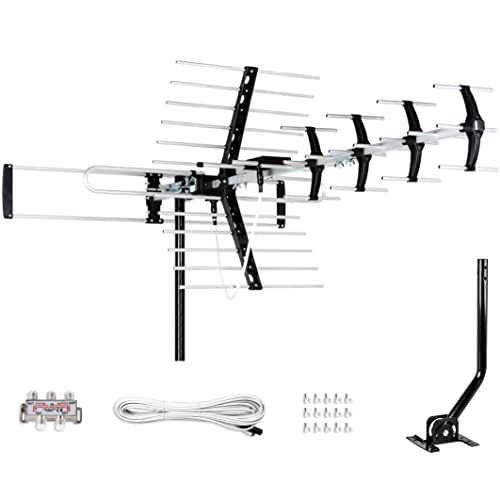
Pros
- Excellent range for rural and suburban locations, pulling in stations from far distances.
- Supports 4K and ATSC 3.0, giving access to the latest over-the-air broadcasts.
- Includes all necessary mounting hardware and a splitter, so no extra purchases are needed for a basic setup.
- Can be installed in attic or outdoors, offering flexibility based on your home's layout and signal conditions.
- Cost-effective alternative to cable TV, with no monthly fees and hundreds of free channels available.
Cons
- Reception quality may vary significantly based on local terrain, trees, and building obstacles.
- Requires careful positioning and possibly multiple attempts for optimal signal strength.
- May need a separate amplifier for extreme distances over 100 miles or in areas with weak signals.
The Five Star Outdoor HDTV Antenna is a powerful solution for anyone looking to cut the cord and access free over-the-air television. Designed for both VHF and UHF signals, this antenna claims a range of up to 200 miles from broadcast towers, making it suitable for homeowners in rural or suburban areas where cable alternatives may be limited. It is ATSC 3.0 ready, so it can handle next-generation broadcasts alongside standard 4K and 1080p channels.
This antenna is best suited for cord-cutters, families, sports fans, and news watchers who want reliable access to local stations without monthly fees. The package includes a mounting bracket, J-pole, and a splitter that supports up to four TVs, which is ideal for a household with multiple televisions. Installation can be done on a roof, attic, eave, or chimney, and the multi-directional design helps pick up signals from several towers without constant adjustment.
In terms of performance, user feedback suggests that signal reception can vary widely depending on local conditions such as trees, hills, and building materials. The product description emphasizes that a channel scan is necessary after setup, and monthly scans are recommended to maintain the channel lineup. Many users find that the antenna works best when mounted high and with a clear line of sight to broadcast towers, though attic installation is also possible with slightly reduced range.
Build quality appears durable with weather-resistant materials, and the extended antenna length is designed to capture weaker signals from distant stations. The included J-mount and hardware make mounting straightforward for those comfortable with basic DIY tasks. However, for extreme distances or challenging environments, an additional amplifier may be required, which is not included.
Overall, the Five Star antenna represents a practical and cost-effective way to enjoy free HD and 4K content from major networks. It is a solid choice for budget-conscious viewers who want to reduce their monthly bills without sacrificing access to live sports, local news, and popular shows. While results depend on location, the combination of range, multi-TV support, and ATSC 3.0 compatibility makes this a strong contender for any cord-cutting setup.
For apartment renters or homeowners who cannot install external antennas, attic mounting offers a compromise, though performance may be lower. The product is also a good gift idea for tech-savvy individuals or families looking to transition away from cable. With a 4.5-star rating and included installation kit, the Five Star antenna provides a complete package for over-the-air TV enthusiasts.

Pros
- Motorized rotation operates via remote control, eliminating the need to physically reposition the mast
- Includes distribution hardware to feed uncompressed broadcast signals to five separate TV tuners
- Compatible with NextGen ATSC 3.0 tuners for modern digital audio and high-resolution picture formats
- Tool-free folding design and included mounting pole simplify the initial installation process
Cons
- Physical geography such as dense foliage, hills, and metal roofs can reduce effective reception range
- Routing coaxial cables to multiple rooms requires careful planning and drilling through exterior walls
- Motorized base requires an active indoor AC power outlet near the distribution box
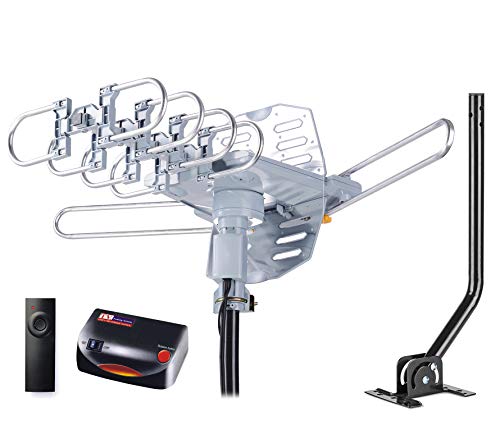
The Five Star 2026 Upgraded Outdoor TV Antenna is an amplified long-range reception system engineered to capture over-the-air television signals without recurring monthly bills. Designed primarily for suburban and rural homeowners, cord-cutters, sports enthusiasts, and busy families, this motorized setup eliminates costly cable subscriptions while delivering uncompressed high-definition broadcasts directly to your living room or basement home theater.
Picture performance from high-definition broadcast towers often surpasses compressed cable and satellite signals. By supporting both standard 1080p feeds and NextGen TV (ATSC 3.0) 4K broadcasts, this antenna helps modern OLED, QLED, and 4K LED televisions present clean lines, accurate color reproduction, and reduced motion artifacts during fast-paced football games and live events. The integrated high-gain amplifier works to pull in distant signals from up to 200 miles under favorable conditions, helping viewers maintain stable image feeds with fewer dropped frames or pixelation.
Physical orientation plays a massive role in signal quality, and the built-in motorized 360-degree rotation provides a practical solution. Rather than climbing onto a roof or into an attic every time a broadcast tower location shifts, users can make precise directional adjustments using the handheld remote. The hardware also includes an integrated bubble level on the mounting bracket, which prevents awkward tilt angles and mechanical binding during rotation. Tool-free snap-and-fold arms allow homeowners to open the assembly directly out of the box without hunting for specialized tools.
Multi-room connectivity is another strong feature for household entertainment. The package includes an installation kit capable of distributing digital signals to up to five individual televisions throughout the home, making it easy to supply clear channels to master bedrooms, kids' playrooms, and garage workshops simultaneously. The outdoor housing uses weather-resistant materials designed to withstand everyday sun exposure, rainfall, and dust, while the included mounting pole simplifies installation on rooftops, chimneys, or balcony railings.
While the antenna offers impressive reception potential, real-world reception is inherently subject to local geography. Heavy tree lines, surrounding hills, and metal roof structures can shorten signal reach or require careful mast positioning. Running coaxial lines through exterior walls to multiple rooms also requires thoughtful planning. For households eager to enjoy local news, Sunday football watch parties, and primetime television in clear high definition without monthly fees, this motorized antenna package serves as a capable, budget-friendly addition to any home entertainment system.
Setting up the Five Star antenna is designed to be accessible for DIY homeowners. The snap-and-fold element design allows the receiving reflectors and dipoles to lock into place without requiring screwdrivers or wrenches. The included mounting pole provides sufficient elevation above rooflines, while the built-in bubble level ensures the vertical mast remains plumb for smooth motorized rotation.
Connecting the system involves running the outdoor coaxial cable down to the indoor power supply and distribution splitter. From there, dedicated lines can be routed to up to five television tuners across the home. Once physical connections are established, running a simple channel scan through each TV menu allows the tuner to recognize all available digital and ATSC 3.0 stations.
Live sports coverage benefits tremendously from direct over-the-air digital signals. Cable providers and internet streaming services frequently apply heavy digital compression that introduces macroblocking and motion blur during fast action. Capturing signals directly via antenna provides an uncompressed feed that allows high refresh rate 4K TVs to display crisp player movement and sharp stadium detail.
Support for ATSC 3.0 NextGen TV guarantees compatibility with emerging broadcast formats, including advanced audio codecs and higher dynamic range metadata. For fans hosting Super Bowl parties or tracking weekend college football matchups, an outdoor amplified antenna delivers immediate, low-latency viewing with zero streaming buffer delays.


Pros
- Motorized 360-degree rotor allows precise direction adjustments from inside using the wireless remote
- Dual TV outputs on the power control box power two separate screens without extra splitters
- Ready for ATSC 3.0 NextGen TV broadcasts to unlock HDR color, crisp dialogue, and future 4K channels
- Comes packaged with a long 59-foot RG6 coaxial cable and grounding accessories
Cons
- Actual broadcast distance depends heavily on local geography, surrounding hills, and dense foliage
- Mounting J-pipe or pole must be purchased separately to complete exterior installation
- Rotator sensor requires a direct line-of-sight to the indoor control box for reliable operation
The PBD Amplified Outdoor TV Antenna is an exterior reception system created to feed crisp over-the-air digital signals directly into your modern television display. Modern 4K OLED, QLED, and LED screens showcase incredible panel capabilities, but streaming compression and costly cable subscriptions often degrade real-time video feeds. This motorized broadcast antenna targets cord-cutters, sports fans, suburban homeowners, and budget-conscious families who want to tap into free local digital broadcasts without compromising their display visual potential.
Over-the-air signals provide uncompressed digital feeds that frequently look sharper than standard satellite or cable channels, delivering crisp black levels, vibrant color saturation, and artifact-free motion handling during fast-paced NFL games, local basketball matchups, or primetime dramas. Supporting ATSC 3.0 NextGen TV alongside standard 1080p and 720p digital channels, this antenna prepares your home theater for advanced HDR broadcasts and enhanced audio clarity as regional stations continue upgrading their broadcast towers. The built-in low-noise amplifier works to pull in distant stations while preserving signal purity, minimizing digital pixelation or audio dropouts.
A standout utility feature is the motorized 360-degree rotation mechanism. Broadcast transmitters in many metropolitan areas are scattered across different directional compass points. Instead of making physical trips up a ladder to realign your antenna mast, you can tap the included wireless remote to rotate the antenna smoothly until signal meters on your television read optimal strength. Additionally, the indoor control module features dual TV outputs, enabling you to feed pristine broadcast feeds to both the primary living room display and a secondary bedroom or basement recreation TV simultaneously without purchasing an external signal splitter.
Physical construction utilizes weather-resistant materials designed to withstand cold winters, heavy downpours, and intense summer sun. For homeowners hesitant about roof penetrations, the compact profile can also be mounted cleanly inside a spacious attic space, which helps preserve the assembly from outdoor exposure while retaining solid line-of-sight reception. The package comes with a 59-foot RG6 coaxial cable and grounding block, providing sufficient length to route cables neatly down through exterior walls or attic access ports toward your entertainment center.
While the antenna is rated for extended ranges, prospective buyers should recognize that real-world reception is influenced by physical obstructions like ridgelines, tall buildings, and heavy tree canopies. You will also need to supply your own mounting pole or J-pipe bracket, as the basic kit only includes mounting hardware for the antenna head itself. For cord-cutting enthusiasts and families looking to lower monthly entertainment expenses while keeping live sports, emergency weather updates, and network television on their high-resolution screens, this amplified antenna is a practical and dependable solution.
Installing the PBD Amplified Outdoor TV Antenna is straightforward, whether you choose to mount it on an exterior chimney, roof eave, or inside an attic crawlspace. Placing the unit as high as possible with minimal direct obstruction toward nearby broadcast towers yields the most stable signal performance for your smart TVs.
The included 59-foot RG6 coaxial line connects directly from the antenna head down to the indoor power supply box. From there, two standard coaxial outputs allow direct connections to your primary living room television and a secondary bedroom screen. Once connected, running a basic digital channel scan through your TV menu locks in local stations for immediate viewing.
Modern smart TVs equipped with ATSC 3.0 tuners unlock NextGen TV capabilities, offering high dynamic range visuals, rich color gamuts, and dialogue-enhancing audio tracks. This antenna is engineered to receive these advanced digital broadcasts alongside standard high-definition transmissions.
Because local network affiliates often position their transmitters in opposite directions, the 360-degree motorized rotation ensures you can fine-tune reception for individual channels without leaving your living room. A quick tap of the remote repositions the elements to secure maximum signal strength for Sunday football or late-night talk shows.

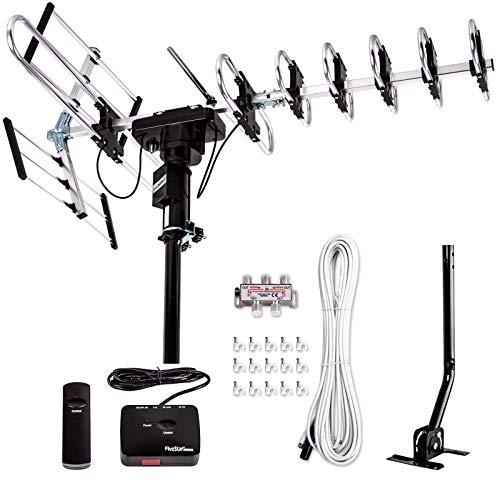
Pros
- Supports uncompressed 4K and 1080p digital reception for crisp, artifact-free TV picture quality
- Motorized 360-degree rotation allows convenient directional tuning from inside your living room
- Includes a comprehensive installation package with J-pole mounting hardware, splitter, and coax cable
- Capable of feeding broadcast signals to multiple televisions simultaneously throughout the household
Cons
- Long-range reception performance can be affected by dense tree lines, valleys, and heavy building obstructions
- Outdoor roof or attic mounting requires basic DIY wiring and physical installation effort
- Multi-room setups may require additional coaxial cabling depending on the layout of your home
The Five Star Outdoor Digital Amplified HDTV Antenna is an outdoor motorized television antenna system engineered to capture free, over-the-air digital broadcasts for modern smart TVs, 4K displays, and multi-room home entertainment systems. This antenna setup is tailored for cord-cutters, budget-conscious homeowners, sports enthusiasts, and families who want reliable access to local network broadcasts without paying recurring monthly cable or satellite fees. Whether you are outfitting a primary living room 4K OLED TV or distributing signals to multiple bedroom displays, this unit provides a versatile pathway to free television programming.
For viewers who care deeply about visual fidelity, over-the-air broadcasts often deliver superior picture quality compared to standard cable feeds or compressed streaming platforms. Based on product specifications, this antenna captures native uncompressed 1080p, 1080i, and 720p signals, along with next-generation broadcast formats up to 4K resolution where available. Sports fans hosting Super Bowl watch parties or tracking live college football games will appreciate the sharp motion clarity, vibrant colors, and lack of streaming buffering on local network channels such as FOX, CBS, NBC, and ABC.
Under the hood, the antenna features an advanced reception design combining six UHF reflector elements with a dedicated VHF band. The system incorporates an auto gain control chip providing 15 to 35 dB of booster gain, which assists in pulling in distant transmission towers across broad frequency bands. The integrated 360-degree motorized rotor is operated via an indoor controller, enabling homeowners to dial in signal direction directly toward local transmitters without having to climb up a ladder or manually readjust the pole in rough weather.
Physical construction focuses on durable weather resistance, featuring weather-shielded components and wind-resistant reflectors designed to withstand outdoor conditions. The package includes an installation kit featuring a J-pole mount, 40 feet of coaxial cable, and a multi-port splitter capable of driving feeds to up to five televisions at once. This makes it practical to connect a high-end living room home theater, a basement gaming display, and family bedroom TVs through a centralized antenna distribution setup.
Real-world reception always depends on local geographic factors, including distance from regional broadcast towers, natural terrain, hills, and surrounding building density. While the manufacturer lists long-range capabilities, suburban and rural users situated behind heavy ridges or dense forest canopies may need to experiment with placement between attic and outdoor roof mounting. In addition, routing coaxial cables into multiple rooms requires some basic DIY effort and patience during initial channel scanning on each smart TV tuner.
For households seeking to eliminate recurring television bills while maximizing the picture clarity on their 4K TVs, the Five Star Amplified HDTV Antenna represents a practical and cost-effective home entertainment upgrade. It bridges the gap between streaming apps and live broadcast television, giving sports lovers, news followers, and movie viewers reliable access to pristine broadcast channels across every room in the home.
Setting up the Five Star antenna is designed to be straightforward thanks to the included mounting hardware and cabling accessories. Homeowners can install the provided J-pole on an exterior roof fascia, chimney, or within a high attic space to preserve exterior roof lines while maintaining clear line-of-sight toward broadcast towers.
Once mounted, connect the 40-foot coaxial cable to the control box indoors, and attach the multi-way splitter to distribute feeds to separate TV inputs. After running a quick digital channel scan on your smart TV menu, you can tap the rotor button to reposition the antenna angle and optimize signal strength for stubborn channels.
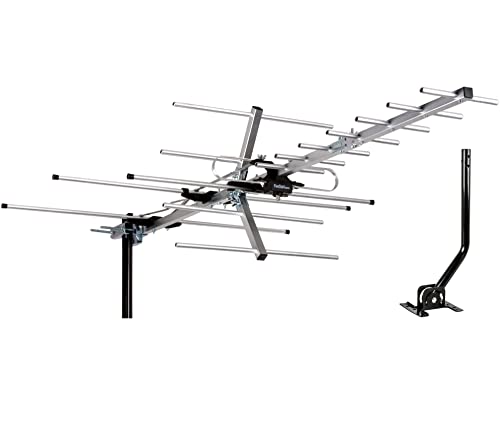
Pros
- Impressive 200-mile range capability for picking up distant broadcast towers (actual range varies by location).
- Solid weatherproof build suitable for year-round outdoor mounting - resists wind, rain, and lightning.
- Includes essential mounting hardware and long coax cable - no extra purchases needed for basic installation.
- Excellent value for cord-cutters wanting to access free local channels in HD without ongoing costs.
Cons
- Assembly required for some parts - not fully pre-assembled out of the box.
- Actual reception range heavily depends on your distance from broadcast towers and physical obstructions like hills or buildings.
- No built-in amplifier - may need a separate signal booster in weak signal areas or for long cable runs.
The Five Star Yagi TV Antenna is an outdoor/indoor antenna designed for cord-cutters, homeowners, apartment renters, and anyone looking to ditch expensive cable subscriptions while still enjoying free local broadcast television. This antenna is not a TV itself but a powerful accessory that pulls in over-the-air (OTA) signals from local stations, including ABC, CBS, NBC, Fox, PBS, and more, in resolutions up to 4K and 1080P. It's a practical solution for families, sports fans, and streamers who want live news, sports, and network shows without monthly fees.
In terms of performance, the Yagi design features extended receiving elements and an upgraded smart chip that claims to capture signals up to 200 miles away. Real-world results will vary based on your location relative to broadcast towers and any obstructions like trees or buildings. Many users report strong reception for local channels in suburban and rural areas, especially when mounted high on a roof or in an attic. The antenna handles both VHF and UHF frequencies, which covers most digital channels. It does not have a built-in amplifier, so if you live far from towers or have a long cable run, you might need an external preamplifier for optimal performance.
Build quality is a highlight - the antenna is made with durable, weather-resistant materials that can withstand rain, wind, and lightning. It's designed for outdoor mounting but can also be placed in an attic for a cleaner look. The package includes a 20-inch mounting pole and 40 feet of coax cable, which is generous and saves you from buying extra parts. The assembly is partially pre-assembled, so you'll need to attach the remaining elements - it's straightforward and takes about 15-20 minutes.
Setting up the antenna is fairly simple: choose a location with a clear line of sight to broadcast towers if possible, mount the pole securely, attach the antenna, run the coax cable to your TV, and scan for channels. The included cable is long enough for most installations, but you can extend it if needed. The antenna works with any digital TV or converter box, and it's compatible with FM radio signals as well. One limitation is that the antenna is fairly large (17 x 8 x 6 inches) and may be noticeable if mounted outdoors, but that's typical for high-gain Yagi designs.
Overall, the Five Star Yagi TV Antenna is a solid choice for anyone wanting to cut the cord and access free local channels. It's especially good for homeowners with a clear view of towers, apartment renters with attic access, or families who want to supplement streaming services with live TV. The value is excellent given the included mounting hardware and cable. Just be realistic about your location and consider a signal amplifier if needed. For the price, it's a reliable way to get local news, sports, and entertainment without monthly bills.
Installing the Five Star Yagi TV Antenna is a straightforward DIY project. Start by determining the best location - ideally a roof, attic, or eave with a clear line of sight toward the nearest broadcast towers. Use the included 20-inch mounting pole to secure the antenna to a mast, chimney strap, or wall bracket (not included). Attach the pre-assembled antenna to the pole using the provided hardware. Run the 40-foot coax cable from the antenna to your TV or converter box. Connect the cable to the antenna's F-connector and tighten. On your TV, go to the settings menu and select 'Channel Scan' or 'Auto Program' to detect all available over-the-air channels. For best results, aim the antenna toward the direction of broadcast towers - you can use websites like AntennaWeb or FCC DTV Reception Maps to find tower locations. If you have weak signals, consider adding a preamplifier or a signal amplifier near the TV. The antenna is weatherproof, but ensure all connections are sealed with weatherproof tape or silicone to prevent moisture damage. Once installed, enjoy free HD channels without monthly fees.
Plan and install an outdoor TV antenna safely
Install an outdoor TV antenna by identifying a workable location, assembling and mounting the antenna as its instructions specify, routing coaxial cable safely, and scanning for channels after connecting it to the television. Reception availability and reliability vary by address and conditions, so the best position must be determined for the actual building and setup. Treat advertised range or channel figures as claims, not a prediction for your home. If the mounting point involves a roof, ladder, electrical work, or uncertain grounding requirements, stop and consider a qualified installer.
Check the site before selecting a mount
Start with local broadcast availability rather than a package’s advertised distance. A broadcast lookup tied to your location can show which signals are worth investigating and their general directions, but it cannot account perfectly for every wall, tree, terrain feature, or installation detail. Compare that information with the places where an antenna could legally and safely be installed. A position with a clearer path toward relevant transmitters may help, but no position guarantees reception.
Consider whether an attic, eave, mast, or other outdoor mounting point is feasible. An attic can avoid some weather exposure, yet roofing materials and the building structure may obstruct signals. A roof or exterior position may reduce some building obstructions, but it brings additional mounting, weather exposure, cable routing, and access considerations. Renters should check lease terms and building rules before attaching equipment or running cable through shared areas.
Use this checklist to assess the installation site before unpacking or climbing:
- Check local broadcast availability and note the directions of signals relevant to your area.
- Identify a permitted mounting point that avoids unsafe proximity to power lines.
- Consider whether trees, buildings, roofing, or terrain may obstruct the antenna’s path.
- Plan a cable route that avoids sharp edges, trip hazards, and unnecessary exposure.
- Confirm that the television has an antenna input and can scan over-the-air channels.
- Review building rules and the antenna maker’s mounting and safety instructions.
Choose an antenna position and orientation
Directional antennas generally need to be aimed toward the signals of interest, while a multidirectional design may be intended to receive signals from more than one direction. The product’s stated design and instructions should guide orientation; do not assume that all outdoor antennas mount or point the same way. If relevant transmitters lie in different directions, the site and antenna design may require a compromise. Nearby obstacles and the building’s construction can change which position works best.
Try a ground-level or otherwise accessible preliminary check when the equipment and instructions allow it, before committing to a permanent mount. Move the antenna between feasible positions and orientations, then scan the television again after each meaningful change. Keep track of which setup produced a stable result, rather than relying on a single scan or a claimed range. If the equipment cannot be safely handled at the planned height, do not improvise a test from a ladder or roof.
Outdoor does not automatically mean higher is better or that a rooftop is necessary. Height can change obstruction and exposure, and a safe, permitted mounting point matters more than an unsupported assumption about height. Attic placement may be preferable when outdoor work is restricted, but the structure can affect reception. Compare realistic locations in your building and use the television’s scan results to guide the decision.
Assemble and secure the antenna mount
Read the instructions for the exact antenna and mounting hardware before assembly. Identify the antenna’s parts, the permitted mounting surfaces, and any stated requirements for orientation or fastening. Some listed options include a pole, bracket, or installation kit, while others may not; confirm what is supplied rather than assuming a generic kit is complete. Do not substitute hardware or alter the antenna unless the manufacturer permits it.
Choose a mount that is suitable for the building surface and the antenna according to its instructions and local requirements. Securely attached equipment should not obstruct doors, access routes, or shared property, and the mounting point should not be selected solely for convenience if it is exposed to a hazard. Do not install near overhead power lines. If you cannot confirm safe clearance or secure attachment, have the work assessed by a qualified installer.
Use these checks while preparing the mounting point:
- Match the supplied bracket and fasteners to the installation described in the instructions.
- Check that the selected surface and location are allowed by building rules.
- Keep the antenna and tools clear of overhead electrical lines and hazards.
- Do not work on a roof or ladder if conditions or access make the task unsafe.
- Follow specified grounding and electrical-protection requirements without bypassing safeguards.
- Ask a qualified installer to handle work beyond your skills or safe access.
Route coaxial cable and connect the television
Once the mounting plan is settled, route the coaxial cable from the antenna to the television location. Use the cable type, connectors, and routing approach specified for the equipment; the supplied product details vary, so not every antenna includes the same cable or accessories. Avoid crushing, sharply bending, or pinching the cable, and protect it from damage along the route. Keep it away from places where people may trip or where doors and windows could damage it.
Connect the cable to the antenna and the television’s antenna or RF input as directed by the relevant instructions. A splitter may be needed for multiple televisions, but each added connection can affect the overall setup, and the supplied information does not establish that every antenna supports every distribution arrangement. Check the product documentation before adding splitters, amplifiers, or other components. If an amplifier requires power, follow its specified power arrangement and do not assume it is necessary in every installation.
An amplifier is not a substitute for suitable placement or a usable incoming signal. It may help in some setups, but it can also fail to address a blocked path, poor aiming, a damaged cable, or a loose connection. Identify whether the antenna is passive or amplified from its documentation, then connect and power any included components as instructed. Avoid adding amplification simply because a channel is missing.
Scan for channels and verify reception
After all connections are in place, use the television’s settings to select its antenna or over-the-air input and start a channel scan. Menu names vary by television, so consult the TV manual if the scan option is unclear. A cable or satellite input setting will not scan broadcast channels through the antenna connection. Let the scan finish before judging the lineup, and note that the television may replace or update its stored channels.
Check the channels that appear and watch for pixelation, dropouts, or channels that disappear during viewing. A scan result is a useful starting point, not a promise of continued reception under every condition. If reception is inconsistent, make one change at a time, such as checking a connection or trying a different permitted orientation, then scan again. A related Roku television settings guide covers display configuration, but antenna channel scanning is a separate television function.
Troubleshoot missing or unstable channels
A missing channel can result from several causes, and a single symptom does not identify which one applies. Start with simple, safe checks before moving a mounted antenna or changing equipment. Confirm that the television is set to its antenna input and that the coaxial cable is seated at both ends. Check for visible cable damage, loose connectors, or a newly added splitter, and consult the equipment instructions before changing the wiring.
If the connections are sound, review the antenna’s position and direction against your local signal information. Buildings, trees, terrain, and changes in broadcast conditions can affect reception, while an indoor or attic route can introduce additional obstructions. Rescan after a meaningful placement or connection change because the television’s stored lineup may not reflect the new setup. Avoid repeated scans without changing anything, since they cannot correct a physical obstruction or defective connection.
Intermittent reception may point to a loose connection, cable damage, a changing obstruction, or a marginal signal, but these are possibilities rather than a diagnosis. Check whether the problem affects all channels or only some, and whether it began after weather, construction, a move, or equipment changes. Record the conditions and adjustments that affect the result. That information can help distinguish a placement issue from a connection or equipment problem.
Do not troubleshoot outdoor equipment during unsafe weather or by reaching from an unstable ladder. If the antenna, mount, cable entry, or grounding arrangement needs inspection at a hazardous height, leave that work to a qualified person. Follow manufacturer instructions and applicable local safety requirements for outdoor equipment and electrical protection. Never bypass grounding or other protective systems to test reception.
Know when installation help is the safer choice
A straightforward connection and scan may be manageable from a safe, accessible location, but roof mounting and electrical or grounding questions can exceed a homeowner’s ability. Building rules, mount compatibility, and the route for exterior cable can also complicate a seemingly simple setup. Ask a qualified installer when you cannot verify the mounting surface, safe access, required protection, or a suitable cable entry. That is a practical safety decision, not a guarantee of better reception.
Product descriptions can help identify design and included components, but they do not establish performance at a particular address. For example, the supplied listings distinguish outdoor and attic positioning, rotation features, and included installation items, but those details should not be treated as proof of local reception. Compare the chosen antenna’s actual instructions with the intended mounting location, connection plan, and television input. Confirm that any claimed compatibility or feature applies to the exact model and setup.
After a successful scan, secure the cable route as the instructions allow and keep the equipment accessible for safe inspection. Rescan when you move the antenna, change relevant connections, or need to refresh the stored lineup. If channels remain absent, check local availability and revisit placement before buying additional components. Choose the next step from the observed problem, and avoid assuming that a higher range claim or amplifier will solve it.
Proceed with permanent mounting only when the location, hardware, cable path, and safety requirements are clear. Verify the result with your own television scan, and consult a qualified installer for hazardous or uncertain work.

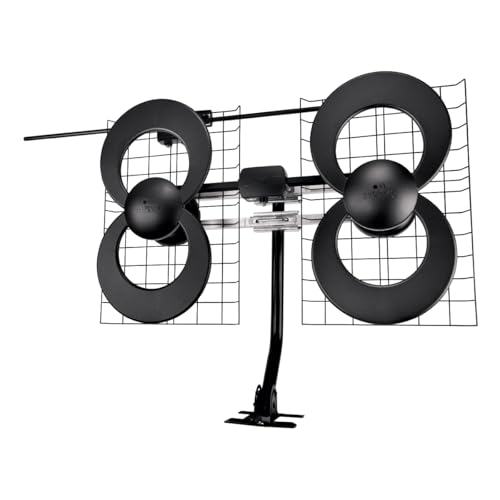



Write Your Review
No reviews yet. Be the first to share your experience!