


A home theater connection can be confusing because HDMI cables carry picture and sound, while older devices may use separate analog audio and video leads. To work out how to connect av receiver to tv, first decide whether your receiver will handle sound from the TV’s built-in apps, external devices, or both. The right route depends on which ports are available on the television, receiver, and source equipment.
Check the labels beside the HDMI ports before connecting anything. A TV port marked ARC or eARC can send audio back to a compatible receiver, while a receiver’s HDMI inputs can route video from connected players or consoles to the TV. Our practical guide to 4K UHD signal handling can help clarify why the source, receiver, and display all need to support the formats you want to watch.
The products listed below address narrower analog connection situations, not the standard HDMI link between an AV receiver and television. One is described as a TCL TV AV adapter, and the other converts composite AV input to HDMI output. Check their signal direction and device compatibility carefully before treating either as a solution for your receiver setup.
Product Shortcode
Pros
- Specifically compatible with TCL TVs (not Sony, Samsung, LG, Hisense)
- Simple plug-and-play operation for quick connection of older AV devices
- Sturdy PVC build with pure copper core for reliable signal transmission
- Short 9-inch cable design minimizes clutter and keeps connections close to the TV
Cons
- Not compatible with non-TCL TV brands, limiting its versatility
- Only 9 inches long, may not be ideal for setups where the TV is far from the AV device
- Lacks gold-plated connectors or shielding found in premium cables
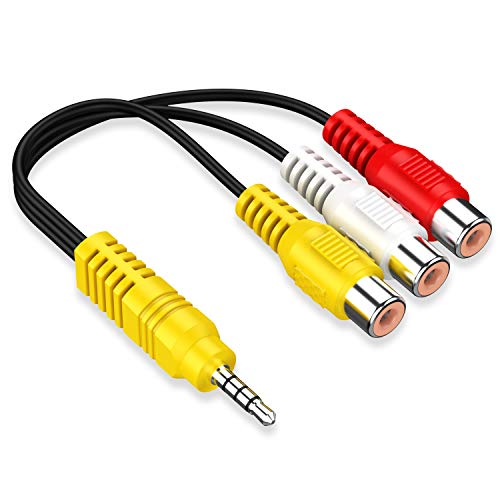
If you own a TCL TV and have older AV components like a DVD player, VCR, or retro game console gathering dust, the SNLLMZI AV Adapter Cable provides an easy, budget-friendly way to bring them back to life. This 9-inch cable converts a standard 3.5mm mini AV output (found on many TCL models) into three RCA female connectors for composite video and stereo audio. It's a focused solution for TCL TV owners who want to stream classic home movies, play vintage video games, or watch old family recordings without buying a new device.
Built with soft, flexible PVC material and a pure copper wire core, this cable delivers reliable video and audio transmission. The plug-and-play design means you just connect it and go - no drivers, no settings, no fuss. For families that enjoy holiday movie traditions from old DVDs or gamers nostalgic for their PS2 or N64, this adapter simplifies the setup. It works especially well for cord-cutters who keep a DVD player for physical media and want to use it with their TCL smart TV.
At just 9 inches long, the cable keeps connections tidy and prevents excess slack behind your TV stand or wall mount. It's ideal for tight spaces like apartment living rooms, bedroom TV setups, or basement home theaters where you don't want wires hanging everywhere. The lightweight design (under 0.1 pounds) won't strain ports, and the connectors fit snugly into standard RCA jacks.
One important caveat: this cable is designed specifically for TCL TVs. It is NOT compatible with Sony, Samsung, LG, or Hisense televisions. So if you've got a mixed-brand home entertainment system, this won't work for your other sets. It's a dedicated accessory for TCL owners. Also, because it's a basic composite adapter, you won't get upscaling to HD or 4K - the output will be standard definition quality, which is fine for older content but won't look sharp on a large modern display.
The AV adapter is perfect for budget-conscious shoppers, gift buyers looking for a practical stocking stuffer for a TCL TV owner, or home theater enthusiasts who want to preserve their retro media library. Setup takes seconds, and the reliable copper core ensures clear picture and sound for basic AV needs. For streamers and cord-cutters who rely on Netflix and Disney+, this won't add 4K HDR, but it's a handy companion for those nostalgic movie nights or vintage gaming sessions.
Overall, the SNLLMZI AV Adapter is a straightforward, affordable accessory that solves a specific problem: connecting old AV gear to a TCL TV. If that's your situation, it's a no-brainer purchase at its low price point. Just keep the brand limitation in mind, and you'll have a neat, functional cable that keeps your classic entertainment options alive.

Pros
- Affordable price makes it a no-brainer for occasional retro gaming or movie nights.
- Simple setup - just plug in the cables and power, and it works instantly.
- Sturdy aluminum housing and gold-plated connectors feel built to last.
- Upscales to 1080P for a noticeable improvement over standard composite output.
Cons
- Requires a USB power source (like a TV's USB port or wall adapter) to function.
- Only converts AV to HDMI, not the other way around - cannot use it to output from HDMI to old TVs.
- Some users may find the all-in-one cable design a bit short for large home theater setups.
If you've got a dusty VCR, a beloved DVD player, or even an old PS2 gathering dust in the attic, the PASOW RCA to HDMI Converter is a simple, affordable way to bring those memories back to life on your modern TV. This compact adapter takes the analog composite signal from your old device and converts it to a digital HDMI signal, upscaling it to 1080p resolution. For anyone who wants to watch classic home movies or revisit retro games without buying a new TV, this little gadget is a practical solution.
This converter is best suited for a wide range of folks: homeowners with a collection of old tapes, apartment renters who want to keep a classic game console in the living room, and budget-conscious shoppers who'd rather spend $15 than hundreds on a new player. It's also a great gift for movie lovers, cord-cutters digging out old DVDs, or families wanting to show kids what Saturday morning cartoons looked like in the '80s. Tech enthusiasts will appreciate the ease of use, and it's a no-brainer for anyone setting up a retro corner in their bedroom or home office.
Performance-wise, the PASOW converter does its job well. It accepts standard composite video and stereo audio via RCA inputs and outputs HDMI at up to 1080p. The upscaling isn't going to make your VHS tape look like a 4K Blu-ray, but it does clean up the image reasonably well, reducing some of the softness and noise you'd see on an old CRT. Colors appear more vibrant and details sharper on a modern 1080p display compared to the raw composite signal. That said, the quality is ultimately limited by your source - an old VHS tape will still have its inherent grain and limitations. Motion handling is fine for standard 60Hz content, and there's no noticeable judder for most movies.
Build quality is a highlight. The adapter sports a gold-plated aluminum alloy housing that feels solid and durable, a step above the flimsy plastic converters you often find. The included cables (RCA male, HDMI, and USB power) are all molded into one unit, so you won't lose any parts. The gold-plated connectors are a nice touch for corrosion resistance and signal integrity. The USB power cable is essential - the converter won't work without 5V power, so plan to plug it into a USB port on your TV or a small wall adapter. Setup is truly plug-and-play: connect your old device to the RCA inputs, plug in the HDMI to your TV, and connect USB power. No drivers, no software, no waiting.
There are a couple of realistic limitations to consider. The all-in-one cable design means the RCA and HDMI cables are permanently attached, so you can't swap them for longer ones. If your TV is far from your old device, you might need a separate extension. Also, this converter is one-directional only - it takes AV (composite) and outputs HDMI. It cannot convert HDMI to AV, so you can't use it to play modern devices on an old CRT TV. Some users also note that the USB power cable is relatively short, so a nearby outlet or USB port is required. Overall, these are minor trade-offs for the price and convenience.
For its low cost, the PASOW RCA to HDMI Converter offers a solid way to enjoy your old media collection or retro gaming setup on any modern HDMI-equipped display. It's an excellent choice for occasional use with a VCR, DVD player, or PS2 in a living room, bedroom, or dorm. If you're a sports fan wanting to replay classic game tapes, a movie lover with a stack of DVDs, or a gamer who misses old-school titles, this adapter will serve you well. Just remember to bring your own USB power source. At under $20, it's a smart, practical buy for anyone looking to bridge the gap between yesterday's media and today's TVs.
Connecting an AV Receiver to a TV: Signal Paths, Ports, and Analog Exceptions
The basic connection depends on where the sound originates. For a streaming app built into the TV, send audio from the television to the receiver through an HDMI port labeled ARC or eARC, if both devices support that connection. For a player or console connected to the receiver, send its video through the receiver to the TV, while the receiver handles audio. Those are related but distinct paths, so choosing the wrong one can leave you with picture and no sound, sound and no picture, or an unnecessary extra cable.
Choose the signal path before plugging in
Start by listing the equipment that needs to connect: the television, AV receiver, and each source such as a game console, disc player, or streaming box. Decide whether each source should connect directly to the receiver or directly to the TV. Connecting a source to the receiver is useful when the receiver can pass the source’s video format to the television and you want the receiver to play its audio.
Connecting a source to the TV instead may be necessary if the receiver does not support the source’s video format or if available inputs are limited. In that arrangement, the TV needs a way to return sound to the receiver, usually ARC or eARC over HDMI when both devices provide compatible ports. Some setups can use an optical digital audio connection, though supported audio formats and features may differ from HDMI ARC or eARC.
There is no universal best route without knowing the exact models and formats involved. Read the labels on the devices and consult their manuals for supported audio and video signals. Port labels can identify a connection’s intended role, but they do not by themselves establish that every device format will pass through successfully.
Use HDMI ARC or eARC for TV app audio
ARC stands for Audio Return Channel. It lets a compatible television send audio back to a compatible receiver through an HDMI connection, so a TV app can play through the receiver without running a separate audio cable for that return path. Connect the TV’s HDMI port marked ARC or eARC to the receiver’s HDMI output port marked for ARC or eARC, following the port labels and manuals for both products.
Use eARC only when both devices support it and the connection is made through the designated ports. eARC is designed for enhanced audio return compared with ARC, but the formats available still depend on the television, receiver, app, and source content. Don’t assume that an eARC label means every format or feature is supported across the full chain.
After connecting the cable, open the TV’s audio settings and select the external audio system or receiver output. The exact setting name varies by manufacturer, so use the television’s instructions rather than relying on a universal menu path. The receiver may also need its input or control settings configured for the connected TV port.
If the TV and receiver offer HDMI control features, enabling the relevant control setting on both may allow them to coordinate power or volume. These features can be named differently across brands and may not behave identically. Test ordinary volume changes and power behavior after setup, and turn off control features if they cause unwanted switching or inconsistent operation.
Route players and consoles through the receiver
For a source connected to the receiver, plug the source’s HDMI output into an available receiver HDMI input. Then connect the receiver’s HDMI output to a regular HDMI input on the TV. Select the matching receiver input for the source and the corresponding TV input for the receiver, then confirm that both picture and sound reach their destinations.
This arrangement reduces the need to send audio back from the TV for those devices because the receiver receives the source signal directly. It also makes receiver compatibility important: the receiver must support the video formats and features you expect to use. A mismatch can limit the signal even if the TV and source each support a newer format on their own.
For a game console or other device with demanding video features, check the specifications for the source, receiver, and TV rather than assuming every HDMI port is equivalent. Confirm which receiver and TV ports support the desired signal, and consult their manuals for any required input settings. Our TV gaming connection guide offers related context on matching display connections to gaming needs.
If the receiver cannot pass a format required by a source, connecting that source directly to a compatible TV input may be an alternative. The TV can then return audio to the receiver over ARC or eARC, if the equipment supports it. Verify the audio format and features that survive this route, since signal handling varies by device and connection.
Check the receiver input and television output settings
A correct cable path still needs matching input selections. Set the TV to the HDMI input connected to the receiver, then select on the receiver the input used by the chosen source. If you are listening to an app inside the TV, switch the receiver to its TV audio or corresponding return-audio input, as described in its manual.
For TV audio over HDMI, confirm that the television’s sound output is set to the receiver or external audio system rather than its internal speakers. A digital audio format setting may also affect whether the receiver recognizes the signal. If automatic format handling produces silence or an incompatible output, consult both manuals and try a supported setting rather than changing several options at once.
Some televisions and receivers include a setting for HDMI control, ARC, or eARC that must be enabled before the return channel works. Names and menu locations vary, and enabling one feature does not guarantee that another device will recognize it immediately. Turn the relevant features on only as instructed for the specific models, then recheck the selected input and output.
Where analog adapters fit, and where they don’t
The SNLLMZI AV Adapter, Video AV Component Adapter is described as a 3.5 mm mini AV male to three RCA female adapter for specified TCL TVs. Its listed compatibility is limited: the product information specifically says it is not compatible with Sony, Samsung, LG, or Hisense TVs. It is a TV-side analog adapter, not a general HDMI cable or an AV receiver connection solution.
That distinction matters because a connector’s physical shape does not tell you whether its signal direction or pin arrangement matches another device. A television’s 3.5 mm AV socket may use a particular wiring arrangement, and the adapter is described for TCL sets rather than as a universal standard. Check the exact TV model’s documentation and the adapter’s compatibility notes before purchase.
The RCA to HDMI Converter for Smart TV is described as converting composite RCA input to HDMI output, with USB power required. That direction is intended for an older analog source feeding an HDMI-equipped display. It does not convert HDMI output into RCA input, and its description does not establish that it can replace an HDMI ARC or eARC connection between a TV and receiver.
Keep direction in mind whenever shopping for a converter. An AV-to-HDMI converter receives an analog AV signal and outputs HDMI, while an HDMI-to-AV converter would need the opposite conversion. A simple adapter changes connector format or wiring where supported; an active converter changes the signal, and may require its own power. Neither product listed here should be treated as an all-purpose receiver hookup accessory.
Troubleshoot silence, missing video, or intermittent audio
If the TV picture appears but the receiver is silent, check the receiver’s selected input first, then confirm the TV’s sound output selection. For TV app audio, make sure the cable runs between the labeled ARC or eARC ports rather than two ordinary HDMI inputs. Confirm that the return-channel feature is enabled on both devices if their manuals require it.
If a source connected through the receiver has no picture, confirm that the TV is set to the receiver’s HDMI input and that the receiver is set to the source’s input. Try a different compatible input if available, and verify the cable is seated at both ends. A source format the receiver cannot pass may also prevent a usable picture, so test the source directly on the TV when practical.
Intermittent audio can come from an unstable connection, a selected input mismatch, or incompatible format settings. Test one source at a time and avoid changing several devices’ settings simultaneously, since that makes it harder to identify which change matters. If the receiver displays an audio format or input status, compare it with the source and TV settings described in their documentation.
For an analog setup, check that the source’s RCA plugs are connected to inputs rather than outputs and that the converter’s input and output directions match the intended path. A converter that needs USB power must receive the power specified in its product instructions. Keep the troubleshooting within accessible connections and settings; do not open the receiver or television.
Confirm the complete chain before settling on a cable
Write down the make and model of the TV and receiver, then identify the exact port labels on each. Add the source device to that list if it is part of the route. The manuals can confirm whether the ports support ARC or eARC, which audio formats are accepted, and whether a receiver can pass the video format you plan to use.
Choose the simplest path that meets the actual need. A TV app sending sound to the receiver generally calls for a supported audio return connection, while a player sending picture and sound through the receiver follows a source-to-receiver-to-TV path. An older composite device may need a directional converter, but that is a separate problem from connecting the receiver itself.
Once connected, verify ordinary TV app audio, each external source, and any control features you intend to use. Check that the receiver and TV show the expected input, and confirm that sound comes from the intended speakers rather than both the receiver and TV speakers. If one route fails, isolate the source, receiver, and display one connection at a time before buying another adapter.
The reliable approach is to match port labels, signal direction, and supported formats across every device. Use ARC or eARC for compatible TV audio return, route external sources through the receiver when its capabilities suit them, and reserve analog adapters for the specific older-device connections they support. Verify the exact models before ordering a cable or converter.



Write Your Review
No reviews yet. Be the first to share your experience!