

Connecting a new streaming player to an Ultra HD television often creates unexpected confusion about video resolution, cable standards, and display scaling. Many viewers wonder if do you need a 4k roku for a 4k tv when setting up their home theater or upgrading an older media hub. While an older standard high-definition player will physically produce an image on a modern panel, feeding a 1080p source into a 3840 x 2160 screen forces the television processor to stretch every frame across millions of additional pixels. This upscaling process can introduce digital blur, soften fine textures, and completely bypass the lifelike clarity that modern displays are engineered to provide.
Investing in a native Ultra HD player ensures that pristine visual data passes directly from your favorite streaming apps to your television without awkward interpolation. Modern budget large-screen televisions and premium panels alike require high-resolution source signals along with advanced dynamic range metadata to truly shine. Dedicated hardware with support for Dolby Vision and HDR10+ preserves specular highlight details and color accuracy that standard HD players simply drop. Understanding how streaming hardware interacts with your television panel ensures you achieve the sharpest possible picture without bottlenecking your display capabilities.

Pros
- Supports both Dolby Vision and HDR10 for excellent picture quality on compatible 4K TVs
- Integrated Ethernet port provides stable wired connectivity for buffer-free 4K viewing
- Private listening feature on the voice remote is perfect for late-night viewing without waking others
- Straightforward Roku OS interface makes finding live sports, movies, and shows effortless
- Comes with an HDMI cable and wired headphones right in the box
Cons
- Lacks a USB port for playing media files directly from external flash drives
- Does not include the hands-free voice control or remote finder feature found on the standard Ultra
- Tabletop set-top box format requires a small amount of shelf or console space compared to streaming sticks
The Roku Ultra LT is a high-performance 4K streaming media player designed to enhance any living room television, home theater setup, or bedroom display. Built for cord-cutters, movie buffs, sports fans, and busy families, this set-top box bypasses sluggish built-in smart TV interfaces with Roku's famously straightforward platform. Apartment renters and homeowners looking to modernize an aging 4K TV or simplify their entertainment experience will appreciate its fast quad-core processor and wide app library.
Visual quality is a major highlight, with support for crisp 4K Ultra HD resolution, standard HDR10, and Dolby Vision. When paired with a compatible 4K HDR television, colors appear rich and vibrant, while contrast levels in dark cinematic scenes gain noticeable depth. Fast-paced sports broadcasts and action movies stream smoothly with minimal buffering, whether viewing live events on YouTube TV or binge-watching high-bitrate series on Netflix and Disney+. The quad-core processor keeps channel switching rapid and app loading virtually instantaneous.
Convenience extends to audio handling and remote control practicality. The included voice remote manages television power and volume, cutting down coffee table clutter. For late-night entertainment after the kids are asleep, the remote features a built-in 3.5mm headphone jack for private listening, accompanied by included wired earbuds. Dialogue clarity remains sharp directly in your ears without disturbing sleeping family members or apartment neighbors, and Roku OS supports Dolby Atmos passthrough via HDMI for full surround sound audio systems.
Hardware design leans functional and sturdy, utilizing a compact tabletop console rather than a hidden dongle. Alongside dual-band Wi-Fi, the built-in Ethernet port delivers rock-solid network stability, which is especially useful for basement home theaters or rooms with weak wireless signals. The box includes a high-speed HDMI cable and power adapter in the package, making initial installation plug-and-play. Setup requires only plugging the cables into your TV, connecting to the internet, and following the on-screen prompts.
While the device covers all streaming fundamentals, there are a couple of trade-offs compared to the flagship Roku Ultra. The LT model lacks a USB port for local external drive media playback and does not feature hands-free voice activation or a lost remote finder button on the box. Even with these omissions, the Roku Ultra LT stands as a dependable, budget-friendly media player for streamers, sports fans, and families who want top-tier 4K Dolby Vision playback and the quiet convenience of headphone private listening.
The included voice remote is tailored for everyday convenience, combining standard navigation with voice search that lets you find titles, launch channels, or browse favorite actors in seconds. Dedicated buttons for TV power and volume eliminate the need to juggle multiple remotes during movie night or casual channel surfing.
One of the strongest features for apartment renters and night owls is the integrated private listening port. Simply plug the included wired headphones directly into the 3.5mm jack on the side of the remote, and the TV audio instantly reroutes to your ears, muting external speakers automatically.
Unlike basic streaming sticks that rely solely on wireless signals, the Roku Ultra LT includes an integrated RJ-45 Ethernet port. This wired connection provides reliable throughput for consistent 4K HDR playback, making it ideal for entertainment centers placed far from home Wi-Fi routers.
Setup is refreshingly quick, with the package supplying an HDMI cable straight out of the box. Users only need an available HDMI port on their TV or soundbar, an electrical outlet, and an internet connection to begin streaming thousands of free and paid entertainment channels.

Pros
- Brilliant 4K playback with HDR10+ compatibility enhances movie nights and sports streaming.
- Discreet plug-in design hides behind the TV without blocking adjacent HDMI ports.
- All-in-one voice remote eliminates the need to juggle separate TV power and volume remotes.
- Roku platform offers responsive navigation and a massive selection of free and premium channels.
- Simple setup makes it ideal for upgrading older smart TVs, bedroom displays, or guest room setups.
Cons
- Lacks Dolby Vision support, which some high-end 4K home theater owners might prefer.
- Requires a wall outlet adapter if your TV USB port provides insufficient power.
- Does not include an integrated Ethernet port, relying entirely on home Wi-Fi connectivity.
The Roku Streaming Stick Plus is a dedicated 4K streaming media player engineered to modernize any television setup with fast access to digital entertainment. It caters directly to cord-cutters, apartment dwellers, movie enthusiasts, and busy families who want an intuitive smart TV experience without replacing their current display. Whether you are outfitting a primary living room screen, a guest bedroom display, or a college dorm TV, this compact dongle provides a straightforward streaming upgrade.
On the video performance front, the device streams in ultra-high-definition 4K resolution and supports HDR10+ formatting. When connected to a compatible 4K TV, viewers can expect rich contrast, accurate color rendering, and sharp picture clarity during family movie nights or weekend sports streaming sessions. The HDR processing helps preserve highlight details in bright daylight scenes and prevents shadow crushing in darker dramatic films, providing a noticeable visual lift over standard 1080p streaming sticks.
At the heart of the experience is the renowned Roku operating system, which remains one of the cleanest and easiest navigation interfaces on the market. Users get access to massive libraries of on-demand content, including Netflix, Disney+, Prime Video, and Max, alongside an extensive catalog of free ad-supported live television. The included voice remote speeds up searches across multiple services, while integrated TV power and volume controls eliminate everyday remote clutter on the coffee table.
From a hardware and design perspective, the stick form factor is built for convenience and clean installations. Measuring just under four inches in length, it slips neatly into any rear or side HDMI port without obstructing adjacent inputs, making it an excellent match for tight wall-mounted TVs. Power can often be drawn directly from a standard TV USB port, which minimizes visible cords. Built-in Wi-Fi connectivity handles multi-room wireless setups, making travel between home, hotel rooms, and vacation rentals seamless.
While the device excels at general streaming tasks, there are a few practical trade-offs to keep in mind. The unit relies entirely on wireless networking, meaning users with congested Wi-Fi routers cannot plug in a direct wired Ethernet cable without third-party adapters. In addition, home theater purists seeking advanced Dolby Vision mastering will need to look to higher-tier players, as HDR support here is focused around HDR10 and HDR10+. Some older TV USB ports might also fail to deliver enough amperage, necessitating the use of a standard wall outlet.
Overall, the Roku Streaming Stick Plus represents an exceptionally practical purchase for streamers, sports fans, and families seeking dependable 4K performance at an accessible price. It transforms sluggish, outdated smart TV interfaces into responsive entertainment hubs with minimal physical footprint. For everyday living room viewing, secondary bedroom displays, or portable streaming on the go, this stick delivers strong everyday value.
The Roku OS interface provides a clutter-free, customizable home screen where your favorite streaming apps sit front and center. You can quickly launch major platforms like YouTube, Hulu, Apple TV+, and ESPN without wading through aggressive full-screen banner advertisements.
Cord-cutters benefit from deep integration with The Roku Channel, offering hundreds of free live linear channels covering local news, weather, sports commentary, and classic sitcoms. Unified subscription management also allows you to consolidate billing across various premium services into a single profile.
The included voice remote allows users to press a button and speak natural commands to launch movies, locate favorite actors, or switch genres. Furthermore, its universal power and volume buttons sync directly with your television, streamlining daily TV operation down to a single handheld controller.
Setting up the Roku Streaming Stick Plus requires just a few minutes, making it well-suited for non-technical users and quick bedroom TV upgrades. You simply plug the stick directly into an available HDMI port on the back or side of your television.
For cable management, the stick can frequently run off a 5V USB port built into your TV using the included cable, eliminating the need to drop power cords down through walls or behind furniture. If your TV does not output sufficient USB power, the stick can easily be plugged into a nearby wall outlet.
Once connected, on-screen prompts guide you through Wi-Fi network pairing, account activation, and remote calibration for TV volume and power controls. Its slim footprint keeps neighboring HDMI slots completely unobstructed for gaming consoles or soundbars.

Pros
- Low-profile stick stays hidden behind the television and avoids blocking neighboring HDMI inputs.
- Convenient voice remote controls TV power and volume, eliminating the need for a secondary remote.
- Fast, responsive Roku interface with a customizable home screen and convenient live TV guide.
- Capable of drawing power directly from compatible TV USB ports for a truly wire-free appearance.
Cons
- Resolution tops out at standard 1080p HD, lacking 4K UHD and HDR support for advanced displays.
- Some older TVs with low-power USB ports may require an optional AC wall adapter.
- Lacks hands-free voice commands, requiring a press of the microphone button on the remote.
The Roku Streaming Stick HD is an ultra-compact media player engineered to modernize standard HDTVs, older flat panels, and secondary displays into fast, capable smart TVs. Based on product specifications and user feedback, this pocket-sized streamer is exceptionally well suited for apartment renters, college students in dorms, cord-cutters, and families outfitting a guest room, kids playroom, or master bedroom. Its discreet form factor plugs directly into any available HDMI port and remains completely hidden behind the television frame, making it a great pairing for clean wall-mounted installations.
When connected to standard 720p or 1080p high-definition television panels, the stick delivers crisp video playback and steady motion handling for everyday entertainment. While it does not support 4K resolution or HDR formats such as Dolby Vision or HDR10, HD sitcoms, network broadcasts, and streaming movies retain sharp detail and balanced color reproduction across compatible screens. Sports fans and news followers can watch live broadcasts with consistent frame pacing, avoiding noticeable judder as long as a stable home Wi-Fi connection is maintained.
At the center of the experience is Roku OS, celebrated for its uncluttered tile layout, speedy menu navigation, and minimal app loading lag. The included voice remote simplifies the entire living room setup by incorporating essential television power and volume controls, allowing you to retire the original TV remote for regular daily viewing. Voice search works smoothly to locate titles, actors, and specific genres without the tedium of on-screen typing. Audio is passed directly through HDMI to television speakers, soundbars, or AV receivers, preserving crisp dialogue clarity and dependable stereo separation.
In terms of build and design, the stick measures only 3.7 inches long, which prevents it from crowding adjacent HDMI ports or digital optical outputs on tight TV input panels. The ability to draw power directly from an adjacent USB port on your television helps maintain a neat aesthetic free of hanging wall cords. Dual-band Wi-Fi connectivity keeps streaming connections reliable even when the stick is nestled behind a dense TV chassis, and the lightweight construction holds up well for travelers who prefer having their own login credentials ready in hotel rooms.
Initial installation is remarkably straightforward: plug the stick into an HDMI port, connect the USB power lead, follow the on-screen network prompts, and sign into your streaming services. There are practical limitations to keep in mind, however. Because playback resolution caps out at HD, owners of 4K LED, QLED, or OLED home theater centerpieces will prefer a dedicated 4K model to take full advantage of their display panel. Additionally, certain older televisions with weak USB power output may prompt an on-screen warning, requiring connection to a standard wall outlet.
For budget-focused shoppers, bedroom setups, kitchen displays, or anyone seeking to upgrade an aging secondary TV, the Roku Streaming Stick HD delivers dependable performance and unmatched user convenience. It eliminates remote clutter, consolidates live sports and free streaming channels, and hides neatly out of sight behind your television frame.
The Roku operating system continues to stand out for its straightforward home screen and broad channel availability. Users can customize app placement to prioritize services like Netflix, Disney+, Hulu, and YouTube right at the top of the menu. Navigating between apps feels fluid, with fast launch times that outpace many sluggish built-in smart TV interfaces found on older televisions.
A standout feature is the Roku Sports Zone, which centralizes game times, broadcast networks, and streaming destinations for your favorite sports teams. Coupled with The Roku Channel, which offers hundreds of free ad-supported live television networks, local news feeds, and movies, the platform provides expansive content variety right out of the box without requiring expensive cable packages.
Installing the Roku Streaming Stick HD takes only a few minutes from unboxing to streaming. Its slim body slides directly into an open HDMI port without requiring bulky extension brackets in most television arrangements. Once inserted, connecting the included USB cable to your television USB port delivers operating power, keeping the entire entertainment space free from drooping cords.
The on-screen setup assistant guides you through connecting to your home Wi-Fi network and calibrating the voice remote to control your television brand for power and volume toggles. Roku account linking is handled quickly via a mobile device or browser, ensuring that your preferred channels and subscription preferences populate without complex manual entry.
Pros
- Supports both Dolby Vision and HDR10+ dynamic formats for rich picture contrast on compatible displays
- Voice remote combines streaming navigation with TV power and volume controls for easy daily operation
- Slim stick form factor stays hidden behind wall-mounted TVs and does not crowd neighboring inputs
- Long-range wireless receiver maintains steady connections in rooms with weaker Wi-Fi reception
Cons
- Requires power from an external wall outlet or a powered USB port on the back of your television
- Does not include an integrated Ethernet port for wired home theater network connections without an adapter
- Final video quality and audio depth remain dependent on your television panel and sound hardware
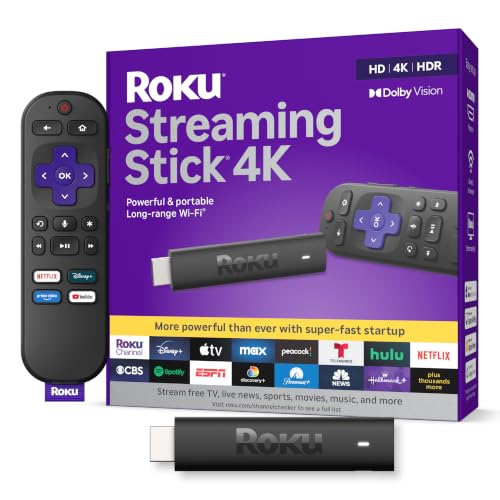
The Roku Streaming Stick 4K is an ultra-compact media streaming device engineered to plug directly into an available HDMI port on modern flat-screen televisions. Designed to deliver an intuitive and fast entertainment experience, this compact player serves as an effortless upgrade for homeowners, apartment renters, and families dealing with slow or outdated smart TV operating systems. Whether you are setting up a dedicated media room, adding smart features to a secondary bedroom display, or turning an older 4K panel into a modern cord-cutting hub, this streaming stick provides immediate access to thousands of streaming services and free live TV channels.
Picture quality remains a central highlight based on manufacturer specifications and user impressions. With support for 4K Ultra HD at 60 frames per second alongside high dynamic range formats like Dolby Vision and HDR10+, the device allows compatible screens to showcase deep black levels, expanded contrast, and rich color accuracy. Streaming blockbuster films or high-profile sporting events on platforms such as Netflix, Disney+, or Prime Video reveals sharp textures and vibrant highlights. The included Roku operating system handles video decoding efficiently, ensuring smooth motion rendering and clean upscaling when viewing standard high-definition programming.
Practical design details make this stick especially appealing for neat home theater setups. Unlike bulkier streaming boxes that require tabletop shelf space, this device plugs flush behind the television, making it an excellent match for wall-mounted displays and minimalist entertainment centers. Its slim profile prevents obstruction of neighboring HDMI inputs, leaving ample room for gaming consoles, Blu-ray players, or soundbar eARC connections. The built-in long-range Wi-Fi receiver is embedded directly along the power cable, which helps minimize signal interference behind dense television chassis and keeps 4K video streams steady across household rooms.
Daily operation is straightforward thanks to the included Roku voice remote. Home viewers can power on the television, adjust audio volume levels, and mute playback directly from the handheld controller, significantly reducing coffee table clutter. The built-in voice search functionality allows users to locate specific actors, genres, or movie titles across various streaming libraries without typing on an onscreen keyboard. Navigation feels snappy, with rapid app launch times that make switching between live news broadcasts, workout videos, and family movie marathons quick and frustration-free.
While this streaming player excels in convenience, a few practical limitations exist. The device requires continuous power from either an included AC adapter or a sufficiently powered USB port on the back of the TV, which adds a short cable run. Home theater enthusiasts seeking hardwired gigabit networking will also note the absence of a native Ethernet port, requiring an optional USB adapter for wired internet. Nevertheless, for streamers, sports fans, and cord-cutters seeking reliable 4K picture quality, robust HDR support, and simple navigation at a reasonable price, the Roku Streaming Stick 4K represents one of the most dependable streaming upgrades available.
High dynamic range makes a noticeable difference when watching movies and prestige television series on modern 4K screens. The Roku Streaming Stick 4K features compatibility with both Dolby Vision and HDR10+, allowing your television to interpret dynamic scene-by-scene metadata for balanced brightness and shadow detail. This helps prevent bright skies from washing out while preserving shadow nuances in darker cinematic sequences.
Because the device automatically detects your display panel capabilities during initial setup, it optimizes the video signal without requiring complicated manual display adjustments. For movie lovers who stream across multiple platforms, having broad HDR format support ensures that content looks as close to the director vision as your television screen allows.
Setting up the Roku Streaming Stick 4K takes only a few minutes. You simply insert the stick into any open HDMI port on your television, connect the included power cable with the embedded Wi-Fi receiver, and plug the USB cable into a wall outlet or compatible USB power port. The on-screen wizard guides viewers through wireless network connection, display resolution detection, and remote programming for television volume and power controls.
The straightforward physical footprint also makes this streaming stick an exceptional choice for travel. Apartment dwellers and frequent travelers can quickly unplug the stick and take their customized subscriptions, watchlists, and settings to dorm rooms, hotel suites, or vacation rentals without needing to sign into unfamiliar smart TV platforms.

Pros
- Swift menu responsiveness and rapid application loading across major streaming platforms
- Comprehensive HDR support including Dolby Vision and HDR10+ alongside Dolby Atmos audio pass-through
- Ethernet jack and Wi-Fi 6 provide versatile, high-speed networking choices for smooth 4K playback
- Backlit, rechargeable voice remote eliminates recurring battery purchases and fumbling in dark home theaters
Cons
- Desktop box form factor requires dedicated shelf space compared to compact streaming sticks
- Demands an external AC wall outlet rather than drawing power directly from standard TV USB ports
- Advanced cloud gaming features are more limited compared to specialized gaming consoles
The Roku Ultra stands as a dedicated high-performance 4K streaming media player tailored to bring modern entertainment capabilities to any living room, bedroom, or dedicated media space. Designed specifically for cord-cutters, movie buffs, sports fans, and busy families, this tabletop unit breathes new life into existing displays by upgrading older smart TV interfaces with an intuitive, lag-free operating system.
Visual and audio performance remain central to the viewing experience. Based on product specifications, the device handles 4K resolution effortlessly while delivering high dynamic range content via Dolby Vision, HDR10+, and standard HDR10. When paired with a capable OLED, QLED, or Mini-LED display, viewers can enjoy deep black levels, wide color gamuts, and balanced highlight details across blockbuster films and live sporting events. For audio enthusiasts, Dolby Atmos pass-through feeds multi-dimensional sound directly to soundbars or AV receivers, ensuring dialogue clarity and deep surround immersion during movie nights.
Under the hood, the hardware provides a noticeably snappy experience, with apps launching rapidly and menus scrolling smoothly. Network stability is anchored by Wi-Fi 6 connectivity, which helps maintain steady bitrates even in homes with multiple active smart devices. Home theater owners who demand rock-solid connections can take advantage of the rear Ethernet port for wired streaming, eliminating buffering during big game live streams or 4K HDR marathons.
The included Roku Voice Remote Pro adds considerable day-to-day convenience to the entertainment setup. Built-in motion-sensing backlighting ensures you can navigate controls in a darkened home theater room without turning on lamps. Hands-free voice commands let viewers launch shows, adjust volume, or search titles across services using simple verbal prompts. Furthermore, the integrated rechargeable battery eliminates disposable battery waste, while the lost remote finder provides an easy way to locate the controller when it slips between couch cushions.
While the player offers substantial capabilities, practical considerations should be kept in mind. Unlike slim streaming sticks that tuck entirely out of sight, the Roku Ultra is a tabletop unit that requires a flat surface near the television, along with an available HDMI port and standard electrical wall outlet. Additionally, viewers interested in heavy cloud gaming services will find the platform focused primarily on video entertainment rather than graphics-intensive interactive gaming.
For apartment renters, suburban homeowners, and budget-conscious tech buyers who want a premium streaming hub without replacing an otherwise great television, the Roku Ultra offers tremendous value. Its blend of broad format support, dependable networking, and comfortable hands-free remote functionality makes it a standout choice for daily household viewing.
Roku OS remains celebrated for its straightforward, uncluttered home screen that lets users organize preferred apps such as Netflix, Max, Prime Video, and Apple TV quickly. The clean design helps families with kids and casual viewers find content without wading through confusing promotional menus or sponsored clutter.
Beyond subscription services, the platform provides direct access to hundreds of free live TV channels, local news, and weather broadcasts via The Roku Channel. Integrated voice controls allow quick cross-app search results, presenting choices based on pricing and platform availability so viewers avoid paying twice for movie rentals.
Private listening flexibility is enhanced with Bluetooth Headphone Mode, which enables direct wireless pairing between the box and your favorite Bluetooth earbuds. This makes late-night television watching, bedroom streaming, or high-volume action movies enjoyable without disturbing resting family members.
Setting up the Roku Ultra takes only a few minutes out of the box. Users simply connect a high-speed HDMI cable to an available port on their television or receiver, plug the power adapter into an outlet, and follow the on-screen guided setup instructions to connect to the home network.
Connectivity options are well suited for versatile home entertainment environments. The inclusion of Wi-Fi 6 delivers efficient wireless range and speed for homes with modern routers, while the physical Ethernet port provides a reliable wired alternative for basement home theaters where wireless signals may be weak.
The compact footprint measures roughly 5 inches across, allowing it to nestle cleanly beside soundbars, atop media consoles, or inside ventilated TV stands without generating clutter or requiring complicated mounting hardware.
The Technical Reality of Using Roku Hardware on an Ultra HD Television
Technical compatibility and visual fidelity are two distinct aspects of modern home entertainment. You do not technically require a 4K player just to make your television show a picture, as any standard 1080p streaming device will establish an HDMI handshake with an Ultra HD display. However, if your goal is to experience genuine Ultra HD detail, wide color saturation, and advanced dynamic range, you absolutely need a 4K-capable media player. Operating an HD-only device on an Ultra HD screen severely caps your visual output, leaving the television hardware underutilized and dependent entirely on artificial pixel duplication.
How Display Panels Handle Lower Resolution Video Feeds
Every modern Ultra HD display contains a fixed pixel grid consisting of 3840 horizontal pixels and 2160 vertical pixels. When an external media player outputs a standard 1080p signal, it delivers roughly two million pixels of visual data to a panel that requires over eight million pixels to create a full image. The internal image processor inside your television must bridge this gap by calculating where to insert millions of missing pixels in real time. Depending on the processing engine in your television, this scaling interpolation can introduce visible artifacts, soften sharp edges, and create a slightly hazy appearance across large screen sizes.
Supplying your screen with a native 4K signal eliminates the need for mathematical estimation by establishing a direct pixel-to-pixel mapping between the source file and your panel. Streaming content from dedicated Ultra HD devices delivers precise, uncompressed pixel coordinates that align naturally with the display architecture. High-frequency textures such as fabric weaves, distant foliage, and facial details remain crisp and distinct without edge haloing. For viewers sitting at standard viewing distances from screens measuring 55 inches or larger, the visual distinction between native Ultra HD rendering and scaled high definition is immediately apparent.
The Hidden Visual Loss: High Dynamic Range Formats
Resolution represents only one component of modern picture quality, while dynamic range and color depth dictate contrast impact and realism. Standard high-definition streaming players are limited to eight-bit color depth and standard dynamic range, which limits the spectrum of light and shade a panel can reproduce. In contrast, 4K streaming platforms routinely broadcast in HDR10, HDR10+, and Dolby Vision formats with ten-bit or twelve-bit color grading. Without a streaming device engineered to decode these modern formats, your television cannot activate its wide color gamut or drive its backlight to peak specular highlights.
Dynamic metadata formats such as Dolby Vision instruct your television on how to map luminance frame by frame according to your panel capabilities. This dynamic instruction prevents blown-out bright skies while preserving shadow gradation in dark, moody scenes. When you stream through an HD player that lacks HDR processing, the signal sends a flat luminance curve that compresses both shadow details and bright highlights. Premium television backlights cannot utilize their local dimming capabilities effectively when receiving a flat SDR input, resulting in duller colors and washed-out contrast throughout the presentation.
Built-In Smart TV Applications Versus External Roku Hardware
Many modern televisions already include integrated streaming operating systems, prompting buyers to question the necessity of an outboard player. Integrated smart platforms often suffer from limited onboard processing memory, causing menus to lag, applications to crash, and system updates to cease after a few years. An outboard streaming device offloads all interface processing, networking, and application decoding to dedicated hardware designed specifically for media playback. This separation of duties keeps your viewing experience snappy, responsive, and free from the clutter of manufacturer-sponsored banner ads that dominate many factory television home screens.
Manufacturer update schedules frequently abandon older smart television interfaces long before the physical display panel reaches the end of its useful lifespan. Using an external streaming device protects your entertainment setup against obsolete application versions and discontinued streaming services. In addition, standalone streaming players offer uniform remote control layouts and predictable menu structures across multiple rooms in your home. If you relocate between different screens, your preferences, channel layouts, and sign-in credentials remain organized on your portable player without requiring complex panel reconfiguration.
Analyzing the Roku Streaming Hardware Lineup
The current product line provides clear divisions between standard high-definition playback and advanced Ultra HD capability. Entry-level options such as the Roku Streaming Stick HD with Voice Remote are engineered strictly for 1080p outputs, making them suitable for compact bedroom displays or older non-4K panels. Connecting this HD model to an Ultra HD screen will successfully display a picture, but the signal output is locked at standard high definition. Because this stick cannot decode Ultra HD streams or HDR metadata, your 4K television will never receive native Ultra HD content through this specific player.
Viewers seeking true Ultra HD reproduction have several compact and tabletop form factors to evaluate based on their setup requirements. The Roku Streaming Stick Plus with Voice Remote provides native 4K resolution alongside HDR10+ support, plugging directly into your television port to eliminate dangling power bricks. Stepping up to the Roku Streaming Stick 4K with Voice Remote adds full Dolby Vision decoding and a long-range wireless receiver, which significantly improves connection reliability in rooms situated far from your home router. Both compact devices hide neatly behind mounted panels while drawing adequate operating power directly from compatible display ports or standard wall adapters.
For dedicated home entertainment hubs where performance and connectivity matter most, desktop streaming players offer superior stability. The Roku Ultra LT (2023) HD/4K/HDR Dolby Vision includes a quad-core processor, an integrated Ethernet port, and a remote with a headphone jack for private listening. At the pinnacle of the lineup, the Roku Ultra, Ultimate Streaming Player features an even faster quad-core architecture, cinematic Dolby Atmos audio passthrough, and a rechargeable Voice Remote Pro with backlit buttons and hands-free voice controls. Choosing between these tiers depends largely on whether your installation demands physical wired networking, premium remote controls, or a discrete hidden stick profile.
Broadband Bandwidth Demands for Ultra HD Streaming
Streaming native Ultra HD content requires substantially more network throughput than standard high-definition video feeds. While a standard 1080p stream typically consumes between three and five megabits per second, an uncompressed or high-bitrate 4K HDR stream generally demands fifteen to twenty-five megabits per second of continuous data transfer. If your home network experiences signal dropouts or heavy congestion, streaming applications will automatically downscale the playback resolution to prevent buffering pauses. Maintaining a robust wireless connection or utilizing a physical wired Ethernet cable ensures your streaming device receives the uninterrupted bandwidth required for peak visual clarity.
Network stability becomes even more critical when streaming high-frame-rate action and live broadcasts across advanced display panels. When paired with high-refresh displays such as Mini-LED screens for sports, data drops can cause jarring frame stutter and pixelated macroblocking during rapid camera pans. Compact streaming sticks placed directly against the rear metal chassis of a television can also encounter wireless interference from internal display power supplies. Choosing hardware equipped with dedicated long-range Wi-Fi receivers or opting for a player with a physical Ethernet port provides the signal resilience necessary for pristine high-bitrate streaming.
Audio Connectivity and Surround Sound Processing
Video fidelity represents only half of the home theater experience, as immersive sound formats significantly heighten viewing engagement. While standard streaming sticks can output basic stereo and compressed multichannel surround sound, advanced 4K players add support for object-based audio codecs like Dolby Atmos. When connected to a television that supports audio return channel passthrough, these players route complex soundscapes directly to your soundbar or multichannel AV receiver. This architecture allows overhead spatial audio cues, dynamic panning, and crisp vocal dialogue to render accurately throughout your room.
Integrated television speakers often sound thin and muffled due to the acoustic limitations of ultra-slim cabinet construction. Viewers who prioritize speech intelligibility and dynamic acoustic range frequently pair external streaming hardware with televisions optimized for audio clarity or dedicated audio systems. Premium players like the Roku Ultra feature advanced volume leveling, dialogue enhancement modes, and remote-based private listening options that allow you to plug in headphones directly. These versatile audio features ensure you can enjoy cinematic movie nights or quiet late-night viewing without disturbing other members of your household.
Optimizing HDMI Port Settings and Signal Formats
Plugging a 4K streaming player into your television does not always guarantee that your display is receiving an optimal Ultra HD signal. Many television manufacturers ship their sets with HDMI ports configured to legacy compatibility modes by default to prevent handshake errors with older video gear. To unlock full 4K resolution at sixty frames per second alongside HDR color reproduction, you must navigate into your television input settings. Depending on the brand, you must switch the corresponding HDMI port setting from standard to enhanced, full color, or advanced format.
Failing to enable enhanced HDMI signal formats can lock your player into a restricted 4K thirty-hertz mode or disable HDR signaling entirely. You can confirm your active transmission status by checking the display information banner on your television while streaming compatible content. The on-screen diagnostics should clearly indicate a 3840 x 2160 resolution signal operating at sixty hertz alongside an active Dolby Vision or HDR10 badge. Taking a few moments to verify these input parameters ensures that your television hardware fully utilizes the high-bandwidth data stream delivered by your external player.
Troubleshooting Handshake Errors and Common Setup Pitfalls
High-bandwidth Ultra HD streams rely on High-bandwidth Digital Content Protection, commonly known as HDCP 2.2 or HDCP 2.3, to safeguard digital content. If you connect your player through an older audio receiver or use an outdated HDMI cable, you may encounter black screens, flashing static, or content error messages. Modern 4K streaming requires an HDMI cable rated for at least eighteen gigabits per second to carry Ultra HD video and dynamic metadata simultaneously. Replacing aging cables with certified premium high-speed cables promptly resolves the majority of signal dropouts and blank screen errors.
Another frequent setup mistake involves powering compact streaming sticks directly from low-amperage television USB service ports. Many television USB ports only provide half an amp of current, which is insufficient to sustain the power demands of continuous 4K decoding and wireless data transfer. Underpowered streaming sticks can experience unexpected reboots, sluggish navigation responsiveness, and dropped network connections during high-action movie sequences. Utilizing the included manufacturer wall adapter ensures consistent electrical current, keeping your streaming stick stable, cool, and fully responsive under heavy playback loads.
Decision Criteria: Which Player Fits Your Viewing Environment
Selecting the appropriate streaming player depends on your room layout, television capabilities, and everyday usage habits. If your television is a secondary 1080p display in a kitchen or guest bedroom, a standard high-definition player provides reliable navigation and app access without unnecessary expense. However, if you own an Ultra HD television in your primary living space, purchasing a 4K-capable player is essential to avoid throttling your panel visual capabilities. The modest investment in a 4K streaming device ensures that your display renders every movie, sports match, and series with maximum clarity and color depth.
For wall-mounted installations where clean aesthetics and hidden cables take priority, compact streaming sticks with long-range wireless antennas offer an elegant solution. If your media console houses an external soundbar, gaming consoles, and a wired home network, a flagship desktop streaming box delivers maximum processing speed and versatile audio options. Matching your source hardware to your display specifications protects your investment in modern screen technology. By pairing an Ultra HD television with a fully compatible 4K streaming device, you ensure your entertainment system consistently delivers the breathtaking visual performance it was built to achieve.





Write Your Review
No reviews yet. Be the first to share your experience!