


Eliminating Streaming Stutter and Interface Lag on Modern Displays
Sluggish smart TV interfaces and sudden app crashes frequently disrupt viewing, especially when built-in processors struggle with high-bitrate live video feeds. Connecting an external streaming player relieves that hardware strain, delivering responsive navigation and consistent playback across all platforms. Sourcing the best android tv box for iptv ensures smooth frame pacing whether paired with an inky-black OLED display or a high-luminance Mini-LED screen. Dedicated video decoding unlocks true ultra-high-definition 4K resolution clarity, letting fast-paced sports and live broadcasts stream without frame drops.
Viewing distance also shapes your visual experience, with standard guidelines suggesting 7 to 9 feet for a 65-inch screen and 9 to 11 feet for 75-inch panels. Modern living spaces often face window reflections, making vibrant HDR10+ and Dolby Vision dynamic range essential for maintaining shadow detail. Passing surround sound through HDMI eARC to a soundbar preserves crisp dialogue alongside punchy bass. Reviewing hardware specifications and verified owner feedback shows that dedicated quad-core streaming boxes offer the processing headroom needed for reliable Wi-Fi streaming.

Pros
- Generous 32GB internal storage handles dozens of streaming apps with ease
- Broad audiovisual format support featuring Dolby Vision, HDR10+, Dolby Atmos, and DTS:X
- Wi-Fi 6 connectivity ensures quick buffer-free loading on compatible home networks
- Intuitive Google TV interface provides streamlined content aggregation and smart voice control
Cons
- System memory of 2GB is optimized for streaming rather than heavy 3D gaming multitasking
- Reaching maximum wireless speeds requires a compatible home Wi-Fi 6 router setup
- Compact chassis lacks an integrated Ethernet jack for direct wired network hookups
The Xiaomi Google TV Box S 3rd Gen is a compact 4K Ultra HD streaming media player engineered to modernize existing televisions, computer monitors, and home theater projectors. Designed for cord-cutters, apartment renters, budget-conscious homeowners, and movie fans, this external hub offers a straightforward way to enjoy current smart platform capabilities without buying a brand-new television. Whether you want to upgrade an aging living room set, add smart apps to a basement projector, or equip a bedroom display with quick streaming, this compact box delivers dependable performance.
In terms of video and audio support, product specifications highlight full compatibility with 4K UHD resolutions alongside premium dynamic HDR formats such as Dolby Vision and HDR10+. For movie lovers and sports fans, this means bright highlights, natural color saturation, and improved shadow detail during intense viewing sessions. Audio capabilities are equally well-rounded, offering passthrough support for Dolby Atmos and DTS:X. When connected to a capable soundbar or surround sound system, viewers can expect clear dialogue presentation and spatial effects that make family movie night or weekend football watch parties much more engaging.
Under the hood, the device features an energy-efficient 64-bit 6nm quad-core processor clocking up to 2.5GHz, paired with 2GB of system memory and 32GB of internal flash storage. This setup allows for snappy navigation across the Google TV interface, quick app loading times, and plenty of space to install streaming services like Netflix, Disney+, and YouTube. Connectivity is bolstered by modern Wi-Fi 6 support utilizing OFDMA and MU-MIMO technology, which helps maintain steady bitrates even in busy households with multiple connected devices. The included HDMI 2.1 port ensures reliable digital delivery to modern 4K displays.
Everyday operation feels straightforward thanks to the included 360-degree Bluetooth remote control, which eliminates line-of-sight frustrations and provides one-touch access to Google Assistant for voice searches. Built-in Google Cast also enables rapid media sharing directly from Android and iOS smartphones. On the practical side, the 2GB memory footprint is tailored primarily for media consumption rather than heavy 3D mobile gaming, and unlocking top network throughput requires a compatible Wi-Fi 6 router.
For homeowners and cord-cutters looking to enhance older displays, or streamers frustrated with laggy built-in television operating systems, this Xiaomi streaming box presents a practical, feature-packed solution. It brings leading HDR standards, reliable wireless streaming, and modern voice control into an unobtrusive footprint that easily tucks away behind any entertainment center.
The integrated Google TV platform brings together titles from your favorite subscriptions into a clean, unified dashboard. Instead of jumping in and out of individual applications, viewers can browse personalized recommendations based on their viewing habits, making it simple to pick up where you left off on binge-worthy series.
The included 360-degree Bluetooth remote features dedicated voice control powered by Google Assistant. Users can search for movie titles, launch specific streaming apps, ask about weather updates, or control compatible smart home lighting without needing direct line of sight to the box. Built-in Google Cast further expands usability by letting family members beam videos, music, and vacation photos straight from a mobile phone to the big screen.
Setting up the streaming box is fast and beginner-friendly, requiring only an HDMI connection to your television and a standard wall outlet for power. Once plugged in, on-screen prompts guide users through pairing the Bluetooth remote, connecting to Wi-Fi, and signing into a Google account.
Connectivity options are anchored by modern Wi-Fi 6 and HDMI 2.1, supporting stable data throughput and reliable handshake communication with modern 4K televisions and AV receivers. Its compact dimensions make it easy to hide out of sight behind wall-mounted TVs or slide into tight media console shelves without creating cable clutter.
Pros
- Crisp 4K Ultra HD streaming upgrade for non-smart or aging televisions
- Intuitive Android TV platform with access to massive Google Play Store app library
- Responsive Google Assistant voice remote and built-in Chromecast convenience
- Includes a dedicated high-speed HDMI cable for easy out-of-the-box installation
Cons
- Requires an available HDMI port and external power outlet near the television
- Relies heavily on a stable home Wi-Fi network for smooth 4K video playback
- Lacks dedicated Ethernet jack for direct wired internet connections without third-party adapters
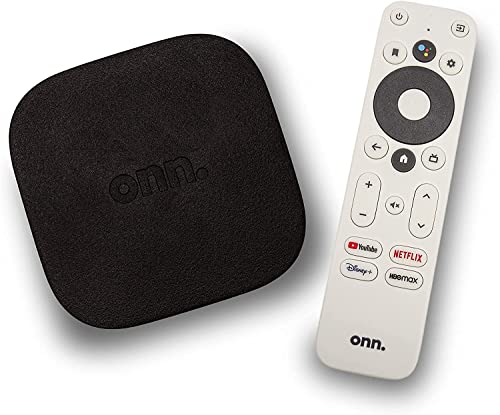
The ONN Android TV 4K UHD Streaming Device is a compact digital media receiver designed to transform any standard HDMI-equipped display into a full-featured entertainment center. Ideal for apartment renters, cord-cutters, college students, and homeowners outfitting a guest bedroom or basement hangout, this device delivers modern smart capabilities without demanding an expensive television replacement. Whether you want to refresh an older 1080p flat-screen or unlock smooth streaming on an entry-level 4K display from brands like Samsung, Sony, Vizio, Hisense, or TCL, this unit provides an accessible gateway to digital entertainment.
On the performance side, this streamer outputs sharp 4K Ultra HD resolution, delivering four times the pixel density of standard Full HD. When paired with a compatible 4K television, movie lovers and sports fans can enjoy clear detail, crisp text, and vibrant colors during Super Bowl watch parties or weekend family movie nights. The device also supports high-quality audio processing designed to enhance dialogue clarity and provide a balanced listening mix, making late-night binge-watching easier to enjoy without constantly reaching for the volume button.
Running on the reliable Android TV operating system, the streamer grants access to thousands of streaming platforms and tools through the Google Play Store, including Netflix, Prime Video, Disney+, and YouTube. The included voice remote features a dedicated Google Assistant button, letting you search for shows, check the weather, or jump between applications using simple voice commands. With Chromecast built-in, casting personal videos, vacation photos, or music playlists from your iOS or Android phone to the big screen requires only a single tap.
Hardware setup is refreshingly straightforward thanks to the included high-speed HDMI cable and lightweight form factor. The low-profile black unit fits discreetly behind wall-mounted displays or rests neatly on a media console shelf, keeping wire clutter down to a minimum. Connecting to your home wireless network and signing into your Google account takes only a few minutes, making it an appealing option for family members who appreciate simple, user-friendly technology.
While the streamer performs reliably for standard household streaming, there are a few practical limitations to keep in mind. The unit relies on Wi-Fi for its internet connection and does not include a built-in Ethernet port, which means households with congested wireless networks might experience buffering during peak evening streaming hours. Additionally, you will need both an open HDMI port on your display and an available electrical outlet nearby to supply dedicated power.
For budget-conscious shoppers, secondary room setups, and streamers looking to bypass sluggish proprietary TV operating systems, the ONN 4K Android TV Streaming Device offers exceptional everyday practicality. It turns any compatible television into a responsive media hub, making it an excellent investment for casual gaming, weekend movie marathons, and daily news updates.
The Android TV platform offers one of the most versatile smart ecosystems available for modern living room setups. Users can explore a vast library of entertainment, fitness, news, and gaming apps available via the Google Play Store, tailoring their home screen to highlight their favorite subscriptions.
Built-in Google Assistant elevates hands-free convenience, allowing streamers to launch specific titles, pause playback, or manage compatible smart home gear directly through the voice remote microphone. Integrated Chromecast support further expands utility, letting friends and family effortlessly mirror content from mobile devices during social gatherings.
Setting up the ONN streaming media player takes just a few straightforward steps right out of the box. Simply plug the included high-speed HDMI cable into an open input on your television, connect the power adapter, and switch your display input to begin guided on-screen instructions.
The configuration process walks you through linking your home Wi-Fi network and signing into your Google profile. Compact dimensions ensure the device easily conceals behind thin wall mounts, making it well suited for clean apartment layouts, dorm rooms, or RV entertainment systems.

Pros
- Substantial 32GB internal storage provides plenty of room for streaming apps and system updates.
- Comprehensive HDR format support including both Dolby Vision and HDR10+ for optimal color and contrast.
- Clean Google TV interface brings personalized content curation and dependable Google Assistant voice search.
- HDMI 2.1 cable and dedicated voice remote are included in the box for hassle-free setup.
Cons
- Limited to 2GB of RAM, which may slow down heavy background multitasking or demanding 3D gaming.
- Includes only a single USB 2.0 port, limiting simultaneous wired peripherals and fast external storage.
- Lacks a dedicated Ethernet port, making streaming stability dependent on your home Wi-Fi network strength.
The Xiaomi TV Box S 3rd Gen is a compact 4K streaming media player designed to bring modern smart television capability to virtually any display with an HDMI port. For cord-cutters, apartment renters, college students, and homeowners looking to revitalize an aging flat screen without purchasing an entirely new television, this media hub delivers an accessible way to access current streaming ecosystems. It serves as a practical bridge for secondary bedroom displays, basement home theater setups, or guest rooms that need quick access to major entertainment platforms.
Based on product specifications, video performance reaches full 4K Ultra HD at 60 frames per second, complemented by dual high dynamic range support via Dolby Vision and HDR10+. This broad HDR compatibility ensures that compatible 4K HDR TVs produce balanced highlights, rich contrast levels, and vibrant color accuracy across platforms like Netflix, Prime Video, and Disney+. For audio enthusiasts running an external soundbar or multi-channel audio receiver, the unit supports Dolby Audio and DTS:X processing, which helps maintain crisp dialogue clarity and expansive surround dynamics during movie nights or sports watch parties.
The heart of the user experience revolves around Google TV, which aggregates movies, live television, and shows across multiple subscriptions into an intuitive home screen. Navigating menus feels snappy thanks to the quad-core processor, while the onboard 32GB of storage stands out as a clear advantage over competing streaming sticks that commonly offer only 8GB. This extra capacity allows users to install dozens of streaming apps, utility tools, and casual games without constantly managing storage limits. The included voice remote integrates Google Assistant, making voice searches for actors, titles, and live sports schedules quick and accurate.
In terms of build and design, the media box maintains a pocket-sized square footprint measuring under four inches wide, allowing it to sit unnoticed on a media console or tuck behind a wall-mounted television. Connectivity includes an HDMI 2.1 interface for steady digital transmission, dual-band Wi-Fi for wireless streaming, and Bluetooth 5.2 for pairing wireless headphones or gamepads. A single USB 2.0 port is included for connecting flash drives or local media storage, though users should be aware that the device lacks a dedicated Ethernet jack, meaning high-bitrate 4K streaming depends entirely on home Wi-Fi coverage.
For families, sports fans, and movie lovers seeking an affordable way to upgrade an existing living room or bedroom television, this streaming player represents solid practical value. While hardcore gamers may want a dedicated console and power users might miss wired Ethernet, everyday viewers will appreciate the seamless combination of Dolby Vision playback, responsive voice navigation, and generous app storage. It provides a simple, dependable upgrade path that keeps your display relevant for years of streaming entertainment.
Google TV serves as the centerpiece of this streaming device, organizing your preferred subscriptions, movie rentals, and live TV channels into customized rows. Instead of jumping in and out of individual applications, viewers can browse unified recommendations based on viewing history across services like YouTube, Max, and Peacock.
The included remote features direct microphone integration with Google Assistant, allowing users to search across services, launch specific episodes, check weather updates, and control compatible smart home lights without typing. Integrated Google Cast functionality makes streaming home videos, photo albums, or web tabs directly from an Android, iPhone, or laptop completely seamless.
Setting up the Xiaomi TV Box S 3rd Gen requires only plugging the included power adapter into an outlet and connecting the included HDMI cable directly to your television. The on-screen Google Home setup guides users through Wi-Fi connection and account sign-in using a smartphone in just a few minutes.
With Bluetooth 5.2 onboard, viewers can pair wireless headphones for late-night movie watching without disturbing family members, or connect compatible wireless controllers for lightweight Android gaming. The USB 2.0 port also supports thumb drives for playing local video and audio files through media player apps.
Frequently Asked Questions
Does an external Android streaming box improve picture quality on a 4K TV?
Yes, an external streaming player enhances playback stability, color depth, and motion rendering on your television. Dedicated processors paired with Dolby Vision and HDR10+ send clean, uncompressed video signals to your screen panel. This eliminates the interface lag and frame drops common to underpowered built-in smart TV processors.
How much internal storage is ideal for the Best Android Tv Box For Iptv in 2026?
At least 16GB to 32GB of internal storage is ideal to prevent app slowdowns and system memory bottlenecks. Streaming platforms and personalized content guides fill local storage quickly, making players like the Xiaomi TV Box S with 32GB ROM far more dependable. Ample storage space also preserves room for streaming buffer data, maintaining fluid playback without stuttering.
Can you pass Dolby Atmos surround sound from an Android box to a soundbar?
Yes, streaming devices supporting Dolby Atmos and DTS:X pass multi-channel audio through your television via HDMI eARC. Review our guide on Dolby Atmos passthrough setup to ensure your screen passes raw bitstream audio directly to your soundbar. This direct link eliminates audio lip-sync delay during cinematic movie nights.
Does Wi-Fi 6 support eliminate buffering on live 4K streams?
Yes, Wi-Fi 6 integration offers expanded bandwidth and lower latency to handle demanding 4K video feeds. While some setups rely on a separate wireless adapter network upgrade for older hardware, integrated dual-band Wi-Fi 6 hardware provides an immediate, low-latency connection. This network stability prevents sudden resolution drops during peak evening viewing hours.
What is the optimal television viewing distance for 4K streaming?
The ideal viewing distance for a 65-inch 4K screen is 7 to 9 feet, while 75-inch screens view best from 9 to 11 feet away. Sitting at these distances allows your eyes to resolve full 3840 x 2160 detail without spotting individual pixels. Proper placement also maximizes immersion for live television broadcasts and HDR movie sessions.






Write Your Review
No reviews yet. Be the first to share your experience!