
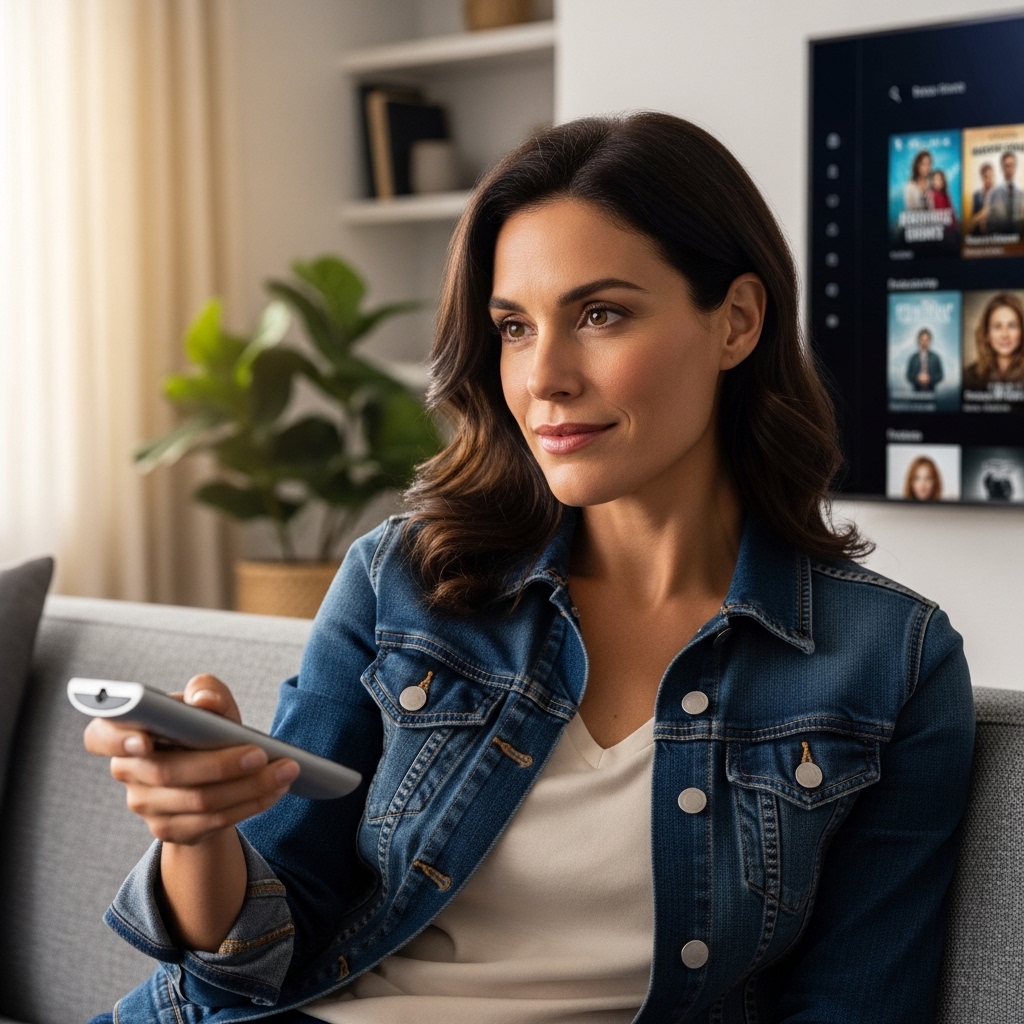

Eliminating Interface Lag and Streaming Headaches
Clunky menus, freezing apps, and delayed remote responses can instantly ruin a relaxing movie evening. Selecting the best android smart tv or compatible streaming hardware helps bypass sluggish proprietary software, granting smooth access to the Google Play ecosystem, intuitive voice navigation, and personalized content feeds. Whether you are setting up a panel at an optimal viewing distance of seven to nine feet or seeking a flexible display for kitchen counters, having responsive processing and vibrant 4K motion makes all the difference. Proper connectivity also matters, especially when pairing external media devices or learning what UHD means on a display for sharper picture clarity across fast-paced streaming sessions.
Every entertainment environment brings unique trade-offs between panel brightness, viewing angles, and physical footprint. Dedicated media rooms benefit from deep black levels and precise contrast, while sunlit spaces demand higher peak luminance to suppress harsh daytime reflections. Audio performance deserves equal attention, where features like HDMI eARC passthrough ensure dialogue remains crisp without muddy resonances. Careful analysis of operating systems, hardware memory, and verified user feedback ensures your chosen display setup delivers reliable performance for daily entertainment.

Pros
- Mobile wheeled base and built-in battery offer genuine cord-free convenience across different rooms
- Direct Google Play access enables smooth standalone streaming without requiring extra dongles
- Responsive 10-point capacitive touchscreen makes app navigation quick and natural for kids and adults alike
- Integrated 128GB storage provides ample room for caching video workouts, games, and presentation files
- HDMI connection adds flexibility for hookups to video game consoles and laptops
Cons
- Wireless screen mirroring does not support native AirPlay or Google Cast casting protocols for copy-protected apps
- 1080p resolution lacks the ultra-fine pixel density of 4K displays when viewed from close distances
- Not weather-sealed, so outdoor viewing must remain strictly in dry, covered patio settings
The ApoloSign 32-inch smart portable touchscreen TV rethinks how video displays fit into a modern living space. Instead of being anchored permanently to a drywall mount or an entertainment console, this display sits on a smooth rolling pedestal stand that moves wherever life takes you. It acts essentially as a giant, interactive Android tablet on wheels, designed to cater to apartment renters, busy parents, remote professionals, and casual streamers who need flexible entertainment without drilling holes or rearranging heavy furniture.
Visual performance centers around a 32-inch Full HD 1080p panel with responsive 10-point touch control. The screen produces crisp text, punchy colors, and respectable contrast for daily streaming, morning news, and YouTube workout videos. While it does not feature the deep black levels of an OLED or the ultra-high brightness of high-end HDR living room sets, it handles typical indoor ambient lighting reliably. The capacitive touch response feels fluid, allowing family members to pinch, swipe, and scroll through apps just like they would on an oversized smartphone.
Hardware functionality is where this rolling display stands out. Running an official Google EDLA certified Android 16 build, users get direct native access to the Google Play Store. You can download major streaming staples such as Netflix, Hulu, Prime Video, and Disney+, alongside productivity software like Zoom for virtual meetings. Backed by 8GB of system memory and 128GB of internal storage, app launch speeds remain quick, and multitasking feels stable. The built-in 15000mAh rechargeable battery provides up to 6 hours of cordless playback, giving you the freedom to roll the unit to the kitchen counter for recipes or out to a covered deck for evening sports.
Practical features continue with the physical stand and input options. The weighted base ensures solid balance while maneuvering across hardwood, tile, or low-pile rugs. The display height and angle adjust to suit standing desk work, couch-side binge sessions, or floor-mat yoga routines. For external media, an HDMI port on the chassis allows gamers to connect a Nintendo Switch or PlayStation, while a dedicated voice remote gives you hands-free search capability across the Android interface when you are relaxing out of arm's reach.
There are a few realistic trade-offs to keep in mind before buying. The screen mirroring function supports local media and device sharing, but it does not support AirPlay, Google Cast, or casting protected streams from external mobile devices. Users should instead run streaming services directly through the onboard Android apps. Additionally, while 1080p looks sharp from normal viewing distances, movie purists used to 4K resolution may notice reduced sharpness when sitting very close to the screen.
For homeowners and apartment dwellers seeking a multi-functional secondary screen, the ApoloSign Gen2 rolling display represents an exceptionally practical solution. It bridges the gap between a portable tablet, an interactive family organizer, and a mobile bedroom television. If your daily routine involves moving from home gym workouts to desk work and late-night movie watching, this portable display delivers genuine everyday flexibility.
Powered by an EDLA certified Android 16 operating system, this rolling smart screen gives you an authentic Google Play environment right out of the box. You are not locked into a proprietary or stripped-down app store, making it simple to install familiar favorites such as Spotify, YouTube Kids, and social streaming platforms. The included voice remote supports quick voice searches, which proves handy when your hands are busy in the kitchen or during an intense workout.
The built-in 15000mAh battery eliminates the constant hassle of hunting for an electrical wall outlet. Depending on volume and brightness settings, the battery sustains up to 6 hours of continuous use. The smooth-gliding caster wheels allow effortless transport between the patio, kitchen island, and living room, making it one of the most versatile secondary displays available for shared family households.
Setting up the ApoloSign portable TV involves securing the display to the mobile column stand, an intuitive process that takes minimal time. Once powered on, connecting to your home 5GHz Wi-Fi network and logging into your Google account gets your personalized dashboard and app library running within minutes.
In addition to wireless connectivity and Bluetooth pairing for headphones or external speakers, the unit features an accessible HDMI input. This port allows users to transform the screen into a mobile monitor for remote laptop work or a portable gaming station for consoles. While wireless casting is restricted to local photos and documents rather than copyright-protected streaming feeds, the native app compatibility through Android covers everyday entertainment needs with ease.
Pros
- Crisp 4K Ultra HD streaming upgrade for non-smart or aging televisions
- Intuitive Android TV platform with access to massive Google Play Store app library
- Responsive Google Assistant voice remote and built-in Chromecast convenience
- Includes a dedicated high-speed HDMI cable for easy out-of-the-box installation
Cons
- Requires an available HDMI port and external power outlet near the television
- Relies heavily on a stable home Wi-Fi network for smooth 4K video playback
- Lacks dedicated Ethernet jack for direct wired internet connections without third-party adapters
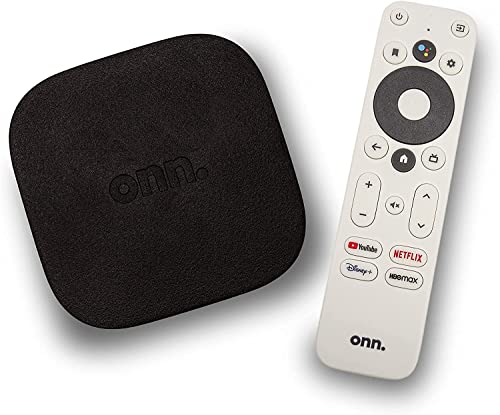
The ONN Android TV 4K UHD Streaming Device is a compact digital media receiver designed to transform any standard HDMI-equipped display into a full-featured entertainment center. Ideal for apartment renters, cord-cutters, college students, and homeowners outfitting a guest bedroom or basement hangout, this device delivers modern smart capabilities without demanding an expensive television replacement. Whether you want to refresh an older 1080p flat-screen or unlock smooth streaming on an entry-level 4K display from brands like Samsung, Sony, Vizio, Hisense, or TCL, this unit provides an accessible gateway to digital entertainment.
On the performance side, this streamer outputs sharp 4K Ultra HD resolution, delivering four times the pixel density of standard Full HD. When paired with a compatible 4K television, movie lovers and sports fans can enjoy clear detail, crisp text, and vibrant colors during Super Bowl watch parties or weekend family movie nights. The device also supports high-quality audio processing designed to enhance dialogue clarity and provide a balanced listening mix, making late-night binge-watching easier to enjoy without constantly reaching for the volume button.
Running on the reliable Android TV operating system, the streamer grants access to thousands of streaming platforms and tools through the Google Play Store, including Netflix, Prime Video, Disney+, and YouTube. The included voice remote features a dedicated Google Assistant button, letting you search for shows, check the weather, or jump between applications using simple voice commands. With Chromecast built-in, casting personal videos, vacation photos, or music playlists from your iOS or Android phone to the big screen requires only a single tap.
Hardware setup is refreshingly straightforward thanks to the included high-speed HDMI cable and lightweight form factor. The low-profile black unit fits discreetly behind wall-mounted displays or rests neatly on a media console shelf, keeping wire clutter down to a minimum. Connecting to your home wireless network and signing into your Google account takes only a few minutes, making it an appealing option for family members who appreciate simple, user-friendly technology.
While the streamer performs reliably for standard household streaming, there are a few practical limitations to keep in mind. The unit relies on Wi-Fi for its internet connection and does not include a built-in Ethernet port, which means households with congested wireless networks might experience buffering during peak evening streaming hours. Additionally, you will need both an open HDMI port on your display and an available electrical outlet nearby to supply dedicated power.
For budget-conscious shoppers, secondary room setups, and streamers looking to bypass sluggish proprietary TV operating systems, the ONN 4K Android TV Streaming Device offers exceptional everyday practicality. It turns any compatible television into a responsive media hub, making it an excellent investment for casual gaming, weekend movie marathons, and daily news updates.
The Android TV platform offers one of the most versatile smart ecosystems available for modern living room setups. Users can explore a vast library of entertainment, fitness, news, and gaming apps available via the Google Play Store, tailoring their home screen to highlight their favorite subscriptions.
Built-in Google Assistant elevates hands-free convenience, allowing streamers to launch specific titles, pause playback, or manage compatible smart home gear directly through the voice remote microphone. Integrated Chromecast support further expands utility, letting friends and family effortlessly mirror content from mobile devices during social gatherings.
Setting up the ONN streaming media player takes just a few straightforward steps right out of the box. Simply plug the included high-speed HDMI cable into an open input on your television, connect the power adapter, and switch your display input to begin guided on-screen instructions.
The configuration process walks you through linking your home Wi-Fi network and signing into your Google profile. Compact dimensions ensure the device easily conceals behind thin wall mounts, making it well suited for clean apartment layouts, dorm rooms, or RV entertainment systems.

Pros
- Ready to use straight out of the box with zero programming or pairing necessary
- Convenient quick-launch shortcut buttons for key streaming apps
- Strong infrared signal working at distances up to 40 feet
- Extensive compatibility across various Philips 4K Android television series
Cons
- Does not include voice control or an integrated microphone for Google Assistant
- Requires two AAA batteries that must be purchased separately
- Infrared operation requires a direct line of sight to the television sensor
The TOPKIND Replacement Remote Control is designed specifically as a direct replacement for owners of Philips Android smart TVs who need to replace a lost, chewed, or worn-out factory remote. Whether you are outfitting an apartment living room, finishing a basement home theater, or managing a bedroom television setup, having a responsive controller is essential for enjoying everyday entertainment. This remote serves homeowners, renters, busy families with kids, and cord-cutters who want an affordable, functional way to navigate their smart TV platform without wrestling with complicated universal remote pairing procedures.
Daily smart TV operation relies heavily on seamless navigation, and this replacement unit is engineered to handle menu browsing, volume adjustments, and input switching effortlessly. Having quick access to television settings allows viewers to tweak picture modes for movie night, engage low latency game modes on connected gaming consoles, or switch audio outputs toward an external soundbar via HDMI eARC. Dedicated quick-access shortcut buttons for Netflix, YouTube, VUDU, and Google Play let streamers jump right into 4K HDR movies or family shows without navigating through nested home screen menus.
Built with practical durability in mind, the remote features a lightweight, ergonomic chassis measuring just over eight inches long and weighing under 0.2 pounds. The internal smart chip uses mature infrared technology to transmit signals across distances exceeding 40 feet, making it well-suited for open-concept floor plans and larger living spaces. With a fast 0.2-second response latency, switching between sports broadcasts, streaming series, or news updates feels crisp and dependable.
Setup could not be simpler for anyone looking to avoid tech headaches. There is no code searching or manual sync process required; you simply slide in two standard AAA batteries, and the remote communicates directly with compatible Philips Android TV models. While this simplicity is a huge plus, buyers should note that this model operates exclusively via infrared and lacks an internal microphone for Google Assistant voice commands. As with any standard IR remote, keeping a clear line of sight to the TV sensor ensures reliable operation.
For anyone seeking a cost-effective, straightforward way to regain control over their Philips 4K smart TV, this replacement remote delivers solid value. It eliminates the frustration of unresponsive buttons during late-night streaming marathons or Sunday football watch parties, providing a dependable clicker that keeps family entertainment running smoothly.
This replacement clicker is engineered to support an extensive selection of Philips Android 4K smart TVs, including popular series such as 50PFL5806/F7, 75PFL5604/F7, 55PFL5604/F7, 43PFL5766/F6, and 65PFL5704/F7. It serves as an effective replacement for original factory remotes such as the NH800UP, URMT26RST004, URMT47CND001, URMT47CND002, and RF-402A.
Getting started takes only seconds with zero technical experience required. Since the remote is pre-configured with factory Philips infrared codes, there is no need to enter programming codes or pair over Bluetooth. Simply install two fresh AAA batteries into the rear compartment, point toward your television screen, and enjoy immediate control over power, volume, streaming apps, and on-screen display menus.

Pros
- Sharp 4K UHD resolution stands out among typical 1080p portable rolling screens
- Built-in 15000mAh battery allows hours of cable-free viewing across rooms
- Full Google Play Store support with verified EDLA certification and voice remote
- Generous 256GB storage capacity and 8GB RAM prevent app stutter
- Responsive 10-point touchscreen interface simplifies menu navigation and workout tracking
Cons
- Wireless screen casting lacks native AirPlay and Google Cast protocol support
- Heavier total assembly weight compared to standard stationary desktop monitors
- Not built for permanent outdoor weather exposure or direct bright sunlight
The ApoloSign 32-Inch 4K Smart Portable TV represents an adaptable hybrid display designed to bridge the gap between a giant family tablet and a dedicated home television. Built on a gliding wheeled stand with an integrated rechargeable battery, this display caters directly to modern apartment dwellers, busy parents, fitness fans, and remote professionals. Instead of being anchored to a living room wall or entertainment console, this unit travels effortlessly across living spaces, making it equally suited for streaming recipes by the kitchen island, following guided morning workouts in the spare bedroom, or entertaining guests on a covered back patio.
Picture quality is where this display holds a noticeable edge over conventional portable screens that often settle for standard 1080p panels. Featuring a genuine 3840 x 2160 Ultra HD panel, the screen renders streaming video, sports broadcasts, and digital media with crisp definition and clean text clarity. Viewing angles remain wide and forgiving, which is essential for a mobile screen that may be positioned beside a kitchen counter, a yoga mat, or a bedside table. The interactive 10-point capacitive touchscreen responds smoothly to tap and swipe gestures, giving navigation an intuitive feel whether you are scrolling through social feeds or guiding kids through educational apps.
Under the hood, the system runs on an Android 16 foundation supported by official Google EDLA certification. Having legitimate Google Play Store support ensures straightforward access to prominent streaming staples including Netflix, Disney+, Prime Video, YouTube, and productivity tools like Zoom. The internal hardware profile pairs 8GB of RAM with an expansive 256GB of local storage, preventing the sluggish app loading and stuttering common in underpowered smart TVs. Included voice remote navigation makes searching for movie titles or adjusting volume seamless from across the room when you prefer not to use touch controls.
Everyday usability benefits tremendously from the cord-free design powered by a generous 15000mAh onboard battery. Users can expect up to 6 hours of untethered playback on moderate settings, providing plenty of juice for a movie double feature, football game, or workday video conferences without searching for a wall plug. The heavy-duty wheeled pedestal glides smoothly across hardwood, laminate, and low-pile rugs while maintaining rock-solid stability. If you want to connect a gaming console, streaming stick, or work laptop, the built-in HDMI port provides direct plug-and-play video input alongside standard wireless phone mirroring.
A few operational trade-offs should be kept in mind before ordering. While the screen supports local wireless screen mirroring, it lacks native Apple AirPlay and Google Cast protocols for certain DRM-protected casting streams, making direct app downloads on the TV the preferred viewing method. The base assembly also carries noticeable weight to prevent tip-overs, so lifting it over staircases requires real effort. For families, cord-cutters, and multi-room streamers looking for a flexible screen that easily adapts to shifting daily routines, this portable display offers exceptional versatility and sharp 4K visual performance.
The core advantage of this display centers on true household mobility. Equipped with an integrated 15000mAh rechargeable battery pack, the television delivers up to 6 hours of cord-free operation depending on screen brightness and volume levels. This enables complete freedom from extension cords whether you are following a recipe while cooking dinner or watching a game on the deck.
The included floor stand features hidden rolling caster wheels engineered for silent, smooth movement across tile, hardwood, and area rugs. The weighted base ensures solid balance so the screen will not wobble or tip during touchscreen interactions or rapid room-to-room transitions.
Running on Android 16 with Google EDLA certification, this screen operates just like an oversized Android tablet with official access to the Google Play Store. You can download major entertainment platforms such as Netflix, Prime Video, Hulu, Disney+, and YouTube without relying on sideloaded APK files.
Beyond standard video streaming, the ApoloSign Dashboard converts the display into a multi-functional household command center. Families can organize schedules, display digital photo albums, track workout routines, or manage work presentations effortlessly using either the voice-enabled remote or direct 10-point finger touch controls.

Pros
- Instant functionality upon inserting batteries without confusing programming steps
- Convenient quick-launch shortcut buttons for rapid streaming navigation
- Generous 35-foot operating range suitable for spacious living rooms and home theaters
- Durable ABS material withstands everyday family living room use
Cons
- Not compatible with Hisense Roku TV or Hisense Fire TV models
- Uses infrared technology that requires an unobstructed line of sight to the TV sensor
- Batteries are not included in the package and must be purchased separately
A missing or broken remote can instantly bring family movie nights or weekend sports viewing to a frustrating halt. This universal replacement remote from Smartby is designed specifically to restore full control to owners of Hisense 4K ULED, LED, UHD, and Android smart TVs. It serves as an accessible replacement for apartment renters, busy households with kids, cord-cutters, and home entertainment enthusiasts who need an uncomplicated way to get back to streaming their favorite shows and managing TV inputs.
In daily home theater use, the remote offers responsive navigation through smart TV menus and streaming dashboards. Viewers can easily adjust picture settings, switch between HDR and sports viewing modes, dial in dialogue volume, and toggle HDMI sources for gaming consoles or soundbars. The inclusion of four dedicated quick-launch buttons makes jumping directly into major entertainment apps quick and effortless, cutting down on menu searching during late-night binge watching.
The build quality centers around a rigid ABS plastic shell crafted to survive typical living room hazards, such as accidental falls from couches or coffee tables. Measuring roughly 7.9 inches in length and weighing under a quarter of a pound, it provides a balanced, natural grip for hands of all sizes. The rubberized buttons offer clear tactile feedback, ensuring that volume adjustments and channel selections register smoothly from across the room.
Setup is genuinely effortless because the unit requires no manual code entry, Wi-Fi pairing, or Bluetooth syncing. As soon as two standard batteries are inserted, the remote communicates directly with compatible Hisense televisions right away. It covers a vast lineup of original Hisense remotes, including common variants like the EN2A27, EN2BN27H, and ERF2A60, making it an ideal drop-in replacement when the original controller gets lost or damaged.
There are a few practical limitations to keep in mind before buying. Because this controller relies strictly on standard infrared (IR) signals rather than RF or Bluetooth, it must be pointed directly toward the television sensor without obstructions in the way. Additionally, it lacks integrated voice search microphones, so viewers who frequently use voice commands will need to rely on the physical directional buttons. It is also strictly incompatible with Hisense models running Roku OS or Fire TV platforms.
For homeowners and budget-conscious streamers looking for an affordable, reliable way to navigate Hisense Android and UHD displays, this replacement delivers excellent utility. It restores easy access to your 4K display, HDMI inputs, and streaming channels without unnecessary setup steps or premium replacement costs.
Compatibility is straightforward for owners of Hisense televisions running native smart interfaces or Android TV. The unit is pre-programmed to replace a broad array of original factory remote models, such as the EN2A27, EN2A127H, EN2B27, EN2G27, and ERF2A60, ensuring reliable control across standard 4K LED and ULED screens.
Setting up the remote requires zero technical knowledge. There are no pairing buttons to hold down and no multi-digit code lists to enter. Simply install fresh batteries, point the remote at the infrared receiver on your Hisense display, and start navigating immediately.
Buyers should take note of platform restrictions. This remote will not work with Hisense Roku TVs or Hisense Fire TV editions, as those operating systems require different command protocols. Confirming your TV platform before purchasing ensures a seamless, out-of-the-box experience.
Navigating modern streaming platforms requires a remote that responds swiftly, and this model delivers dependable command execution via its infrared transmitter. With an operating reach extending beyond 35 feet, it easily covers large living areas, open-concept apartments, and basement home theaters.
The remote layout features dedicated quick-launch buttons that take you directly into major streaming applications with a single click. This convenience eliminates tedious cursor navigation, making it simple for kids and guests to jump into entertainment without hassle.
Beyond streaming shortcuts, the remote gives you full authority over essential television settings. Switching picture profiles for HDR movie viewing, adjusting audio modes for better dialogue clarity, and cycling through HDMI ports for gaming setups are all easily accessible via dedicated controls.

Pros
- Affordable price point makes it a fantastic value for a secondary or budget TV.
- Simple, user-friendly Roku smart platform with fast app loading and automatic updates.
- Bluetooth headphone mode is a standout feature for private late-night viewing.
- Voice remote works well for hands-free control, and the TV works with Alexa and Google Assistant as well.
Cons
- 1080p resolution and limited brightness may not satisfy home theater enthusiasts seeking 4K HDR performance.
- Built-in speakers are adequate for small rooms but lack bass and power compared to external sound systems.
- The 40-inch size may feel small for larger living rooms, and the edge-lit LED panel has narrow viewing angles.
The Roku Select Series 40-inch 2026 model is a straightforward 1080p Full HD LED smart TV designed primarily for budget-conscious viewers, cord-cutters, and those looking for a reliable secondary screen. With a price point that undercuts many competitors, this TV focuses on delivering a smooth streaming experience rather than chasing 4K or HDR performance. It's a solid pick for a bedroom, dorm room, or a kid's playroom where practicality and ease of use matter most.
Picture quality is what you'd expect from a 1080p LED TV at this price: decent clarity, acceptable color accuracy, and good enough contrast for casual viewing. The Roku Smart Picture feature helps optimize incoming signals, but don't expect deep black levels or high peak brightness. In a low-light room, the image is fine for watching shows, news, or streaming movies. However, in a bright room, the screen may appear washed out due to its limited brightness and edge-lit design. Viewing angles are narrow, so it's best to sit directly in front of the TV.
The star of the show is the Roku smart platform. It's one of the easiest to navigate, with a clean home screen that lets you rearrange apps and access thousands of streaming channels. The included voice remote works well for searching across apps and controlling playback. Additionally, the TV supports voice control via Siri, Alexa, and Google Assistant, and Apple AirPlay makes it convenient for Apple device users to share photos, videos, and music. The TV also receives automatic software updates, keeping the experience fresh without any effort from you.
One standout feature is Bluetooth headphone mode. This is a game-changer for late-night viewing in a shared living space or bedroom. Simply pair your wireless headphones, and you can watch without disturbing anyone else. It's a small but meaningful addition that adds a lot of value. The built-in speakers are tuned for clear speech and louder output than some competitors, but they still lack bass and can sound tinny at higher volumes. For most casual use, they're adequate, but a soundbar would be a worthwhile upgrade.
Setup is straightforward: the TV comes with a simple stand that requires minimal assembly, and wall mounting is supported via a standard VESA pattern (though the exact pattern is not specified in the product data, it's typical for this size). Connections include HDMI and USB ports, but the number is not listed. Be prepared to connect your streaming stick or game console, though for most users the built-in Roku apps will suffice. Wi-Fi connectivity is fast, and apps launch quickly with minimal buffering during use.
Overall, the Roku Select Series 40-inch TV is a practical, budget-friendly option for those who value simplicity and a great streaming interface over cutting-edge picture quality. It's perfect for a secondary TV in a bedroom, an apartment, or a dorm room. If you need a TV for occasional Netflix binges, watching local news, or letting kids watch cartoons, this is a solid choice. If you're a home theater enthusiast or a gamer demanding 4K, HDR, or high refresh rates, look elsewhere. For everyone else, it's a reliable performer at an unbeatable price.
Frequently Asked Questions
Can an Android smart TV handle all major streaming applications?
Yes, certified Android smart television platforms provide full access to the Google Play Store for streaming apps. You can easily download popular services like Netflix, Prime Video, Disney+, and YouTube directly to the device. The integrated Google Assistant also allows for fast voice searches across multiple platforms without manually typing titles.
How much internal storage is recommended for the best android smart tv in 2026?
At least 16GB of internal storage is ideal for smooth operation, though portable touch displays often feature 128GB or 256GB for offline media and productivity apps. Standard streaming devices usually allocate 8GB to 16GB, which is sufficient for basic streaming apps and system caching. Having ample RAM, such as 2GB to 8GB, ensures rapid app switching and prevents annoying interface stutter.
What viewing distance works best for compact and mid-size smart screens?
A viewing distance of four to six feet works well for 32-inch to 40-inch panels, while larger 55-inch to 65-inch displays shine at seven to nine feet. Compact screens fit comfortably on bedroom dressers, office desks, or rolling stands where close-up interaction is common. Positioning your screen at eye level prevents neck strain during long viewing sessions.
How do you connect external audio systems to an Android TV setup?
You can connect soundbars or AV receivers using HDMI eARC, optical audio cables, or wireless Bluetooth pairing. Using HDMI eARC provides the highest bandwidth for uncompressed audio formats like Dolby Atmos and DTS. If you are configuring your sound system, understanding how to adjust advanced surround sound settings helps ensure immersive home theater performance.
Can you mirror your phone or tablet display to an Android smart screen?
Yes, most Android TV systems support wireless screen casting or wired HDMI connections from mobile devices and laptops. Built-in Chromecast functionality allows one-tap casting of supported videos and photos directly from Android and iOS phones. Some specialized portable displays support local media mirroring, making them practical for workouts, recipes, and work presentations.
Is it possible to expand audio across multiple speakers on modern televisions?
Most modern televisions output audio to one primary soundbar or receiver at a time via optical or eARC connections. While questions often arise about whether you can manage hooking up two soundbars to one TV, standard setups rely on dedicated multi-channel receivers or synchronized wireless audio protocols to avoid phase cancellation and audio delay.



Write Your Review
No reviews yet. Be the first to share your experience!