


Sluggish factory interfaces and frozen menus often turn movie nights into troubleshooting sessions on older television displays. Connecting an external media streamer bypasses bloated built-in operating systems, restoring snappy navigation across popular apps like Netflix and Prime Video. Selecting the best tv box in 2026 ensures your living room panel receives pristine signals with fast app load times and zero stutter. Whether you sit eight feet away from a 65-inch screen or watch across a bedroom, reliable hardware preserves detail. Reviewing bandwidth and understanding what UHD means on a TV screen helps maximize resolution across every connected device.
Modern entertainment setups require flexible video decoding alongside seamless audio delivery. Dedicated players with quad-core or octa-core processors handle 4K Ultra HD streaming at 60 frames per second without overheating. Built-in support for Dolby Vision and HDR10+ preserves color depth and contrast, while dual-band Wi-Fi 6 or 6E eliminates buffering during high-bitrate playback. Comparing internal storage, voice remotes, and app platforms ensures your display remains fast and dependable.
Pros
- Delivers crisp 4K Ultra HD picture clarity with dynamic HDR10+ color support.
- Alexa+ voice integration simplifies content discovery across numerous streaming platforms.
- Supports Xbox cloud gaming without requiring an expensive physical video game console.
- Extremely compact and lightweight design remains completely hidden behind your display.
- Provides quick access to a huge catalog of live, free, and subscription entertainment channels.
Cons
- Relies on HDR10+ without listed support for Dolby Vision dynamic metadata.
- Xbox cloud gaming performance depends heavily on home Wi-Fi stability and requires a separate paid subscription.
- The home screen displays sponsored banners and promotional content rows that some viewers may find cluttered.
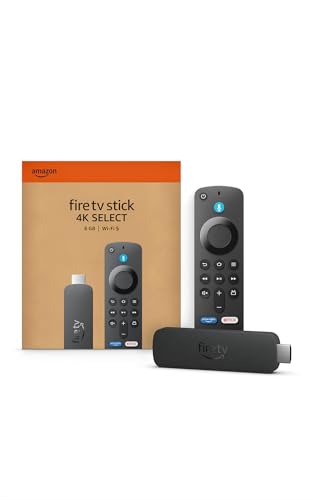
The Amazon Fire TV Stick 4K Select serves as a dedicated streaming media player built to transform any standard television into an intelligent entertainment display. Designed primarily for cord-cutters, apartment renters, busy families, and bedroom TV users, this compact dongle attaches directly to an open HDMI port. It presents a cost-effective way to modernize older flat-screen sets or replace sluggish built-in smart TV interfaces with an updated, responsive operating system.
Regarding visual performance, the device supplies crisp 4K Ultra HD playback with high dynamic range support via HDR10+. Connected to an HDR10+ capable LED, QLED, or OLED TV, viewers can enjoy enhanced contrast ratios, punchy colors, and clear highlights during movie nights or weekend sports broadcasts. Fast motion handling remains smooth for live hockey matches or football games, provided your home Wi-Fi delivers sufficient bandwidth to prevent buffering drops.
Smart functionality stands out through the modernized Fire TV user experience, backed by natural voice interaction through Alexa+. Rather than endlessly scrolling through distinct apps, viewers can speak naturally to find specific genres, track down actors, or manage playback across services like Prime Video, Netflix, Disney+, and Max. Furthermore, the inclusion of Xbox cloud gaming through Xbox Game Pass turns your living room TV into a casual console, allowing users to pair a wireless Bluetooth gamepad and play blockbuster titles directly over the cloud.
In terms of hardware build and everyday practicality, the player measures just over four inches long and weighs less than a tenth of a pound. This low-profile profile easily hides behind slim wall-mounted displays without demanding complex cable management or bulky shelf space. Connectivity relies on standard HDMI along with Wi-Fi, making the initial configuration quick and straightforward for non-technical users looking to stream workout videos, news updates, or late-night shows.
A few practical considerations are worth observing before choosing this model. The specifications highlight HDR10+ rather than Dolby Vision, which might leave dedicated home theater buffs wanting broader premium HDR format support. Furthermore, while the cloud gaming feature works well for casual play, competitive gamers may notice occasional latency depending on home network congestion, and an active Xbox Game Pass subscription is required.
For everyday viewers, apartment living rooms, student dorms, and guest bedrooms, the Fire TV Stick 4K Select delivers remarkable utility. It combines reliable 4K playback, an expansive library of free and premium streaming apps, and smart voice assistance into an unobtrusive footprint. Whether organizing family cartoon marathons or catching the big game with friends, this streaming player provides a practical, straightforward upgrade for modern home entertainment.
The updated interface prioritizes speed, helping family members pin their favorite applications directly to the home bar for one-click access. Integration with Alexa+ enables conversational searches, meaning you can ask for movies by quote or ask for recommendations based on mood, eliminating repetitive remote clicking.
For casual gamers, the ability to stream Xbox titles straight to the television via Xbox Game Pass provides an accessible alternative to buying a dedicated console. Players simply connect a compatible Bluetooth controller, launch the app, and play major titles with low input lag on solid Wi-Fi connections.
Physical installation requires only seconds, as the stick slots right into any open HDMI port on the back or side of your television. Because it draws power via an included cable and adapter, it stays hidden away, keeping living room entertainment consoles clean and wire-free.
The player pairs effortlessly with home Wi-Fi networks and guides users through a fast on-screen setup process. Once connected, users can also control compatible smart lights, thermostats, and security cameras straight from the couch using the included voice remote.
Pros
- Affordable way to convert analog TV to receive digital channels.
- Built-in USB recording and playback without a monthly fee.
- Easy setup with included cables and remote control.
- Closed captions and parental controls add versatility for families.
Cons
- Requires an external antenna (not included) to receive over-the-air signals.
- Only supports 1080p resolution; no 4K or HDR upscaling.
- Some users report software update needed; contact seller for updates.
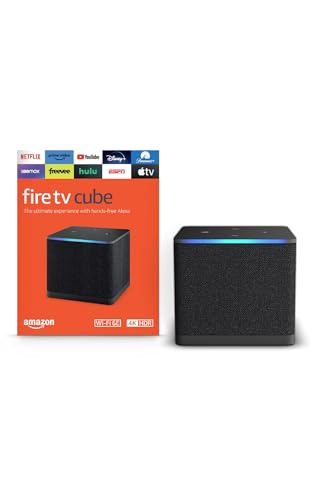
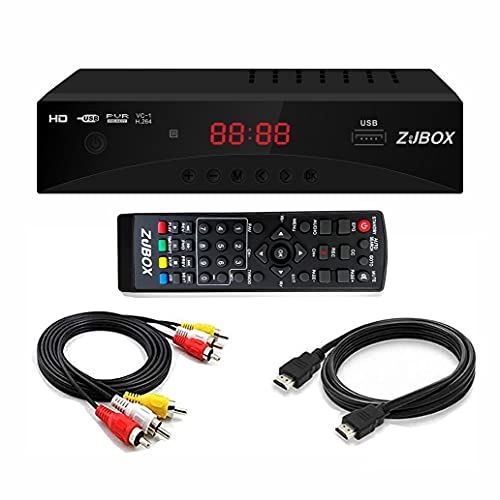
The ZJBOX Digital TV Converter Box is a compact and practical device designed for anyone looking to access free over-the-air HDTV broadcasts on older analog televisions, projectors, or computer monitors. This ATSC tuner box is especially useful for cord-cutters, budget-conscious shoppers, and families who want to enjoy local channels without paying for a cable subscription. It's also a great gift for tech enthusiasts or homeowners who want to repurpose an older TV in a bedroom, garage, or basement.
Based on the product description and user feedback, this converter box delivers 1080p output resolution, providing clear and sharp picture quality for news, sports, and everyday viewing. While it won't match the contrast or HDR performance of a modern OLED or QLED TV, the image is perfectly adequate for standard definition content and digital broadcasts. The recording and playback function is a standout feature, allowing you to save live TV shows to a USB drive for later viewing on your TV or computer. This can be especially handy for families with busy schedules or sports fans who don't want to miss a game.
In terms of build quality, the ZJBOX is lightweight and comes with both HDMI and composite cables, so you can connect it to almost any display. The remote control is basic but functional, and the timer settings (start-up and shut-down) add convenience for scheduled recordings. However, keep in mind that this box requires an external antenna to receive over-the-air signals, and it does not replace a cable or satellite box. The 1080p limit means it's not suitable for 4K or HDR content, but for standard HD broadcasts, it performs well.
Setup is straightforward: plug in the antenna, connect the box to your TV via HDMI or composite, scan for channels, and you're ready to watch. The auto-tuning feature makes channel scanning quick, and the favorite channel list lets you customize your viewing experience. Parental control options are a nice touch for families with young children, helping to restrict access to certain channels.
Some users mention that software updates may be required, and the seller provides support through Amazon. Also, the box does not support streaming apps like Netflix or YouTube, so it's purely for over-the-air broadcasts. The recording function works with USB drives, but you'll need to supply your own storage device.
Overall, the ZJBOX Digital TV Converter Box is a reliable and affordable solution for cord-cutters, gift buyers, or anyone wanting to extend the life of an older TV. It's best suited for casual viewing, news, sports, and family programming in a secondary room or travel setup. If you already have an antenna and want to unlock free local channels, this converter box is a solid choice.

Pros
- Substantial 32GB internal storage provides plenty of room for streaming apps and system updates.
- Comprehensive HDR format support including both Dolby Vision and HDR10+ for optimal color and contrast.
- Clean Google TV interface brings personalized content curation and dependable Google Assistant voice search.
- HDMI 2.1 cable and dedicated voice remote are included in the box for hassle-free setup.
Cons
- Limited to 2GB of RAM, which may slow down heavy background multitasking or demanding 3D gaming.
- Includes only a single USB 2.0 port, limiting simultaneous wired peripherals and fast external storage.
- Lacks a dedicated Ethernet port, making streaming stability dependent on your home Wi-Fi network strength.
The Xiaomi TV Box S 3rd Gen is a compact 4K streaming media player designed to bring modern smart television capability to virtually any display with an HDMI port. For cord-cutters, apartment renters, college students, and homeowners looking to revitalize an aging flat screen without purchasing an entirely new television, this media hub delivers an accessible way to access current streaming ecosystems. It serves as a practical bridge for secondary bedroom displays, basement home theater setups, or guest rooms that need quick access to major entertainment platforms.
Based on product specifications, video performance reaches full 4K Ultra HD at 60 frames per second, complemented by dual high dynamic range support via Dolby Vision and HDR10+. This broad HDR compatibility ensures that compatible 4K HDR TVs produce balanced highlights, rich contrast levels, and vibrant color accuracy across platforms like Netflix, Prime Video, and Disney+. For audio enthusiasts running an external soundbar or multi-channel audio receiver, the unit supports Dolby Audio and DTS:X processing, which helps maintain crisp dialogue clarity and expansive surround dynamics during movie nights or sports watch parties.
The heart of the user experience revolves around Google TV, which aggregates movies, live television, and shows across multiple subscriptions into an intuitive home screen. Navigating menus feels snappy thanks to the quad-core processor, while the onboard 32GB of storage stands out as a clear advantage over competing streaming sticks that commonly offer only 8GB. This extra capacity allows users to install dozens of streaming apps, utility tools, and casual games without constantly managing storage limits. The included voice remote integrates Google Assistant, making voice searches for actors, titles, and live sports schedules quick and accurate.
In terms of build and design, the media box maintains a pocket-sized square footprint measuring under four inches wide, allowing it to sit unnoticed on a media console or tuck behind a wall-mounted television. Connectivity includes an HDMI 2.1 interface for steady digital transmission, dual-band Wi-Fi for wireless streaming, and Bluetooth 5.2 for pairing wireless headphones or gamepads. A single USB 2.0 port is included for connecting flash drives or local media storage, though users should be aware that the device lacks a dedicated Ethernet jack, meaning high-bitrate 4K streaming depends entirely on home Wi-Fi coverage.
For families, sports fans, and movie lovers seeking an affordable way to upgrade an existing living room or bedroom television, this streaming player represents solid practical value. While hardcore gamers may want a dedicated console and power users might miss wired Ethernet, everyday viewers will appreciate the seamless combination of Dolby Vision playback, responsive voice navigation, and generous app storage. It provides a simple, dependable upgrade path that keeps your display relevant for years of streaming entertainment.
Google TV serves as the centerpiece of this streaming device, organizing your preferred subscriptions, movie rentals, and live TV channels into customized rows. Instead of jumping in and out of individual applications, viewers can browse unified recommendations based on viewing history across services like YouTube, Max, and Peacock.
The included remote features direct microphone integration with Google Assistant, allowing users to search across services, launch specific episodes, check weather updates, and control compatible smart home lights without typing. Integrated Google Cast functionality makes streaming home videos, photo albums, or web tabs directly from an Android, iPhone, or laptop completely seamless.
Setting up the Xiaomi TV Box S 3rd Gen requires only plugging the included power adapter into an outlet and connecting the included HDMI cable directly to your television. The on-screen Google Home setup guides users through Wi-Fi connection and account sign-in using a smartphone in just a few minutes.
With Bluetooth 5.2 onboard, viewers can pair wireless headphones for late-night movie watching without disturbing family members, or connect compatible wireless controllers for lightweight Android gaming. The USB 2.0 port also supports thumb drives for playing local video and audio files through media player apps.
Frequently Asked Questions
Can an external media box improve picture quality on an older 4K TV?
Yes, an updated streaming player can noticeably enhance overall video delivery. External hardware features faster processors that decode 4K Ultra HD feeds without the frame drops common on aging built-in interfaces. Support for Dolby Vision and HDR10+ also delivers accurate tone mapping to compatible television screens.
Does a media streaming device support immersive Dolby Atmos audio?
Yes, capable streaming devices pass multi-channel Dolby Atmos audio to compatible soundbars and receivers. Connecting through your television HDMI eARC port sends surround sound without distracting delay. Viewers setting up home theater gear can learn how to turn on Dolby Atmos on a TV to verify proper audio passthrough settings.
What Wi-Fi standard is recommended for smooth 4K streaming?
Wi-Fi 6 and Wi-Fi 6E provide the most reliable wireless performance for high-bitrate 4K media playback. These standards reduce network congestion when multiple household devices stream simultaneously. If your display sits far from a router, exploring the best USB Wi-Fi adapter for TV can help identify dependable networking options.
Can you record over-the-air television with a digital converter box?
Yes, dedicated ATSC converter boxes allow viewers to record free digital broadcast channels to a connected USB hard drive. Units like the ZJBOX converter output clear 1080p signals to analog TVs, monitors, or projectors. Users can schedule automated timers to record sports and favorite programs without paying monthly subscription fees.
How does cloud gaming perform on a modern streaming stick?
Cloud gaming runs reliably on modern streaming sticks paired with high-speed internet connections. Devices like the Amazon Fire TV Stick 4K Select support Xbox Game Pass cloud streaming with a wireless Bluetooth controller. Fast hardware decoding ensures responsive inputs, transforming standard displays into casual gaming hubs without an expensive console.



Write Your Review
No reviews yet. Be the first to share your experience!