

A dated TV interface or a missing app can make a capable screen feel frustrating, but a streaming device only helps if it fits your TV and viewing habits. This roundup of Best Android Tv Streaming Media Player includes Android TV and Google TV options, a Roku stick, and media players with different stated features. The ONN Android TV 4K UHD Streaming Device with Voice includes an HDMI cable and voice remote, while the Roku Streaming Stick HD with Voice Remote is an HD option with a compact design. If you’re checking whether a 4K screen is a match for your setup, this 4K UHD TV guide can help clarify the display side of the decision.
Compare platform, stated resolution, connection options, and included accessories rather than assuming every device supports the same apps or services. The product listings specify features such as storage, Wi-Fi, Ethernet, or voice control for some models, but leave other details unclear; check the listing and your TV’s available inputs before buying. The AGPTEK HDMI Media Player, for example, is described for local file playback and includes HDMI or AV output, so it serves a different purpose from an app-focused streaming device. Think about whether you need supported streaming apps, a compact travel setup, or media playback from external storage, and remember that paid services may require separate subscriptions.
Pros
- Crisp 4K Ultra HD streaming upgrade for non-smart or aging televisions
- Intuitive Android TV platform with access to massive Google Play Store app library
- Responsive Google Assistant voice remote and built-in Chromecast convenience
- Includes a dedicated high-speed HDMI cable for easy out-of-the-box installation
Cons
- Requires an available HDMI port and external power outlet near the television
- Relies heavily on a stable home Wi-Fi network for smooth 4K video playback
- Lacks dedicated Ethernet jack for direct wired internet connections without third-party adapters
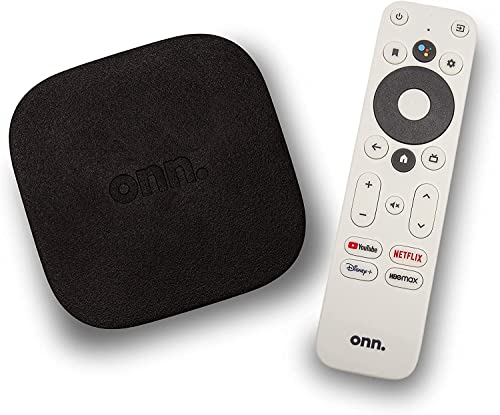
The ONN Android TV 4K UHD Streaming Device is a compact digital media receiver designed to transform any standard HDMI-equipped display into a full-featured entertainment center. Ideal for apartment renters, cord-cutters, college students, and homeowners outfitting a guest bedroom or basement hangout, this device delivers modern smart capabilities without demanding an expensive television replacement. Whether you want to refresh an older 1080p flat-screen or unlock smooth streaming on an entry-level 4K display from brands like Samsung, Sony, Vizio, Hisense, or TCL, this unit provides an accessible gateway to digital entertainment.
On the performance side, this streamer outputs sharp 4K Ultra HD resolution, delivering four times the pixel density of standard Full HD. When paired with a compatible 4K television, movie lovers and sports fans can enjoy clear detail, crisp text, and vibrant colors during Super Bowl watch parties or weekend family movie nights. The device also supports high-quality audio processing designed to enhance dialogue clarity and provide a balanced listening mix, making late-night binge-watching easier to enjoy without constantly reaching for the volume button.
Running on the reliable Android TV operating system, the streamer grants access to thousands of streaming platforms and tools through the Google Play Store, including Netflix, Prime Video, Disney+, and YouTube. The included voice remote features a dedicated Google Assistant button, letting you search for shows, check the weather, or jump between applications using simple voice commands. With Chromecast built-in, casting personal videos, vacation photos, or music playlists from your iOS or Android phone to the big screen requires only a single tap.
Hardware setup is refreshingly straightforward thanks to the included high-speed HDMI cable and lightweight form factor. The low-profile black unit fits discreetly behind wall-mounted displays or rests neatly on a media console shelf, keeping wire clutter down to a minimum. Connecting to your home wireless network and signing into your Google account takes only a few minutes, making it an appealing option for family members who appreciate simple, user-friendly technology.
While the streamer performs reliably for standard household streaming, there are a few practical limitations to keep in mind. The unit relies on Wi-Fi for its internet connection and does not include a built-in Ethernet port, which means households with congested wireless networks might experience buffering during peak evening streaming hours. Additionally, you will need both an open HDMI port on your display and an available electrical outlet nearby to supply dedicated power.
For budget-conscious shoppers, secondary room setups, and streamers looking to bypass sluggish proprietary TV operating systems, the ONN 4K Android TV Streaming Device offers exceptional everyday practicality. It turns any compatible television into a responsive media hub, making it an excellent investment for casual gaming, weekend movie marathons, and daily news updates.
The Android TV platform offers one of the most versatile smart ecosystems available for modern living room setups. Users can explore a vast library of entertainment, fitness, news, and gaming apps available via the Google Play Store, tailoring their home screen to highlight their favorite subscriptions.
Built-in Google Assistant elevates hands-free convenience, allowing streamers to launch specific titles, pause playback, or manage compatible smart home gear directly through the voice remote microphone. Integrated Chromecast support further expands utility, letting friends and family effortlessly mirror content from mobile devices during social gatherings.
Setting up the ONN streaming media player takes just a few straightforward steps right out of the box. Simply plug the included high-speed HDMI cable into an open input on your television, connect the power adapter, and switch your display input to begin guided on-screen instructions.
The configuration process walks you through linking your home Wi-Fi network and signing into your Google profile. Compact dimensions ensure the device easily conceals behind thin wall mounts, making it well suited for clean apartment layouts, dorm rooms, or RV entertainment systems.

Pros
- Quick and seamless setup via any standard HDMI port on existing televisions
- Android TV platform grants access to thousands of streaming apps and services
- Convenient voice remote with built-in Google Assistant for fast title searching
- Built-in Chromecast makes casting media from mobile devices simple and intuitive
- Compact, lightweight build tucks out of sight behind wall mounts or desktop stands
Cons
- Max streaming resolution is limited to 2K FHD rather than native 4K Ultra HD
- Lacks an Ethernet port, requiring a stable Wi-Fi connection for uninterrupted streaming
- Not designed for intensive cloud gaming or advanced high-end surround sound passthrough
The ONN Android TV 2K FHD Streaming Stick is a compact plug-in media player designed to give standard televisions full smart capabilities without requiring an expensive screen replacement. Based on product specifications, this device is tailored for cord-cutters, apartment renters, college students in dorm rooms, and budget-conscious homeowners looking to revive an older display. It serves especially well in guest bedrooms, home offices, and kitchen viewing stations where a reliable streaming setup is needed without complicated hardware.
With support for 2K Full HD output, this streaming stick delivers clean visual clarity and dependable color reproduction on compatible 1080p and smaller LED or LCD panels. While it skips native 4K rendering, picture quality on typical bedroom screens ranging from 32 to 50 inches remains sharp enough for casual movie nights, kids cartoon streaming, and regular sports viewing. Motion handling and app transitions remain fluid for standard 60Hz content, ensuring smooth playback when catching up on weekly series or morning news broadcasts.
Powered by the Android TV operating system, the interface offers quick access to popular streaming services along with thousands of applications downloadable through the Google Play Store. The included voice remote simplifies title searches by letting users press the microphone button to ask Google Assistant for specific movies, actors, or apps. Additionally, built-in Chromecast allows family members and houseguests to beam photos, web videos, and music playlists directly from an Android, iPhone, or laptop screen to the television without hassle.
In terms of build quality and installation, the streaming stick features a discreet matte black chassis that plugs straight into an open HDMI port. Because it weighs just over half a pound and measures a few inches in length, it stays completely concealed behind wall mounts or slim TV panels, eliminating tangled cords and bulky entertainment center clutter. Setup involves plugging in the included power adapter, connecting to your local Wi-Fi network, and logging into your Google account to begin downloading your preferred streaming subscriptions.
Users should note that this model tops out at 2K resolution, so owners of modern 4K OLED or QLED displays will want a higher-bandwidth media player to take full advantage of HDR10 or Dolby Vision formats. Furthermore, the absence of a hardwired Ethernet port means performance relies directly on home Wi-Fi strength. For secondary television rooms, workout setups, and budget-friendly entertainment spaces, the ONN 2K FHD Streaming Stick offers a practical, user-friendly gateway to modern streaming entertainment.
The core advantage of this media stick is the integration of the Android TV operating system. This grants viewers immediate entry to a broad entertainment catalog, allowing quick downloads for Netflix, Prime Video, Hulu, Disney+, YouTube, and countless live TV streaming applications directly through the Google Play Store.
Navigation is handled smoothly via the included remote control, which features a dedicated virtual assistant microphone button. Instead of manually typing lengthy show titles using an on-screen keyboard, users can speak natural voice commands to launch apps, search for specific genres, or ask general questions like current local weather updates.
The built-in Chromecast protocol rounds out the smart ecosystem. Whether sharing a family vacation photo album, streaming personal workout playlists, or mirroring browser tabs from a laptop, the device receives wireless casting from compatible smart devices with minimal latency.
Setting up the streaming stick is straightforward and takes only a few minutes from unboxing to first playback. The unit slides directly into any available HDMI port on the back or side of a television, making it compatible with older flat-panel displays, computer monitors with audio, or compact secondary sets.
Power is supplied via the included power adapter and cable, which can plug into a standard wall outlet or a powered USB port depending on your setup. Once powered on, the display guides you through a guided on-screen wizard to connect to Wi-Fi and synchronize your Google credentials.
Because the physical stick remains hidden behind the television screen, it helps maintain a clean wall-mounted look free of dangling cords or external shelf clutter, making it an excellent choice for minimalist bedrooms and tight apartment living rooms.

Pros
- Clean 4K video playback with responsive app navigation across top streaming channels
- Intuitive Google TV platform provides personalized recommendations for movie lovers and families
- Compact chassis fits neatly into crowded entertainment centers and tight bedroom TV stands
- Budget-friendly solution to add modern smart TV features to secondary displays and older HDTVs
Cons
- The 8 GB internal memory capacity fills up quickly if downloading numerous streaming apps
- Requires an open HDMI port and an available power outlet near your TV setup
- Lacks advanced gaming features such as 120Hz refresh rate pass-through or VRR support
The onn. Google TV 4K Streaming Box is a compact digital media adapter designed to bring modern smart television functionality to existing flat-panel screens, computer monitors, and home displays. This device is particularly well suited for cord-cutters, apartment renters, college students, and budget-conscious homeowners who want an organized, fast streaming interface without the expense of purchasing an entirely new television set. Connecting via a standard HDMI port, it transforms conventional displays into comprehensive Google TV entertainment hubs.
Picture quality remains central to the viewing experience, and this streaming player outputs crisp 4K Ultra HD video for weekend movie marathons and live sports viewing. When connected to a compatible 4K display, it produces sharp details, balanced contrast levels, and natural color accuracy across major streaming services. Motion handling remains steady during high-speed action sequences and live football games, helping prevent distracting judder or stutter on standard 60Hz panels.
Powered by the Google TV smart platform, the device aggregates content from subscriptions like Netflix, Prime Video, Disney+, and YouTube directly onto a unified home screen. Voice control through the included remote allows viewers to search for specific actors, change inputs, or check weather updates hands-free. App loading speeds feel snappy during daily handling, making it easy for kids to switch to cartoon shows or for families to catch up on the evening news.
From a design and hardware perspective, the lightweight black box weighs less than a pound and fits comfortably behind slim TV wall mounts or beside compact soundbars. Setup requires only a few minutes using standard HDMI and home Wi-Fi connections, helping maintain tidy cable management around entertainment stands. The unit also passes audio reliably to external soundbars or AV receivers, assisting with dialogue clarity and fuller sound for living room viewing.
While everyday streaming performance is smooth, prospective buyers should consider a few practical trade-offs. The 8 GB of internal storage is sufficient for essential streaming platforms, but users who prefer installing extensive collections of specialty apps may find storage space tight over time. Additionally, this media player is tailored for casual video streaming rather than competitive gaming, as it does not support 120Hz output or HDMI 2.1 gaming enhancements.
For viewers seeking an uncomplicated, cost-effective way to update a master bedroom TV, basement den, or primary living room display, this streaming box offers dependable everyday value. It provides straightforward access to modern streaming ecosystems, making it a sensible upgrade for movie nights, sports broadcasts, and casual family streaming.
Setting up the onn. Google TV 4K Streaming Box takes minimal effort, even for casual TV viewers. Users simply connect the device to an open HDMI input on their television or home theater receiver, plug in the power adapter, and follow the on-screen pairing prompts.
The compact footprint makes cable management hassle-free, allowing the box to rest on a media console or remain tucked discreetly behind a wall-mounted flat screen. Connecting to home Wi-Fi and logging in with a Google account pulls in your favorite streaming apps within minutes, creating an instant smart entertainment center for family movie nights.

Pros
- Modern Android 14 operating system provides broad application compatibility and fresh software navigation
- Wi-Fi 6 hardware provides stable wireless data transfer for streaming shows and home video files
- Ultra-compact footprint fits easily onto crowded TV stands, dorm desks, or bedroom dressers
- Expandable storage via TF card slot allows media lovers to keep private video collections accessible
Cons
- The 2GB of system memory is best suited for streaming rather than demanding 3D gaming marathons
- Wired Ethernet port is rated for 10/100 Mbps speeds rather than full gigabit connectivity
- Standard mobile Android framework may require an air mouse or keyboard for navigating certain third-party apps
The IDEALROYAL Android 14 TV Box is an ultra-compact standalone media streamer designed to breathe new life into older flat-screen televisions, computer monitors, or secondary displays. Instead of replacing a dependable television that simply lacks updated smart capabilities, this device plugs directly into an available HDMI port to provide access to streaming platforms, video players, and web utilities. It is primarily geared toward cord-cutters, apartment renters, budget-minded shoppers, and tech hobbyists who appreciate the freedom of an open Android ecosystem for their home entertainment setups.
Visual performance centers around its capable video decoding hardware, which supports resolutions up to 8K. While native 8K television content remains scarce in typical living room environments, this decoding headroom allows the device to process dense 4K video files, home movies, and high-bitrate streaming feeds with minimal stutter. Connected to a 4K HDR television, colors appear vibrant and contrast remains faithful to the source material, making it suitable for casual movie nights, YouTube binge sessions, and family cartoon streaming on weekend mornings.
Under the hood, the device runs on a quad-core RK3518 chipset paired with 2GB of RAM and 16GB of onboard storage. The system runs on Android 14, delivering an updated user interface and broad compatibility with modern streaming applications. Wireless performance is bolstered by dual-band Wi-Fi 6 alongside Bluetooth 5.4, allowing viewers to stream high-definition sports highlights without heavy latency while effortlessly piping audio to soundbars or wireless headphones for late-night viewing in the bedroom.
Build quality is defined by practical simplicity. Measuring less than four inches across, the compact black chassis tucks neatly behind wall-mounted displays or rests discreetly on an entertainment console without cluttering power cords. The inclusion of two USB ports enables viewers to connect external flash drives, mini keyboards, or wired remotes, while the dedicated TF card slot allows users to add up to 128GB of local storage for downloaded media, music libraries, or holiday photo slideshows.
Potential buyers should consider a few natural hardware boundaries before purchasing. The 2GB memory configuration is tailored for video streaming and lightweight browsing rather than intense mobile multitasking or high-end 3D gaming. Additionally, the physical network jack tops out at 10/100 Mbps, meaning viewers with fast fiber internet will often achieve better peak speeds using the onboard Wi-Fi 6 radio. Certain proprietary streaming services may also run in standard mobile formats, occasionally requiring a mouse or USB keyboard for ideal navigation.
Based on product specifications and everyday home entertainment needs, this streamer represents a practical, wallet-friendly upgrade for secondary living spaces. It functions exceptionally well in guest bedrooms, college dorms, home offices, and garage workshop setups where viewers want reliable access to video streaming without purchasing an entirely new smart television.
Setting up the IDEALROYAL media player requires only a few minutes out of the box. Users simply attach an HDMI cable from the unit to an open television input, plug in the included power adapter, and follow the on-screen setup prompts. The built-in Wi-Fi 6 radio quickly discovers dual-band home networks, providing dependable bandwidth for streaming media feeds across multiple rooms.
Peripheral connectivity is one of the strongest practical benefits of this compact box. Equipped with Bluetooth 5.4, it quickly pairs with wireless headphones, allowing apartment dwellers to enjoy late-night action movies without waking roommates or children. The two onboard USB ports also allow quick plug-and-play access for wireless keyboard dongles, gamepads, or external storage drives loaded with home video archives.

Pros
- Low-profile stick stays hidden behind the television and avoids blocking neighboring HDMI inputs.
- Convenient voice remote controls TV power and volume, eliminating the need for a secondary remote.
- Fast, responsive Roku interface with a customizable home screen and convenient live TV guide.
- Capable of drawing power directly from compatible TV USB ports for a truly wire-free appearance.
Cons
- Resolution tops out at standard 1080p HD, lacking 4K UHD and HDR support for advanced displays.
- Some older TVs with low-power USB ports may require an optional AC wall adapter.
- Lacks hands-free voice commands, requiring a press of the microphone button on the remote.
The Roku Streaming Stick HD is an ultra-compact media player engineered to modernize standard HDTVs, older flat panels, and secondary displays into fast, capable smart TVs. Based on product specifications and user feedback, this pocket-sized streamer is exceptionally well suited for apartment renters, college students in dorms, cord-cutters, and families outfitting a guest room, kids playroom, or master bedroom. Its discreet form factor plugs directly into any available HDMI port and remains completely hidden behind the television frame, making it a great pairing for clean wall-mounted installations.
When connected to standard 720p or 1080p high-definition television panels, the stick delivers crisp video playback and steady motion handling for everyday entertainment. While it does not support 4K resolution or HDR formats such as Dolby Vision or HDR10, HD sitcoms, network broadcasts, and streaming movies retain sharp detail and balanced color reproduction across compatible screens. Sports fans and news followers can watch live broadcasts with consistent frame pacing, avoiding noticeable judder as long as a stable home Wi-Fi connection is maintained.
At the center of the experience is Roku OS, celebrated for its uncluttered tile layout, speedy menu navigation, and minimal app loading lag. The included voice remote simplifies the entire living room setup by incorporating essential television power and volume controls, allowing you to retire the original TV remote for regular daily viewing. Voice search works smoothly to locate titles, actors, and specific genres without the tedium of on-screen typing. Audio is passed directly through HDMI to television speakers, soundbars, or AV receivers, preserving crisp dialogue clarity and dependable stereo separation.
In terms of build and design, the stick measures only 3.7 inches long, which prevents it from crowding adjacent HDMI ports or digital optical outputs on tight TV input panels. The ability to draw power directly from an adjacent USB port on your television helps maintain a neat aesthetic free of hanging wall cords. Dual-band Wi-Fi connectivity keeps streaming connections reliable even when the stick is nestled behind a dense TV chassis, and the lightweight construction holds up well for travelers who prefer having their own login credentials ready in hotel rooms.
Initial installation is remarkably straightforward: plug the stick into an HDMI port, connect the USB power lead, follow the on-screen network prompts, and sign into your streaming services. There are practical limitations to keep in mind, however. Because playback resolution caps out at HD, owners of 4K LED, QLED, or OLED home theater centerpieces will prefer a dedicated 4K model to take full advantage of their display panel. Additionally, certain older televisions with weak USB power output may prompt an on-screen warning, requiring connection to a standard wall outlet.
For budget-focused shoppers, bedroom setups, kitchen displays, or anyone seeking to upgrade an aging secondary TV, the Roku Streaming Stick HD delivers dependable performance and unmatched user convenience. It eliminates remote clutter, consolidates live sports and free streaming channels, and hides neatly out of sight behind your television frame.
The Roku operating system continues to stand out for its straightforward home screen and broad channel availability. Users can customize app placement to prioritize services like Netflix, Disney+, Hulu, and YouTube right at the top of the menu. Navigating between apps feels fluid, with fast launch times that outpace many sluggish built-in smart TV interfaces found on older televisions.
A standout feature is the Roku Sports Zone, which centralizes game times, broadcast networks, and streaming destinations for your favorite sports teams. Coupled with The Roku Channel, which offers hundreds of free ad-supported live television networks, local news feeds, and movies, the platform provides expansive content variety right out of the box without requiring expensive cable packages.
Installing the Roku Streaming Stick HD takes only a few minutes from unboxing to streaming. Its slim body slides directly into an open HDMI port without requiring bulky extension brackets in most television arrangements. Once inserted, connecting the included USB cable to your television USB port delivers operating power, keeping the entire entertainment space free from drooping cords.
The on-screen setup assistant guides you through connecting to your home Wi-Fi network and calibrating the voice remote to control your television brand for power and volume toggles. Roku account linking is handled quickly via a mobile device or browser, ensuring that your preferred channels and subscription preferences populate without complex manual entry.

Pros
- Substantial 4GB RAM and 64GB storage capacity compared to entry-level streaming sticks
- Supports 4K UHD 60Hz output and HDR for clear, colorful picture reproduction
- Included handheld mini keyboard makes typing passwords and searches much faster
- Dual-band Wi-Fi and physical Ethernet port offer flexible home network connections
- Updated Android 14.0 operating system provides broad application compatibility
Cons
- Uses Bluetooth 4.2 rather than modern Bluetooth 5.0 or newer standards
- Certain subscription streaming applications may require mouse navigation via the keyboard
- Lacks the unified TV-first home screen interface found on dedicated Google TV or Roku platforms
The RINGREAT Android 14.0 TV Box is an external 4K media player designed to bring flexible smart television capabilities to any television, computer monitor, or home theater projector equipped with an HDMI input. For cord-cutters, apartment renters, and budget-conscious homeowners looking to revitalize an older LED screen or add streaming utility to a secondary bedroom display, this compact media player offers an accessible path to digital entertainment. Equipped with 4GB of RAM and 64GB of internal storage, it avoids the sluggish menu response and low-memory warnings frequently encountered on basic entry-level streaming sticks.
Based on product specifications, the media player supports 4K Ultra HD resolution output at 60Hz alongside HDR color processing and H.265 hardware decoding. When paired with a compatible 4K HDR television, it presents online video streams, family videos, and high-definition movie files with solid clarity, deep contrast, and balanced color saturation. The 60Hz output rate helps maintain steady motion handling during fast action sequences, family movie nights, and live sports viewing, keeping on-screen movement clear without distracting stutter.
Under the hood, a quad-core processor works in tandem with 4GB of system memory to ensure dependable multitasking and prompt app loading. The 64GB internal storage allocation stands out in this price segment, providing abundant room for multiple streaming services, utility applications, and offline media files without an immediate need for external flash drives. While it is not intended to replace a dedicated modern gaming console, casual Android games and retro titles can run smoothly for family gaming sessions.
The physical footprint of the unit is notably compact at roughly four inches square, enabling it to rest discreetly on a home theater console or stay tucked behind a wall-mounted television panel. Network connectivity includes both 2.4GHz and 5GHz dual-band Wi-Fi for wireless convenience, alongside a physical Ethernet LAN port for users who prefer the stability of a hardwired connection. External ports also include high-speed USB 3.0 for local media playback and Bluetooth 4.2 for pairing wireless headphones or gamepads. The included handheld mini keyboard simplifies account sign-ins, web browsing, and catalog searching far better than a standard directional-pad remote.
Prospective buyers should keep in mind that generic Android TV boxes utilize an open Android environment rather than a locked smart TV ecosystem, meaning certain proprietary streaming platforms may require mouse navigation or manual layout adjustments. Furthermore, the Bluetooth standard is revision 4.2 rather than newer iterations. Even with these considerations, the RINGREAT Android 14 TV Box serves as a versatile, high-capacity media hub for tech enthusiasts, guest rooms, basement entertainment setups, and streamers seeking spacious storage at an approachable cost.
Setting up the RINGREAT streaming box is straightforward thanks to its plug-and-play architecture. Users simply connect the included HDMI cable to any television, monitor, or projector, plug in the power adapter, and follow the on-screen configuration prompts to connect to their home network.
The device provides versatile connectivity options for diverse living room arrangements. Dual-band 2.4GHz and 5GHz Wi-Fi ensures flexible wireless placement throughout the house, while the onboard 10/100M Ethernet jack offers an uninterrupted wired route for consistent 4K streaming. A fast USB 3.0 port allows homeowners to hook up external hard drives or flash drives to play local photo collections and video files directly on the big screen.
A notable feature of this entertainment package is the bundled wireless mini keyboard, which includes an integrated multi-touch trackpad. Typing long Wi-Fi passcodes, searching for YouTube titles, and entering streaming login credentials becomes substantially quicker compared to clicking on-screen keyboards with standard remotes.
The package also includes an HDMI cable and a dedicated power adapter, giving buyers everything required to get the media box running straight out of the box without purchasing additional cables.

Pros
- Compact palm-sized aluminum design is highly portable for travel and tidy bedroom TV setups
- Supports both modern HDMI and legacy composite AV connections with cables included
- Plays a wide variety of video file formats directly from external hard drives up to 8TB
- Simple plug-and-play operation requires no internet connection or app subscriptions
Cons
- Caps playback at 1080p resolution and cannot decode native 4K phone or camera video files
- Lacks built-in Wi-Fi or smart streaming apps like Netflix, Disney+, and Prime Video
- User interface is basic compared to modern smart TV operating systems
The AGPTEK Mini 1080p Full-HD Digital Media Player is a dedicated hardware playback box designed to send stored video, music, and picture files straight to a television display. Unlike app-based smart streaming sticks that require steady broadband internet, this device operates completely offline. It bridges the gap for apartment renters, budget-conscious homeowners, road trippers, and family archivists who want to watch their downloaded films, home movies, or photo libraries on the big screen without buffering or software updates.
Picture delivery is handled through a Full HD 1080p output at 60Hz over HDMI, rendering clean and stable images on 4K TVs, QLED displays, and standard LED panels. Users with older CRT televisions or analog monitors in basements and workshops can take advantage of the included composite AV connection. The player also lets you pipe video to a flat screen via HDMI while running analog sound to external stereo speakers or a vintage sound system, providing welcome flexibility for custom home entertainment corners.
Storage versatility is a significant advantage. The unit accommodates USB flash drives up to 512GB, SD memory cards up to 128GB, and external mechanical or solid-state hard drives up to 8TB formatted in MBR partitions. It decodes popular digital formats including MKV, MP4, AVI, MOV, and TS files, along with support for external subtitle tracks and multiple audio codecs. Helpful software features such as resume playback from breakpoints, auto-looping, and zoom controls make it especially practical for marathon movie watching, holiday photo slideshows, and trade show video loops.
The physical build is crafted from an aluminum alloy shell measuring just about three inches on each side. Its ultra-compact footprint easily tucks behind a wall-mounted TV or fits into a backpack pocket for hotel stays and cabin getaways. The included infrared remote control manages file navigation, track skipping, and playback settings from the sofa, keeping daily operation straightforward for both kids and older family members.
There are practical limitations to keep in mind before buying. The device maxes out at 1080p resolution, so it cannot play modern 4K video captures from newer smartphones or high-bitrate UHD files. It also lacks Wi-Fi, meaning it cannot stream live sports, YouTube, or services like Prime Video on its own. The onscreen menu system is purely utilitarian rather than flashy.
For home theater fans, collectors of ripped movies, travelers, and families who prioritize dependable offline playback from USB storage, this player provides remarkable utility. It turns any HDMI display or legacy tube television into an easy-to-use entertainment center without monthly subscription fees or complicated smart setups.
Connectivity options on this mini media hub are designed for both modern and retro display setups. The digital HDMI port sends 1080p high-definition video and stereo audio directly to contemporary LED, OLED, and QLED flat panels using standard HDMI cables.
For legacy televisions, campers, or retro gaming displays, the composite AV jack supplies analog video and dual-channel sound through the included composite breakout cable. The hardware automatically detects which output you connect, eliminating tedious manual menu switching. You can also send high-definition video through HDMI while directing the analog AV outputs into a secondary soundbar, receiver, or powered desktop speakers.
Getting started takes only a couple of minutes. Simply connect the media player to your TV using either the HDMI cable or the composite AV cable, plug in the included 5V power adapter, and insert your USB flash drive, external hard drive, or SD card.
External hard drives should be formatted with an MBR partition style in FAT32 or NTFS formats for seamless recognition. Once powered up, the intuitive home screen lets you use the remote control to jump right into movies, music, photos, or file management folders. The petite form factor sits neatly beneath your display, on a slim media shelf, or behind a mounted screen with no clutter.
Questions to Check Before You Buy
Will these devices connect to any TV?
Not necessarily; check the specific device’s connection requirements and your TV’s available input. The ONN 4K device listing says it plugs into an HDMI port and includes a cable, while the AGPTEK player also lists AV output for compatible displays.
Do all the listed products support 4K?
No; the listings describe different output capabilities. The ONN Android TV 4K device and RINGREAT Android 14.0 TV Box specify 4K, while the Roku stick is described as HD and the ONN stick as 2K.
Does buying a streaming player include paid content?
No; a device purchase does not establish that paid content or subscriptions are included. Streaming apps and subscription services may require account sign-in and separate payment, so verify access terms for the services you plan to use before choosing a platform.
Which models list voice control or voice search?
The ONN Android TV 4K device and ONN 2K stick list voice features, and Roku describes voice search on its remote. Compare each remote control description, since the listings do not establish identical commands or platform support.
Is a Roku streaming stick a 4K option?
The listed Roku Streaming Stick HD is described as an HD device, not a 4K model. Check your TV’s resolution needs and the player’s stated output before buying; this guide to using a 4K Roku with a regular TV covers a related compatibility question.


Write Your Review
No reviews yet. Be the first to share your experience!