
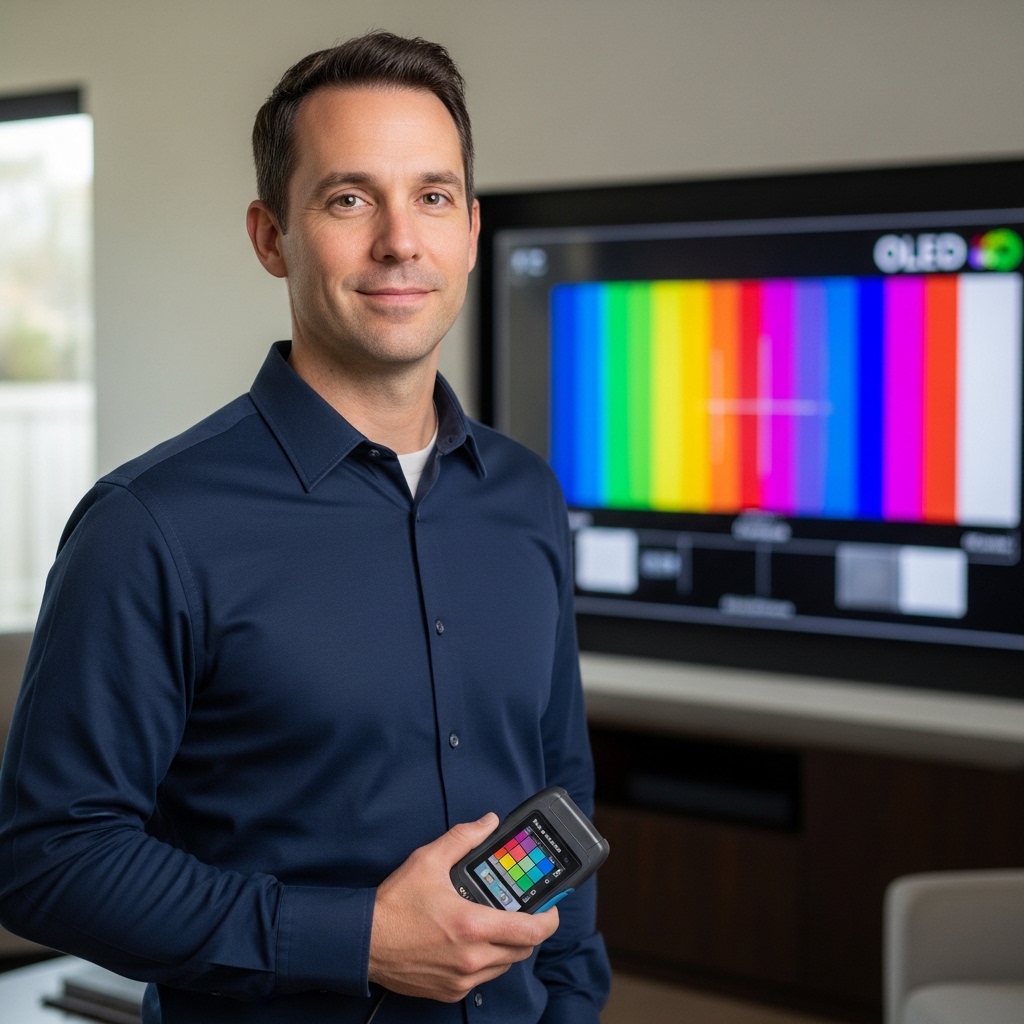

If your television lacks an app you want, an Android TV box is a separate device that connects to a TV and can run compatible apps. The phrase what is the android tv box describes a question about both the device and what it can do; it doesn’t mean every box offers the same features or service access. The TV, available connection, home network, app, and any required subscription all affect whether a particular setup will work. A separate player may help when the TV’s built-in platform doesn’t meet your needs, but it isn’t automatically necessary if the TV already supports the services you use.
Product descriptions in this category vary: some list HDMI, Wi-Fi, wired networking, voice remotes, storage, or screen mirroring, while others describe different combinations. Those specifications explain advertised device features, not a guarantee that every app or service is available or that playback will be smooth. Before choosing a device, check the television’s inputs, your network options, and whether the services you want support that device’s software. Keep the distinction clear between device capability and service access, since a streaming box doesn’t by itself provide paid subscriptions or override a service’s requirements.
Pros
- Crisp 4K Ultra HD streaming upgrade for non-smart or aging televisions
- Intuitive Android TV platform with access to massive Google Play Store app library
- Responsive Google Assistant voice remote and built-in Chromecast convenience
- Includes a dedicated high-speed HDMI cable for easy out-of-the-box installation
Cons
- Requires an available HDMI port and external power outlet near the television
- Relies heavily on a stable home Wi-Fi network for smooth 4K video playback
- Lacks dedicated Ethernet jack for direct wired internet connections without third-party adapters
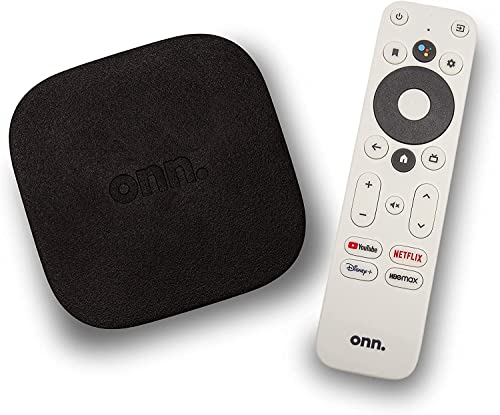
The ONN Android TV 4K UHD Streaming Device is a compact digital media receiver designed to transform any standard HDMI-equipped display into a full-featured entertainment center. Ideal for apartment renters, cord-cutters, college students, and homeowners outfitting a guest bedroom or basement hangout, this device delivers modern smart capabilities without demanding an expensive television replacement. Whether you want to refresh an older 1080p flat-screen or unlock smooth streaming on an entry-level 4K display from brands like Samsung, Sony, Vizio, Hisense, or TCL, this unit provides an accessible gateway to digital entertainment.
On the performance side, this streamer outputs sharp 4K Ultra HD resolution, delivering four times the pixel density of standard Full HD. When paired with a compatible 4K television, movie lovers and sports fans can enjoy clear detail, crisp text, and vibrant colors during Super Bowl watch parties or weekend family movie nights. The device also supports high-quality audio processing designed to enhance dialogue clarity and provide a balanced listening mix, making late-night binge-watching easier to enjoy without constantly reaching for the volume button.
Running on the reliable Android TV operating system, the streamer grants access to thousands of streaming platforms and tools through the Google Play Store, including Netflix, Prime Video, Disney+, and YouTube. The included voice remote features a dedicated Google Assistant button, letting you search for shows, check the weather, or jump between applications using simple voice commands. With Chromecast built-in, casting personal videos, vacation photos, or music playlists from your iOS or Android phone to the big screen requires only a single tap.
Hardware setup is refreshingly straightforward thanks to the included high-speed HDMI cable and lightweight form factor. The low-profile black unit fits discreetly behind wall-mounted displays or rests neatly on a media console shelf, keeping wire clutter down to a minimum. Connecting to your home wireless network and signing into your Google account takes only a few minutes, making it an appealing option for family members who appreciate simple, user-friendly technology.
While the streamer performs reliably for standard household streaming, there are a few practical limitations to keep in mind. The unit relies on Wi-Fi for its internet connection and does not include a built-in Ethernet port, which means households with congested wireless networks might experience buffering during peak evening streaming hours. Additionally, you will need both an open HDMI port on your display and an available electrical outlet nearby to supply dedicated power.
For budget-conscious shoppers, secondary room setups, and streamers looking to bypass sluggish proprietary TV operating systems, the ONN 4K Android TV Streaming Device offers exceptional everyday practicality. It turns any compatible television into a responsive media hub, making it an excellent investment for casual gaming, weekend movie marathons, and daily news updates.
The Android TV platform offers one of the most versatile smart ecosystems available for modern living room setups. Users can explore a vast library of entertainment, fitness, news, and gaming apps available via the Google Play Store, tailoring their home screen to highlight their favorite subscriptions.
Built-in Google Assistant elevates hands-free convenience, allowing streamers to launch specific titles, pause playback, or manage compatible smart home gear directly through the voice remote microphone. Integrated Chromecast support further expands utility, letting friends and family effortlessly mirror content from mobile devices during social gatherings.
Setting up the ONN streaming media player takes just a few straightforward steps right out of the box. Simply plug the included high-speed HDMI cable into an open input on your television, connect the power adapter, and switch your display input to begin guided on-screen instructions.
The configuration process walks you through linking your home Wi-Fi network and signing into your Google profile. Compact dimensions ensure the device easily conceals behind thin wall mounts, making it well suited for clean apartment layouts, dorm rooms, or RV entertainment systems.

Pros
- Generous 128GB internal storage eliminates the frequent memory warnings common on entry-level streaming sticks.
- Dual-band Wi-Fi 6 support helps maintain stable wireless connectivity in homes with multiple active smart devices.
- Pre-installed Google Play Store allows straightforward installation of diverse utility tools and streaming software.
- USB 3.0 connection supports quick data reading from external flash drives and home media drives.
Cons
- Wired networking is limited to 100 Mbps Ethernet, making Wi-Fi 6 the preferred route for high-bitrate streaming.
- Running open Android rather than Android TV OS may require a separate wireless mouse or air remote for smoother navigation in certain apps.
- Does not include official high-tier certifications for native 4K playback on select proprietary streaming platforms.
The IDEALROYAL Android 13.0 TV Box is an ultra-compact streaming media player built to give existing flat screens, budget LED displays, and desktop monitors a functional smart entertainment upgrade. With its compact footprint measuring just 4.21 inches square, it tucks discreetly beside a television stand or mounts behind a wall-hung bedroom display. This hardware is particularly well-suited for cord-cutters, apartment dwellers, dorm room setups, and home entertainment enthusiasts who want an adaptable media hub capable of running third-party media players, customized launchers, and local video archives without paying premium hardware prices.
Video processing is driven by an RK3528 quad-core Cortex-A53 CPU paired with a Mali-450 graphics processor. The player provides support for modern H.265 decoding along with high-definition up to 8K video output capability. When connected via HDMI to a 4K television, movie lovers and sports fans can expect crisp visual detail, stable frame delivery, and smooth motion handling across standard streaming bitrates. Colors appear vivid on standard LED and QLED panels, while dark contrast handling remains faithful to the source material being decoded.
Hardware specifications are a distinct strength of this device, highlighted by 4GB of system RAM and a remarkable 128GB of internal flash storage. While standard streaming sticks often throttle performance with meager 8GB capacities, this box provides the space needed to download extensive app selections, store family photos, or preload offline video files. The operating system is Android 13.0, and having the Google Play Store ready out of the box makes it simple to personalize your media environment. Wireless capabilities are up to date with dual-band Wi-Fi 6 on 2.4 GHz and 5.8 GHz frequencies, which helps prevent buffering hiccups during movie night even when other family members are busy gaming or working online.
Connectivity options are well thought out for daily living room convenience. The chassis features one USB 3.0 port for fast file access from portable hard drives, one USB 2.0 port for peripherals, an Ethernet port, and HDMI output. Bluetooth 5.0 is also on board, allowing seamless pairing with wireless headphones for late-night viewing when the kids are asleep, or connecting a Bluetooth gamepad for casual retro gaming. The box requires minimal setup: simply attach the HDMI cable to your television, connect the power adapter, run through the basic Wi-Fi setup prompts, and you are ready to stream.
Prospective buyers should keep a few realistic limitations in mind. The physical Ethernet jack operates at 100 Mbps, meaning the built-in Wi-Fi 6 connection is usually faster for moving heavy media files across a home network. Additionally, because the device runs an open Android mobile architecture rather than a locked-down smart TV platform, navigating some touch-oriented streaming apps is much easier with an inexpensive USB air mouse or mini wireless keyboard rather than the basic included remote. It may also lack native ultra-high-definition certification for select proprietary subscription apps.
For homeowners wanting to breathe new life into a secondary bedroom TV, tech tinkerers seeking an open streaming platform, or families wanting an affordable media player for travel and guest rooms, this IDEALROYAL Android box provides dependable value. The pairing of 128GB storage, capable decoding, and Wi-Fi 6 creates a practical home entertainment companion that handles daily streaming routines with ease.
Running on Android 13.0, this media player grants open access to thousands of entertainment, utility, and playback applications through the Google Play Store. Users have the freedom to customize their home screen layout, install specialized media center software, and adjust settings without the strict platform locks often imposed by proprietary smart TV brands.
The dual-band Wi-Fi 6 wireless card ensures broad coverage and stable throughput across modern home mesh routers. For peripheral support, integrated Bluetooth 5.0 makes connecting wireless soundbars, external speakers, or game controllers quick and painless. Physical inputs including USB 3.0 and USB 2.0 give viewers easy access to external hard drives and keyboards, making it a flexible workstation or media player for any room.
For casual entertainment and family movie nights, this device pairs easily with standard television HDMI ports, outputting clear digital video and multi-channel audio to your receiver or soundbar. Video decoding ensures low judder on recorded sports broadcasts, web video streams, and family home video archives.
Casual gamers and retro enthusiasts can take advantage of the 4GB RAM and capable RK3528 processor to run classic gaming emulators and lightweight Android games smoothly. Connecting a Bluetooth gamepad transforms this compact box into a miniature arcade console suitable for dorm rooms, kids' playrooms, or casual basement lounge setups.
Pros
- Generous 4GB RAM and 32GB onboard storage provide ample headroom for apps and local media
- Dual-band Wi-Fi (2.4G/5G) and Bluetooth 5.0 offer versatile wireless connectivity options
- Micro SD card slot provides easy storage expansion for offline movie collections
- Affordable plug-and-play upgrade for older flat-screen TVs, monitors, and secondary displays
Cons
- Uses open Android 12 rather than certified Google TV OS, which may restrict official 4K playback on certain DRM streaming services
- Ethernet port is rated at 10/100M rather than Gigabit speeds
- Included voice remote requires separate batteries that are not included in the package
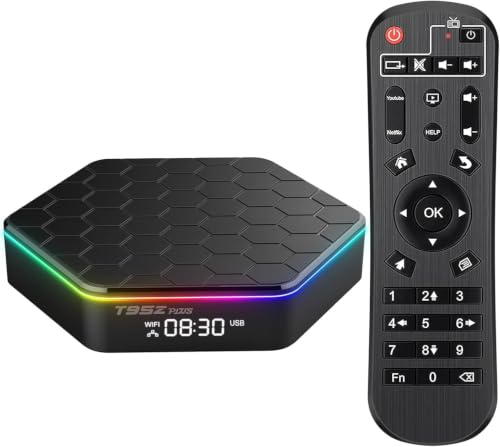
The ADDCOLOR T95Z Plus Android 12.0 TV Box is a dedicated streaming media player designed to transform any standard television or computer monitor into a versatile entertainment hub. This compact streaming box is well-suited for cord-cutters, apartment renters, budget-conscious shoppers, and families seeking an affordable way to modernize a bedroom or guest room TV without investing in a completely new flat-panel display. By connecting via HDMI, it delivers a customizable Android media experience tailored for movie lovers, casual gamers, and video streamers.
At the heart of the device is an Allwinner H618 Quad-Core Cortex-A53 processor paired with 4GB of RAM and 32GB of internal storage. Based on product specifications, this hardware configuration provides smooth daily navigation across system menus and reliable multitasking when launching streaming apps or playing casual Android games. The box supports high-efficiency video decoding up to 6K resolution as well as 3D content, which allows users to enjoy crisp playback from supported local video files and compatible streaming sources on their 4K or 1080p home displays.
Connectivity options are robust for a compact media box, featuring 2.4GHz and 5.0GHz dual-band Wi-Fi alongside a standard 10/100M Ethernet port for stable wired network streaming. Bluetooth 5.0 support makes it easy to sync wireless headphones for late-night viewing without disturbing roommates or family members, or to connect external soundbars and wireless gamepads for an enhanced audio-visual setup. The unit also includes a micro SD card slot, giving users the freedom to expand local storage for extensive offline movie and photo libraries.
Setup is straightforward and practical, requiring only a connection to the TV through the included HDMI cable, plugging in the US power adapter, and connecting to a home wireless network. While the open Android 12 platform grants extensive freedom for downloading apps and sideloading media utilities, prospective buyers should recognize that devices running open mobile Android may not support certified high-definition playback on proprietary streaming platforms like Netflix or Prime Video, which often require specific DRM licenses.
For home entertainment enthusiasts building a secondary media setup in a dorm, garage, or bedroom, the T95Z Plus offers strong value and dependable hardware headroom. Its generous RAM and expandable storage make it an appealing choice for DIY media streamers, sports fans using web feeds, and viewers who want versatile playback capabilities at an accessible price point.
Running on Android 12.0, the T95Z Plus offers a customizable home screen environment that allows users to organize their preferred media applications with ease. The system provides access to a broad library of entertainment utilities, web browsers, and media players suitable for streaming videos, displaying family photo slideshows, or listening to music.
The included voice remote simplifies everyday operation, allowing users to speak navigation commands and search terms directly into the microphone. Bluetooth 5.0 integration further expands smart usability by enabling easy connections with wireless keyboards, air mice, and wireless game controllers for a more interactive living room setup.
Getting the T95Z Plus ready for daily viewing takes only a few minutes. Users simply connect the included HDMI cable from the TV box to an open HDMI input on their television, attach the included US power adapter, and power the device on. The on-screen setup guide assists in connecting to either a 2.4GHz or 5GHz Wi-Fi network, or users can run a direct Ethernet cable into the rear LAN port for stable connectivity.
Its compact form factor allows the box to sit neatly on any TV stand or shelf next to soundbars and game consoles without creating cable clutter. Adding extra media storage is equally simple by sliding a micro SD card into the dedicated expansion slot on the side of the unit.

Pros
- Delivers up to 4K output to elevate older television sets and compact displays
- Dual-band Wi-Fi and dedicated Ethernet port ensure reliable streaming connectivity
- Generous storage expansion options supporting up to 2TB external hard drives and 64GB TF cards
- Fast USB 3.0 connectivity enables quick file transfers and lag-free local playback
- Small, lightweight chassis integrates cleanly into any living room or bedroom setup
Cons
- 2GB of internal RAM is geared toward media streaming rather than demanding 3D Android games
- Utilizes Bluetooth 4.0 instead of newer Bluetooth standards
- Requires an existing television or monitor with an available HDMI port
The Upvivi Android 11.0 TV Box functions as a dedicated streaming media player designed to upgrade existing televisions, secondary bedroom screens, and computer displays into fully functional smart entertainment hubs. Rather than replacing a perfectly good display panel, this compact external unit breathes new life into older high-definition and 4K UHD sets. Driven by a quad-core RK3318 chipset and the Android 11.0 operating system, it provides an open smart ecosystem that lets users stream video, run entertainment apps, and browse local media files.
Visual output is a central focus of the device, supporting up to 4K resolution output to compatible televisions and monitors. When connected to a modern 4K display, it delivers clean picture details, balanced color output, and smooth video playback for movies and television series. In addition to direct streaming, the unit supports wireless screen mirroring from mobile devices, allowing family members to cast photos, home videos, and presentations directly from a smartphone or tablet to the big screen.
Hardware connectivity is well thought out for a compact device. Networking is handled via dual-band 2.4GHz and 5GHz Wi-Fi for stable wireless video delivery, alongside a physical Ethernet port for viewers who prefer a wired connection to eliminate wireless interference. Bluetooth 4.0 is also on board, making it simple to pair wireless headphones for late-night viewing without disturbing the rest of the household, or to attach wireless keyboards, mice, and gamepads for easier interface navigation.
Storage and expansion options are notably flexible compared to many basic streaming dongles. The box is equipped with 2GB of RAM and 16GB of internal ROM, providing adequate headroom for daily app installations. For extensive local media libraries, the system supports TF card expansion up to 64GB and external hard drives up to 2TB. The inclusion of a high-speed USB 3.0 port ensures that large high-bitrate video files load quickly from external drives, while an additional USB port accommodates input accessories.
There are some realistic performance boundaries to keep in mind. With 2GB of RAM and an RK3318 processor, the device is optimized primarily for video playback and standard streaming apps rather than heavy multitasking or high-end mobile 3D gaming. Users running multiple heavy background applications may encounter occasional interface pauses. Additionally, Bluetooth 4.0 provides solid wireless pairing, though it lacks the extended range and power efficiency of newer Bluetooth iterations.
For American households looking to extend the lifespan of an existing living room TV, equip a guest bedroom display, or set up a versatile media player in a home office or dorm, the Upvivi Android 11.0 TV Box offers dependable utility. Its combination of 4K output, dual-band Wi-Fi, external storage support, and Android app versatility delivers solid practical value without necessitating an expensive new television purchase.
The hardware layout of the Upvivi TV Box provides a practical blend of wired and wireless connections. With dual-band 2.4GHz and 5GHz Wi-Fi, users can take advantage of faster 5G network bands to minimize buffering during high-definition and 4K playback. The inclusion of a dedicated 10/100M Ethernet port offers a reliable alternative for entertainment consoles located near a home router.
Peripheral connectivity is anchored by a high-speed USB 3.0 port and a companion USB 2.0 port. The USB 3.0 port allows for fast data throughput when connecting external hard drives up to 2TB, ensuring that uncompressed home videos and high-bitrate files read smoothly without stutter. Users can also connect USB keyboards, air remotes, or webcams for expanded living room functionality.
Wireless peripheral pairing is supported through Bluetooth 4.0, which allows users to connect wireless headphones, external speakers, or wireless game controllers. A built-in TF card slot accommodates cards up to 64GB, making it effortless to transfer digital photo albums and music libraries directly onto the system.
Running on Android 11.0, the Upvivi streaming box provides access to a versatile ecosystem of media applications, video players, and utilities. The interface is organized to provide straightforward navigation across installed streaming services, personal video libraries, and device settings.
Screen mirroring support enhances everyday living room utility, allowing users to project personal media from mobile phones or tablets onto the television screen without requiring dedicated cables. Whether sharing vacation photos with friends or reviewing work documents on a larger screen, the mirroring functionality integrates smoothly.
Local media decoding handled by the quad-core RK3318 chip supports standard 4K video playback formats, giving users the freedom to enjoy movies from external drives or network shares without needing secondary computer hardware running in the background.

Pros
- Affordable way to upgrade older or non-smart TVs to Android 14.0 media streaming.
- Features high-speed WiFi 6 and Bluetooth 5.0 for reliable streaming and headphone connectivity.
- Supports 4K@60fps output with HDR10+ and H.265 hardware decoding for sharp video playback.
- Bundled voice remote enables quick searches and simplified navigation across menus.
Cons
- Modest 2GB RAM and 16GB storage capacity may limit heavy multitasking or large app libraries.
- Ethernet connection is capped at 100M speeds rather than Gigabit bandwidth.
- External streaming box requires an open HDMI input and a separate power outlet near the TV.
The GREALT Android 14.0 TV Box represents a practical hardware solution designed to upgrade standard or aging television displays into fully functional smart media hubs. Instead of replacing a perfectly good living room screen or compact bedroom TV, this streaming player plugs into an available HDMI port to deliver modern streaming capabilities. It is particularly well suited for budget-conscious households, secondary-room setups like guest bedrooms, home offices, and dorms, or viewers looking to add Android app functionality to older 4K UHD or 1080p displays without investing in an entirely new television set.
In terms of video processing and playback capabilities, the device is built around an RK3518 64-bit quad-core processor paired with 2GB of system RAM and 16GB of onboard storage. The unit supports video output up to 4K resolution at 60 frames per second over HDMI 2.1, alongside hardware decoding for H.265 video files, HDR10+, and standard HDR10 content. While the manufacturer advertises 8K decoding support, most standard household viewers will rely on its stable 4K@60Hz playback to feed compatible ultra-high-definition television panels, allowing HDR-compatible screens to display rich colors and enhanced dynamic range during movie streaming sessions.
Hardware connectivity is a clear strength for a device in this tier, incorporating dual-band 2.4GHz and 5GHz WiFi 6 support alongside an RJ45 100M Ethernet jack. The inclusion of WiFi 6 helps maintain consistent wireless streaming throughput and lower signal congestion when connected to compatible modern home routers. Furthermore, integrated Bluetooth 5.0 allows users to pair wireless headphones for private late-night listening without disturbing family members, or connect wireless accessories such as a keyboard or mouse. The bundled voice remote simplifies content discovery, letting viewers speak search commands directly into the microphone to locate media quickly.
Setting up the GREALT TV Box is straightforward thanks to its compact chassis footprint, which rests easily on standard entertainment consoles or can be tucked discreetly behind wall-mounted displays. Once connected via HDMI and powered on, the Android 14.0 operating system provides an intuitive interface for launching popular streaming services, adjusting display output settings, and utilizing mobile screencasting to share family photos and phone videos on the big screen. The compact design ensures that your television furniture remains uncluttered while adding modern navigation features to your existing viewing setup.
Potential buyers should keep realistic performance boundaries in mind when considering this hardware. With 2GB of RAM and 16GB of internal storage, system multitasking and heavy app installations must be managed carefully, as running numerous background processes could lead to navigation sluggishness. Additionally, the wired network port operates at 100M speeds rather than Gigabit bandwidth, which is plenty for 4K streaming services but may be a constraint for users streaming uncompressed local network media files. As with any external player, it also requires an open HDMI port on your TV and a nearby electrical outlet for continuous power.
Based on product specifications and listed hardware features, the GREALT Android 14.0 TV Box offers solid value for viewers who want to extend the lifespan of their current television hardware. By pairing modern dual-band WiFi 6, Bluetooth 5.0, 4K@60Hz video playback, and voice remote controls in an accessible package, it delivers an easy, cost-effective smart upgrade for family rooms, bedrooms, and budget home entertainment setups.
Powered by Android 14.0 and an RK3518 64-bit quad-core processor, this media player offers a familiar smart environment designed for straightforward media streaming. The system comes equipped with 16GB of onboard flash storage for installing essential entertainment applications, alongside 2GB of system RAM to handle daily navigation and media playback.
The included voice remote control streamlines menu navigation and media searches, allowing users to issue voice commands instead of typing out lengthy titles on an on-screen keyboard. In addition, built-in wireless screencasting enables direct screen mirroring from compatible Android mobile devices, making it simple to share personal photos, home videos, or presentation decks on your television display.
The GREALT TV Box features robust wireless connectivity highlighted by dual-band 2.4GHz and 5GHz WiFi 6. This modern wireless standard provides improved stability, better resistance against household network congestion, and smooth data transfer rates for streaming 4K video content without persistent buffering.
For hardwired setups, an integrated 100M Ethernet port provides a direct, uninterrupted network line to your home router. The device also incorporates Bluetooth 5.0, enabling quick pairing with wireless headphones for late-night movie watching, or connecting peripheral input hardware like external mice and keyboards for easier navigation.
Pros
- Smooth 4K video playback with HDR10 support for improved visual depth
- Upgraded Wi-Fi 6 and Bluetooth 5.4 for dependable wireless performance
- Responsive voice-enabled remote control simplifies daily content browsing
- Versatile local media playback via USB 2.0 and analog AV connectivity
- Cost-effective smart upgrade for older HDTVs and secondary displays
Cons
- USB power cable is included but the wall power adapter must be supplied separately
- 2GB of RAM is optimized for video streaming rather than heavy multitasking or complex 3D gaming
- Standard open Android architecture may limit maximum resolution on select proprietary streaming platforms
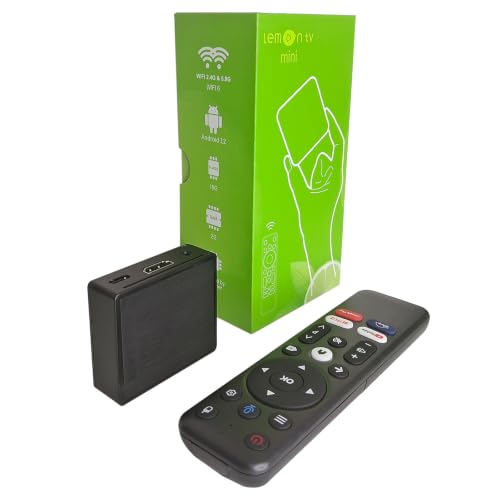
The BOXPUT H618 4K Android TV Box is a compact streaming media player designed to bring modern smart features to older flat-screen televisions or secondary screens throughout the house. Running on Android 12 and powered by an Allwinner quad-core Cortex-A53 processor, this streamer serves budget-conscious cord-cutters, apartment renters, college students, and families looking for an affordable way to access digital content. Whether you want to revitalize a guest room television, equip a basement hangout, or add streaming capabilities to a garage workshop display, this lightweight media box offers a straightforward path to upgrade your entertainment setup without buying a brand-new smart TV.
Visual performance is centered around its ability to decode 4K Ultra HD video at up to 60 frames per second with HDR10 support. When paired with a compatible 4K television or display, the box delivers sharp video details, decent color saturation, and improved dynamic contrast across supported movies and nature documentaries. Motion handling remains steady during casual sports viewing and weekend movie nights, preventing obvious stutter on standard television broadcasts. While it does not include advanced audio formats like native Dolby Atmos processing, the optical and AV sound options deliver clean dialogue and adequate stereo separation when paired with a basic soundbar or built-in TV speakers.
Navigating through content feels relatively smooth thanks to the dual-band Wi-Fi 6 connection and updated Bluetooth 5.4 integration. The included voice remote allows users to speak search queries directly, cutting down on tedious onscreen typing when tracking down YouTube clips, family shows, or workout videos. Built-in wireless mirroring protocols like AirPlay and DLNA make sharing phone photos and vacation videos effortless during family gatherings. With 16GB of onboard storage and a USB 2.0 port, users can also plug in external hard drives or flash drives to play personal photo libraries and local video files directly on the big screen.
The physical box is remarkably small and discreet, sitting flat on any media console without creating clutter or demanding complex cable routing. However, there are a few practical limitations buyers should keep in mind. A power cable is included, but the box does not come with an AC wall adapter, meaning you will need a spare USB power block to run it. Furthermore, with 2GB of system RAM, it is best kept to streaming media and casual web browsing rather than heavy multi-tab operations or demanding Android gaming. As with many open Android boxes, some premium streaming services may limit their playback resolution depending on app-level DRM licensing.
Overall, the BOXPUT H618 streaming device offers great utility for viewers seeking an economical media player for everyday entertainment. It is particularly well-suited for secondary living spaces, kid playrooms, bedroom late-night viewing, and vacation home displays where spending top dollar on a premium brand streamer might be unnecessary. For cord-cutters who appreciate flexible local media playback and straightforward wireless casting on a sensible budget, this versatile little box provides a capable smart entertainment companion.
Setting up the BOXPUT TV box is quick and accessible for almost any home user. You simply connect the included HD cable to an open HDMI port on your television, plug in the USB power lead using a standard 5V wall adapter, and follow the onscreen startup steps. Dual-band Wi-Fi 6 assists with stable signal reception even if your primary router is located a few rooms away.
For households with legacy audio hardware, the integrated AV output provides a practical pathway to plug in older analog speaker systems or auxiliary sound setups. Meanwhile, the USB 2.0 port lets you quickly attach external flash storage or wireless keyboard dongles for easier navigation and offline video playback.
How an Android TV box connects your television to apps
An Android TV box is a separate media player that connects to a television and provides a software interface for compatible apps and other supported functions. In a typical arrangement, the television displays the device’s output, while the box connects to a network so its apps can reach online services. The exact interface, supported apps, connection options, and features depend on the particular device. The name alone doesn’t establish that a box is officially certified for a service or that it will work with every television.
The practical question is whether the device, TV, network, and service fit together. A product listing may specify an HDMI connection, wireless networking, a wired network port, or a particular remote feature, but those details should be verified for the exact model. The TV still needs a compatible input, the network needs to reach the device, and the selected service must support the platform. A subscription or account may also be required independently of the box.
- Check the TV’s available input before assuming a box can connect directly.
- Confirm the device listing identifies the connection and network options you need.
- Verify that your preferred service supports the specific device and its software.
- Account for required service subscriptions separately from the streaming hardware.
- Compare advertised resolution with the television and content you intend to use.
What the box does, and what it doesn’t provide
The box runs its own software and presents supported functions through a TV-connected interface. Depending on its stated features, it may offer app access, local media playback, casting, a voice remote, or storage for apps and files. These are not universal Android TV box features, so check the individual listing rather than treating a feature on one product as standard across the category. A device description that mentions an app store, for example, doesn’t establish that every app in that store works with every streaming service.
The box also doesn’t replace the television’s display or guarantee a particular viewing result. A resolution claim describes a device capability as presented by its manufacturer; the TV, content source, app, and service can affect what is actually displayed. Similarly, a voice remote can offer a way to issue commands if the product includes and supports that function, but it doesn’t mean every app understands every command. Read the model’s documented features and limits as specific claims, not as a promise about the whole product category.
Streaming access is separate from hardware. A viewer may need to install or open a compatible app, sign in, and meet the service’s own account or subscription conditions. Buying a device doesn’t grant access to paid content, remove regional limits, or make an unsupported service available. If a service is the main reason for considering a box, verify its current compatibility through the service and device information before purchase.
When a separate player may be useful
A separate player may make sense if a television lacks a desired app or its built-in streaming interface doesn’t meet a household’s needs. It can also be relevant when a viewer wants a feature listed for a particular device, such as a voice remote or a stated casting function. The decision depends on the gap the device is meant to fill, not simply on the Android name. If the TV already offers the services and controls you need, adding another device may not solve a problem you have.
Think about everyday use before treating specifications as benefits. A remote can affect how people search and navigate, while storage figures may matter to someone who installs apps or keeps local files. Ethernet could be relevant if a particular box lists a wired network connection and the setup can use it. None of these features alone establishes better streaming or broader app support, so connect each advertised specification to a real requirement.
The supplied product descriptions illustrate why checking the model matters: the listed devices differ in stated operating systems, storage, network connections, ports, resolution claims, and remote functions. One description lists Chromecast Built-in, while other descriptions mention features such as screen mirroring or Ethernet. Those claims apply to the named products, not to every Android TV box. They also shouldn’t be read as proof that a specific phone, app, TV, or service is compatible without checking the relevant requirements.
For more on a connected point, our page on is 60hz good for 4k tv goes into it separately.
Check TV, network, and service compatibility before setup
Compatibility is a chain of separate checks, not a single yes-or-no label. Start with the TV connection, then confirm the box’s network options and the service’s platform requirements. A device listing may describe supported connections, but it may not answer whether every app you want is available. If the product page or service documentation leaves a critical point unclear, treat it as unconfirmed rather than assuming compatibility.
Match the TV input to the device connection
Look at the television’s actual ports and the connection specified for the box. Several supplied product descriptions mention HDMI, but that does not mean every TV has a suitable available input or that every device uses the same supplied accessories. One description lists an HDMI cable, while package details differ elsewhere. Confirm what’s included for the exact model and whether the TV input is accessible, especially if other equipment already uses it.
Resolution is another compatibility point, but it needs context. A device’s advertised output capability doesn’t upgrade a TV that cannot display that output, and an app or video source may have its own limits. The TV’s specifications and the content source both matter when deciding whether a resolution feature is useful. Don’t choose based on a large resolution number alone, since it doesn’t establish app availability, image quality, or reliable playback.
Confirm network access and service support separately
Check which network methods the particular box lists and whether they fit the household’s setup. Some supplied descriptions state dual-band Wi-Fi, and some also list Ethernet, but these features aren’t universal. A network feature describes how a device may connect; it doesn’t guarantee that a home connection has sufficient capacity or that a signal reaches the device reliably. If wireless access is uncertain, review the device and network guidance instead of assuming a particular band or connection will resolve it.
Then verify service compatibility with the service provider’s current information. An Android-based operating system or a listed app store isn’t, on its own, confirmation that a particular streaming app is supported on that model. Services can set their own device, software, account, and regional requirements. Check these conditions before purchase if access to a specific service is essential, and remember that any applicable subscription is separate from the hardware.
- Read the exact model name and specifications rather than relying on the category label.
- Check the TV input and confirm the listed device connection can be used.
- Compare the box’s stated network methods with the available home connection.
- Look up service compatibility for the device instead of inferring it from Android branding.
- Confirm any app, account, subscription, or regional requirements with the service.
Consider the built-in TV platform before adding hardware
A television may already offer the apps and interface a household needs. Check the TV’s current software and service availability before adding another player, because a separate device isn’t automatically an improvement or a requirement. If a desired app is missing, confirm whether the limitation comes from the TV model, its software, the service, or the account. Identifying the actual gap helps prevent buying hardware that doesn’t address it.
A separate box can add another interface and remote, and it may introduce another device that needs power, a network connection, and software updates. That tradeoff may be worthwhile when it supplies a verified feature or compatible app that the TV lacks. It may be unnecessary when the existing TV already handles the intended viewing. Compare the practical difference in your setup rather than assuming that an additional box will make every app work.
Readers working through this often check does 4k tv make a difference next.
Set up the device and diagnose common playback problems
Setup generally involves connecting the box according to its instructions, providing power as specified, selecting the relevant TV input, and completing the device’s on-screen network and account prompts. The exact sequence and included accessories vary by model, so use the supplied manual rather than treating a generic description as model-specific instructions. Don’t open or modify the device or bypass software protections. Keep its ventilation unobstructed and follow the manufacturer’s guidance for power, placement, and cabling.
Prepare the TV connection and network first
Before starting, identify the correct TV input and check the device’s connection requirements. Confirm whether the product package includes the cable and power components needed for the stated setup; the supplied descriptions don’t list identical contents for every model. Place the device where its connections can be made without strained or damaged cables, and don’t block ventilation. If any power component or cable appears damaged, stop using it and follow the manufacturer’s guidance.
Have the network details and any account information ready if the on-screen setup requests them. A voice remote, casting feature, or app-store claim should be used only as described for that model. Don’t assume a phone can control or cast to the box just because another product description lists a similar feature. Follow the device’s instructions and the app or service’s own setup directions.
Trace playback failures from the TV to the service
A blank screen, failed app launch, or interrupted stream can have different causes. The TV may be on the wrong input, a connection may be loose, the box may not have network access, or the app or service may require attention. Treat the symptom as a clue, not proof of one specific fault. Check one part of the chain at a time, using the device and television instructions where needed.
If the TV shows no device interface, confirm the selected input and review the physical connection without forcing a plug or cable. If the interface appears but an app won’t play, check whether the device is connected to the network and whether the service account or app reports an issue. A playback problem can also originate with the service or content, rather than the TV box. Avoid factory resets or other disruptive changes unless the model’s instructions or support guidance recommend them.
When playback is unreliable, don’t assume the advertised Wi-Fi feature proves the home connection is adequate. Consider whether the issue affects one app or several, and whether other devices can use the network; those observations can help distinguish a service-specific issue from a broader connection problem. If the box lists Ethernet and the setup supports it, consult the manufacturer’s guidance about that option. No single network adjustment guarantees a fix, and device specifications alone don’t establish actual connection performance.
Check remote response and app access without risky changes
If the remote doesn’t respond, first determine whether the issue affects all controls or only voice commands. Check the remote’s instructions and any stated battery requirements; package contents and remote features differ across models. A voice function may depend on the device, software, network, or the app being used, so a failed voice search doesn’t necessarily mean the whole box has lost power. Don’t open the box or attempt hardware modifications to address a remote problem.
If an app is missing or unavailable, verify the device’s current software and the service’s published compatibility information. A product description that mentions an app store is not a promise that a named service is available, supported, or included. Use official app and service channels, and don’t install unverified software or seek ways around paid access or service restrictions. If the manufacturer or service documents a known limitation, follow that guidance rather than trying an unofficial workaround.
For recurring faults, note what appears on screen, which app is affected, and whether the network connection is present. This focused description can make it easier to follow the correct support instructions. Consult the TV, box, network, or service provider that matches the part of the setup showing the problem. Stop using equipment with visible damage or a concerning power issue and follow the manufacturer’s safety guidance.
Decide whether the box solves a real compatibility gap
The useful decision is whether a particular device supplies a feature or supported app your current television lacks. Compare the model’s stated connections, network options, interface, and remote functions against that need, while verifying service support independently. Treat specifications as model-specific and leave unclear compatibility questions unresolved until reliable documentation answers them. This approach avoids confusing an Android label or a resolution claim with universal service access.
If the television already supports the desired apps and works for the household, a separate box may not be needed. If an app or feature is missing, confirm the TV connection, device requirements, network fit, and service rules before deciding. Choose the next step based on the verified gap, and use the exact product and service documentation for any setup detail that varies by model.
Readers working through this often check hisense tv not connecting to soundbar next.


Write Your Review
No reviews yet. Be the first to share your experience!