
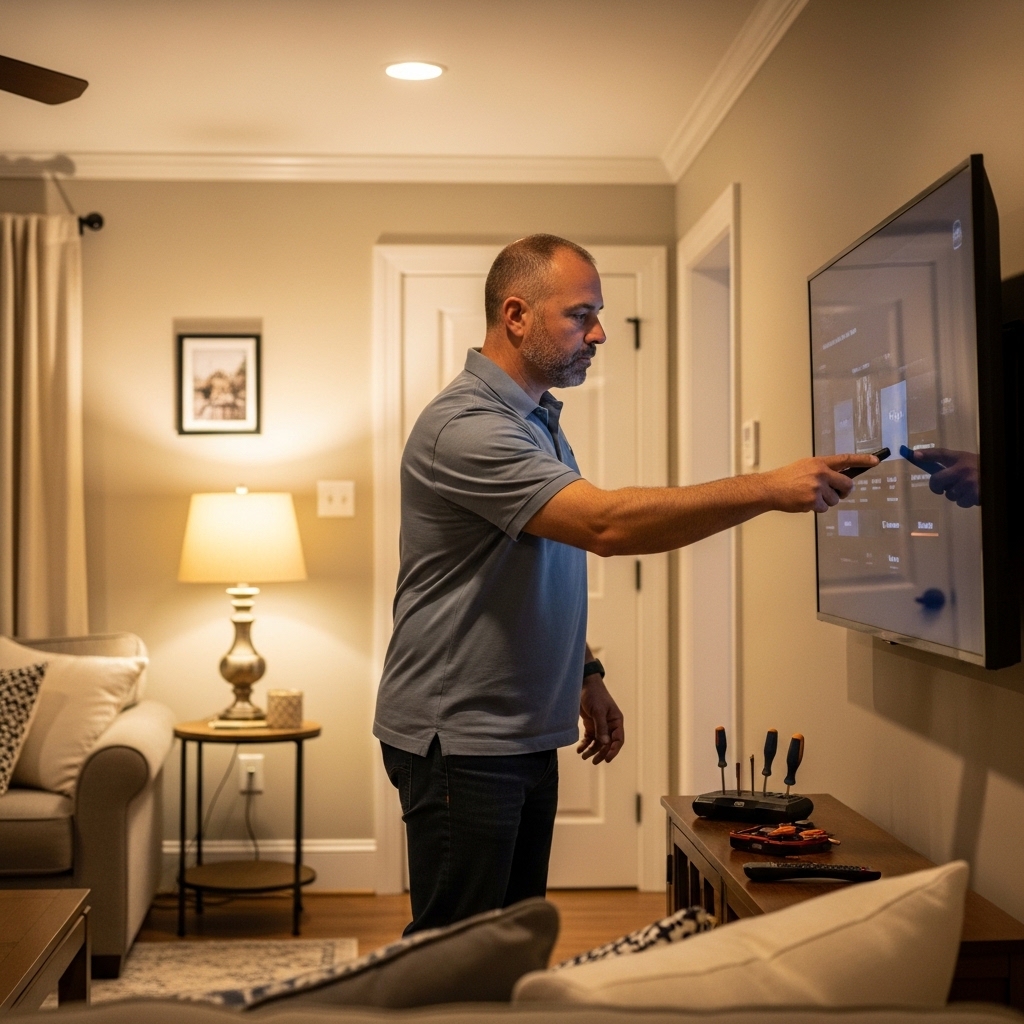

A television can dominate a living room before the rest of the decor gets a chance, especially when its stand becomes a landing spot for remotes, game controllers, and loose cables. A good arrangement gives the screen room to breathe while making the furniture feel connected to the rest of the space. If you’re working out how to decorate tv stand with tv, start with the television’s real footprint and the items you need nearby, then add decor in a few intentional groups rather than filling every surface.
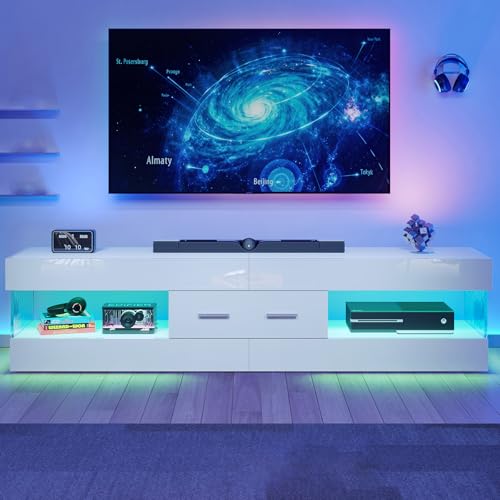
The Bestier 67-inch TV stand is described as a unit for televisions in the 65-to-75-inch range, with a 67-inch tabletop, open shelves, a drawer, LED lighting, and anti-tip hardware. Those details suggest a setup that can combine display space with concealed storage, but the listed screen range doesn’t confirm that every television’s feet will sit safely on its top. A bookcase-style TV stand guide can help if you’re considering a more vertical storage arrangement, while compact TV stand ideas may be useful for a smaller room or secondary screen.
Pros
- Reliably supports large displays up to 75 inches with a solid 200-pound load rating
- Customizable 22-mode LED lighting adds immersive atmosphere behind dark movie scenes
- Dedicated open shelving accommodates wide soundbars and gaming gear with direct line-of-sight for remotes
- Included dual anti-tip safety kits offer crucial security for homes with active kids or pets
Cons
- Low 15.75-inch overall height may feel too low for viewers accustomed to tall traditional media consoles
- Compact 13.78-inch depth leaves limited room for bulky vintage AV receivers and thick power cables
- Requires careful alignment of hardware during flat-pack assembly to ensure seamless door gaps
Finding the right home entertainment foundation is just as critical as choosing the right television panel. The Bestier 67-Inch Modern TV Stand serves as a dedicated media console tailored for modern living spaces, apartments, and dedicated entertainment corners. Designed specifically to host screens ranging from 65 to 75 inches, this console targets movie lovers, sports enthusiasts, and gamers who need dependable support for their big-screen displays without having to mount them directly into drywall.
From an entertainment viewing perspective, console height plays an essential role in visual comfort. With an overall height of 15.75 inches, this low-profile stand positions large 4K LED and OLED panels right around seated eye level. This positioning helps preserve color accuracy and contrast fidelity, especially on displays that utilize VA panels where vertical viewing angles can degrade picture vibrancy if mounted too high. The wide 67-inch top surface provides plenty of breathing room for wide-stance factory TV feet, leaving ample width along the front for a dedicated center speaker or compact soundbar.
For gamers and cord-cutters, the layout balances practical component storage with ambient flair. Built-in LED lighting delivers 22 selectable dynamic patterns, emitting a soft glow through the stone-patterned cabinet doors that doubles as gentle bias lighting. In darker rooms, subtle background light helps reduce eye fatigue during late-night gaming sessions or holiday movie marathons. The open central shelves are sized well for current-generation gaming hardware and streaming hubs, providing passive airflow to prevent thermal throttling on consoles during extended video game tournaments.
Build quality relies on reinforced engineered wood with a clean white finish, rated to support up to 200 pounds of distributed weight. This capacity easily handles high-end smart TVs, which typically weigh between 50 and 80 pounds in the 65 to 75-inch range. The included center drawer provides a closed compartment to tuck away excess cables, streaming sticks, gaming remotes, and Blu-ray discs. Additionally, the manufacturer includes dual wall-anchoring straps, an essential safety measure that prevents accidental forward tipping when family members or pets are moving around the living room.
Assembly is straightforward for flat-pack furniture, typically taking about an hour with clearly labeled hardware. While the 13.78-inch depth provides a sleek footprint for small apartments, it might feel tight for audiophiles with full-sized, deep AV receivers that require substantial rear clearance for heavy gauge speaker wire. For viewers wanting an affordable, contemporary entertainment center that complements bright modern aesthetics, keeps cables tidy, and showcases a large 4K display, this Bestier console stands out as a practical and attractive choice.
Integrating this console into a modern home theater setup is straightforward thanks to its balanced dimensions and open bay architecture. The 67-inch width easily spans the wide stance of 65-inch and 75-inch smart TVs, eliminating the overhang that can create instability on smaller furniture. Placing your soundbar on the open upper deck provides unobstructed sound dispersion for Dolby Atmos audio, ensuring dialogue clarity is not muffled by enclosed cabinetry.
Console gamers will appreciate the open-backed shelving sections that facilitate smooth cable routing directly to your television HDMI 2.1 ports. Routing power cords, HDMI eARC connections, and optical audio lines remains hassle-free, allowing streaming devices like Apple TV, Roku, or Fire TV boxes to maintain clean line-of-sight for infrared remotes while remaining discreetly organized.
The aesthetic profile combines a contemporary glossy white frame with stone-textured door details, fitting seamlessly into bright, modern interior decors. The elevated base protects the bottom edge from floor moisture while simplifying quick vacuum runs beneath the console. Its smooth surface wipes clean easily with a microfiber cloth, resisting dust accumulation around sensitive media hardware.
Engineered MDF panels provide solid horizontal rigidity across the span of the stand, minimizing center deflection under the weight of heavier premium displays. The integrated drawer mechanism glides smoothly on metal tracks, giving you quick access to game controllers, media remotes, and spare batteries without disturbing the clean exterior look of your entertainment space.
Decorate Around the Screen, Not Over It
Decorating a TV stand works best when function leads and accessories follow. First confirm that the television, its feet, and the equipment you use can be placed safely; then choose a small number of objects that add warmth without competing with the display. The Bestier 67-inch Modern TV Stand for 75 Inch TV is listed with a 67-inch tabletop, open shelves, a center drawer, LED lighting, and a stated top capacity of up to 200 pounds. Those specifications help shape a decorating plan, but they don’t replace checking your own TV’s footprint, weight, and setup instructions.
Start by checking the screen and stand proportions
A TV’s advertised diagonal measurement is not its physical width. For example, a typical 65-inch 16:9 television is roughly 57 inches wide, but frame design and aspect ratio can change the exact measurement. Measure the actual screen casing from side to side, then measure the distance between the outer edges of its feet if the television has wide-set legs. The feet, not the diagonal label, determine whether the TV can rest fully on the stand.
The listed 67-inch tabletop gives a useful starting point for comparing widths, but it doesn’t tell you how much room is left for a specific TV’s feet or decorative objects. Aim for a stable base with enough clearance on either side, rather than placing feet near the edge just to make the screen appear centered. A 2-to-4-inch margin at each side is a practical styling target when the furniture and TV dimensions allow it, not a substitute for the manufacturer’s placement guidance. If the feet would overhang or the stand feels unstable, remove tabletop decor and reconsider the arrangement.
Also check the television’s weight against the stand’s stated limit and follow both manufacturers’ instructions. The product description lists a maximum capacity of 200 pounds for its tabletop, but it doesn’t provide individual shelf limits, and the TV’s weight still needs to be within the stated limit. Don’t assume that a compatible diagonal screen range settles questions about base shape, weight, or support. Those are separate checks that matter before styling begins.
Set the viewing position before adding accessories
A pleasing arrangement should also feel comfortable from the usual seat. A common starting point is to place the vertical center of the screen near seated eye level, often around 42 inches from the floor, then adjust for the actual sofa, chair, and viewing posture. That reference is not a fixed rule for every room: low lounge seating, recliners, and different screen sizes can change what feels natural. Sit where you watch most and check whether your gaze falls comfortably on the screen without needing to tilt your head for long periods.
The product information doesn’t state the stand’s height, so don’t infer viewing height from its 67-inch width or advertised TV range. Measure the assembled unit and the display before deciding whether the screen needs to sit directly on the stand. A tabletop TV may place the screen lower than a wall-mounted one, but a very low cabinet can also be awkward from a high sofa. Keep decorative objects low enough that they don’t block the screen’s bottom edge or draw your eyes away from the picture.
Give the tabletop a clear visual hierarchy
Once the screen is positioned, treat the remaining tabletop as a narrow styling zone rather than a display shelf. One taller accent at an outer end and one low grouping on the opposite side can balance the TV without making the console feel crowded. Keep the objects modest in height and away from the screen’s visible edges, especially if the TV occupies most of the furniture’s width. The goal is a clear focal point, not a symmetrical row of items that competes with the picture.
Use variation in shape and texture to make a restrained display feel considered. A small plant, a shallow bowl, or a framed image can add contrast, while a book or low tray can gather small items into one neat group. Avoid placing unstable objects where a cable tug or everyday bump could knock them down. Keep liquids away from electronics and avoid blocking vents on the TV or nearby equipment.
Leave a practical zone for the television’s feet, sensors, and any soundbar or other component that needs open space. Don’t place decor over the screen’s infrared receiver if your remote relies on it, and check that the TV’s own controls remain reachable if needed. The supplied product information says the stand has open shelves, but it doesn’t give their exact dimensions or describe a dedicated soundbar bay. Measure your equipment before assigning it a permanent spot.
Use the drawer and shelves to control visual clutter
Visible accessories can make even a carefully styled console look busy. The Bestier listing describes a center drawer for remotes and accessories, plus open shelves intended for components such as consoles and soundbars. Put small items you use often in the drawer, and reserve the shelves for equipment that needs access or airflow. A limited surface display paired with purposeful storage usually looks calmer than filling every shelf with decorative objects.
Open shelving makes devices easy to reach, but it also leaves them visible. Group controllers or headphones in a small container only if it doesn’t block ventilation or make cables awkward to reach. Avoid stacking objects on equipment or wrapping cords tightly around hot components. Since the product information doesn’t list shelf depth, height, or individual weight ratings, compare each device’s dimensions and manufacturer requirements with the actual assembled compartments before relying on them for storage.
A closed drawer can hide small accessories, but it isn’t a place for equipment that needs ventilation or remote access. Keep game consoles, streaming devices, and receivers positioned according to their own airflow requirements; don’t enclose a heat-producing device in a closed space unless its manufacturer permits that arrangement. The listed open shelves may offer a more accessible location for electronics, but the description doesn’t specify rear ventilation, clearance dimensions, or cable cutouts. Inspect the unit and follow the equipment makers’ guidance rather than assuming a particular airflow path.
Make cables part of the arrangement
Loose cables can undo the effect of thoughtful decor, so plan their route before placing accessories. Separate power leads from signal cables where practical, keep plugs reachable, and use suitable cable ties or organizers to gather slack without pinching or sharply bending wires. The supplied Bestier details don’t confirm dedicated cable grommets or a rear routing channel, so check the assembled unit rather than expecting hidden pass-throughs. Don’t run power cords through a hole that isn’t designed for that purpose.
Arrange devices so their cables can reach the television and power source without tension. A power strip should remain accessible and should be used according to its own instructions, not buried under decor or packed into a closed space with heat-producing equipment. Keep cords clear of drawer tracks and cabinet doors to prevent snagging. A little visible cable at a safe bend is preferable to a taut connection or a cord crushed behind the unit.
Take a final look from the main seating position and from the sides of the room. Cables that seem hidden from the front may still hang visibly beside the console or catch on a vacuum. If routing options are limited, use a finish-matched cable cover where appropriate, following its instructions and any rental restrictions. For more ideas related to the layout around larger screens and living-room furniture, the large-screen TV stand layout guide offers another perspective on arranging a substantial display with a console.
Balance LED lighting and decorative finishes
The product description lists 22 LED lighting modes, with light intended to show through patterned doors. Treat that lighting as an accent rather than the room’s only source of illumination. A softer setting can complement an evening viewing area, while a bright or rapidly changing mode may compete with the screen or become distracting. Check the available controls and placement after assembly, because the supplied details don’t specify how the lighting is powered or adjusted.
Let the console’s finish and door pattern guide the materials you add around it. A few matte, natural, or fabric textures can soften a glossy-looking surface, while repeating one color from nearby cushions or artwork makes the stand feel connected to the room. The product title identifies a white TV stand, but its feature description also mentions a black glossy finish, so the supplied finish information is inconsistent. Confirm the actual color and surface appearance in the current product listing before choosing matching accessories.
Keep care simple and follow the furniture maker’s cleaning instructions. Don’t assume a finish is scratch-proof because marketing language describes it as scratch-resistant, and avoid abrasive cleaners unless the manufacturer says they’re suitable. Use coasters or other protective barriers under objects that could mark the surface, and lift accessories rather than dragging them across it. These small habits help preserve the presentation without relying on unverified durability claims.
Keep stability and everyday access in the plan
Decor should never interfere with secure placement. The product description lists two anti-tip devices, which should be installed according to the provided instructions, particularly in homes with children or pets. Don’t treat the TV or decorative objects as counterweights, and don’t skip the included safety hardware because the unit appears stable on its own. Use appropriate wall attachment methods for the home’s construction and follow the furniture maker’s guidance.
After assembly, check that the unit sits level and doesn’t rock, then confirm that doors and drawers open freely with the TV and equipment in place. Keep the area in front of the drawer clear enough for routine access, and avoid blocking the open shelves with baskets that restrict device ventilation. If the floor is uneven or the console shifts when a drawer opens, address the stability issue before adding fragile decor. Product instructions should guide any assembly adjustment; don’t improvise structural changes.
A finished arrangement should work from more than one angle. Check whether the TV remains centered from the main seat, whether the objects stay clear of the screen, and whether equipment is reachable without moving the display. Confirm that the television’s feet sit fully on the top and that its weight stays within the stated limit. Then secure the anti-tip devices as directed and make sure cables aren’t trapped behind the furniture.
The practical formula is simple: verify fit and viewing comfort first, keep the screen visually dominant, and use the drawer and shelves to give everyday equipment a sensible home. Add a few coordinated accents only after the TV, ventilation needs, cable routes, and safety hardware are settled. That approach makes the stand look intentional while keeping its main job, supporting and organizing the entertainment setup, in focus.


Write Your Review
No reviews yet. Be the first to share your experience!