

Start by matching the mount to the TV’s VESA pattern and weight, then confirm the wall can support the mount using its specified installation method. How to install a tv mount depends on the bracket design and wall material, so the TV’s screen size alone isn’t enough to guide the job. Check the mount instructions, the TV’s mounting-hole details, and the location of studs or other approved structural support before drilling. Planning also helps avoid a crooked screen, blocked ports, or hardware that doesn’t suit the TV’s recessed mounting holes.
Gather the right tools and arrange help lifting the display, especially if it’s large or difficult to handle. A mount’s listed VESA range, weight limit, wall requirements, and included fasteners are useful starting points, but the TV and wall must meet all applicable limits. Renters considering drywall-specific systems should read the exact surface and capacity restrictions rather than assuming every no-stud design works on every wall. For background on that distinction, see this guide to drywall TV mounts.

Pros
- Smooth full motion articulation for flexible viewing angles
- Easy to install with clear instructions and all hardware included
- Sturdy steel construction feels secure and durable
- Great value for the price, especially for smaller TVs and monitors
- Rotates 360 degrees for landscape or portrait orientation
Cons
- Maximum weight limit of 44 lbs may not suit larger or heavier TVs
- Single stud installation may require careful placement for optimal stability
- Some users may find the arm a bit stiff when first adjusting
The Pipishell Full Motion TV Wall Mount is designed for small to medium displays, making it a perfect fit for bedrooms, kitchens, dorm rooms, or home offices. It supports TVs and monitors from 13 to 43 inches with VESA patterns up to 200x200mm, and can handle up to 44 pounds of weight. This mount is ideal for homeowners, apartment renters, and anyone looking to free up valuable floor or table space while enjoying a more ergonomic viewing experience.
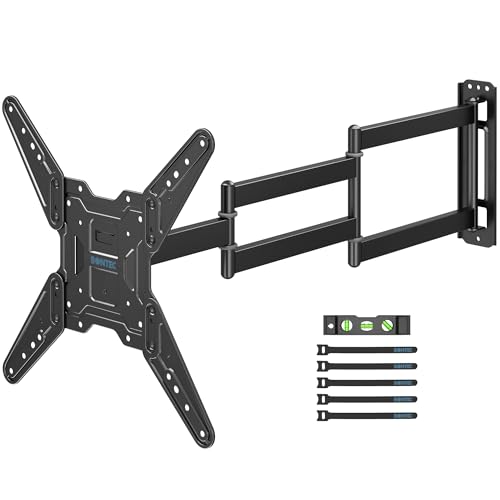
One of the standout features is the full motion articulation. The mount offers +9/-11 degrees of tilt to reduce glare, up to 90 degrees of swivel left or right (depending on screen size), and a full 360-degree rotation for switching between landscape and portrait orientations. This flexibility is great for watching movies from the bed, gaming from a desk, or even using the display for digital signage. The arm extends up to 14.59 inches and retracts to just 2.7 inches, so you can pull the screen closer when needed or tuck it flat against the wall to save space.
Installation is straightforward thanks to the included hardware and clear instructions. The mount uses a single-stud design for wood studs, but also works on concrete or brick walls. The TV plate is removable, which makes it easy for one person to hang the display without struggling. Many users find the setup process manageable even if they are not particularly handy, though having a second person can speed things up.
Build quality is a strong point here. The mount is made from high-grade steel and feels solid once installed. There is no wobble or sag, even when the arm is fully extended. Pipishell backs this product with a 5-year warranty, which adds confidence for long-term use. The black finish is low-profile and should blend well with most TVs and decor.
While this mount is versatile, it does have limitations. The 44-pound weight limit means it is best suited for smaller TVs and monitors. Larger or heavier displays will need a heavier-duty mount. Also, because it relies on a single stud, you need to plan the placement carefully to ensure the TV ends up where you want it. Some users mention the arm can be a bit stiff at first, but it loosens up over time.
Overall, the Pipishell Full Motion TV Wall Mount is an excellent choice for anyone with a small to medium TV or monitor who wants maximum viewing flexibility without spending a lot. It works well for movie lovers, gamers, streamers, and families who want to optimize their viewing angles in tight spaces. If you need a reliable, affordable mount for a secondary TV or computer monitor, this is a solid pick.
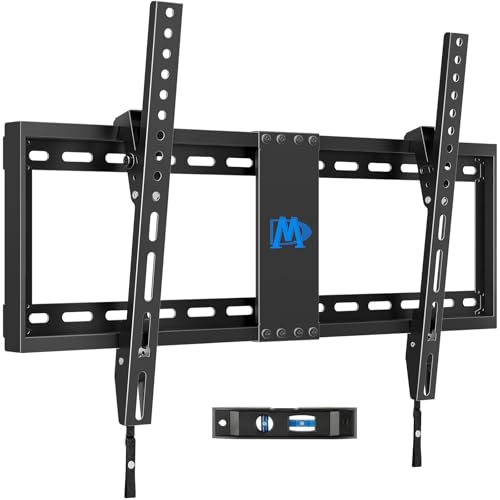
Pros
- Low-profile design saves space and looks clean on the wall.
- 8-degree tilt effectively reduces glare for better viewing.
- Easy to install with clear instructions and included level.
- High weight capacity supports most large TVs up to 132 lbs.
- Universal compatibility with standard VESA patterns and common stud spacing.
Cons
- Not suitable for all wall types; concrete or brick requires separate anchors from the manufacturer.
- No swivel or full-motion articulation – only tilt is available.
- The arms may block bottom connections on some TVs if ports are recessed.
The Mounting Dream TV wall mount is a straightforward, well-built option for homeowners and apartment renters who want to free up floor space and enjoy a cleaner look in their living room, bedroom, or home theater. Designed for most 37- to 75-inch flat-screen TVs, this universal tilt mount supports VESA patterns up to 600x400mm and fits wood studs at 16, 18, or 24 inches – covering the vast majority of modern TVs.
One of its strongest features is the low-profile design. By holding the TV just 1.5 inches from the wall, it gives your setup a sleek, almost floating appearance. This is especially appealing for families who want to keep their media wall tidy, or for cord-cutters and streamers who mount a large 4K TV above the fireplace without adding bulk. The 8-degree forward tilt is a practical bonus: it cuts down glare from windows or overhead lights, making movie nights or Super Bowl parties more enjoyable without having to rearrange the room.
Installation is genuinely simple, according to user feedback. The package includes a clear instruction manual, a bubble level, and necessary hardware for wood stud mounting. You only need three main steps – attach the brackets to the TV, mark the stud locations, and secure the wall plate. Many do-it-yourselfers report finishing in under 30 minutes. For those mounting on concrete or brick, the manufacturer can provide the needed anchors, though they aren't included in the box.
Build quality feels solid. The steel construction is rated for up to 132 pounds, so even larger 75-inch TVs are held securely. The arms have a slight click-in lock once the TV is hung, adding confidence that everything stays put. One minor limitation is that the arms can occasionally block side or bottom ports on TVs with very recessed jacks, so it’s wise to check your TV’s connection layout before install. Also, this mount only tilts – it doesn’t swivel or extend – so it works best when you mount the TV directly in front of your seating area.
Overall, the Mounting Dream TV wall mount is a value-packed choice for budget-conscious shoppers, home theater enthusiasts, and anyone simply wanting a reliable, low-profile solution. Its universal fit, easy installation, and responsive U.S.-based support make it a safe bet. Whether you’re setting up a living room entertainment center, a bedroom TV for late-night watching, or a dedicated gaming setup, this mount delivers exactly what most people need without unnecessary complexity or cost.

Pros
- No need to find studs for installation, saving time and effort for homeowners and renters
- Sturdy construction that securely holds large TVs up to 150 pounds and 100 inches
- Easy DIY setup with included hardware, suitable for a wide range of TV brands and models
- Minimizes wall damage, making it perfect for renters or frequent movers
- Versatile mounting options work on multiple wall types including drywall, brick, and concrete
Cons
- May not be as secure as traditional stud-mounted options for very heavy or large TVs, especially on certain wall types
- Installation may require careful leveling and alignment to ensure the TV is straight and stable
- Some users might find the included hardware insufficient for specific wall materials like thick brick or concrete
The HangSmart TV Wall Mount No Stud is a patented solution designed for homeowners and renters who want an easy, DIY installation without the need to find wall studs. This mount is ideal for those with flat-screen TVs from 19 to 100 inches and can hold up to 150 pounds, making it a solid choice for larger screens. It's compatible with popular brands like Samsung, Sony, LG, Vizio, and TCL, so most users will find it works with their current TV.
For home theater enthusiasts, gamers, and families, this mount offers a hassle-free setup that minimizes wall damage, which is great for renters or anyone who moves frequently. The included hardware includes screws and anchors for various wall types like drywall, brick, cement, wood, and concrete, so you can mount it in a living room, bedroom, or even a basement home theater. The robust support ensures your TV stays secure, but you'll need to carefully level it to avoid any issues.
In terms of picture quality and gaming performance, this mount doesn't directly affect those aspects, but it does keep your TV safe and stable, which is important for a good viewing experience. The smart TV platform and streaming apps are unaffected, so you can enjoy Netflix, Disney+, or YouTube without worrying about the mount. The design is simple and practical, with a black finish that blends well with most setups.
One realistic limitation is that this mount may not be as secure as traditional stud-mounted options for very heavy TVs, especially on certain wall types like thin drywall. Some users might find the included hardware insufficient for specific materials, so you may need additional anchors. However, for most standard setups, it works well.
Overall, this is a good buy for budget-conscious shoppers, renters, or anyone looking for an easy install without damaging walls. It's practical for movie watching, sports viewing, and streaming, and the versatility makes it suitable for various wall types. Just be sure to check your TV's weight and size limits before buying.
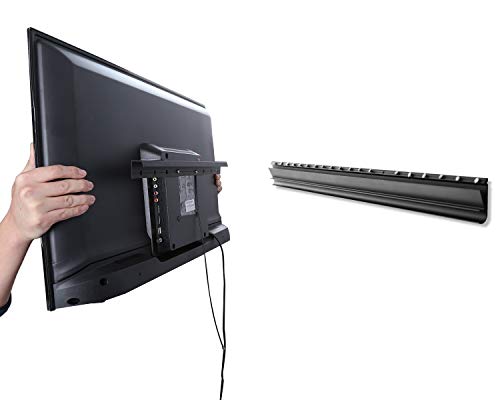
Pros
- No stud finder needed - works directly on drywall, wood, or concrete, saving time and hassle.
- Ultra-slim 1-inch profile creates a flush, clean look perfect for modern living rooms or bedrooms.
- Includes all mounting hardware, built-in level, and security cable for a complete, worry-free setup.
- Versatile VESA pattern compatibility (100x100 to 400x400) fits most 26-55 inch TVs easily.
Cons
- Limited tilt adjustment only +5 degrees, which may not be enough for high or angled wall placements.
- Drywall thickness must be at least 0.4 inches; not suitable for very thin or fragile wall materials.
- Maximum weight capacity of 110 lbs may not support larger or heavier 55-inch TVs with thick bezels.
The AENTGIU Studless TV Wall Mount is a practical solution for anyone who wants to mount a TV without the hassle of finding studs or drilling into walls. Designed for flat-panel TVs from 26 to 55 inches, this mount uses tiny nails that grip directly into drywall, wood, or concrete block, supporting up to 110 lbs. It is an excellent choice for renters who cannot drill into studs, homeowners who want a quick weekend project, or anyone setting up a TV in a bedroom, living room, or home office.
Installation is remarkably simple. The package includes a built-in bubble level, all necessary nails, and a security cable. According to the product description, you can complete the setup in about 10 minutes. The mount sits just 1 inch from the wall, giving your TV a sleek, low-profile appearance that blends into any decor. The tilt feature allows up to +5 degrees, which is helpful for reducing glare or adjusting the viewing angle slightly, though it is not a full articulating arm.
This mount is built from heavy-duty steel and is strength-tested to three times its rated capacity. It accommodates VESA patterns from 100x100mm up to 400x400mm, covering the vast majority of 26 to 55 inch TVs on the market. The drywall requirement of at least 0.4 inches thickness is a key consideration - if your walls are thin or brittle, this mount may not be suitable. However, for standard drywall, wood studs, or concrete, it provides a secure hold.
In terms of real-world use, this mount is ideal for renters, apartment dwellers, or anyone who wants to avoid the mess and expense of hiring a handyman. It is also a great choice for mounting a secondary TV in a bedroom, dorm room, or home gym where studs are hard to find. The included security cable adds peace of mind for high-traffic areas or homes with children. Just keep in mind that the tilt range is limited, so it works best when the TV is mounted at eye level.
For movie lovers and streamers, this mount keeps your TV flush against the wall, creating a clean, modern look that complements any home theater setup. Gamers will appreciate the sturdy hold, though the lack of full motion means you will want to position the TV carefully for optimal viewing. The mount's simple design makes it easy to level and align, even for first-time installers.
Overall, the AENTGIU Studless TV Wall Mount offers excellent value at its price point. It is a reliable, no-fuss solution for anyone who wants to mount a smaller to mid-size TV quickly and securely without the need for studs. While it is not a full-motion mount, its low profile and easy installation make it a smart choice for renters, families, and budget-conscious shoppers looking to save on installation costs.

Pros
- Universal compatibility with a wide range of TV sizes and VESA patterns
- Low profile design saves space and gives a clean, modern appearance
- Tilt feature improves viewing angles and reduces glare
- Sturdy construction supports heavy TVs up to 132 lbs
- Easy installation with clear instructions and labeled hardware
Cons
- Only offers tilt adjustment, no swivel or full motion capability
- May not fit very narrow stud spacing (less than 8 inches) without additional mounting options
- Some users may need to purchase concrete anchors separately if not requested
If you’re looking to mount a big TV without spending a fortune, the USX MOUNT Tilting TV Wall Mount is a practical choice that works with most flat or curved screens from 37 to 95 inches. Rated to hold up to 132 pounds, it’s designed for a wide range of TVs including LED, LCD, OLED, and plasma models. The mount accommodates VESA patterns from 150x100 up to 600x400mm, so it fits many popular brands like Samsung, LG, Sony, TCL, and Vizio.
This mount is best suited for homeowners, apartment renters, and home theater enthusiasts who want a clean, space-saving setup. Its low profile design pulls your TV just 1.61 inches from the wall, giving that modern, floating look that blends nicely into any living room, bedroom, or home theater. The tilt feature (0 to -10 degrees) lets you angle the screen downward slightly, which helps reduce glare from windows or lights and improves the viewing angle when the TV is mounted higher than eye level.
Installation is straightforward thanks to the included bubble level, detailed instructions, and pre-labeled hardware bags. The mount works on wood studs spaced 8 to 24 inches apart and on concrete or brick walls. If you need concrete anchors, the manufacturer provides them free upon request. The pulling straps make it easy to latch and unlatch the TV after mounting, which is handy for accessing cables or adjusting the tilt.
Build quality is solid – the mount is made from heavy duty steel, and the black finish is durable and unobtrusive. The package also includes three cable ties to help keep wires tidy. While this mount doesn’t offer swivel or full motion, its tilt function is enough for most typical viewing setups. If you need to angle the TV side to side or pull it away from the wall, you’d want a different style mount.
Some users might find that the tilt range is limited, and if your studs are closer than 8 inches or you have an unusual wall structure, you may need extra parts. But for the price, this mount delivers a reliable, no-fuss solution. It’s a great fit for budget-conscious shoppers, gift buyers, or anyone outfitting a home theater without overspending on hardware.
Overall, the USX MOUNT tilting mount is a smart pick for most TV sizes up to 95 inches. It balances a slim profile, easy installation, and sturdy support at a very competitive price. Whether you’re setting up a family room entertainment center, a bedroom TV, or a basement home theater, this mount gets the job done without unnecessary complexity.
Installing the USX MOUNT tilting mount is fairly straightforward. Start by locating your wall studs with a stud finder; the mount works with wood studs spaced 8 to 24 inches apart. Use a level to mark your drill points, then attach the wall plate securely. For concrete or brick walls, you’ll need to use the included concrete anchors – if not in the box, contact USX MOUNT to get them free. Next, attach the mounting brackets to your TV using the pre-labeled screw bags. The instructions clearly mark which screws fit different TV models. Finally, lift the TV onto the wall plate and use the pulling straps to lock it in place. The tilt can be adjusted by loosening the tilt bolts slightly, angling the TV, then retightening. Cable management is easy with the included zip ties – simply route cables behind the TV and secure them to the mount arms.

Pros
- Easy single-stud installation with included hardware and clear instructions
- Strong build with thick steel arms and security screws for peace of mind
- Wide compatibility with many TV sizes and VESA patterns
- Excellent range of motion: tilt, swivel, extend, and level for perfect viewing
- Low profile when retracted saves space and looks clean
Cons
- Not designed for drywall-only mounting; requires a stud, concrete, or brick support
- Swivel range may be limited if TV is very large or heavy near the 77 lb limit
- Some users may find the single-stud design less stable for extra-large TVs compared to dual-stud mounts
The Pipishell PIMF7 is a full motion TV wall mount that brings flexibility and space savings to almost any room. Designed for flat or curved TVs from 26 to 65 inches, it supports up to 77 pounds and accommodates VESA patterns up to 400x400mm. This mount works well for homeowners and apartment renters who want to optimize their viewing angle without committing to a fixed position.
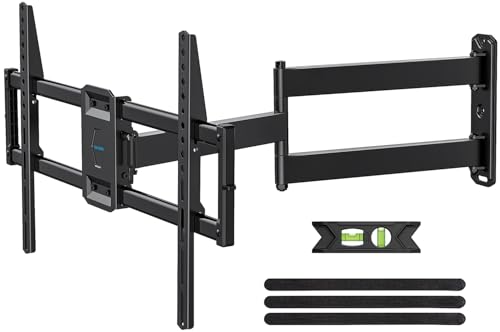
One of the biggest selling points is the articulating arm design. It extends 17 inches from the wall, allowing you to pull the TV forward for better viewing, then push it back to just 2.36 inches when not in use. The swivel range of +-90 degrees makes it easy to direct the screen toward your seating area, whether you are setting up a home theater, watching the big game, or catching up on shows from the kitchen. The tilt feature (+5/-15 degrees) helps reduce glare from windows or lights, ensuring a clearer picture.
Build quality is a strong point. The steel arms are 33% thicker than many competing mounts, according to the manufacturer, which adds rigidity and confidence. The faceplate and included security screws provide extra peace of mind, especially for heavier TVs. Compatibility covers a broad range of VESA dimensions from 75x75mm to 400x400mm, so it works with many popular brands like Samsung, LG, Sony, TCL, and Hisense.
Installation is relatively straightforward thanks to the single-stud design. Instead of requiring two studs spaced exactly, this mount needs only one. That makes it ideal for corner setups, narrower wall spaces, or areas where finding a second stud is tricky. The package includes all necessary hardware for wood stud, concrete, or brick walls. Drywall alone is not sufficient, which is common for full motion mounts. The detailed instructions guide you through the process, and the built-in leveling adjustment allows fine-tuning of up to +/-4 degrees after mounting.
In everyday use, the Pipishell mount performs well for family viewing, movie nights, gaming sessions, and streaming marathons. The ability to pull the TV forward and angle it toward the couch or bed enhances the experience. When not in use, it sits close to the wall, giving the room a tidy, low-profile appearance. Cable management can be kept neat with adhesive clips or ties (not included), but the mount itself does not have integrated cable channels.
Overall, the Pipishell PIMF7 is a solid, affordable choice for anyone looking to mount a medium-sized TV with full motion flexibility. It suits living rooms, bedrooms, home theaters, and even dorm rooms. Budget-conscious shoppers and gift buyers will appreciate the combination of features and value. Just be sure your TV weight and VESA pattern fall within the supported range, and that you can mount into a stud or solid wall. With proper installation, this bracket delivers reliable performance and improved viewing angles for years to come.
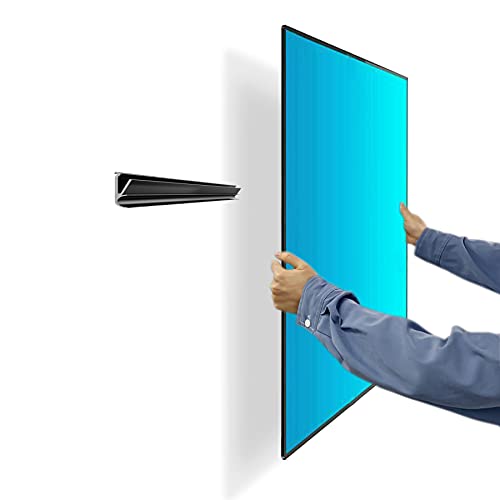
Pros
- No stud or drilling required, making it ideal for renters or those with metal studs
- Quick and easy installation in about 3 minutes with included tools and level
- Strong and sturdy build – supports up to 99 lbs with a slim profile
- Comes with a wide range of bolts and spacers to fit most TV brands and VESA patterns
Cons
- Only works on drywall – not suitable for concrete, brick, or plaster walls
- Maximum TV size is 55 inches; larger TVs cannot use this mount
- Some users may prefer a full-motion or tilt mount for better viewing angles
The Auoace No Stud TV Wall Mount is a practical solution for anyone who wants to mount a television on drywall without the hassle of finding studs or drilling holes. This product is designed specifically for hollow drywall walls, using a cleat-style bracket system that secures your TV with nails and a steel cable for added safety. It's best suited for homeowners, apartment renters, dorm residents, or anyone looking to avoid wall damage – perfect for temporary setups or rented spaces where drilling is not allowed.
Based on product specifications and user feedback, this mount can handle TVs between 13 and 55 inches and up to 99 pounds, with VESA mounting patterns from 100x100 mm up to 400x400 mm. That covers the vast majority of modern TV brands like SAMSUNG, SONY, LG, VIZIO, TCL, and HISENSE. The mount's strength comes from cold-formed steel, and it includes a bubble level and all the necessary hardware – multiple bolt sizes, spacers, washers, and even a steel cable with a bear claw screw for extra security. Many users find the included English guide easy to follow, allowing a single person to complete the installation in about three minutes.
In real-world use, this mount sits very close to the wall – only about 1.1 inches of clearance – giving your TV a clean, modern look without the gap you often see with articulating arms. It works well for a living room, bedroom, office, or even a gaming setup where you want your screen flush against the wall. The mount is also suitable for large computer monitors, making it a versatile option for a desktop workspace. However, since it's a fixed mount (no tilt or swivel), you'll want to install it at the right height for comfortable viewing, as you won't be able to adjust the angle after mounting.
One major advantage is the lack of damage to your walls. The mount uses small nails that leave minimal holes if removed, which is a big plus for renters who need to take their TV down when moving out. The included steel cable acts as a safety tether in case the bracket loosens over time, offering peace of mind. Keep in mind that this mount is only designed for drywall – it won't work on concrete, brick, or metal stud walls. Also, the maximum TV size and weight limits are strict; exceeding them could compromise safety.
For most people looking for a simple, affordable, and non-destructive way to mount a smaller TV (up to 55 inches), the Auoace No Stud TV Wall Mount is a solid choice. Whether you're setting up a bedroom TV for late-night streaming, a living room screen for family movie nights, or a monitor for your home office, this mount offers a practical solution without the expense or complexity of traditional stud-mounted brackets. Just double-check your wall type and TV weight before ordering, and you'll likely enjoy a clean, hassle-free installation.

Pros
- True no-drill installation – great for apartment renters or anyone avoiding power tools
- Very low profile (1.12 inches) keeps the TV flush against the wall
- Sturdy build with safety locks gives peace of mind
- Includes a level and template for straightforward setup
- Affordable price point for a versatile mount
Cons
- Not suitable for cavity walls or all wall types – requires solid drywall, concrete, brick, or block
- Maximum weight limit of 100 lbs may not accommodate larger or heavier TVs
- Some users may prefer a tilting or full-motion mount for better viewing angles
The Perlegear PGMT7 No Drill TV Wall Mount is a practical solution for homeowners and apartment renters who want to mount a TV without the hassle of drilling into studs. This fixed bracket is designed for TVs between 24 and 55 inches and supports up to 100 lbs, making it a versatile choice for smaller living rooms, bedrooms, dorms, or even kids' play areas. The standout feature is its no-drill installation: you secure the wall plate to drywall using the included nails and a hammer, which is ideal for anyone without power tools or who needs a renter-friendly setup that leaves minimal damage.
Compatibility is straightforward – your TV must have a VESA pattern between 100x100mm and 400x400mm, and weigh less than 100 lbs. The mount also includes hardware for traditional stud mounting on 8, 12, or 16 inch wood studs, so it can work on concrete, brick, or block walls too. However, it is not recommended for cavity walls, so it's best to check your wall type before purchasing. The mount itself is made from thick, heavy-duty steel, and the wall plate is twice as wide as standard mounts for added stability. Anti-drop edges and pull cord security locks on each bracket ensure the TV stays put once installed.
Once mounted, the TV sits just 1.12 inches from the wall, giving a sleek, low-profile look that minimizes the gap and makes the TV appear built into the wall. This is perfect for creating a clean, modern aesthetic in any room. The installation process is made easier with the included bubble level and drilling template – according to user feedback, the whole process can be completed in under 30 minutes. The pull cord locking mechanism allows you to easily secure or release the TV from the brackets without tools.
While this mount does not offer tilt, swivel, or full-motion adjustments, its simplicity and strength make it a great choice for fixed viewing areas like above a fireplace or on a feature wall. The fixed design also means the TV sits very close to the wall, which helps reduce shadows and creates a more integrated look. For gamers, sports fans, or movie lovers who don't need to adjust the angle, this mount provides a reliable and unobtrusive solution.
One realistic limitation is that it only works on solid surfaces – if you have an older lath and plaster wall or a cavity wall, this mount won't be appropriate. Also, the 100 lb weight limit means it's not for larger 65 inch or 75 inch TVs. But for the target audience of 24 to 55 inch TV owners, especially renters or budget-conscious shoppers, the Perlegear PGMT7 offers excellent value. It's also a great gift idea for college students, new homeowners, or anyone looking to simplify their TV mounting project.
Overall, the Perlegear No Drill TV Wall Mount is a practical, affordable, and easy-to-install option. It excels in environments where drilling is problematic and delivers a stable, clean result. While it lacks adjustability, its core focus on hassle-free installation and low-profile design makes it a solid recommendation for anyone wanting a simple wall mount for their smaller TV.
Installing the Perlegear PGMT7 is designed to be as simple as hanging a picture frame. The package includes a detailed instruction manual, a bubble level, a drilling template, and all necessary hardware. For no-drill installation on drywall, you use the included nails and a hammer to secure the wall plate directly into the drywall. The template helps you mark the nail positions accurately, and the level ensures your mount is straight. Alternatively, if you have wood studs spaced 8, 12, or 16 inches apart, you can use the provided screws to attach the mount to studs for extra strength. The mount also works on concrete, brick, and block walls using appropriate anchors (included). The pull cord locking mechanism makes it easy to hang the TV: just lift the TV onto the brackets, pull the cords to lock, and you're done. To remove it, pull the cords to release. The whole process typically takes 15-30 minutes for most users.
The Perlegear PGMT7 is constructed from thick, heavy-duty steel, giving it a solid feel. The wall plate is 2x wider than standard mounts to distribute weight evenly and reduce stress on the drywall or studs. Anti-drop edges on the wall plate prevent the TV from accidentally sliding off during installation. The security pull cords act as locks – once engaged, they keep the TV firmly in place. These features help ensure that your TV stays safe even if bumped. The mount is rated for up to 100 lbs, which is more than enough for most 24-55 inch TVs. The low-profile design (1.12 inches from the wall) also reduces leverage, further improving stability. Overall, the build quality is reassuring for a mount in this price range.
This mount is compatible with most 24 to 55 inch TVs that have VESA patterns from 100x100mm up to 400x400mm and weigh less than 100 lbs. It supports both flat-back and slightly curved TVs (as long as the VESA pattern fits). The mount can be installed on drywall (no-drill method), as well as on wood studs, concrete, brick, and block walls. However, it is not suitable for cavity walls, plasterboard without backing, or metal studs. The included hardware covers 8, 12, and 16 inch stud spacing. Before purchasing, measure your TV's size, weight, and VESA pattern to ensure compatibility. This mount is also a great choice for rental properties where you want to avoid drilling large holes.

Pros
- No stud required, ideal for walls without accessible studs or for renters.
- Extremely slim profile, TV sits only 1.18 inches from the wall.
- Easy installation with nails and built-in bubble level.
- Universal VESA pattern fits a wide range of TVs.
- Tilt feature helps reduce glare from windows or lights.
Cons
- Only suitable for drywall, not for brick, concrete, or metal studs.
- Maximum weight capacity of 100 lbs may not support larger or heavier TVs.
- Nail-based installation may feel less secure than traditional stud mounts for some users.
The ECHOGEAR No Stud TV Mount is a smart, practical solution for anyone who wants to mount a TV on drywall without the hassle of finding studs or using a drill. This mount is designed specifically for homeowners, apartment renters, and home theater enthusiasts who need a quick, low-profile installation. Whether you are setting up a living room for movie nights, a bedroom for late-night streaming, or a gaming den for marathon sessions, this mount offers a clean look and straightforward setup.
Performance-wise, the mount uses 32 small but strong nails that work together to hold up to 100 pounds. This makes it suitable for TVs up to 77 inches. The slim profile keeps your TV just 1.18 inches from the wall, giving it a built-in appearance that blends seamlessly into your decor. The bottom of the TV can tilt slightly, which helps reduce glare from overhead lights or windows. For a flush finish, the included magnetic standoffs prop the TV up and provide extra space for cable access while preventing scratches on the wall.
Build quality is solid with a universal design that supports VESA patterns from 75mm to 625mm. This means it works with most modern TVs from Samsung, LG, Sony, TCL, Hisense, and others. A built-in bubble level helps you get the mount straight on the first try, and a satisfying safety button locks the TV in place once it is mounted. The mount's construction feels sturdy enough for everyday use.
Setup is straightforward: no drilling required. You simply mark the nail points, hammer the nails into the drywall, and attach the brackets to your TV. The process can be completed in minutes, making it ideal for renters who need a temporary solution or anyone who wants to avoid the mess of drilling. Cable management is aided by the slight gap created by the standoffs, allowing you to run cables behind the TV neatly.
One realistic limitation is that this mount is designed only for drywall. If you have brick, concrete, or metal stud walls, you will need a different mount. Also, the 100-pound weight limit means it may not support very large or heavy TVs, such as some 85-inch models. While the nail installation is secure for most setups, some users may prefer the added confidence of a stud-mounted bracket.
Overall, the ECHOGEAR No Stud TV Mount is an excellent choice for renters, apartment dwellers, or anyone who wants a quick, no-drill installation. It offers a clean, low-profile look and enough versatility to fit most TVs. If you value ease of setup and a sleek appearance without the need for power tools, this mount is a practical and reliable option for your home entertainment setup.
Install a TV Mount Safely and Check the Fit
A safe installation starts with the TV, bracket, wall, and fasteners all matching their respective requirements. Treat the manufacturer’s instructions as the controlling source for placement, hardware, and assembly; general guidance can’t replace model-specific directions. The process below focuses on planning, careful checks, and verification rather than assuming every mount attaches the same way. If any part of the wall or hardware is uncertain, pause and resolve that question before lifting the screen.
Before marking the wall, confirm the mount supports the TV’s VESA hole spacing and weight, and identify whether the mount is fixed, tilting, or articulating. Then establish the permitted wall type and anchoring method from the instructions. A fixed bracket, a single-stud arm, and a studless drywall product have different requirements, so don’t transfer one design’s installation method to another.
- Read the TV and mount instructions, including wall-type limits and required fasteners.
- Confirm the TV’s VESA spacing and weight against the mount’s listed limits.
- Locate structural support and check the wall material before choosing a mounting position.
- Look for electrical wiring, plumbing, or other hidden hazards before drilling.
- Check rear ports, power plugs, and cable bends against the planned bracket position.
- Arrange another person to help lift and hold a heavy or awkward screen.
Confirm TV compatibility before marking the wall
VESA describes the horizontal and vertical spacing between the TV’s four mounting holes. Find those measurements in the TV documentation or by carefully measuring the hole pattern, then compare both dimensions with the mount’s supported range. A screen can fall within a listed size range yet still have an incompatible hole pattern or exceed the mount’s weight limit.
Check how the mounting area sits on the back of the TV. Recessed holes, a curved back, or nearby ports can affect which supplied screws and spacers are appropriate, but the correct arrangement depends on the TV and bracket instructions. Don’t force a screw, use an unverified length, or stack spacers by guesswork; a fastener that bottoms out or engages poorly can create a serious problem.
Compare the bracket plate with the locations of HDMI, optical, and power connections. A low-profile mount may leave less room for plugs and cable bends, while an articulating design may provide more access when extended but protrude farther from the wall. Check the planned position with the actual cables and follow the instructions for routing them without pinching or sharply bending them.
Match the anchoring method to the wall
For a mount designed for wood studs, identify the stud locations and confirm they align with the wall plate’s installation requirements. Stud spacing can affect where the display can sit, especially if the desired center point falls between framing members. Some brackets offer a different plate or arm arrangement to address placement constraints, but use only the configurations permitted by the manufacturer.
Drywall by itself is not structural framing. Don’t attach a heavy TV or articulating arm to hollow drywall with ordinary plastic expansion anchors, and don’t assume a studless product is suitable for every screen or wall. A system specifically marketed for a particular drywall installation still has its own conditions, limits, and required hardware; verify those details for the exact product and wall before proceeding.
Brick, concrete, and stone require fasteners approved for the specific substrate and the mount’s installation instructions. Hardware intended for wood studs isn’t automatically suitable for masonry, and masonry anchors aren’t interchangeable with drywall hardware. Fireplace surfaces can include different materials or construction behind the visible finish, so confirm the substrate and any site-specific hazards instead of drilling based on appearance alone.
Before drilling any wall, check for hidden electrical wiring and plumbing in the proposed area. If you can’t confidently determine what’s behind the surface, stop and seek appropriate help rather than guessing. Follow the manufacturer’s guidance for the wall type and fasteners, and don’t cut or modify the bracket, TV chassis, or safety components to make an installation work.
Choose a position that suits viewing and access
Consider the usual seating position, window reflections, and whether viewers need to watch from more than one area. A tilting mount can change the screen angle within its listed range, while a full-motion mount can add swivel and extension if the product supports them. These adjustments may help with viewing angle or glare, but they don’t guarantee that reflections will disappear.
Mark the intended screen location only after checking the wall plate’s placement and the TV’s mounting points. A level or the mount’s supplied leveling aid can help keep reference marks aligned, but follow the manual’s sequence rather than treating a bubble level as a substitute for correct structural placement. For a swivel setup, consider the screen’s path and nearby furniture so movement won’t strike an obstacle or pull on cables.
Keep access to connectors in mind, particularly when the TV’s ports face directly toward the wall. Right-angle plugs or suitable cable routing may help in a tight space, but use only arrangements that preserve clearance and comply with the TV and mount guidance. If choosing a movable bracket for seating flexibility, this overview of swivel TV mounts provides related context about that style.
Attach the wall plate and TV bracket carefully
Lay out the included hardware and compare it with the manual before assembly. Product kits may include several screw sizes, washers, or spacers because TV backs vary, but that assortment doesn’t establish which pieces suit a particular television. Select fasteners only as directed for the exact TV and mount, and stop if the thread, length, or seating is uncertain.
Install the wall plate using the specified mounting points and fasteners for the confirmed wall construction. Keep the plate aligned while fastening, and use the tightening sequence and tools stated in the instructions. Don’t substitute a different anchor, omit a required fastener, or exceed a stated limit to compensate for a misplaced hole.
Attach the TV-side rails or bracket using the designated holes and hardware. Make sure each part sits in its intended position and doesn’t interfere with vents, connectors, or other features on the TV. If the bracket’s safety latch, locking bar, or release strap is part of the design, understand how it works before the screen is lifted into place.
Lift, secure, and level the display
Use two people to lift a large or heavy television and keep it supported while aligning its bracket with the wall plate. Follow the mount’s instructions for hanging and locking the TV; don’t let go until the specified retention method is engaged and checked. Keep hands clear of pinch points, and avoid carrying the screen by a part the TV manufacturer says not to use for lifting.
Some brackets allow a small post-installation level correction, while others require the mounting plate to be positioned accurately from the start. Use only the adjustment described for the installed model, and don’t loosen structural fasteners or improvise a correction. If the screen remains crooked, identify whether the bracket offers an approved adjustment or whether the installation needs to be reassessed.
Check that the TV is seated, any safety lock is engaged, and cables remain clear of the mount’s moving parts. Move an articulating arm only as directed, supporting the display as the manual requires. If the arm drifts, the screen tilts unexpectedly, or any component shifts, stop moving it and investigate rather than tightening or modifying parts without guidance.
Run a final installation check
A deliberate final inspection can catch a loose connection, blocked port, or unengaged lock before normal viewing begins. Check each item against the installation instructions, and don’t rely on a quick visual glance at the front of the TV. These checks are especially useful after positioning a screen close to a wall or connecting an articulating mount.
- Verify the wall plate and TV bracket are secured as the instructions specify.
- Confirm the screen is seated and its safety latch or locking feature is engaged.
- Check that the display is level or adjusted only through an approved mechanism.
- Make sure power and signal cables are not trapped, strained, or sharply bent.
- Confirm the TV can reach intended ports without pulling on the mount or cables.
- Recheck any movement limits before swiveling, tilting, or extending the screen.
Respond to fit problems without improvising
If the TV’s holes don’t line up with the bracket, revisit the VESA measurements and the mount’s supported patterns. Don’t drill new holes in a steel bracket or television chassis, and don’t force the rails into place. A different mount may be needed if the pattern or weight falls outside the stated limits.
If supplied screws seem too long, too short, or wrong for the TV, stop before fastening. Confirm the thread and required screw arrangement through the TV and mount documentation or the manufacturers’ support channels. Recessed backs and uneven mounting surfaces can require an approved spacer arrangement, but the right combination can’t be determined safely from screen size alone.
A wall plate that won’t align with framing, or a wall whose construction is unclear, is a reason to pause. Don’t shift to hollow drywall anchoring or add unapproved fasteners to save the planned location. Reconsider the screen position, the specified mount configuration, or qualified assistance while keeping the wall substrate and structural requirements central.
Installation is complete only when the TV, bracket, fasteners, and wall all meet the instructions for the exact setup. If any compatibility or anchoring detail remains unresolved, leave the display off the wall until it’s verified.




Write Your Review
No reviews yet. Be the first to share your experience!